Agent Studio is where you build and manage AI teammates that work inside Aesthetix CRM. You find it in the left sidebar under AI Agents > Agent Studio. This guide explains the two kinds of agents it holds, how they compare with Conversational AI and Ask AI, and which tool to pick for common medical-aesthetics tasks. Use it as your starting point, then follow the sibling guides named throughout.
HIPAA caution: AI features in Aesthetix CRM are not approved for processing Protected Health Information (PHI). Do not put PHI (diagnoses, treatment details tied to a named patient, photos, medical history, insurance data) into agent instructions, prompts, files, memory, Knowledge Bases, or test conversations. Use generic, non-identifying examples when you build and test.
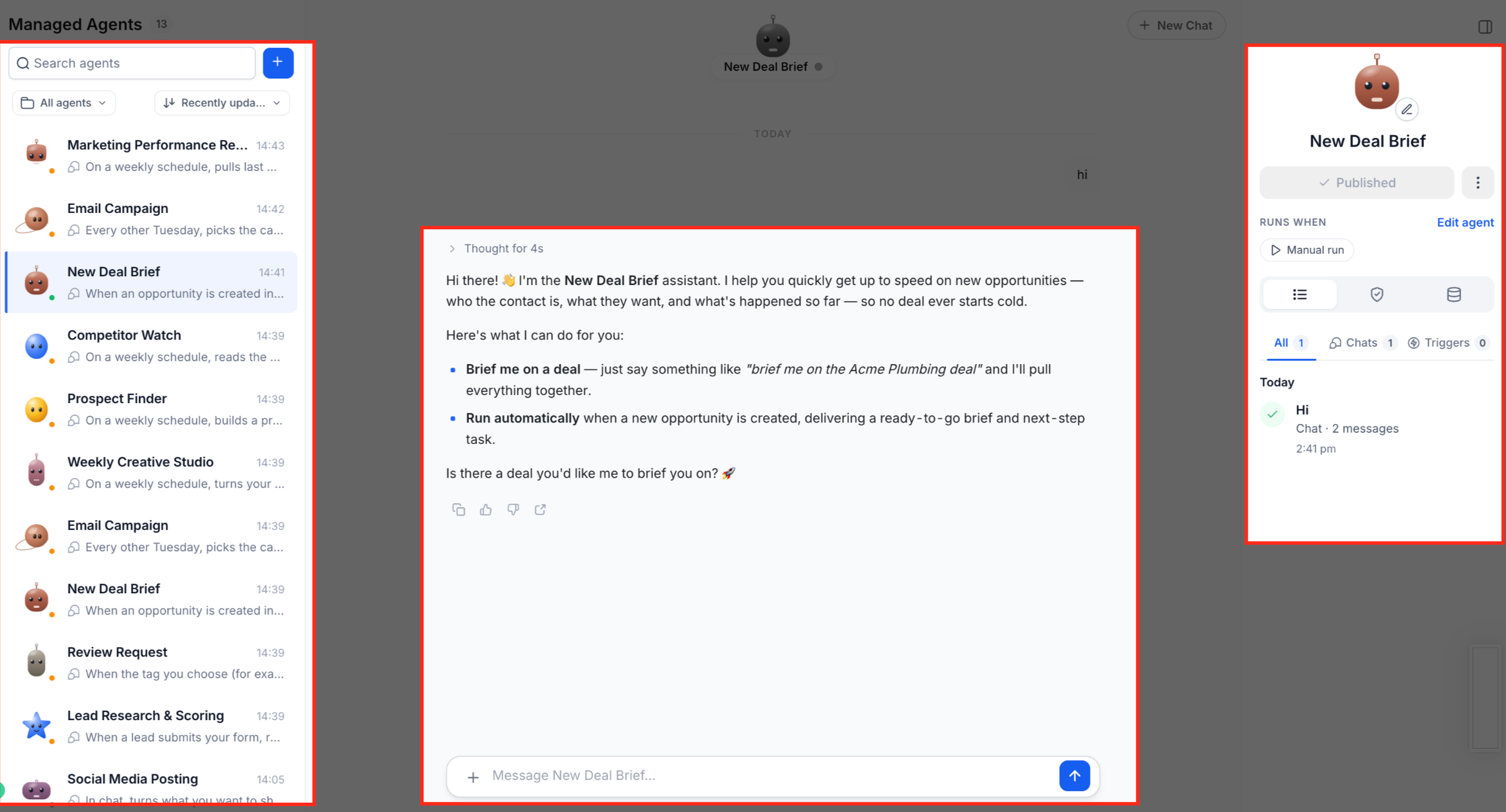
Agent Studio lives under AI Agents > Agent Studio in the sidebar. The AI Agents folder also holds Conversational AI, Voice AI, Knowledge Base, Ask AI and Content AI. Agent Studio has two tabs:
Tab | What it holds | When to use it |
|---|---|---|
Managed Agents | Agents you create by describing the job in plain language. The guided builder assembles the agent, its triggers, tools and knowledge. | Use this for every new agent. |
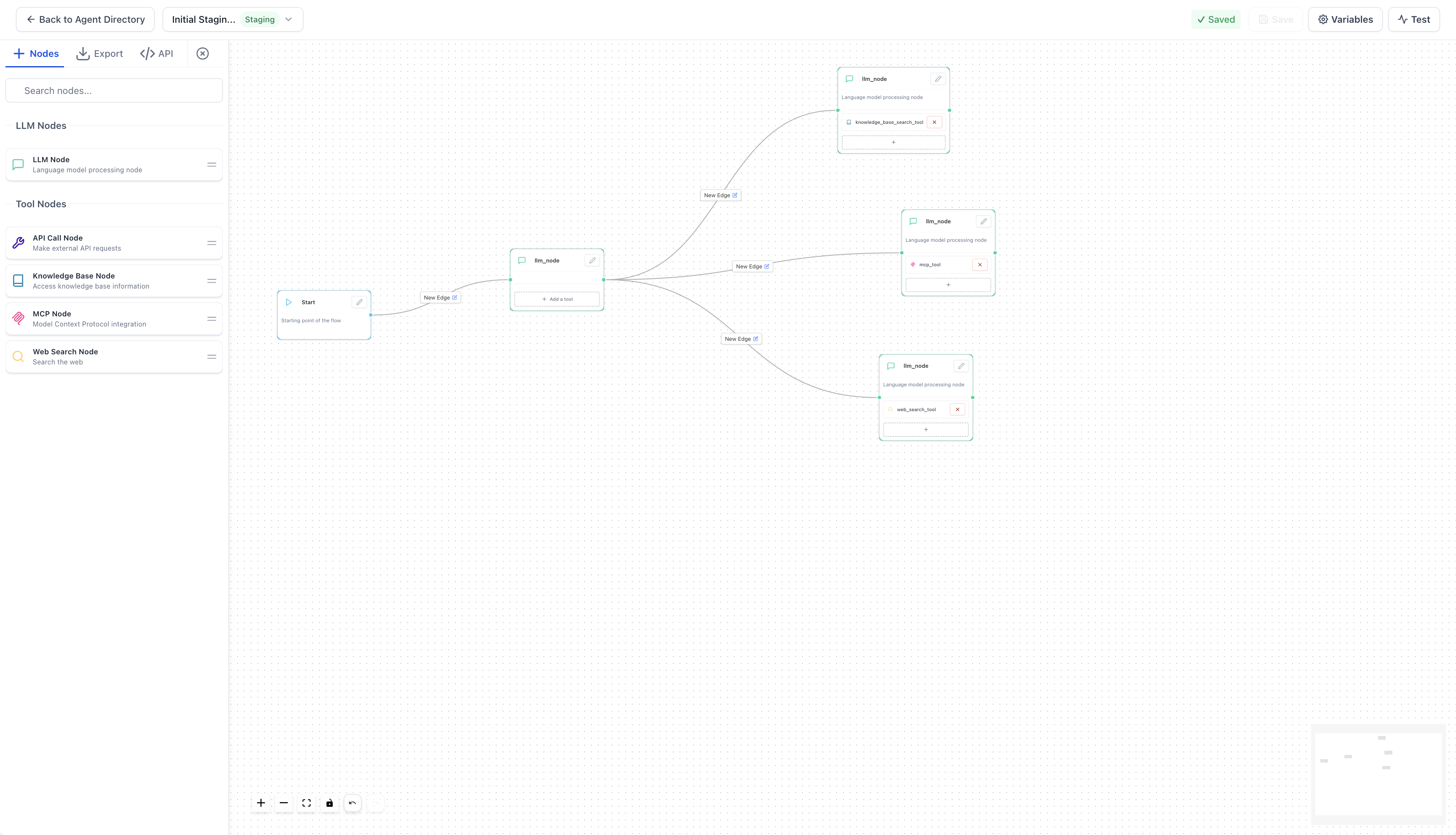
Flow Agents | Agents built on a visual canvas of connected nodes (the older builder). | Keep for editing and maintaining agents that already exist. New flow agents cannot be created. |
Managed Agents was formerly called Super Agents. If you see "Super Agents" in older material, it means Managed Agents.
Agent Studio is available to account admins and users who have the AI Agents permission (see Prerequisites below).
Area | Managed Agents | Flow Agents |
|---|---|---|
How you build | Describe the role in plain language; edit by chatting with the builder | Drag nodes onto a canvas and connect them with edges |
Status | Recommended for all new agents | Existing agents keep running and can be edited, tested and promoted |
Triggers | Many event types (contact, opportunity, tag, form, survey, Facebook lead form, appointment, chat, schedule, webhook) | Start trigger on the canvas: Form submitted, Lead tag, Chat message, Workflows |
Tools | Knowledge Bases, CRM skills, media generation, Computer (browser tasks), MCP apps, custom API calls | LLM, MCP tool, API tool, Knowledge Base and Web Search nodes |
Logic | The agent reasons from your instructions | Branching with edge conditions and variables you wire yourself |
Lifecycle | Draft, test, publish | Staging and Production versions |
Existing Flow Agents and the triggers attached to them continue to work as before. You do not have to migrate them unless your team decides to.
Related guides: Managed Agents: Building an Agent with the Guided Builder and Instructions, Flow Agents: Triggers, Variables, Workflow Action and Public API, and Managed Agents: Apps, MCP Connectors and Custom API Calls.
Aesthetix CRM has three AI products that sound similar but do different jobs. The quickest way to tell them apart is to ask who it serves and what starts it.
Dimension | Managed Agents | Conversational AI | Ask AI |
|---|---|---|---|
Who it serves | You, the owner or marketer automating work | The lead or patient on the other end of a message | You, the staff member working in the CRM |
Who it talks to | Mostly works in the background; can email or message you or a contact when you tell it to | Contacts only, on external channels | Only you, inside the app |
Core job | Custom specialist agents that automate daily tasks and workflows | Answer questions, collect lead details, qualify, book | Write content, set things up, run quick actions |
How you build it | Describe it in plain language | Prompt Builder or Flow Builder | Nothing to build; use it as is |
What starts it | A CRM event: contact or opportunity created, status change, tag change, form or survey submitted, Facebook lead form, appointment, chat, schedule, inbound webhook | An inbound message on a connected channel | You typing or speaking a prompt |
Autonomy | High: can run unattended on a trigger | Medium: Auto-Pilot, or Suggestive where a human reviews drafts | Low: acts only when you ask |
Reach of actions | Broad: CRM fields, tags, workflows, tasks, notes, appointments, plus outside apps through connectors | Scoped: capture info, book, trigger a workflow, hand off to a human | Supported in-app actions: contacts, opportunities, tags, appointments, bulk updates |
Knowledge | Knowledge Bases (documents, tables, websites) and live web search | Bot training data, Brand Voice, Knowledge Base | Knowledge Base, Brand Voice, web |
Channels | Triggers and API | SMS, email, Facebook, Instagram, WhatsApp, chat widget, live chat | In the app (top bar and left sidebar) |
Testing | Built-in test panel with live config preview | Test panel before going live | Interactive; proposes actions before running them |
Maturity | Newer; the Unified Workspace may not be enabled on every account yet | Most established | Established |
One-line positioning:
Ask AI is your copilot for getting work done inside Aesthetix CRM.
Conversational AI is your always-on bot that talks to leads and books appointments.
Managed Agents are AI teammates you describe in plain language; they know your business and act inside the CRM and in connected apps.
If your goal is... | Reach for | Medical-practice example |
|---|---|---|
Reply to and converse with leads on text, social or web chat | Conversational AI | Answer "how much is a consult?" and offer times |
Qualify inbound leads and hand off to staff when it gets complex | Conversational AI | Collect treatment interest, then route to your coordinator |
Book appointments from a live conversation | Conversational AI | Book a consult on a native Aesthetix CRM calendar |
Draft branded content, build a page, summarize a contact | Ask AI | Draft a newsletter about a seasonal skin-care offer |
Do a one-off CRM action by typing or speaking | Ask AI | "Tag every contact who attended Saturday's open house" |
Automate a task that fires on a CRM event | Managed Agents | When a consult form is submitted, create a task and note for the coordinator |
React when a contact or opportunity is created or its status changes | Managed Agents | When an opportunity moves to "Consult Completed", start the follow-up routine |
Act in outside apps too | Managed Agents | Add a new lead to a spreadsheet or project board through a connector |
Build a specialist role | Managed Agents | A social media assistant or a front-desk knowledge helper |
Keep running an older canvas-built agent | Flow Agents | Edit the nodes of an existing intake agent |
Rule of thumb: customer talking to AI means Conversational AI; you talking to AI means Ask AI; the CRM triggering AI means Managed Agents.
Your user needs permission to access AI Agents, which covers Managed Agents, Voice and Chat. The AI Studio permission is separate.
Build and test anything the agent depends on first: Knowledge Bases, workflows, calendars, forms and tags.
For Facebook lead form triggers, the Facebook Page must be connected for lead sync and a Page administrator must accept Meta's Lead Ads Terms of Service.
Available channels and events depend on the triggers and integrations connected to your account.
The Unified Workspace (one screen for agent list, chat, testing, activity and settings) is rolled out through Labs. This feature may not be enabled on every account yet. Accounts without it use the existing Managed Agents screens.
Some AI products and some features inside them may be Labs, beta or staged-rollout features. If you do not see something described here, ask your Aesthetix CRM contact whether it is enabled for your account.
Ask AI does not yet cover every area. For example, it can list but not edit workflows and campaigns, and it cannot configure the chat widget or call-routing menus.
Both agent types follow a safe lifecycle so changes do not touch live activity until you are ready.
Managed Agents
Create the agent by describing its role, channels, knowledge and allowed CRM actions.
Refine it by chatting with the builder (for example, "make the tone more formal").
Add triggers, apps and capabilities.
Test in the testing panel with realistic, non-patient sample data.
Change the status from Draft to Published so it responds to live events.
Monitor, then refine the instructions and keep Knowledge Bases current.
If you edit a published agent and do not publish again, the working copy shows as Draft until you publish.
Flow Agents
Edit the canvas and save; saving updates the Staging version and never affects live traffic.
Use the Test tab to validate the flow.
Promote Staging to Production when ready. Only Production runs for real contacts, and only Production agents can be used by workflows and the Public API.
Managed Agents, Flow Agents, Conversational AI, Ask AI and the other AI tools are metered. Some include allowances, some are billed by usage, and Agent Studio runs are metered the same way whether they start from a trigger, the Agent Studio test panel, a workflow or the API. Check the AI usage and billing details shown in your account, or ask your Aesthetix CRM contact, before turning on an agent that will run at volume. Triggers that fire on high-volume events (such as every new contact) can generate many runs, so test with a small segment first.
No PHI. Never place PHI in instructions, files, memory, Knowledge Bases, prompts, API inputs or workflow messages. Keep Knowledge Bases to approved public information such as service descriptions, pricing guidance, policies and FAQs.
Calendars. AI appointment booking works only with native Aesthetix CRM calendars. It does not work with EMR calendars, so an agent connected to an EMR-synced calendar cannot book directly into it. Have the agent collect the request and create a task for your staff instead.
Human review. Review generated content, links, pricing claims and customer-facing answers before relying on them. Write explicit boundaries in the instructions, such as "suggest the change and wait for staff approval".
Clinical advice. Tell agents not to give medical advice, diagnoses or treatment recommendations, and to send those questions to your team.
What is the difference between Managed Agents and Flow Agents?
Managed Agents are created by describing the job in plain language and are the recommended way to build every new agent. Flow Agents use a manually wired visual canvas. Existing Flow Agents keep running and can still be edited.
Can I still create a new Flow Agent?
No. New agents are created as Managed Agents. Existing Flow Agents stay available for editing, testing and promoting.
Will my existing Flow Agent triggers keep working?
Yes. Existing flow agents and their triggers continue to run normally without any reconfiguration.
What happened to Super Agents?
Super Agents is the former name of Managed Agents. They are the same product.
When should I use Conversational AI instead of a Managed Agent?
Use Conversational AI when the AI needs to chat with a lead or patient on a messaging channel. Use a Managed Agent when a CRM event should kick off background work such as creating tasks, updating fields or calling outside apps.
Can an agent book appointments?
Yes, but only on native Aesthetix CRM calendars. AI booking does not work with EMR calendars.
Can I put patient information in an agent's instructions or Knowledge Base?
No. AI features are not approved for PHI. Use generic examples and approved public business information only.
Why can't I see the Unified Workspace?
It is rolled out through Labs and may not be enabled on every account yet. Without it, you use the existing Managed Agents screens, which work the same way.
Does the agent run before I publish it?
No. Managed Agents respond to live events only after you publish them, and flow agents run live only from the Production version. Use the test panel while building.
Where do I find AI usage details?
Use the AI billing and usage information in your account, or ask your Aesthetix CRM contact for current allowances and charges.
