Manual Sale Attribution lets you assign a sale to an affiliate by hand, whether it happened in your clinic, over the phone, or through a referral that never touched an affiliate link. You'll find it inside Affiliate Manager, under an affiliate's profile in the Commissions tab.
Not every sale an affiliate influences gets tracked automatically. A patient might book a treatment after hearing about your practice from an affiliate, but never click the affiliate's link. A referral partner might promote you at a local event with no way to track clicks. Manual Sale Attribution closes that gap: an admin can go into an affiliate's record and credit them for a sale directly, and Aesthetix CRM calculates the commission automatically based on that affiliate's campaign settings.
This keeps your referral and partner program fair and accurate, even when the sale happens outside your usual online tracking.
Offline sales. An affiliate promotes your practice at a health fair, community event, or in-person consult, and the resulting sale never passes through an affiliate link.
Untracked sales. A prospective patient was referred by an affiliate but booked directly (walked in, called the front desk, or used a browser where the affiliate link wasn't captured).
Word-of-mouth referrals. A patient tells a friend about your practice, and the friend books a treatment without clicking a tracked link.
There are three ways to manually attribute a sale, depending on whether a transaction already exists in your system.
If the sale is already recorded in Aesthetix CRM (for example, a patient paid for a treatment through your order form or store), you can link that existing transaction to an affiliate instead of creating a new one.
Open the affiliate's profile and go to the Commissions tab.
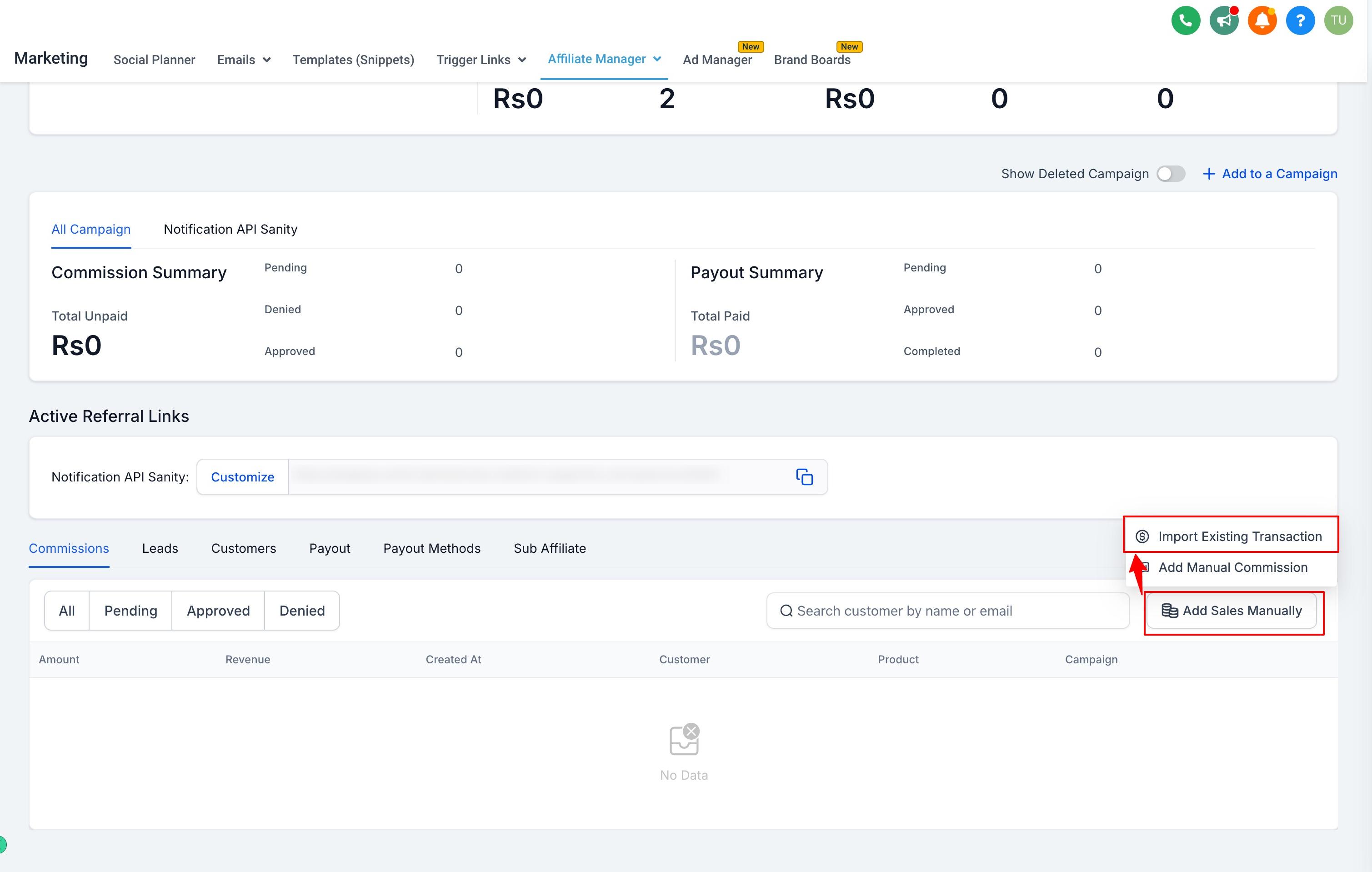
Click Add Sales Manually and choose Import Existing Transaction.
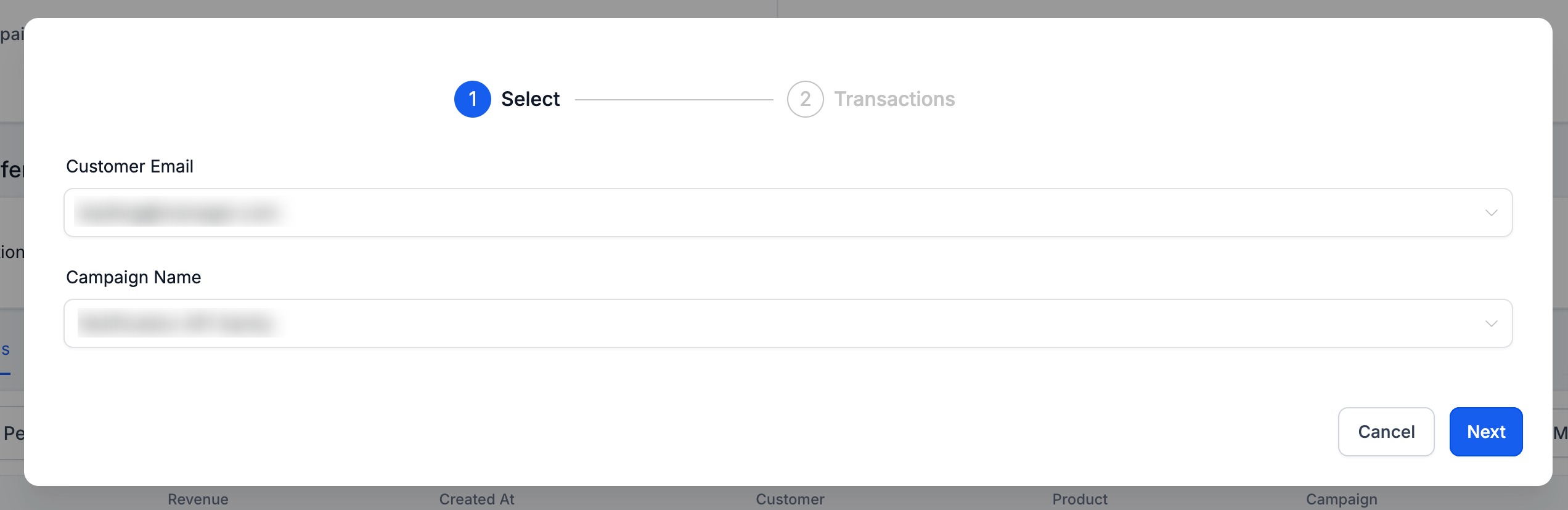
Enter the patient's email address and select the affiliate campaign.
Review the matching transaction(s) and select the one to attribute.
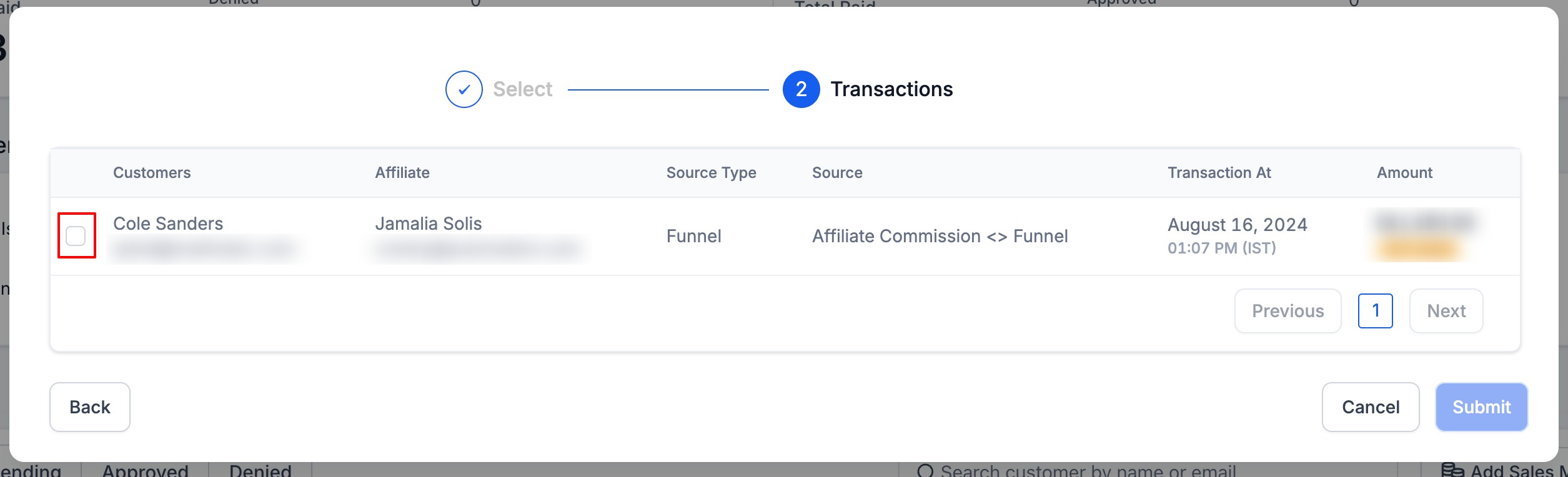
Confirm and submit.
Use this method when the sale happened outside Aesthetix CRM, such as a cash or card payment taken in your clinic during an event.
Open Affiliate Manager and go to the affiliate's profile.
Scroll to the Commissions tab and click Add Sales Manually.
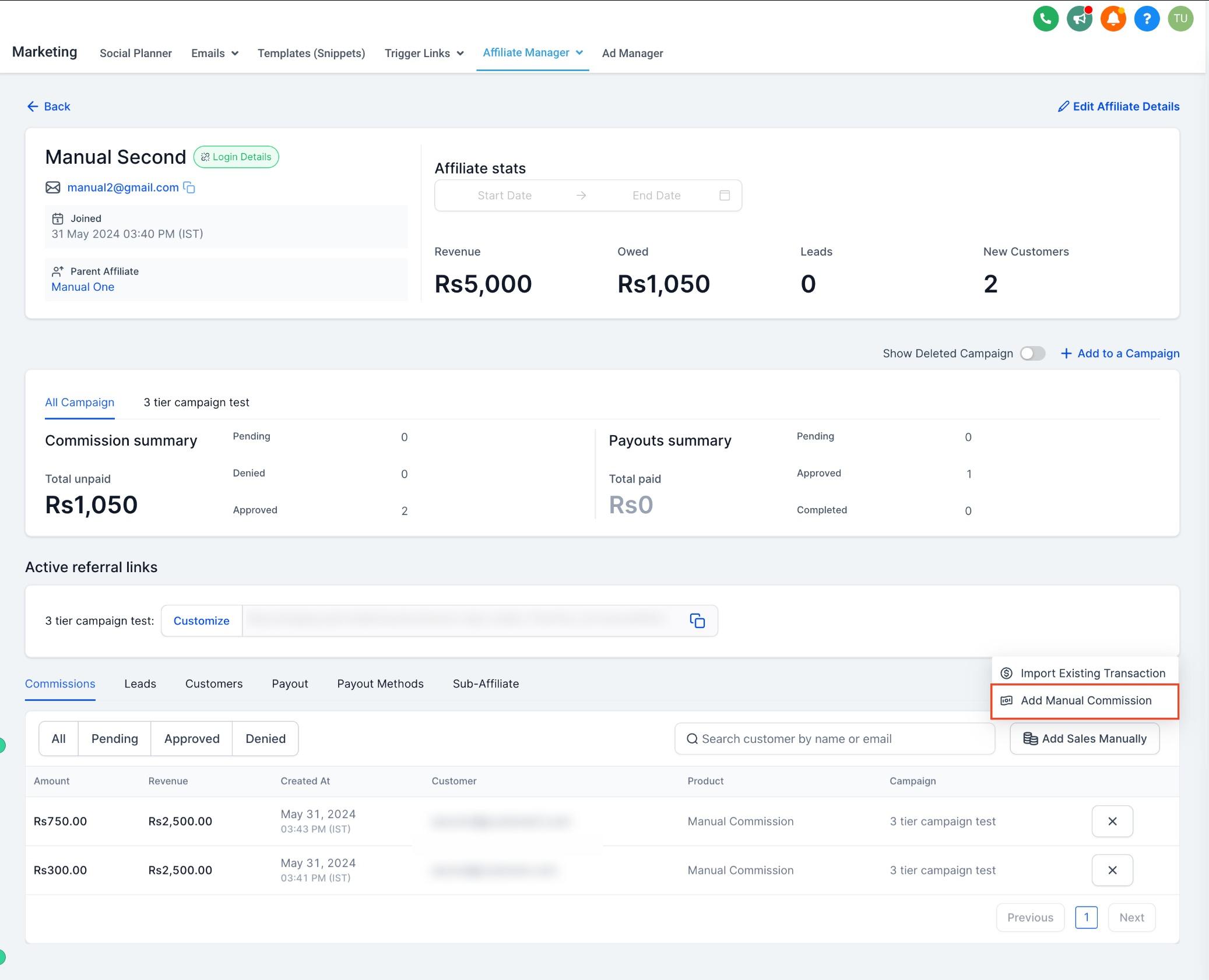
If the patient isn't already in your account, add them as a new lead.
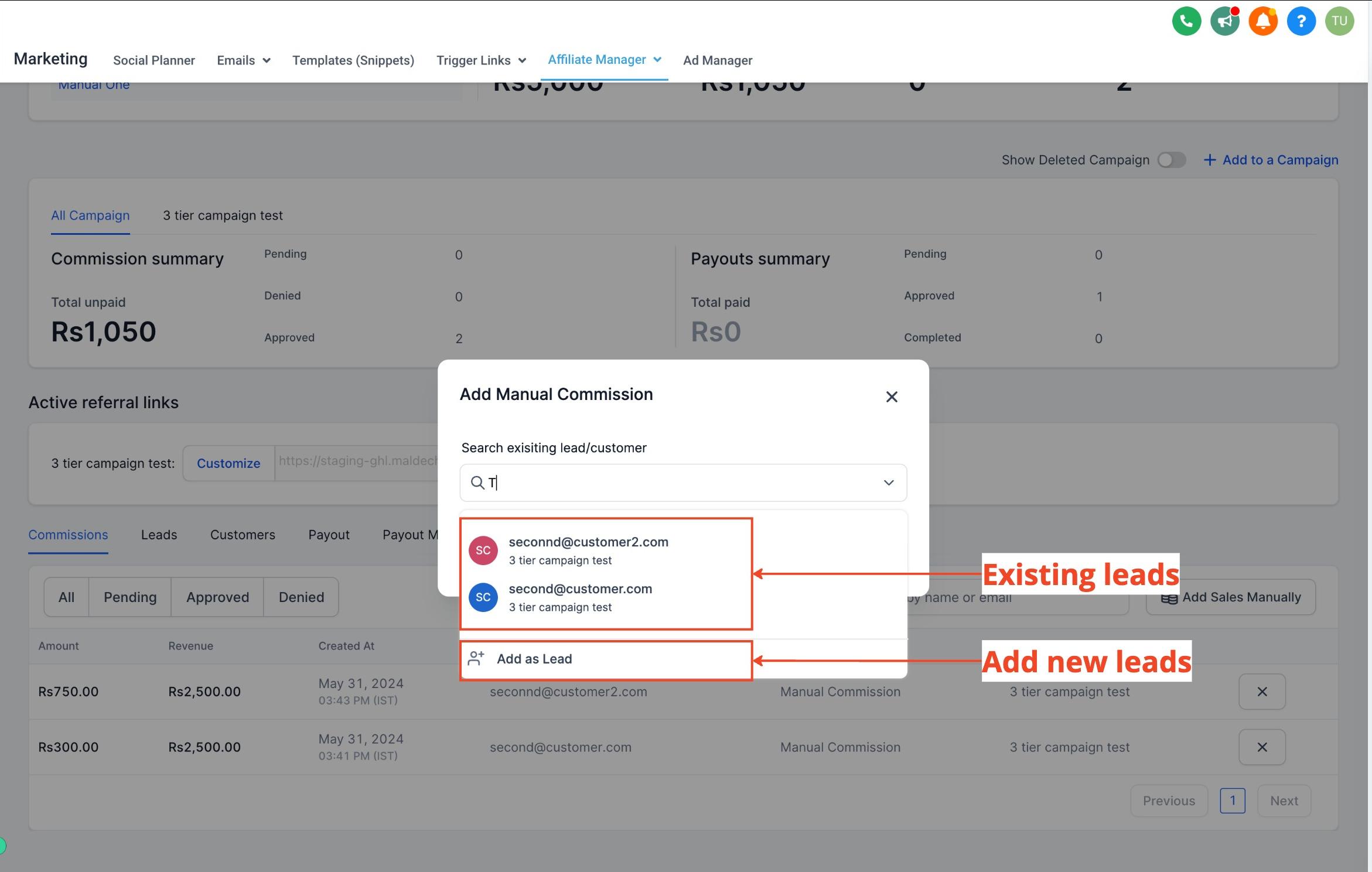
Enter the transaction (revenue) amount. Commission is calculated automatically based on the campaign's default commission rate.
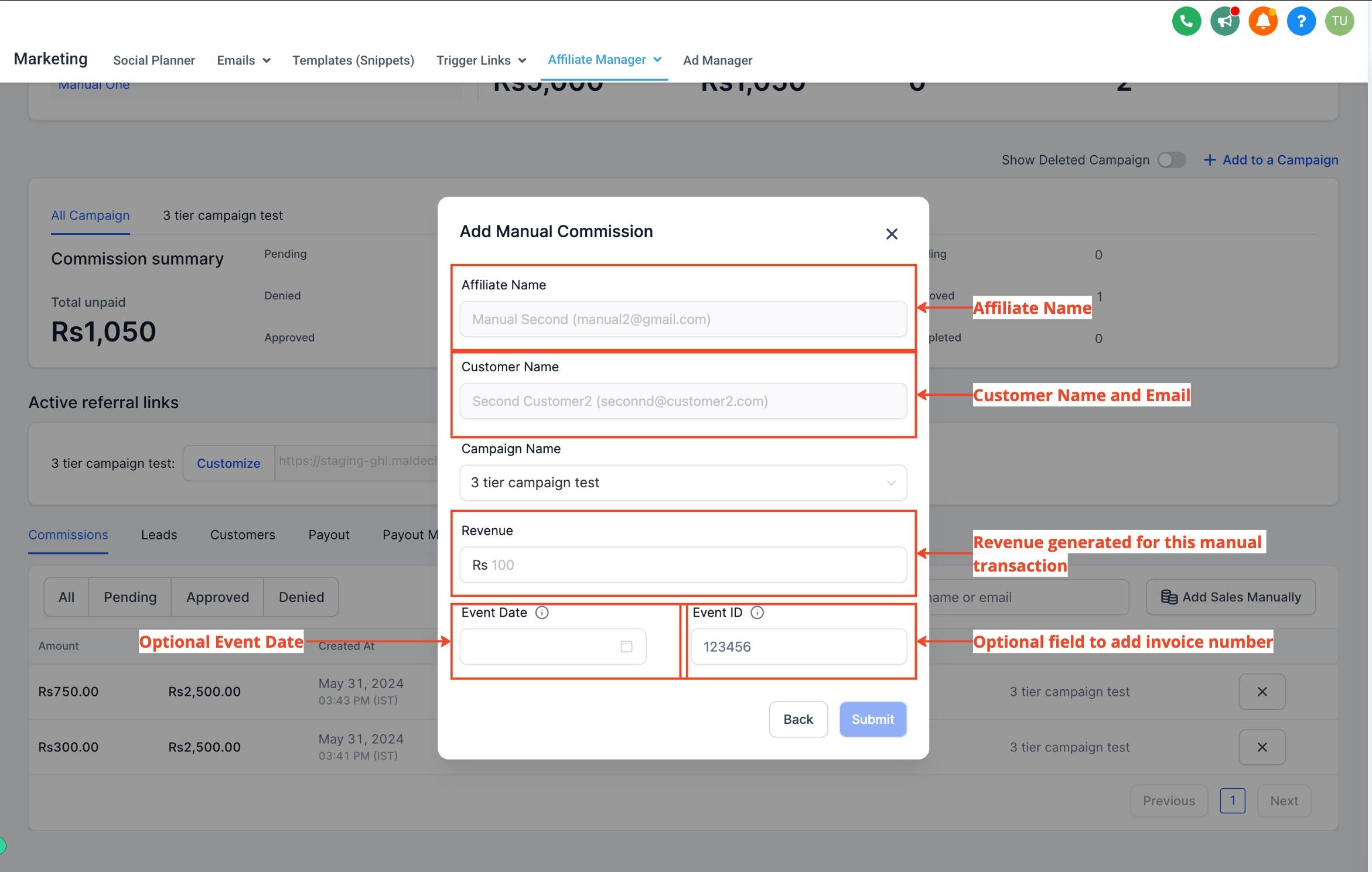
Optionally add a transaction date and reference number for your own records.
Submit and save.
Note: You only need to enter the revenue amount of the sale. Aesthetix CRM calculates the commission for you based on the default rate set on the affiliate's campaign. For example, if you enter a manual sale of $100 in revenue and the campaign's commission rate is 20%, the affiliate is automatically credited $20.
If this sale involved taking payment from a patient, consider processing it through AX Pay, Aesthetix CRM's own built-in payment provider. AX Pay offers better rates than Stripe and keeps the transaction, receipt, and commission calculation all inside your account. See the AX Pay help article for setup details.
For recurring or high-volume manual attribution (for example, a monthly batch of offline event sales), automate it with a workflow action instead of entering sales one at a time.
Add the Add Manual Sales For An Affiliate action to a workflow.

Choose whether the sale should use first-touch or last-touch attribution (based on the affiliate's tracked interactions with the patient).
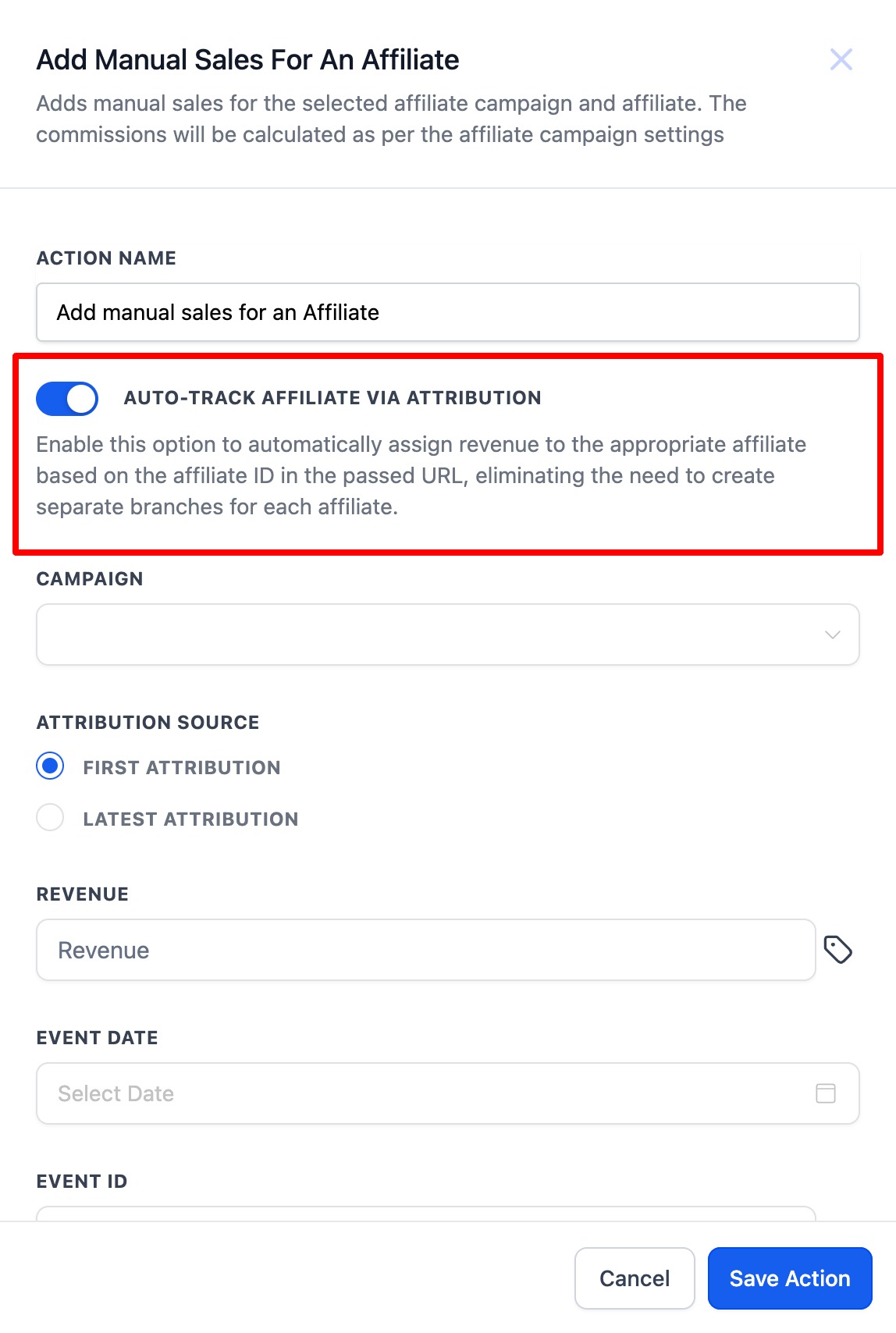
Select the affiliate campaign and enter the revenue details.
Save the workflow to automate manual sales attribution going forward.
For the full list of affiliate-related triggers and actions available in the workflow builder, see the Workflows documentation.
Flexibility. Credit sales from offline events, in-clinic conversations, or any source that doesn't rely on a tracked affiliate link.
Accuracy. Every affiliate-driven sale gets properly tracked and credited, so no partner is shortchanged.
Custom tracking. Attribute sales even when no standard tracking mechanism (like a click on a link) was involved.
Is there a limit to how many affiliates I can associate with a single sale? There's no set limit on associating multiple affiliates with contributions to a sale. That said, the manual attribution feature itself attributes a given transaction to one affiliate at a time; if you need to split credit, attribute the sale and then manually divide the commission between affiliates afterward.
Do manually attributed sales go through the same approval process as tracked sales? Yes. Manually attributed sales follow the same validation and approval process as sales tracked through affiliate links, so commission payouts stay consistent across your whole program.
Can I attribute a sale if the patient's email isn't linked to an affiliate account? Yes. You can attribute the sale using other identifying information rather than relying solely on a matched email address.
Can I attribute offline or in-person sales, like ones made at an event? Yes, that's exactly what this feature is for. Manual Sale Attribution isn't limited to online transactions; it covers offline events, in-clinic sales, and in-person referrals.
What if a patient makes multiple purchases that should go to different affiliates? You can attribute each transaction separately, crediting the affiliate responsible for that specific purchase rather than applying one affiliate to all of a patient's activity.
Are there safeguards against someone manipulating manual sales data? Access to Manual Sale Attribution can be restricted by admin role and permissions, and attribution activity is tracked, which helps protect the integrity of your commission data.
Do I need to calculate the commission myself when adding a manual sale? No. You only enter the revenue amount, and Aesthetix CRM applies the affiliate campaign's default commission rate automatically.
What's the difference between adding a manual sale one at a time versus through a workflow? Adding a manual sale directly in an affiliate's profile is best for one-off situations. Using the "Add Manual Sales For An Affiliate" workflow action is better when you need to attribute sales repeatedly or in batches, such as after a recurring offline event.
