Sub-affiliates are affiliates who work under a parent affiliate inside a multi-tier campaign. When a sub-affiliate refers a new patient or partner and makes a sale, both the sub-affiliate and the parent affiliate who brought them in earn a commission. This layered structure encourages your top referral partners to build out their own referral networks instead of working solo, which grows your practice's reach without any extra effort on your part.
Sub-affiliate settings live in Affiliate Manager > Campaign, under Additional Settings for each campaign. Aesthetix CRM supports campaigns with up to 7 tiers, so a sub-affiliate can have their own sub-affiliates beneath them, and so on.
Please note: The campaign you want to add sub-affiliates to must be multi-tier (tier 2 or above). Single-tier campaigns don't support sub-affiliates.
Multi-tier commission percentages and payout rules for each tier are covered in the commission tiers guide. This article focuses only on how sub-affiliates get added to a campaign.
There are three ways to build out a sub-affiliate network:
Add sub-affiliates manually yourself.
Auto-enroll new customers as sub-affiliates when they make a purchase through an existing affiliate's link.
Let your affiliates recruit their own sub-affiliates through a sign-up link.
Manually adding sub-affiliates gives you full control over exactly who joins a given affiliate's team. This is a good option when you're setting up a campaign for the first time or want to hand-pick which referral partners work together.
Go to Marketing > Affiliate Manager.
Click the Affiliate tab and select the affiliate you want to add sub-affiliates under from the list.
Scroll down and switch to the Sub-Affiliate tab.
Click Add Sub-Affiliate, then select the desired campaign from the dropdown.
Choose the affiliates you want to add as sub-affiliates.
Remove any existing sub-affiliates you no longer want on this affiliate's team, if needed.
If the sub-affiliate you want doesn't already exist as an affiliate, use Add New Affiliate Profile to create one on the spot.
Click Save to apply the changes.
This option automatically signs up a new customer as a sub-affiliate under the affiliate who referred them, right after that customer completes a successful sale. It's a hands-off way to keep growing a campaign's tiers without manually reviewing every new referral.
Go to Marketing > Email Marketing > Affiliate Manager.
Click Campaign, then either click Add to create a new campaign or select an existing campaign from the list.
Work through the campaign setup steps until you reach the Finish tab.
Click Additional Settings to expand more configuration options.
Toggle on Auto Enroll New Customers as Sub-Affiliates.
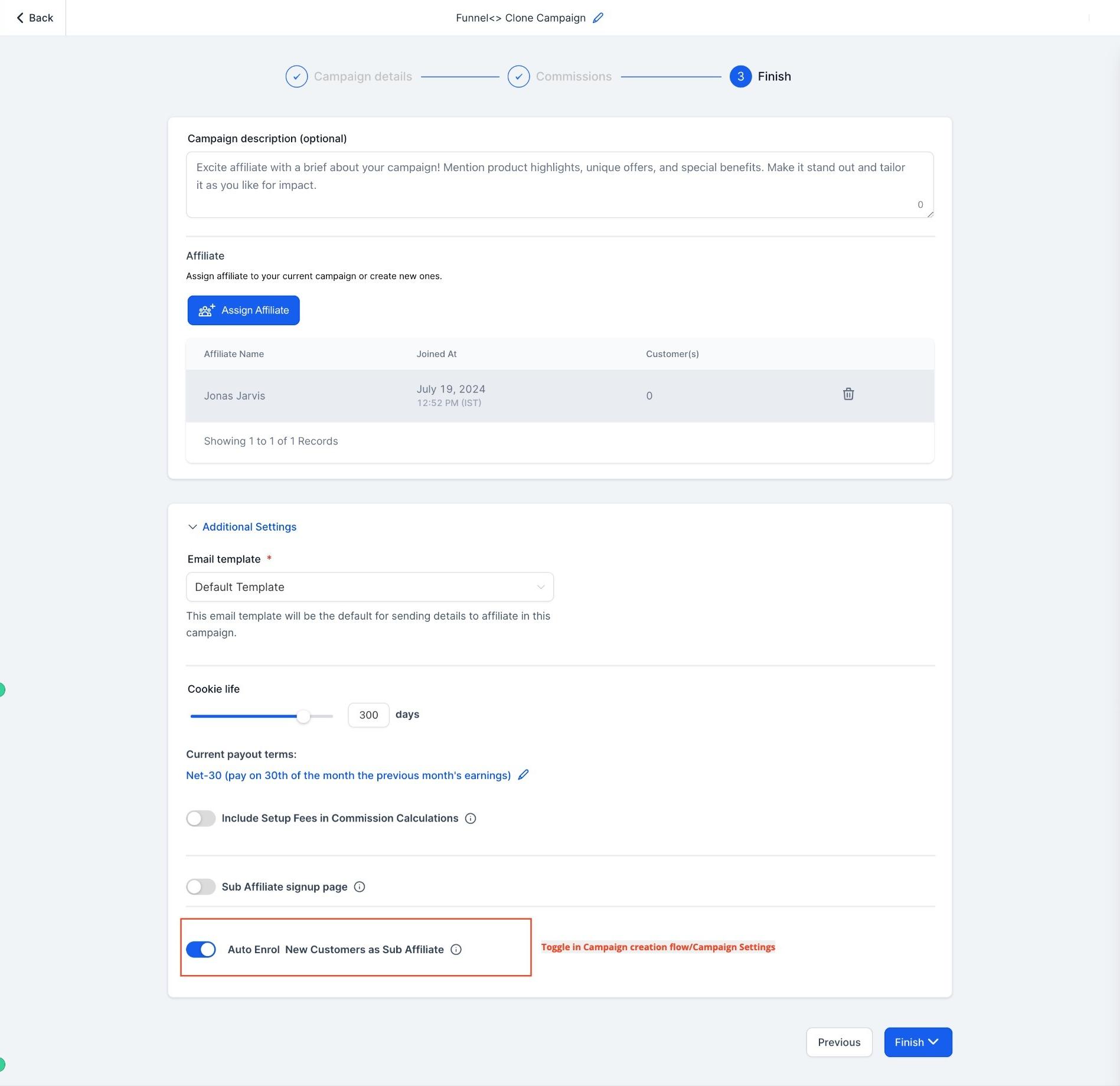
Save and publish the changes to make them effective.
You can also enable or disable this setting globally, in the Affiliate Manager's Global Settings section. A global change applies to all future campaigns, but it won't retroactively change campaigns that already exist.
This method puts the recruiting work in your affiliates' hands. Once enabled, each affiliate gets a personal sign-up link in their affiliate portal that they can share with people they want to bring on as sub-affiliates, whether that's other providers, brand ambassadors, or patients who love referring friends. This makes onboarding easy and gives your top affiliates more ownership over growing their own teams.
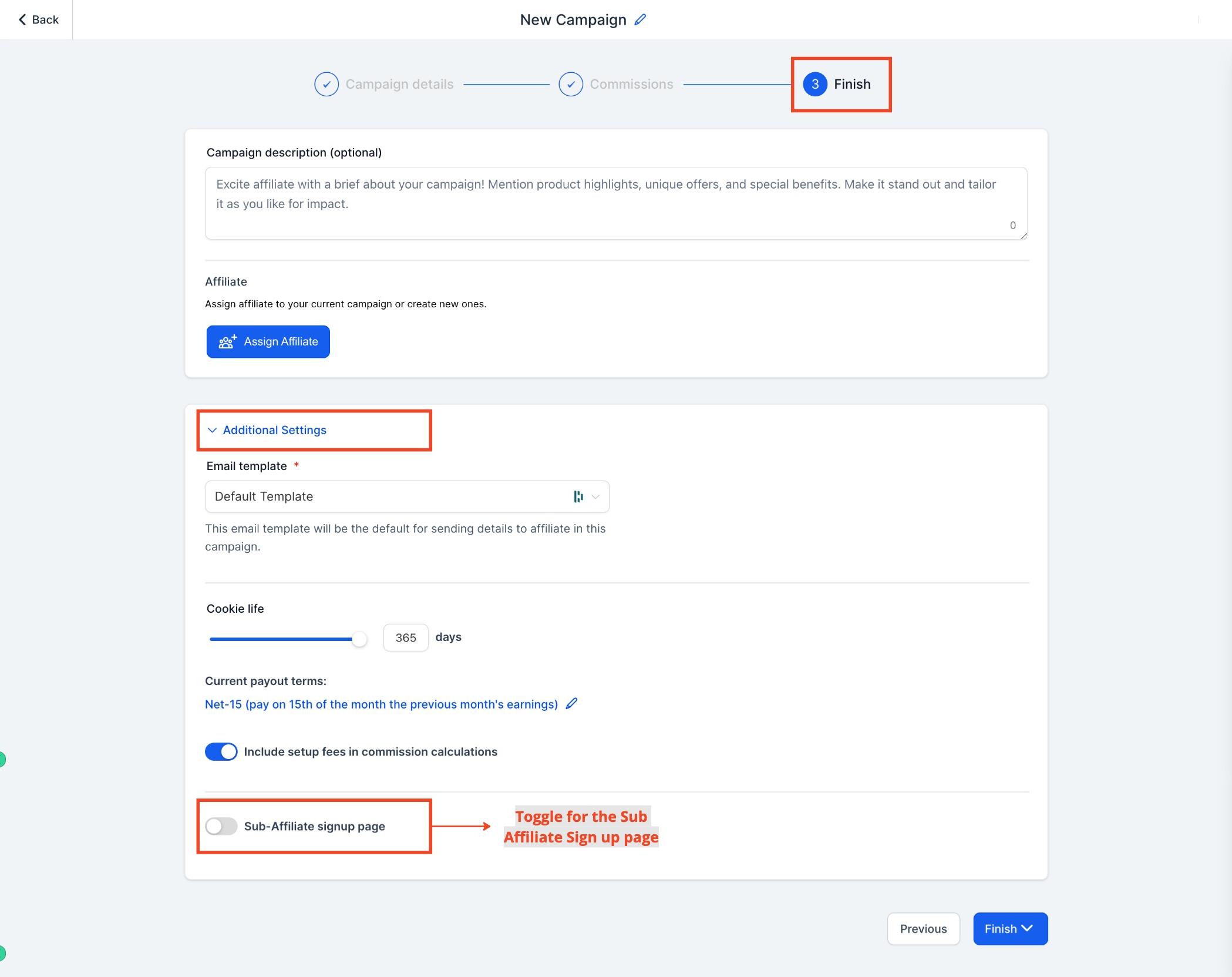
When creating or editing a campaign, go to the last step and click Additional Settings.
Toggle on Sub-Affiliate Sign-Up Page.
Select the form you want to use for sub-affiliate sign-ups.
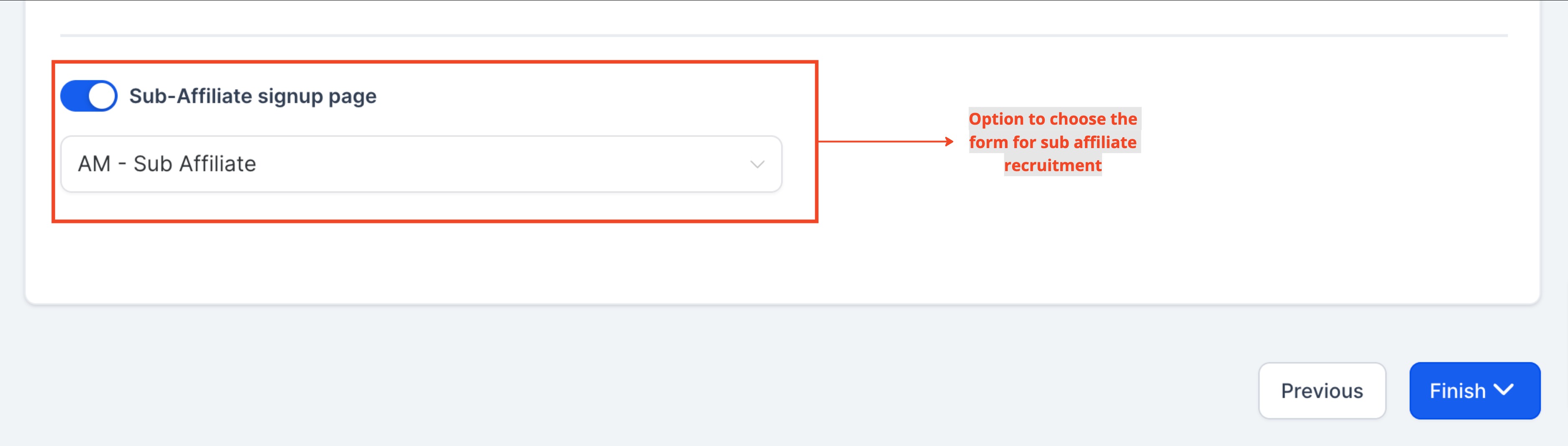
Click Finish to save the changes.
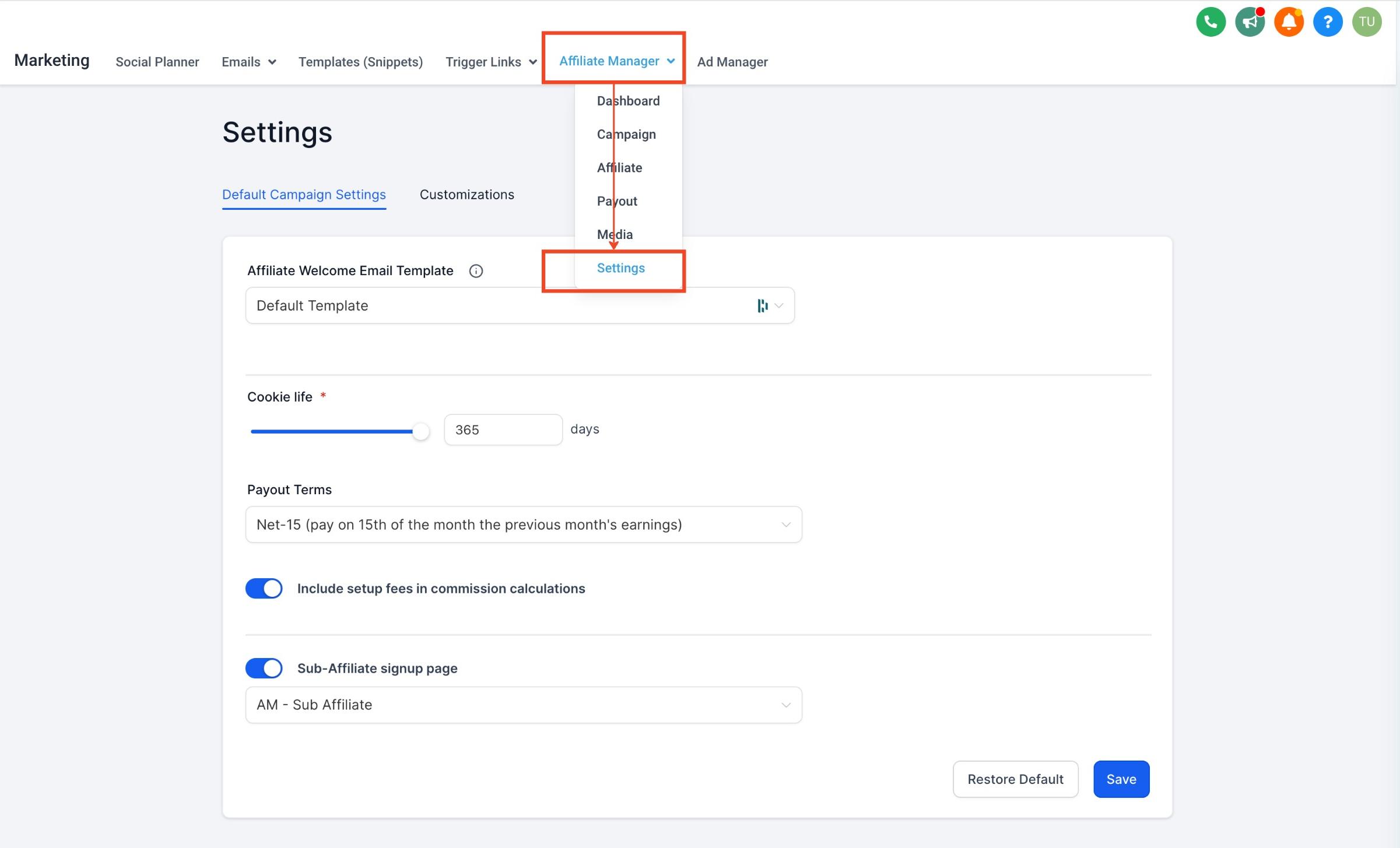
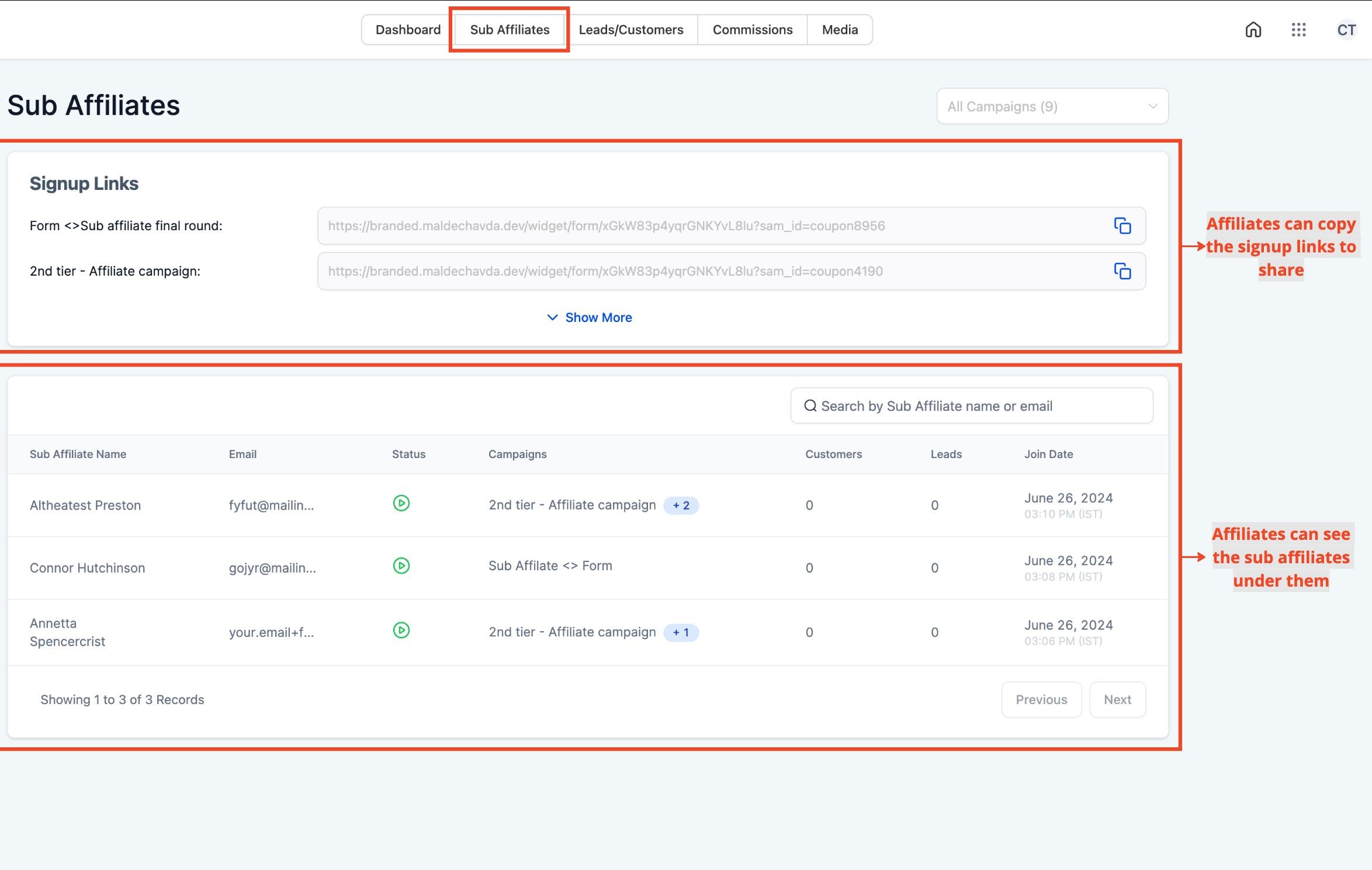
You can also configure this setting globally, in Global Settings. Once it's on, affiliates will see a sign-up link inside their affiliate portal that they can share to recruit sub-affiliates.
The affiliate portal also shows each affiliate a list of all the sub-affiliates currently under them, so they can track their own team's growth.
Please note: Any form used for sub-affiliate sign-ups must collect First Name, Last Name, and Email. Missing fields will cause sign-up errors. The Sub-Affiliate Sign-Up feature only works for multi-tier campaigns (tier 2 or higher), and changes made in Global Settings only apply to future campaigns, not campaigns already in progress.
What's the difference between an affiliate and a sub-affiliate? An affiliate is any partner enrolled in your campaign. A sub-affiliate is an affiliate who was added under a parent affiliate, so sales they generate also credit a commission up to the parent.
How many tiers of sub-affiliates can a campaign have? Aesthetix CRM supports up to 7 tiers, meaning a sub-affiliate can recruit their own sub-affiliates, and so on down the chain.
Can I add sub-affiliates to any campaign? No. The campaign must be set up as multi-tier (tier 2 or above). Single-tier campaigns don't support sub-affiliates at all.
What happens if I remove a sub-affiliate from an affiliate's team? Removing a sub-affiliate ends the parent-child relationship for that campaign going forward. Past commissions already earned aren't affected.
Does auto-enrolling new customers work retroactively on past sales? No. The Auto Enroll setting only applies to future sales made after the toggle is turned on, and only within that specific campaign unless configured globally.
What form fields are required for sub-affiliate sign-up pages? The form must include First Name, Last Name, and Email at minimum. If any of these fields are missing, the sign-up will fail.
If I change a setting in Global Settings, does it affect existing campaigns? No. Global Settings changes for sub-affiliate options only apply to campaigns created after the change, not to campaigns already in progress.
Where do affiliates go to see their own sub-affiliates? Affiliates can see their sign-up link and a list of their current sub-affiliates directly inside their affiliate portal.
Can I create a brand-new affiliate profile while adding sub-affiliates manually? Yes. If the person you want isn't already an affiliate, use the Add New Affiliate Profile option during the manual sub-affiliate add flow to create and add them in one step.
Where do I set commission percentages for each tier? Tier commission rates are managed separately in the multi-tier commissions settings for the campaign, not in the sub-affiliate add flow itself.
