Affiliate Manager lets you run more than one campaign at a time, each with its own affiliates, commission structure, and goals. Campaigns live under Affiliate Manager in your Aesthetix CRM account, and you can create as many as your practice needs to keep different referral programs organized and easy to track.
A single campaign works fine when you have one referral program with one reward structure. Most practices, though, end up wanting to reward different types of partners differently, and that is where separate campaigns help. Common reasons to split your affiliate program into multiple campaigns include:
A specific offer, website, or funnel. For example, a campaign built just around a seasonal promotion or a landing page for a new treatment.
A store with multiple products. If your practice sells skincare products, memberships, or treatment packages online, you may want different commissions per product line.
Limited-time deals or promotions. Run a short campaign with boosted commissions around a launch, then let it expire without touching your main program.
Different commission tiers or reward levels. Not every partner should earn the same rate.
Segmenting your affiliates this way makes it much easier to manage relationships and reward each type of partner appropriately. A few common program types for a med spa or aesthetics practice include:
Patient referral program: existing patients earn a reward (credit, discount, or gift card) for referring friends and family who book a consult.
Influencer or content-creator program: local influencers or aesthetics content creators promote your practice on social media and earn a commission on bookings or product sales they generate.
Local business partner program: complementary businesses (gyms, salons, wellness studios) refer clients to your practice under their own commission structure.
Because each of these audiences behaves differently and deserves a different reward, running them as separate campaigns keeps tracking, payouts, and messaging clean instead of forcing everyone into one generic structure.
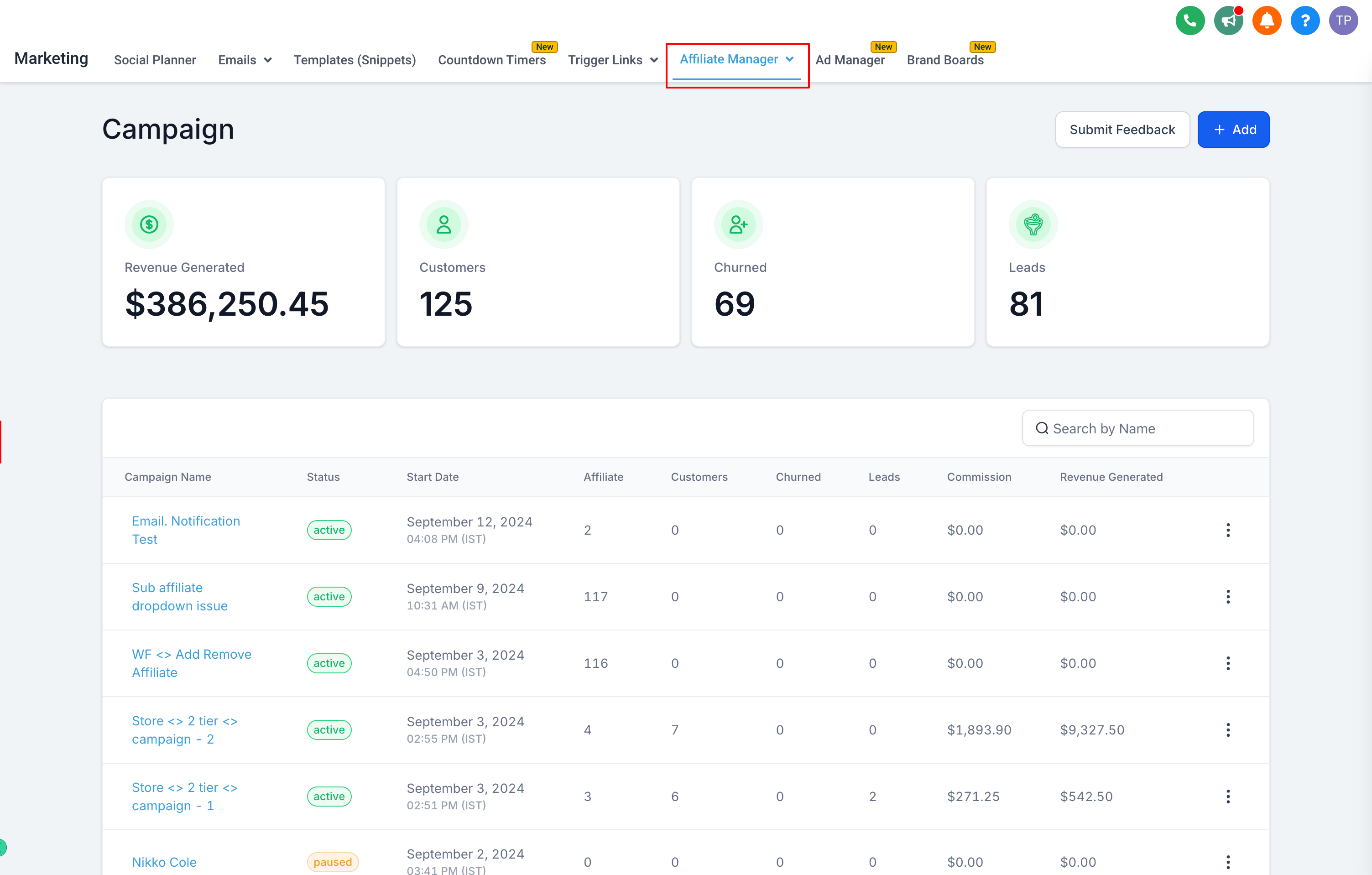
Affiliates are not locked to a single campaign. The same referring patient, influencer, or partner business can belong to multiple campaigns at once, which gives your practice flexibility in how you structure and grow your referral programs. As the campaign manager, you have full control over affiliate membership at the campaign level:
Invite affiliates to join a specific campaign.
Add affiliates directly to a campaign, either one at a time or in bulk.
Remove affiliates from a campaign when they are no longer a fit or the campaign has ended.
This means you could, for instance, keep a patient in your ongoing referral campaign while also adding them to a short-term promotional campaign if they are especially active. As your program evolves, you can adjust who belongs to which campaign without disrupting the affiliate's activity in your other campaigns.
Each campaign has its own commission settings, so you are not stuck applying one flat rate across every affiliate and every referral source. This is the main reason practices split their program into multiple campaigns in the first place. A few ways this plays out:
Your patient referral campaign might offer a flat credit toward a future treatment for every successful referral.
Your influencer campaign might offer a percentage commission on the revenue from bookings they drive.
A local business partner campaign might use tiered commissions that increase once a partner refers a certain number of patients.
Set commission structure and reward levels when you build out each campaign, and keep in mind that affiliates only earn under the rules of the campaign a referral is tied to, not a blended rate across all their campaigns.
Affiliate Manager gives you visibility into how each campaign is performing so you are not managing your program blind. From the reporting inside each campaign you can:
Identify which affiliates or campaigns are driving the most referrals and revenue.
Compare the effectiveness of different commission structures or reward levels against each other.
Spot underperforming campaigns or affiliates and adjust your strategy or reward levels accordingly.
Reviewing performance regularly helps you double down on what is working (say, your influencer campaign outperforming your local partner campaign) and refine or retire campaigns that are not delivering results. This is what makes it practical to scale an affiliate program with several campaigns running side by side instead of one program trying to serve every audience at once.
For the automations that fire when an affiliate signs up, refers a patient, or earns a commission, see the Affiliate triggers and actions available in Workflows. Campaigns themselves are configured and managed here in Affiliate Manager.
Can the same affiliate belong to more than one campaign? Yes. Affiliates are not restricted to a single campaign. You can add or invite the same affiliate to multiple campaigns, and they will earn under each campaign's own commission rules for the referrals tied to that campaign.
Do all my campaigns need to use the same commission structure? No. Each campaign has its own commission and reward settings, which is the main reason to run separate campaigns in the first place: a patient referral program, an influencer program, and a partner program can each use a different structure.
How many campaigns can I run at once? There is no need to limit yourself to one campaign. Practices commonly run several at the same time, for example an always-on patient referral campaign alongside a limited-time seasonal promotion.
What is a good reason to create a new campaign instead of adding affiliates to an existing one? Create a new campaign whenever you need a different commission structure, a different goal, or a different audience than your existing campaigns cover, such as a short-term promotion or a new partner type.
Can I remove an affiliate from one campaign without affecting their activity in another? Yes. Removing an affiliate from a campaign only affects their participation in that campaign. Their status and history in any other campaigns they belong to is unaffected.
How do I know which campaign is performing best? Use the performance tracking inside Affiliate Manager to compare campaigns and affiliates side by side, including which are driving the most referrals and revenue, so you can decide where to invest more reward budget.
Where do I set up the automations tied to affiliate activity, like welcome messages or commission notifications? Those live in Workflows using the Affiliate Manager triggers and actions. Campaigns in Affiliate Manager control the structure and membership; Workflows controls what happens automatically when affiliate events occur.
Should I create a separate campaign for every single product I sell? Not necessarily. Create separate campaigns when products or offers need genuinely different commission structures or audiences. If several products share the same reward logic, they can stay under one campaign.
