The Affiliate Manager lets your practice build a referral program where patients, local businesses, and influencers earn a commission for sending you new business. Instead of running referrals off the honor system, Affiliate Manager gives every partner a trackable link, calculates what they're owed, and lets you review and pay out commissions from one place.
Affiliate Manager works well for any practice that wants to formalize word-of-mouth growth. Common affiliate types include:
Existing patients who refer friends and family in exchange for a commission, credit, or discount on future treatments.
Local businesses (gyms, salons, wellness studios) that send you patients in a cross-promotion arrangement.
Influencers or content creators who promote a treatment, membership, or product line to their audience.
Because commissions are only paid when a referral actually converts, you're never paying for reach that doesn't turn into booked consults or sales.
Affiliate Manager is organized in a simple hierarchy:
Campaigns define what's being promoted (a treatment, a product, a package) and the commission rate for it.
Affiliates enroll in a campaign and receive a unique referral link tied to their account.
Leads are created automatically when someone clicks an affiliate's link and books an appointment or submits a form.
Commissions are calculated when a lead converts into a paying patient or customer.
Payouts are reviewed, approved, and paid out to the affiliate.
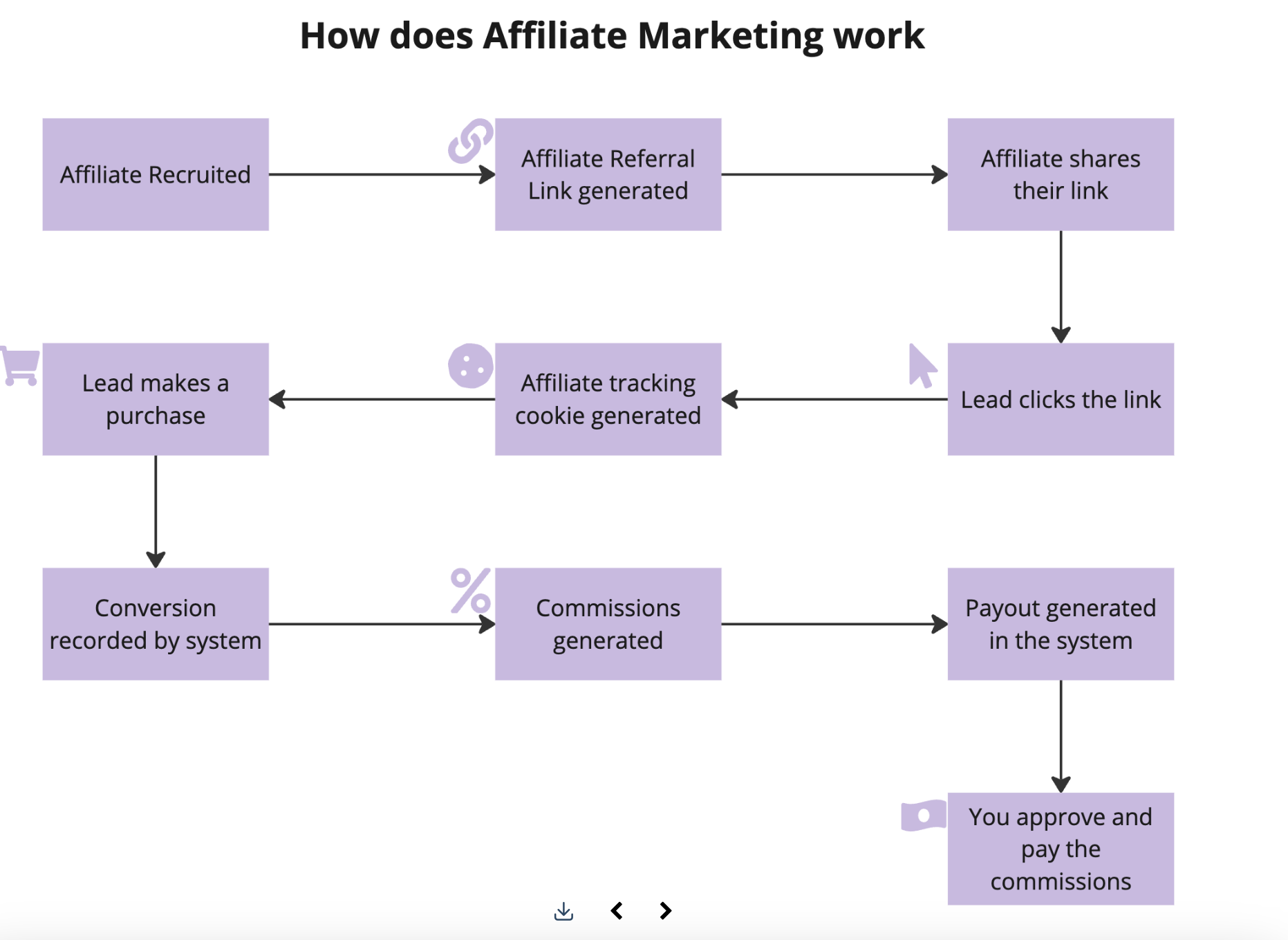
Create a campaign. Choose the treatments, packages, or products you want to promote, set the commission rate, and invite affiliates to join. This can be existing patients, partner businesses, or anyone you want promoting your practice. For the full walkthrough of campaign settings, see the dedicated guide on creating an affiliate campaign.
Affiliates share their link. Once enrolled, each affiliate gets a unique referral link. When someone clicks that link and shows interest, whether by filling out a form or booking a calendar appointment, they're logged as a lead tied to that affiliate. You can also add leads manually if a referral comes in outside the link (a phone call, for example).
Leads convert to patients or customers. When a lead books a paid appointment or makes a purchase, they're automatically converted to a customer under the affiliate whose link brought them in.
Commissions are calculated automatically. Once a sale or booking is completed, the system calculates the affiliate's commission based on the campaign's rate. You, as the account owner, review the resulting payout requests and approve or deny each one before anything goes out.
Payouts are processed. After approval, you can automate payouts through PayPal, or process them manually using your own method, such as Stripe, a bank transfer, Wise, or check.
Tip: If your practice takes payments as part of the referred booking or sale, consider using AX Pay, Aesthetix CRM's built-in payment processor, which offers better rates than Stripe. See the AX Pay help article for setup details.
Affiliate enrollment, commission approvals, and payout events can also trigger automations, such as a welcome email to a new affiliate or a notification when a payout is approved. Those triggers and actions are set up in Workflows, not inside Affiliate Manager itself.
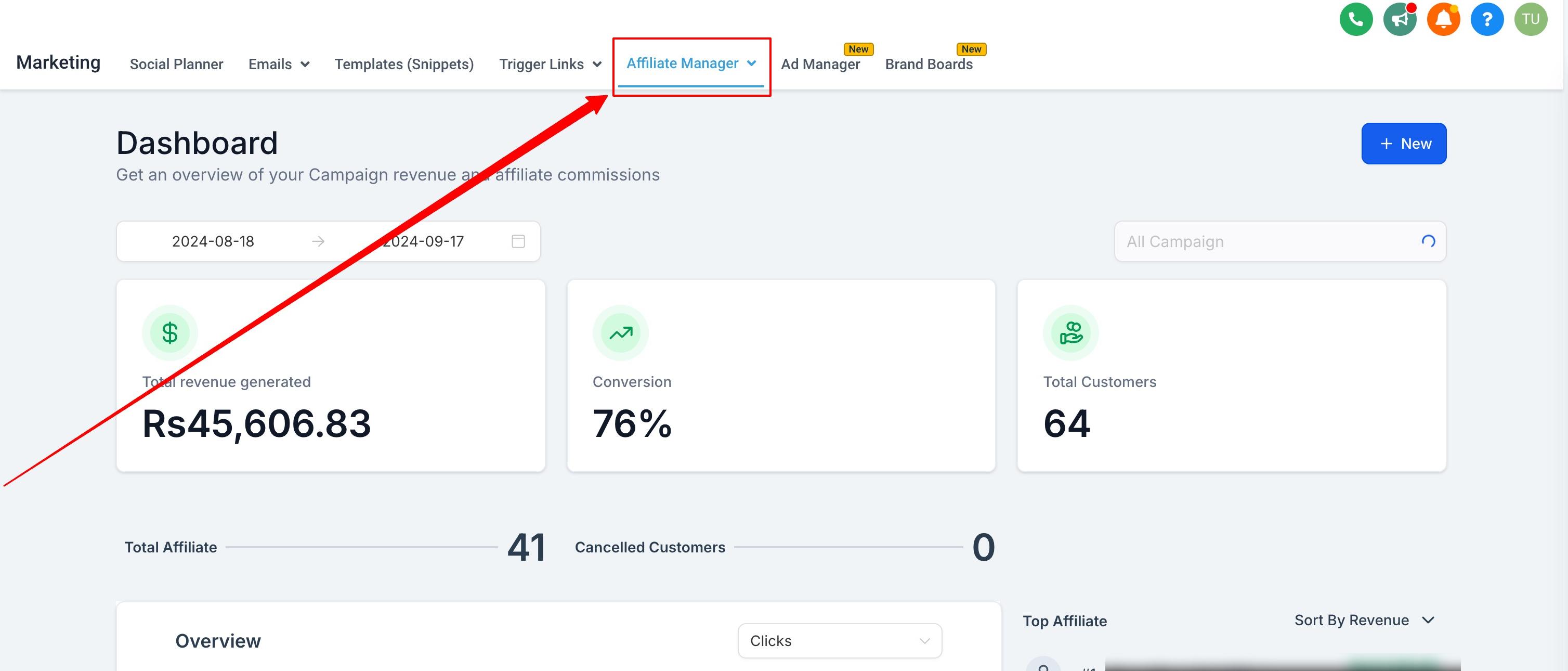
Once campaigns are live, you can track affiliate activity, leads, conversions, and commissions from the Affiliate Manager dashboard. It's the best place to check which affiliates are driving the most referrals and to spot campaigns that need adjusting.
Expand your reach. Affiliates put your practice in front of audiences you wouldn't otherwise reach, whether that's a patient's personal network or an influencer's following.
Performance-based cost. You only pay a commission on referrals that actually convert into booked appointments or completed sales, so there's no upfront advertising spend at risk.
Automated tracking. Leads, conversions, and commissions are tracked and calculated for you, so you're not reconciling referrals by hand.
Built-in incentive to grow. Because affiliate earnings scale with results, your most engaged referral partners are naturally motivated to keep sending business your way.
How do affiliates track the referrals they generate? Each affiliate gets a unique link when they join a campaign. That link tracks every click, form submission, and booking, so referrals are automatically credited to the right affiliate.
How are commissions calculated and paid out? When a referred lead converts into a paying patient or customer, the system calculates the affiliate's commission based on the campaign's rate. You review and approve or deny each payout, then process payment automatically through PayPal or manually through a method like AX Pay, Stripe, bank transfer, Wise, or check.
Can I add a referral manually if it didn't come through an affiliate link? Yes. While most leads come in through affiliate links, you can add leads manually for referrals that happen off-platform, such as a phone call or in-person mention.
Who can be an affiliate? Anyone you invite: existing patients, partner businesses, influencers, or staff running a referral incentive. There's no restriction on affiliate type, only on how you choose to promote and track them.
Do I need a separate campaign for each treatment or product? Not necessarily. You can group related treatments or products under one campaign with a shared commission rate, or create separate campaigns if you want different rates or affiliates for different offers.
Where do I see how each affiliate is performing? Use the Affiliate Manager dashboard to see leads, conversions, and commissions by affiliate and by campaign, so you can identify your top referral partners.
Can affiliate activity trigger automated emails or notifications? Yes. Affiliate enrollment, new leads, and payout approvals can all trigger automations, but those are built in Workflows, using Affiliate Manager's triggers and actions as the starting point.
What happens if I deny a payout? Denied payouts are not paid to the affiliate. You can review the commission details before approving or denying, which is useful for catching duplicate or fraudulent referrals before money goes out.
