Drip Mode in Reviews AI helps you automatically reply to large backlogs of historical, unreplied reviews at a natural, human-like pace. Configure daily limits, time windows, and AI tone so responses align with your brand and business hours. This guide explains what Drip Mode is, how it works, and how to set it up, with best practices and answers to common questions.
Drip Mode applies pacing to automated review replies so historical reviews receive thoughtful, on-brand responses over time rather than all at once. By controlling cadence, windows, and eligibility rules, your team can safely catch up on a backlog without triggering spam-like activity.
Drip Mode is a configurable campaign inside Reviews AI that targets older, unreplied reviews and schedules AI-generated responses over a defined cadence and time window. Campaigns can be paused, edited, or deleted at any time.
Drip Mode is designed for an existing backlog of reviews. Continue using your regular Reviews AI settings to handle new reviews as they come in.
Understanding the benefits clarifies when to use Drip Mode and how it advances your reputation strategy beyond one-off replies.
Backlog Cleanup: Address weeks, months, or years of unanswered reviews without manual effort.
Human-like Pacing: Avoid sudden bursts by setting daily caps, cadences, and allowed send windows.
Brand Consistency: Use Reviews AI agents and tone settings for contextual, on-brand replies.
Operational Control: Pause, edit, or delete campaigns while preserving sent history.
Improved Trust & Response Rates: Increase reply coverage without appearing automated or spammy.
Clear Progress: Track sent replies, daily activity, pending reviews, and campaign completion at a glance.
Lifecycle controls let you adapt to changing priorities without losing historical context or sent history.
Edit Campaign: Update configuration (age, caps, cadence, windows, agent). Changes apply to future scheduled replies and do not alter already-sent responses.
Pause Campaign: Temporarily stop future replies while keeping settings intact for later resumption.
Delete Campaign: Cancel all pending replies and permanently remove the campaign. Sent replies remain in history.
Visibility into scheduled and sent replies ensures accountability, helps forecast backlog clearance, and supports quality assurance.
Scheduled Queue: Review upcoming replies, counts remaining for the day, and next send window.
Sent History: Track which reviews were replied to, timestamps, and response content.
Backlog Progress: Monitor how many eligible reviews remain and estimated days to completion based on caps.
Failures & Retries: Identify any failed sends and take corrective action where available.
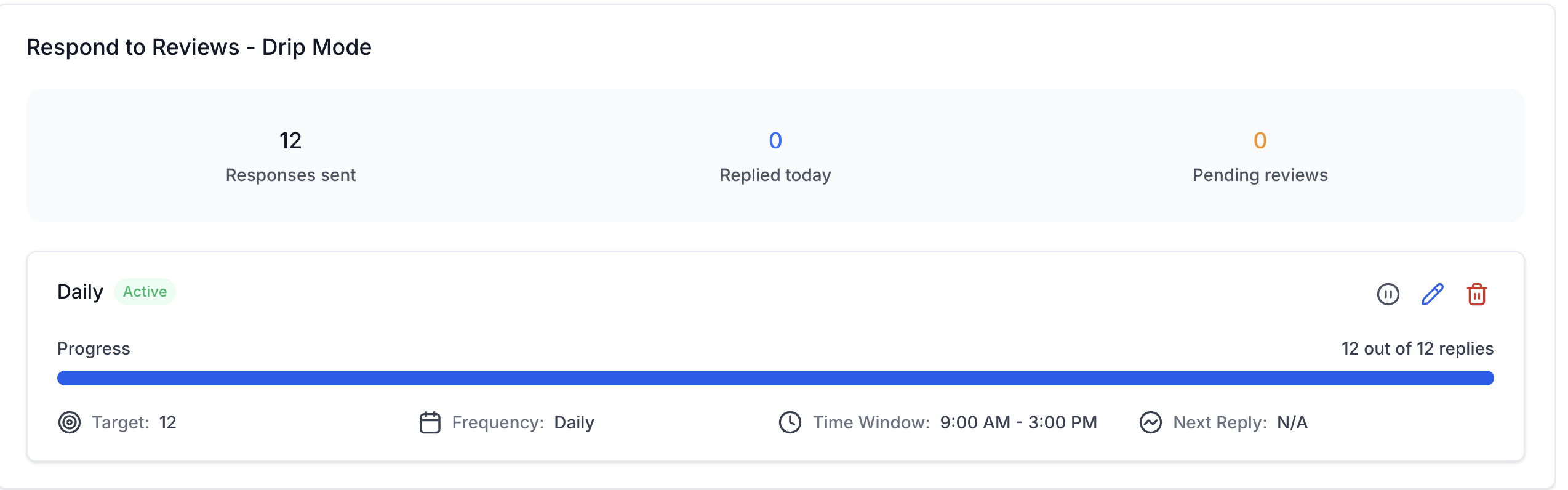
Responses Sent: Total replies the campaign has published so far.
Replied Today: Replies published during the current day.
Pending Reviews: Eligible reviews still waiting for a response.
Progress: Completed replies compared with the campaign's overall target.
Next Reply: The next scheduled response, when one is pending. This shows N/A when there are no pending eligible reviews, the campaign is complete, or nothing is currently scheduled.
Knowing the boundaries helps you plan realistic timelines and avoid unexpected behavior.
A connected review source and at least one configured Reviews AI agent are required before Drip Mode can generate responses. Before creating a campaign, confirm:
Reviews AI is enabled for your account.
A supported review source (such as Google or Facebook) is connected.
Your account has older, unreplied reviews to work through.
At least one Reviews AI agent is configured, with the right tone, source, review type, and assignment rules.
You have permission to manage Reviews AI agents if you need to make agent changes.
Note: If agent-management options are missing, ask an administrator to enable the Manage Reviews AI Agents permission for your role.
Drip Mode targets historical reviews based on your minimum age setting and unreplied filter.
Edits affect only future scheduled replies. Already-sent replies remain unchanged.
Pausing halts future sends until resumed; deleting removes pending items.
Actual send timing depends on your cadence, time windows, and daily caps.
Available review sources depend on the integrations connected to your account.
If a review included in a Drip Mode campaign is deleted from Google or Facebook, the campaign does not repeatedly retry it or generate additional billable AI responses for that review.
A clear, step-by-step setup ensures your campaign starts cleanly, respects business hours, and aligns with your brand tone.
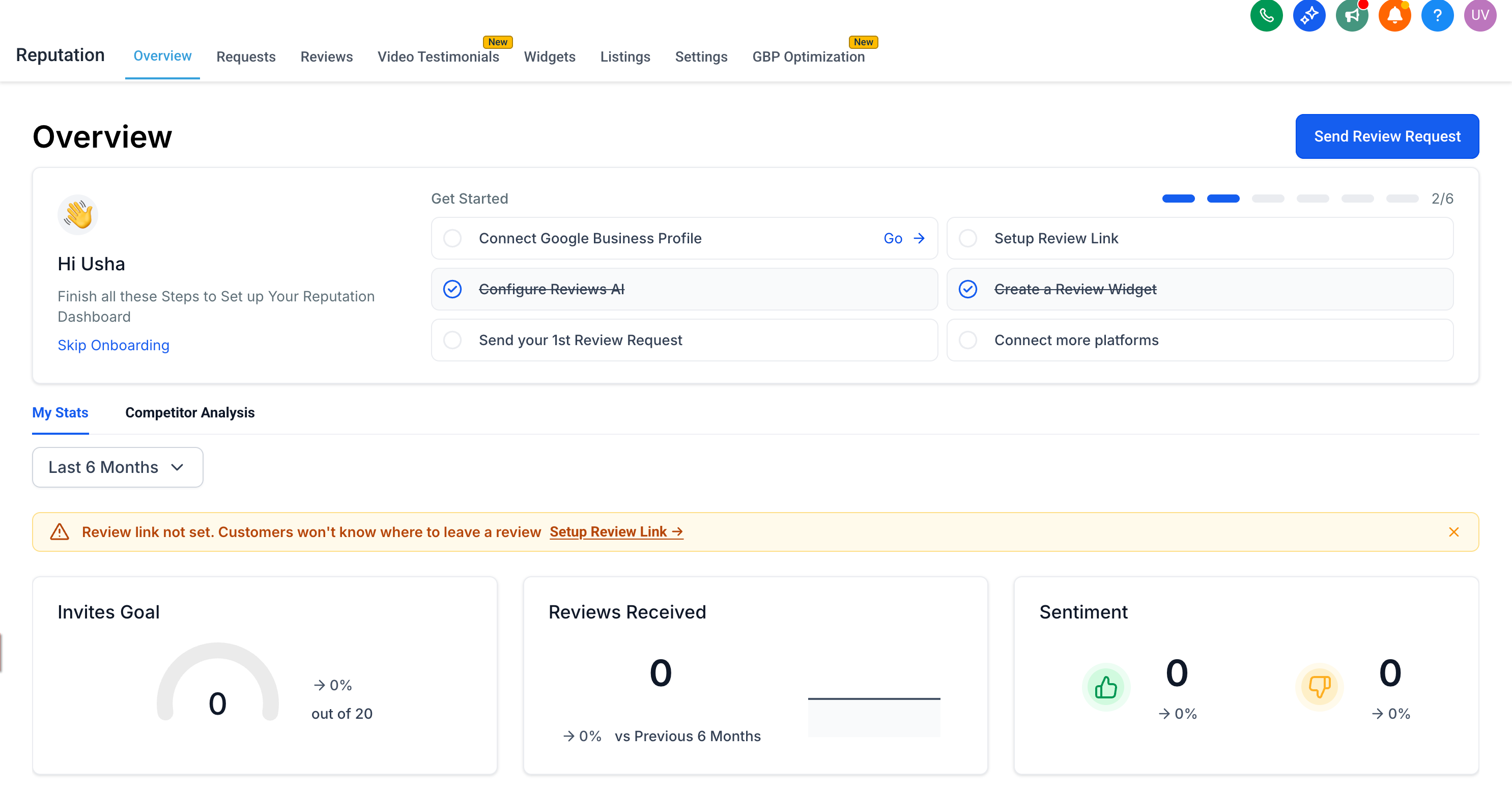
Open Reputation. Confirm Reviews AI is enabled for your account.
Navigate to the Settings tab and Reviews AI.
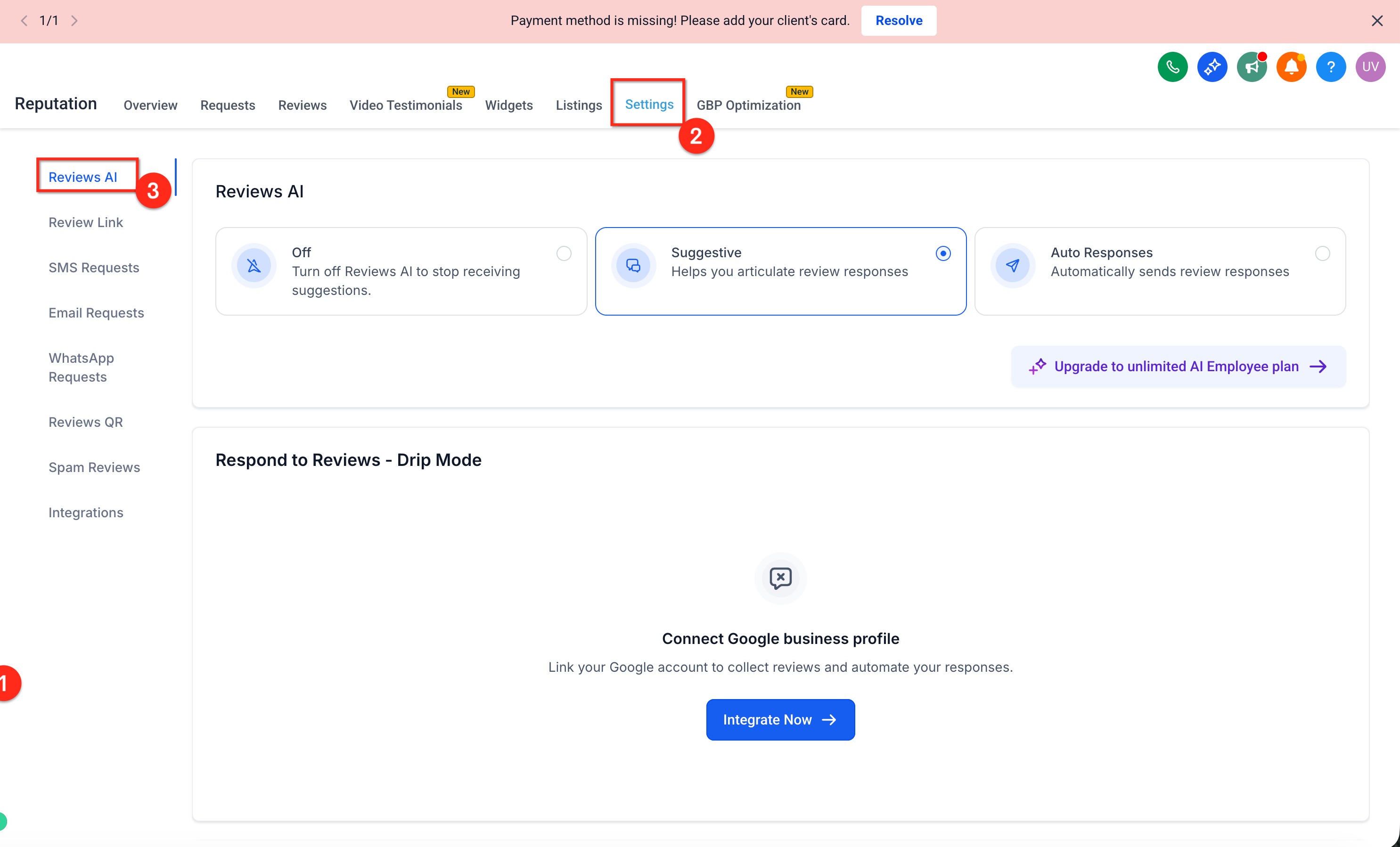
If prompted, click Integrate Now and connect a supported review source before continuing.
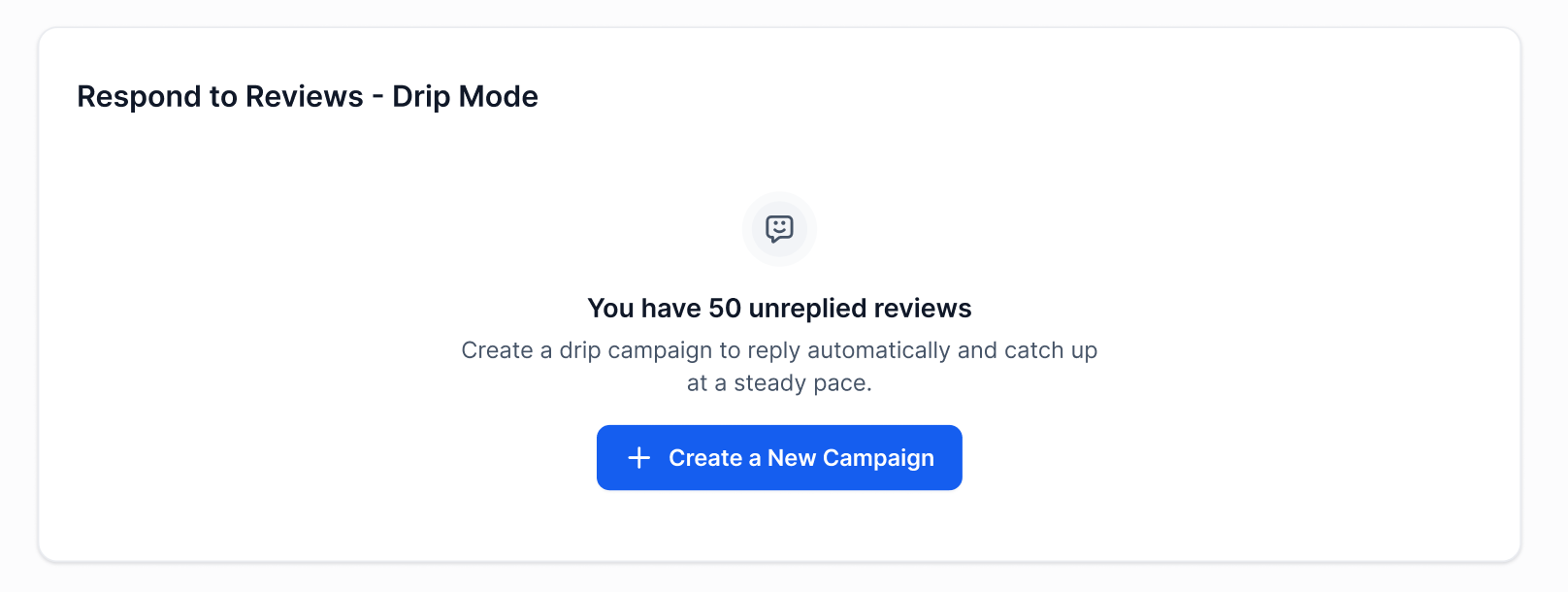
Create a Drip Mode campaign. Click Create Campaign (or New Drip Campaign).
Only Reply to Reviews Older Than: Choose the threshold for "older" reviews.
Review Date Range (optional): Instead of, or alongside, the age threshold, set a specific start and end date to narrow down exactly which historical reviews are eligible for the campaign.
Choose an AI agent and tone. - Select an agent/persona and tone that fits your brand. Review each selected agent's connected platform, review type, and tone before continuing.
Set eligibility rules.
Name: Choose a name that reflects your workflow.
Only Reply to Reviews Older Than: Choose the threshold for "older" reviews.
Configure pace and timing.
Replies Per Day: Set the daily cap.
Frequency: Choose daily, weekly, or monthly based on your workflow.
Time Window: Select business hours for sending.
Choose an AI agent and tone.
Select an agent/persona and tone that fits your brand.
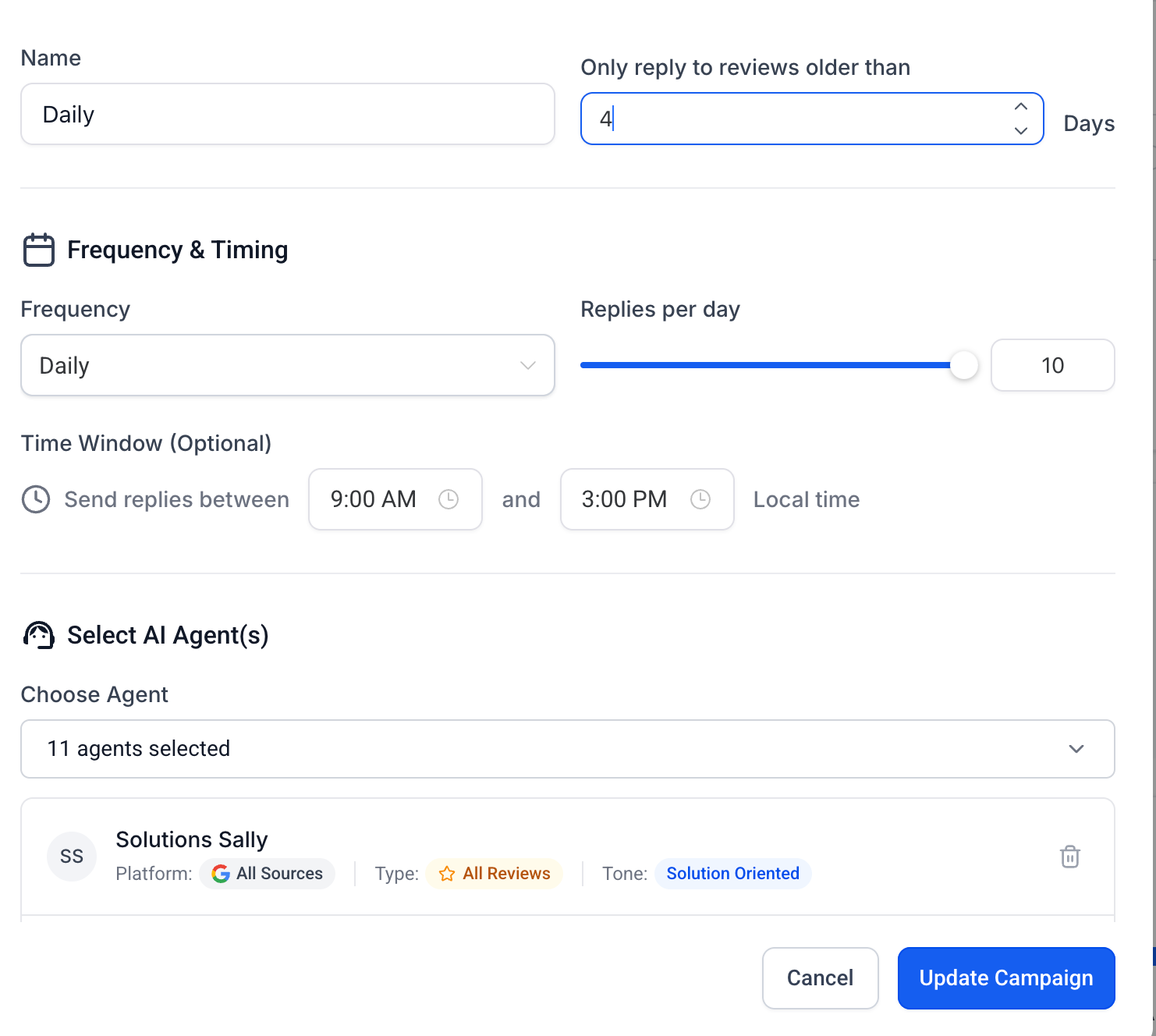
Confirm the summary details (eligible review count, estimated days to clear based on caps). Click Start to activate the campaign.
Note: Use Drip Mode to have Reviews AI work through a backlog of past reviews at a natural pace, rather than replying to everything at once.
Reviewing your campaign settings and sample replies helps maintain a consistent brand voice while the backlog is processed.
Use a campaign name that identifies the review source, backlog, or schedule.
Start with a conservative daily reply limit and increase it after reviewing the results.
Use an empathetic, solution-focused agent and tone for negative reviews.
Keep the time window within your normal business hours.
Review sample responses shortly after starting a new campaign.
Avoid running overlapping campaigns that could target the same review backlog.
Keep Drip Mode focused on historical reviews and manage new-review automation separately.
Pause a campaign before making major agent or tone changes.
Q: Can I run more than one Drip Mode campaign at the same time?
Yes, if supported by your account setup. Ensure campaigns target distinct review sets to avoid overlap.
Q: How are historical reviews selected for reply?
Eligible reviews meet your minimum age and unreplied-only filters. They're added to a schedule and sent according to your cadence and time window.
Q: What happens when the daily cap is reached?
Remaining eligible reviews queue to the next available send window based on your cadence.
Q: Do edits affect already-sent replies?
No. Edits only change future scheduled replies.
Q: Can I pause the campaign without losing my settings?
Yes. Pausing preserves configuration and halts future sends until you resume.
Q: What's the best way to avoid replies sounding repetitive?
Use appropriate tone settings, include brand context, and periodically review samples from the Sent history to refine your agent and tone.
Q: How do I avoid conflicts with auto-replies for new reviews?
Keep Drip Mode focused on older reviews and ensure your new-review automation remains separate.
Q: Can I restrict replies to certain hours or days?
Yes. Use the allowed time window and your chosen cadence to keep replies within business hours.
Q: Does Drip Mode handle negative reviews differently?
Tone and agent selection can emphasize empathy and resolution language, helping you address sensitive feedback professionally.
Q: Where do I see failures or retry items?
Use the monitoring views to check for failed sends and take corrective action if options are available in your account.
Q: Why does Next Reply show N/A?
The campaign may have no pending eligible reviews, may already be complete, or may not currently have another response scheduled. Check the pending-review count and campaign status on the dashboard.
Q: What happens if a review is deleted from Google or Facebook?
If a review included in an active campaign is deleted from its platform, Drip Mode does not repeatedly retry it or generate additional billable AI responses for that review.
