Transferring a domain out of Aesthetix CRM moves its registration and renewal management to another registrar. Aesthetix CRM checks whether the domain is eligible, lets you unlock it, and issues the EPP authorization code the receiving registrar needs to complete the move. Most standard transfers can be started this way without contacting support.
Domain Transfer Out is a self-service option for moving an eligible domain, purchased through or previously transferred into Aesthetix CRM, to another domain registrar. It handles the first part of the process: checking eligibility, unlocking the domain when required, and providing the EPP authorization code used to verify the request.
The transfer starts in the domain's Advanced Settings inside Aesthetix CRM. Once you have the authorization code, you complete the rest of the transfer with the receiving registrar.
Transfers to Cloudflare use a separate process and should not be completed through the standard EPP code workflow described here. If you are moving a domain to Cloudflare, use the dedicated Cloudflare transfer process instead.
Transferring out a .uk family domain (.uk, .co.uk, .org.uk, .me.uk) requires support to step in and complete the transfer for you.
Self-service: start an eligible domain transfer directly from your account, no support ticket needed.
Automated eligibility checks: see any transfer restrictions before you request an authorization code.
Simple unlocking: unlock the domain from the same workflow when it's locked.
Secure authorization: receive an EPP code that verifies the transfer with the receiving registrar.
Registrar flexibility: move an eligible domain to any registrar that supports incoming transfers.
Clear exception handling: Cloudflare, .uk domains, and cancelled accounts each follow their own dedicated process.
Eligibility checks protect domains from unauthorized movement and confirm that registry and registrar requirements are met. Review the eligibility result before starting a transfer so you know whether you can proceed right away or need to resolve a restriction first.
A domain may be ineligible for transfer when:
It was registered or transferred within the past 60 days
The current registrar or registry prohibits transfer
It's already undergoing a transfer
If a domain isn't eligible, read the message shown in the eligibility result and resolve that restriction before trying again.
If your Aesthetix CRM account has already been cancelled, the standard self-service workflow won't be available. Submit a domain release request instead, and be ready to provide ownership and account details to verify the request.
Complete each step in order so Aesthetix CRM can verify the domain's status and securely issue the authorization code. Requesting the EPP code starts the process, but you still need to submit and finish the transfer through the receiving registrar.
Step 1: Open the domain settings
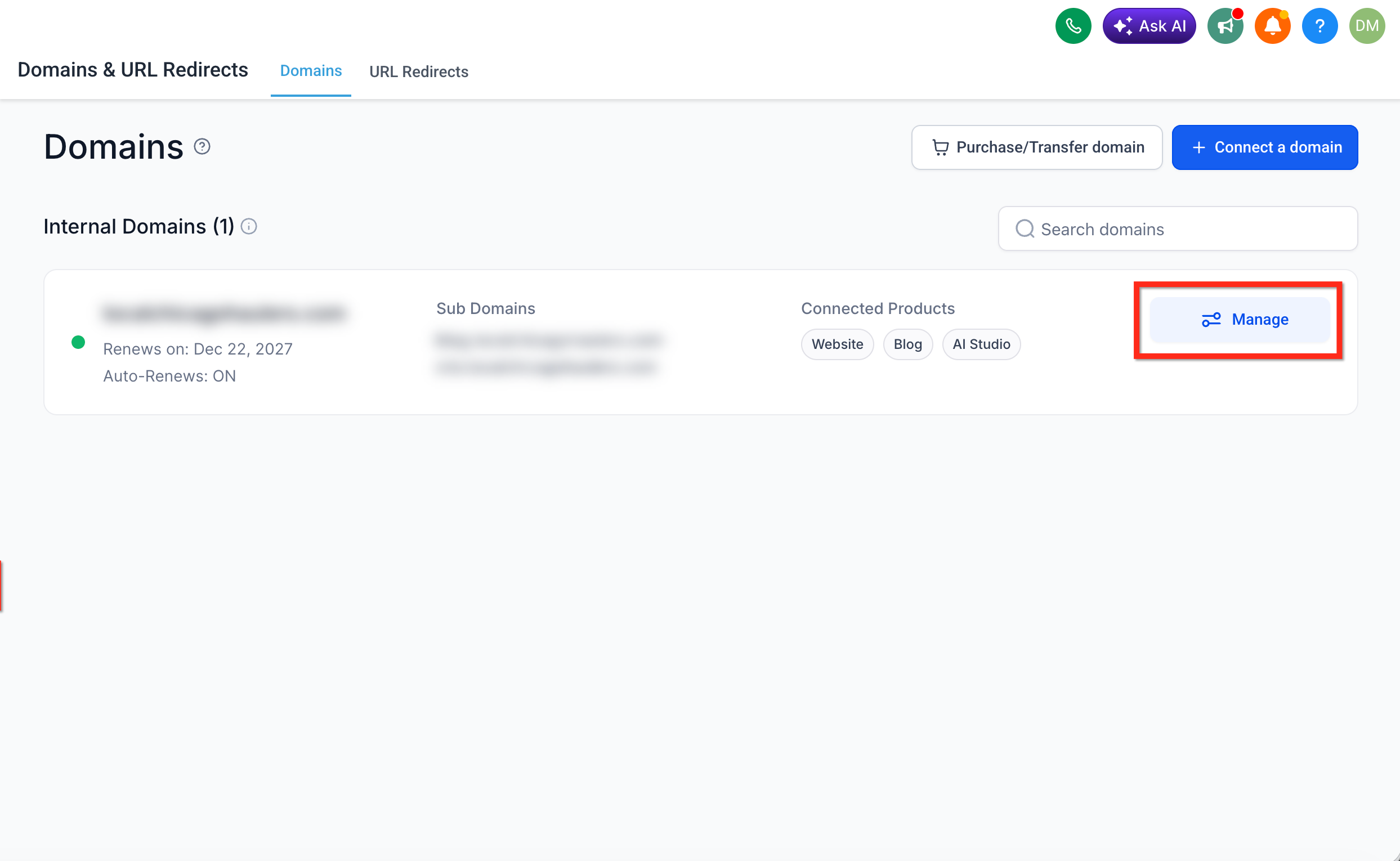
Go to Settings > Domains & URL Redirects. Find the domain you want to transfer and click Manage.
Step 2: Open Advanced Settings
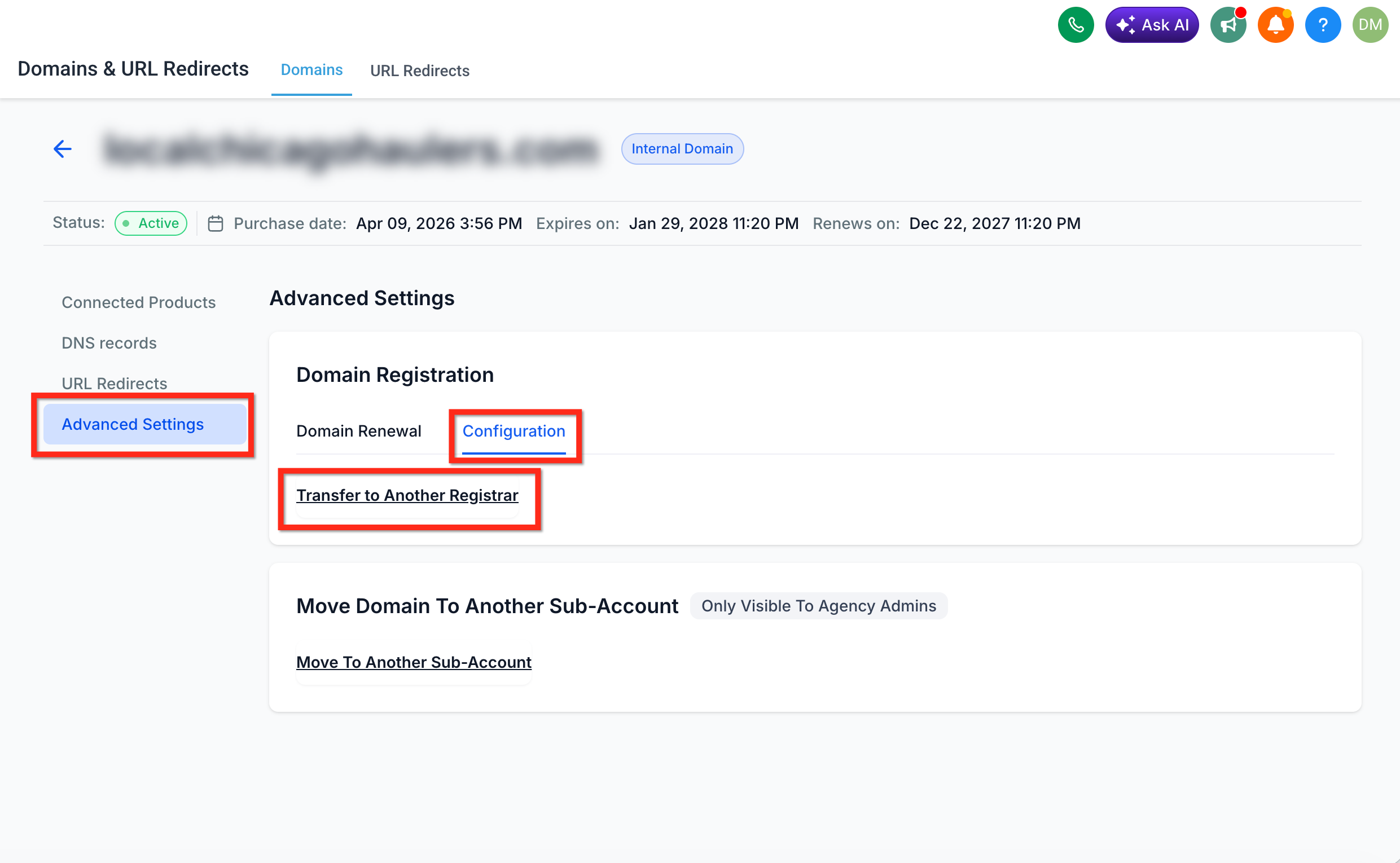
Select the domain's Advanced Settings tab. Click Configuration, then locate Transfer to Another Registrar.
Once you click Transfer to Another Registrar, the domain automatically runs through an eligibility check.
Step 3: Select a registrar
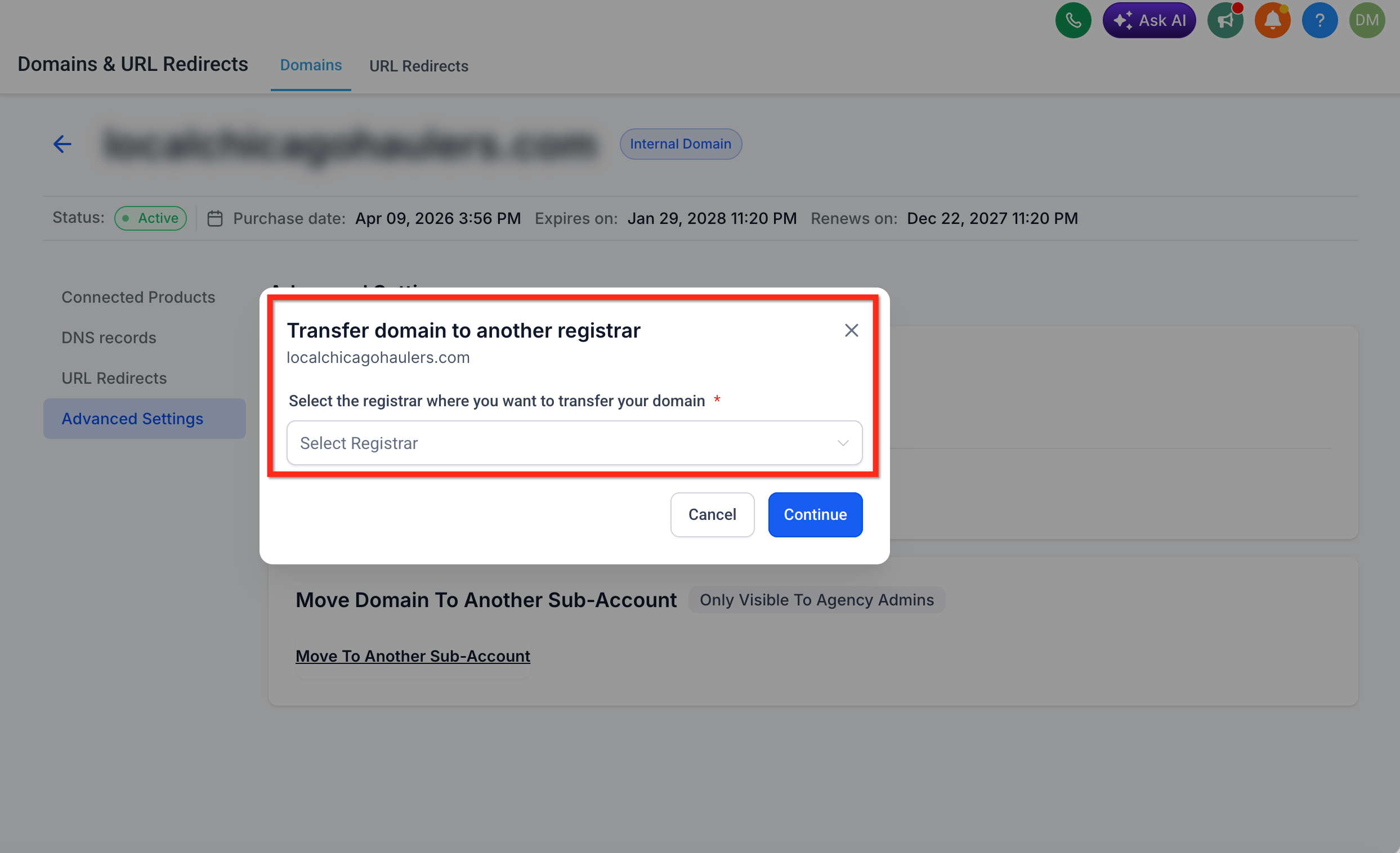
Choose the registrar that will receive the domain from the available dropdown. Selecting a registrar doesn't complete the transfer. It tells Aesthetix CRM where you intend to move the domain before you request the authorization code.
Step 4: Unlock the domain
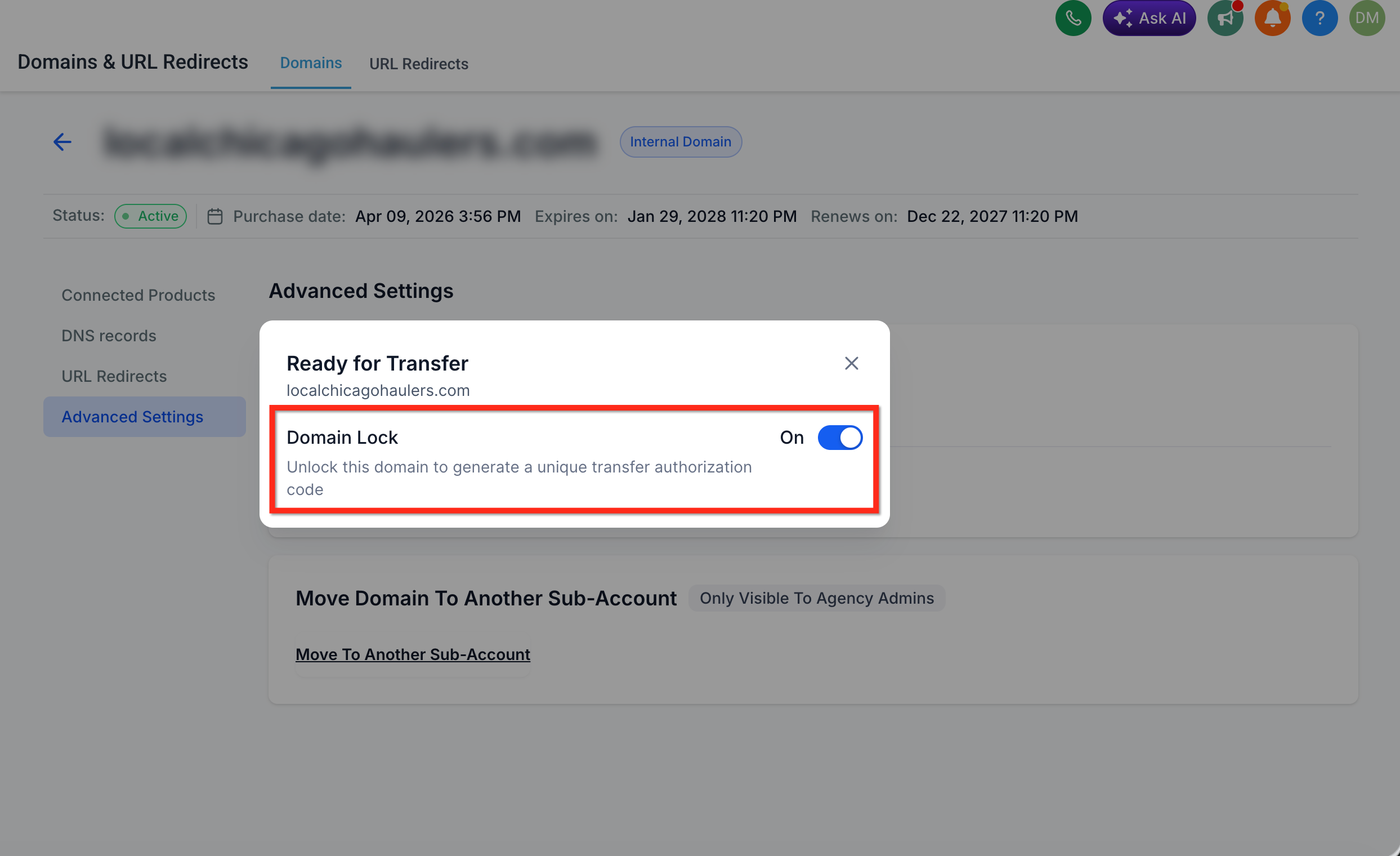
If the domain is locked, use the available control to unlock it. A registrar lock protects the domain from unauthorized transfers, so it must be unlocked before the receiving registrar can complete its side of the transfer.
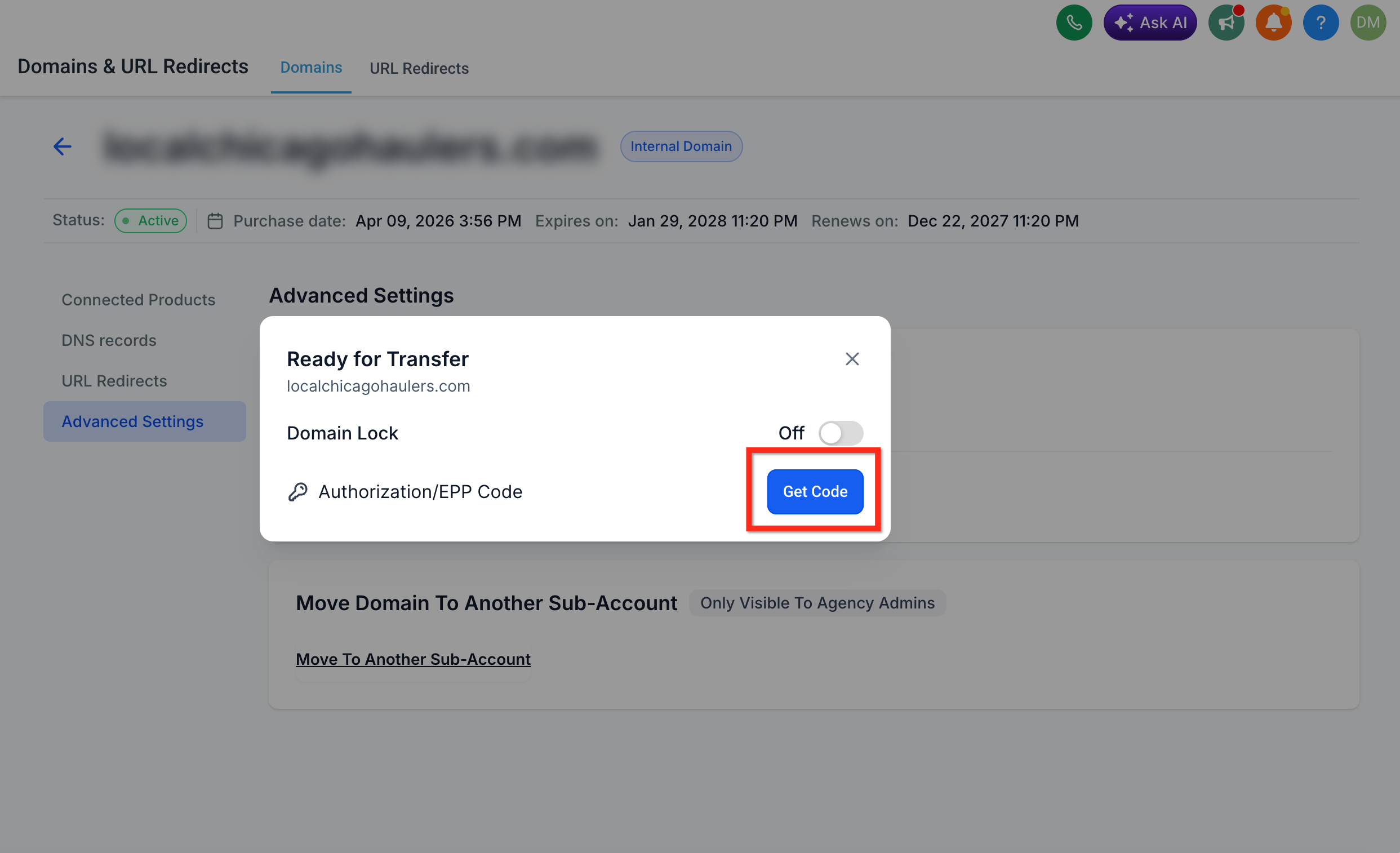
Step 5: Request the EPP authorization code
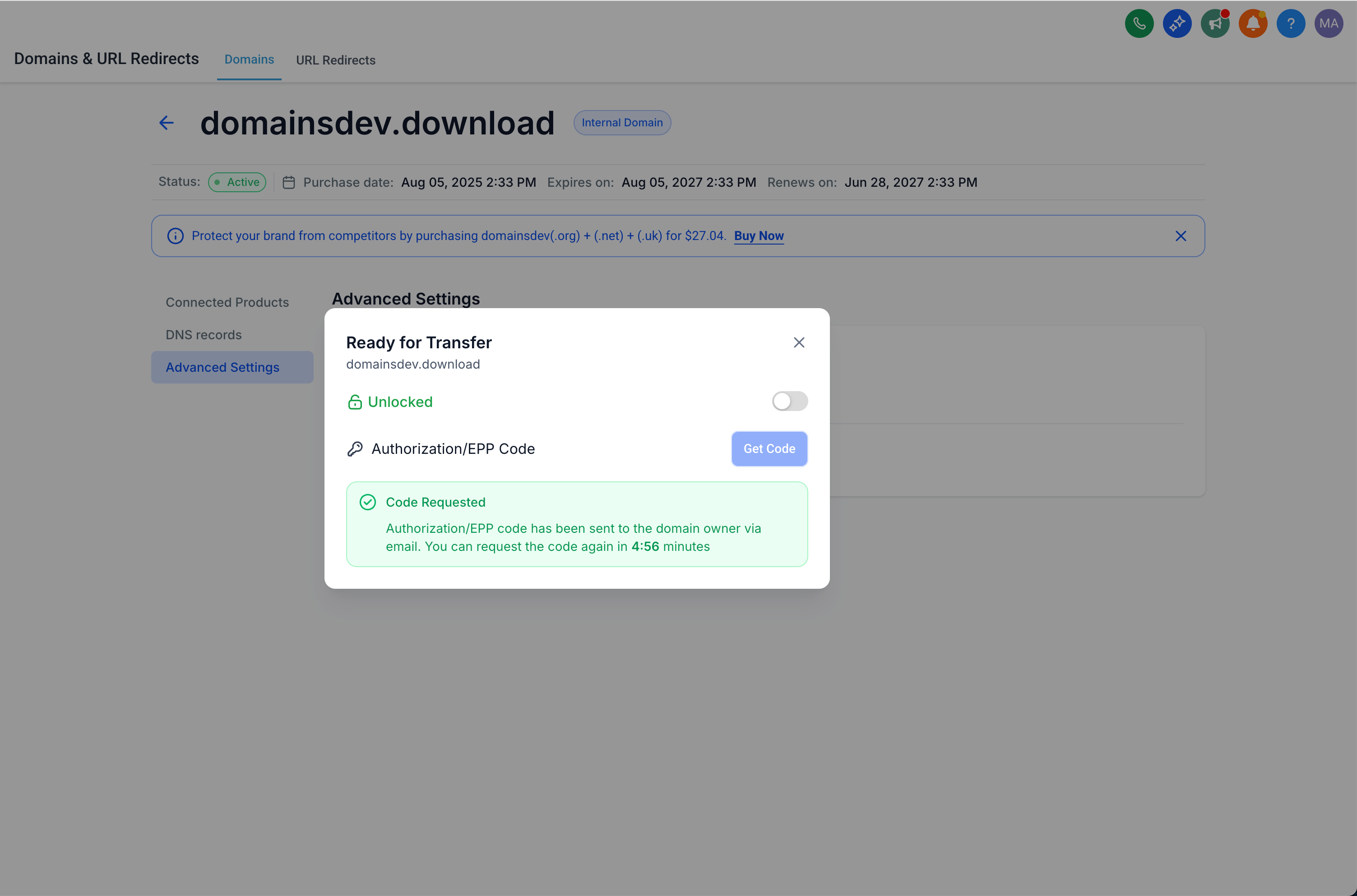
Click Get Code to request the EPP authorization code. This code confirms that whoever is initiating the transfer is authorized to move the domain. Once the request goes through, Aesthetix CRM shows masked versions of the email addresses the code was sent to, not the code itself; you'll retrieve the actual code from one of those inboxes in the next step.
Select the option to request the EPP code. This code confirms that whoever is initiating the transfer is authorized to move the domain.
Each email address is masked before it's displayed:
A local part or domain segment with more than two characters shows only its first and last characters, with everything in between masked.
A two-character segment shows only its first character.
A single-character segment is masked completely.
The top-level domain (for example, .com or .org) always stays visible.
If the code was sent to more than two email addresses, Aesthetix CRM shows the first two masked addresses plus a +N more indicator; hover over it to see the rest.
Step 6: Check the authorized email inboxes
Aesthetix CRM sends the authorization code to:
The domain purchaser's email address
The account owner's email address
Check both inboxes, including spam and filtered folders. If the code doesn't arrive or you need a new one, wait at least five minutes before requesting it again, then use the most recently delivered code when completing the transfer.
Step 7: Complete the transfer with the receiving registrar
Sign in to the receiving registrar and start its domain transfer process. Enter the domain name and the EPP authorization code, then complete any required payment, contact verification, or transfer approval steps on their end.
Keep an eye on the receiving registrar account and both authorized inboxes for status updates or approval requests. Once the transfer finishes, confirm the domain shows up in the new registrar account, check the nameservers and DNS records, and test any connected websites, funnels, or email services to make sure nothing broke in the handoff.
Moving a domain into a different Cloudflare account uses its own process, separate from the standard EPP code transfer described above. It involves a short setup on the Cloudflare side, then Aesthetix CRM support initiates the transfer for you.
Prerequisite: You need an existing Cloudflare account, with access to it, that the domain will be transferred into.
Step 1: Add the domain to the new Cloudflare account
Sign in to the Cloudflare account you want the domain transferred into.
Click + Add, then select Connect a domain.
Enter the domain name and click Continue.
Select the Free plan or a paid plan.
Compare the DNS records Cloudflare scans against your current DNS records. If they match, click Continue to Activation. If they don't, manually add or remove records so they match what's currently configured.
Make sure proxy is turned off for every record before continuing. You don't need to change nameservers at this step.
Step 2: Share your Cloudflare account ID with support
Once the domain is added, find your Cloudflare account ID (the alphanumeric value in your Cloudflare account URL) and send it to Aesthetix CRM support. Support needs this ID to initiate the transfer from our end.
Approve the transfer
After support initiates the transfer, expect it to complete within 24 hours. Then:
Go to Settings > Domains & URL Redirects, find the domain, and click Manage.
Accept the transfer request.
Allow up to 24 hours after you accept for the transfer to finish. Once it's successful, the domain's status changes to Active.
"Invalid Nameservers" status: After you accept the transfer, the domain may briefly show "Invalid Nameservers" in your Cloudflare account. This is expected and usually resolves on its own within 24 hours; no action is needed on your part.
Does requesting an EPP code complete the transfer? No. Requesting the EPP code only gives you the authorization to begin the transfer with the receiving registrar. You still need to submit and finish the transfer through that registrar.
Can I transfer a domain I connected to Aesthetix CRM but purchased somewhere else? No. A domain purchased through another registrar stays managed by that registrar. Start the transfer from wherever the domain is currently registered, not from Aesthetix CRM.
Can I transfer a domain to Cloudflare using this same process? No. Cloudflare transfers use a separate, dedicated workflow. Use the Cloudflare-specific transfer process instead of the standard EPP code steps above.
Can I transfer a .uk domain with an EPP code?
No. The .uk extension family (.uk, .co.uk, .org.uk, .me.uk) uses a different process. Contact support and they'll complete the transfer for you.
What happens if my account is cancelled and I still need to move a domain? Submit a domain release request instead of using the standard transfer controls, which may not be available once account access ends. You'll need to provide ownership and account details to verify the request.
Why isn't my domain eligible for transfer? The most common reasons are that it was registered or transferred within the last 60 days, the current registrar or registry has a transfer restriction in place, or a transfer is already in progress. Check the eligibility message for the specific reason.
Where do I find the authorization code if I don't see the email? Check both the domain purchaser's inbox and the account owner's inbox, including spam and filtered folders. If it still hasn't arrived after a few minutes, wait at least five minutes before requesting a new code.
Does Aesthetix CRM show me the EPP code on screen after I request it? No. After you click Get Code, the confirmation screen only shows masked versions of the two email addresses the code was sent to, not the code itself. Retrieve the actual code from one of those inboxes.
Does unlocking the domain finish the transfer by itself? No. Unlocking just removes the registrar lock so the receiving registrar can process the transfer. You still need to request the EPP code and complete the transfer on the receiving registrar's side.
Will my website or email stop working during the transfer? It shouldn't if the transfer completes cleanly, but you should verify nameservers, DNS records, and any connected websites, funnels, or email services once the transfer finishes to make sure everything still points where it should.
Who can request the EPP code, the domain purchaser or the account owner? Either party can see the authorization code once it's requested, since Aesthetix CRM sends it to both the domain purchaser's email address and the account owner's email address.
How do I move a domain to a new Cloudflare account? That's a separate process from the standard EPP transfer above. Add the domain to the destination Cloudflare account, share your Cloudflare account ID with Aesthetix CRM support, then approve the transfer from Settings > Domains & URL Redirects once support has initiated it on our end. See Transferring a Domain to Cloudflare above for the full steps.
Why does my domain show "Invalid Nameservers" after a Cloudflare transfer? This is expected right after you accept a Cloudflare transfer and typically clears on its own within 24 hours. No action is needed on your part.
