Aesthetix CRM can automatically issue a certificate the moment someone passes a quiz or assignment inside one of your courses. This is useful for practices that run staff training, continuing-education tracks, or patient education programs where completion needs to be recognized with a certificate. The automation lives in the Workflow Builder and pairs a Lesson Completed trigger with an Issue Certificate action.
Certificates are not sent from inside the course editor itself. Instead, you build a short workflow that watches for a specific quiz or assignment to be completed, then fires off the certificate. This means certificate issuance follows the same automation logic as everything else in Aesthetix CRM: it is triggered by an event, filtered down to the exact lesson you care about, and then it runs an action.
Before you start, make sure you already have:
A course built with at least one quiz or assignment (set up in Quiz Builder or as a course assignment).
A certificate template created and ready to use.
Go to Workflows and create a new workflow (or open an existing course-related workflow you want to add this to).
Click Add New Trigger.
Choose Lesson Completed from the trigger list.
If you leave the trigger unfiltered, it will fire for every lesson completion in every course, which is almost never what you want. Add filters so the workflow only fires for the quiz or assignment tied to the certificate:
Product, select the specific course.
Category, select the module or section that contains the quiz or assignment.
Lesson, select the exact quiz or assignment that must be passed.
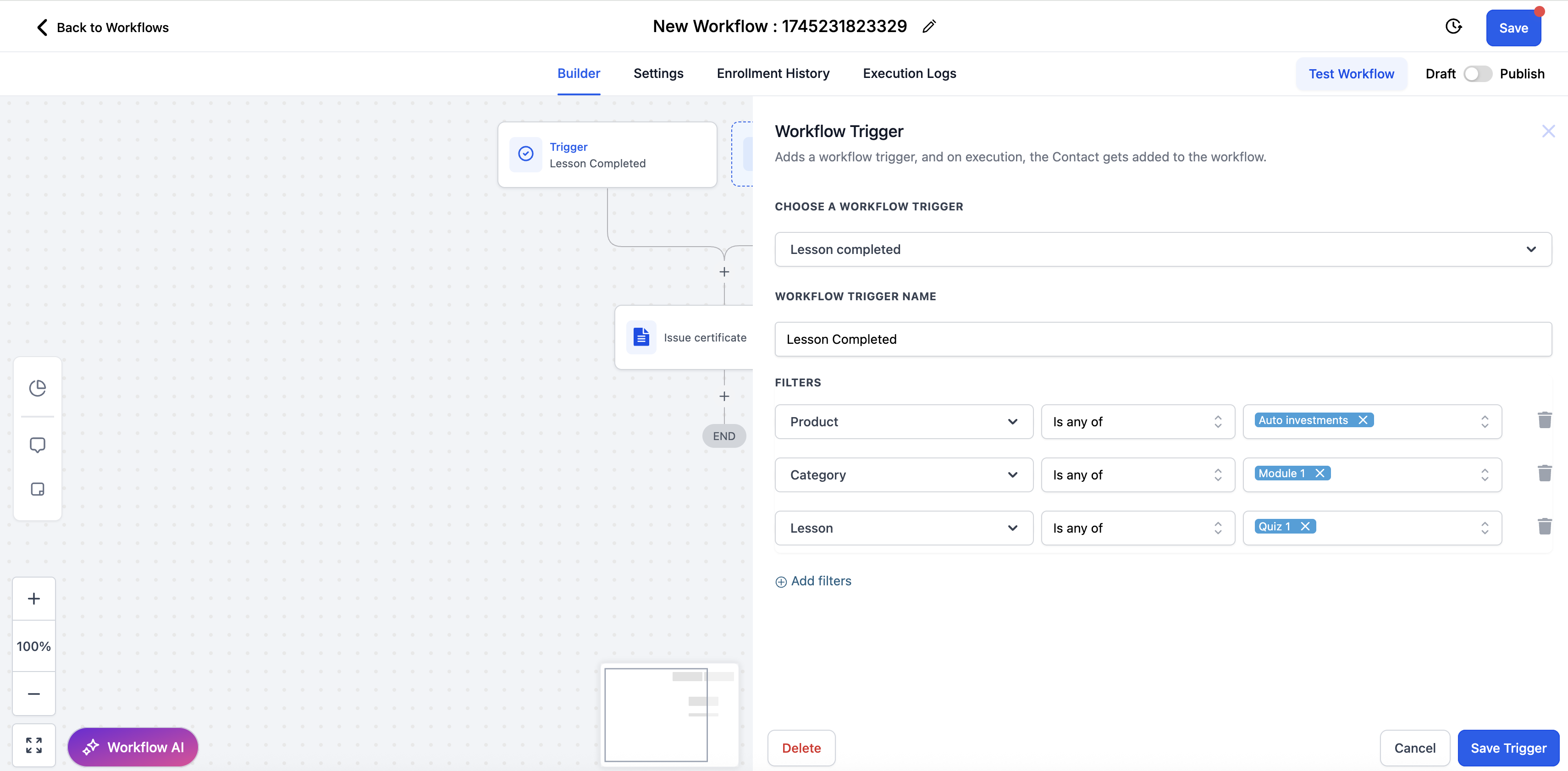
Stacking all three filters (product, category, lesson) prevents the certificate from going out for the wrong quiz, or for a different course that happens to share a similarly named lesson.
Click the + icon directly under the trigger to add an action.
Search for and select Issue Certificate.
Choose the certificate template you want sent when this trigger fires.
Save and publish the workflow.
Once published, any learner who passes the filtered quiz or assignment will automatically receive the selected certificate. No manual step is required on your end.
Before rolling this out to real patients or staff, complete the quiz or assignment yourself (or with a test contact) and confirm the certificate arrives as expected. This also gives you a chance to check that the certificate template looks right and that the correct course/lesson combination is triggering it, rather than finding out after learners start reporting missing certificates.
If you offer certificates for several different quizzes across several courses, build a separate trigger-and-action pair (or a separate workflow) for each one. Reusing a single unfiltered trigger across multiple courses is the most common cause of certificates going to the wrong learners or not going out at all.
Name your workflows clearly (for example, "Certificate: Injectables Refresher Quiz") so it is easy to find and audit later as your course catalog grows.
If a course has both a quiz and a separate final assignment, and you want a certificate only after both are complete, you will need additional filters or a multi-step condition in the workflow rather than a single Lesson Completed trigger.
Do I set up the certificate inside the course editor? No. The course editor is where you build the quiz or assignment itself. The certificate is issued through a workflow in Workflow Builder, using a Lesson Completed trigger tied to that quiz or assignment.
What happens if I don't add filters to the trigger? The workflow will fire for every lesson completion across your courses, which usually sends certificates for the wrong lessons or floods learners with certificates they shouldn't receive. Always filter by product, category, and lesson.
Can I use the same certificate template for multiple quizzes? Yes. A certificate template can be reused across as many workflows as you like. Each workflow simply points its Issue Certificate action at the template you want that quiz to use.
Does this work for assignments as well as quizzes? Yes. The Lesson Completed trigger fires for both quizzes and graded assignments, so the same setup works whether the learner is passing a quiz or completing an assignment.
Where do I build the quiz itself? Quizzes are built and managed in Quiz Builder. This article only covers the automation that issues a certificate once a quiz built there is passed.
Can I require someone to pass more than one quiz before getting a certificate? Not with a single Lesson Completed trigger. If you need a certificate to wait on multiple quizzes or an entire course being completed, you will need to combine filters or conditions across a more advanced workflow.
Will the certificate go out if a learner fails the quiz? No. The Lesson Completed trigger with the applied filters is intended to fire on passing completion of the selected quiz or assignment. Learners who do not pass will not trigger the certificate action.
Can I edit the certificate template after the workflow is live? Yes. Updating the certificate template will apply to future certificates issued by the workflow. It will not retroactively change certificates that have already been sent.
Where can I see certificates that have already been issued? Check the learner's activity and the workflow's execution history for a record of when the Issue Certificate action ran. This confirms the automation fired and for which contact.
Is this the same automation system used elsewhere in Aesthetix CRM? Yes. Certificates use the same Workflow Builder, triggers, and actions as the rest of your course and communication automations, so the skills you use here (triggers, filters, actions) carry over to any other workflow you build.
