Attribution shows you where every lead and patient came from, whether that's a Google search, a paid Instagram ad, a referral link, or a walk-in you added manually. Aesthetix CRM records this automatically on every contact so you can see which channels actually fill your appointment book, not just which ones generate clicks. Attribution data lives on the individual contact record, and it rolls up into the reporting you'll find in the Reporting collection.
Attribution tracks the source of each contact based on how they first interacted with your practice and how they most recently interacted before converting (booking a consult, filling out a form, making a purchase, and so on). With attribution in place, you can:
Identify which marketing channels are actually driving booked consults, not just website traffic
Measure whether a specific campaign or landing page is pulling its weight
Spot growth opportunities in channels that are quietly outperforming
Sharpen your conversion strategy by seeing what touchpoint closes leads, versus what touchpoint first brings them in
Every contact stores two attribution values, giving you a full view of their journey from first touch to conversion.
Attribution type | What it captures | Does it change? |
|---|---|---|
First attribution | The very first interaction a contact had with your practice (for example, submitting an intake form from a Google ad) | No. It stays fixed for the life of the contact. |
Latest attribution | The most recent interaction before the contact converted (for example, booking a consult after clicking a retargeting ad) | Yes. It updates every time the contact has a new tracked interaction. |
First attribution tells you what originally brought a patient into your world. Latest attribution tells you what finally pushed them to convert. Both matter: a practice that only looks at latest attribution can end up crediting a retargeting ad for work that a blog post or referral actually did upstream.
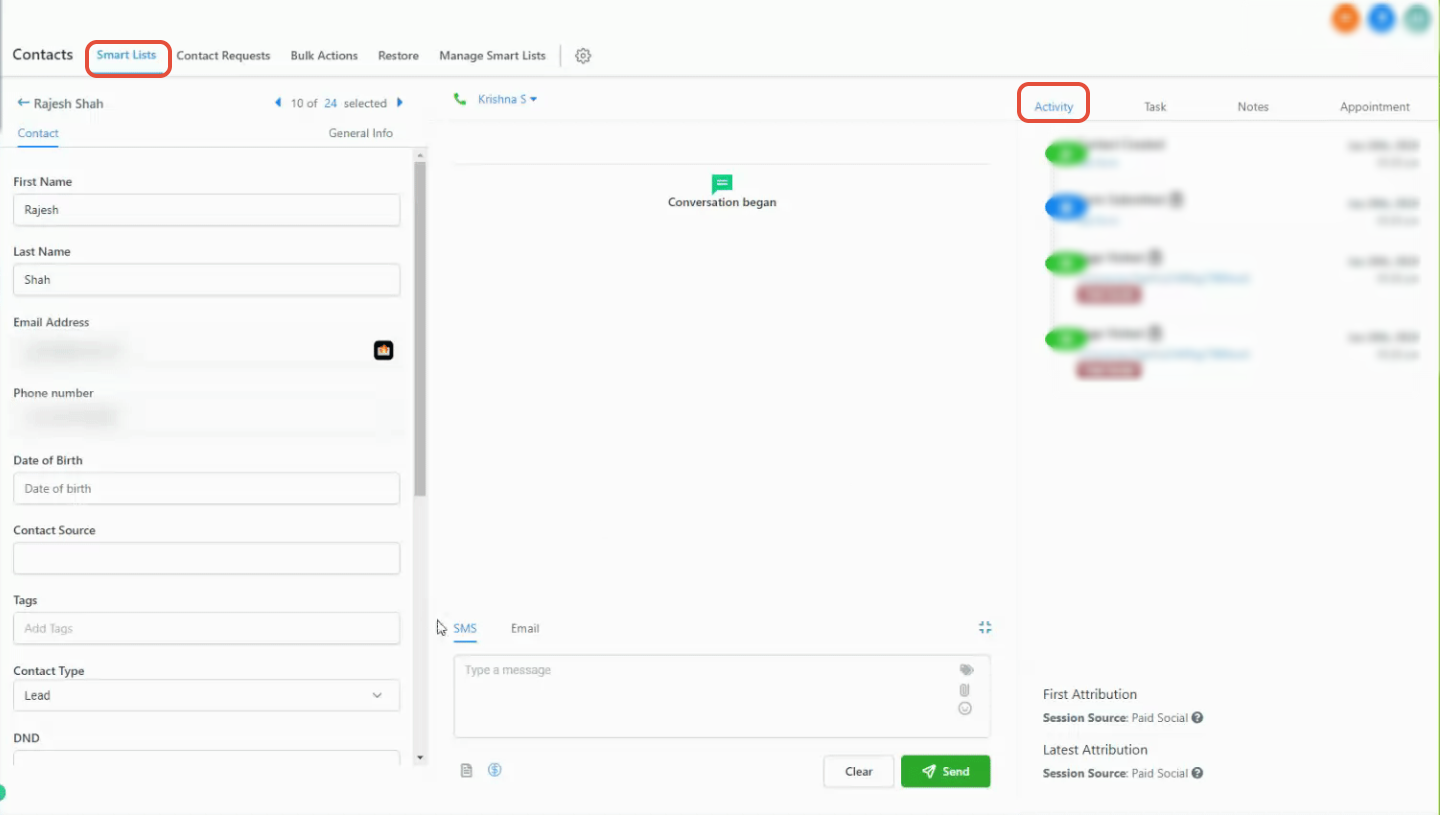
Attribution is stored directly on each contact record, so you can review it without running a separate report.
Open the contact record you want to review.
Go to the activity section of the profile.
Look at the bottom-right panel, where both first and latest attribution are displayed alongside the activity timeline.
Hover over an attribution source to see additional session-level tracking details, such as identifiers and channel classification.
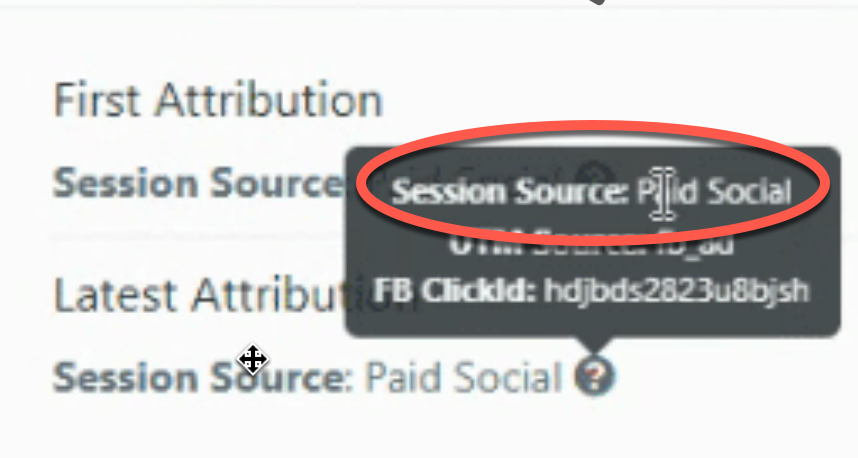
Every contact gets categorized into one of the following sources, based on how they entered your system.
Paid channels
Paid Search: Traffic from search engine ads (for example, Google Ads)
Paid Social: Traffic from paid social campaigns (Facebook, Instagram, TikTok, and similar platforms)
Organic channels
Organic Search: Traffic from search engines with no ad spend behind it
Social Media: Traffic from organic (unpaid) social posts and profile links
Other traffic sources
Direct Traffic: No identifiable source, such as a patient typing your URL directly into their browser
Referrals: Traffic arriving from another website that links to yours
Others: Calls, SMS, emails, and messaging-platform conversations
System-based sources
CRM UI: Contacts created manually by your team inside Aesthetix CRM
Third-Party: Contacts brought in through an integration or external tool
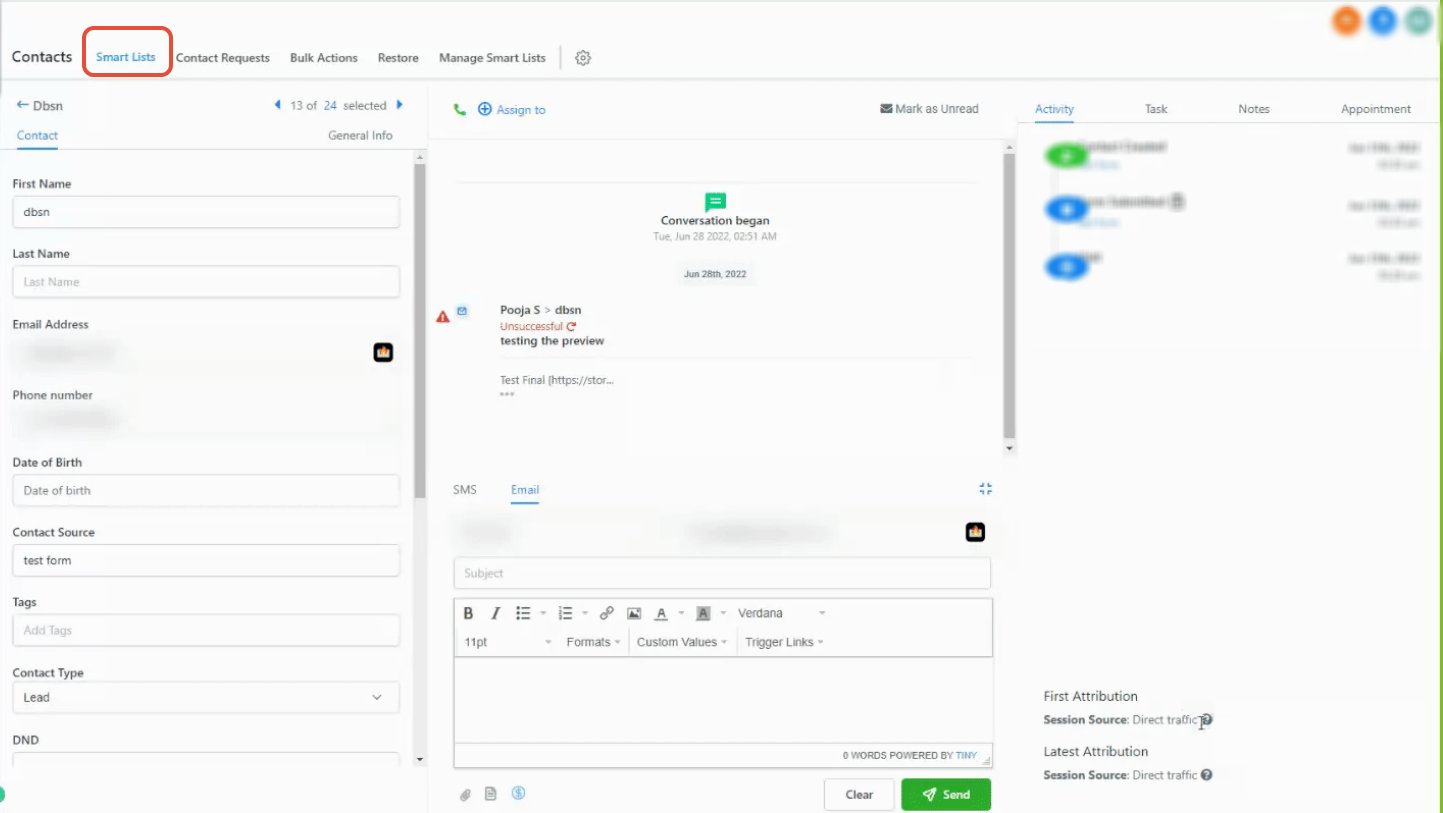
A contact showing as Direct Traffic simply means no referring source or tracking parameters were detected for that visit, not that anything went wrong.
Attribution is captured when a contact takes one of these actions during a tracked session:
Submitting a form or survey
Booking an appointment on your calendar
Interacting with your chat widget (after submitting their contact details)
Submitting an order form
Attribution only records when these actions happen on a page or form that Aesthetix CRM is actively tracking. If a patient fills out a form on a page outside your tracked funnel or website, the interaction won't attribute correctly.
Aesthetix CRM assigns attribution using a rule system built on:
URL parameters (UTMs)
Click identifiers
Referring domains
Simplified logic:
Signal detected | Attribution assigned |
|---|---|
Paid search identifiers present | Paid Search |
Paid social identifiers present | Paid Social |
Referral from a social platform | Social Media |
Referral from a search engine | Organic Search |
Referral from an external website | Referrals |
No source data present | Direct Traffic |
Messaging or call-based interaction | Others |
Manually created contact | CRM UI |
Brought in via an integration | Third-Party |
Accurate attribution for paid campaigns depends on clean URL tagging. Keep these requirements in mind when you build out ad campaigns and landing pages:
Use consistent tracking parameters across every ad and landing page in a campaign
Make sure parameter values match exactly, including capitalization (tracking parameters are case-sensitive)
Apply tracking parameters to the actual landing page URL a patient lands on, not just the ad itself
Detailed campaign and platform-level ad reporting (spend, ROAS, cost per lead by ad set) lives in the Ads Manager collection under Ad Reporting. This guide focuses on how an individual contact gets attributed to a source, not on ad-spend analytics. If you're trying to understand your practice's overall lead-to-revenue picture across every channel, the flagship attribution and reporting guides in Essential Guides are the best starting point, and this article won't duplicate that content.
If attribution data looks missing or incorrect on a contact, check the following before assuming something is broken:
Remove extra spaces or typos from your tracking parameters, and confirm every parameter is formatted correctly.
Attribution is only captured if the form, booking, or order submission happens on the same page the patient landed on. Redirecting a patient to a different page before they submit will break the attribution chain.
Don't hand-edit or restructure standard tracking parameters. Non-standard formats can prevent Aesthetix CRM from reading them correctly, which shows up as missing or incorrect attribution.
Why is attribution missing for some contacts? Attribution isn't recorded if the contact's qualifying action (form, booking, chat, or order submission) didn't happen on a page or form Aesthetix CRM is tracking, or if they were redirected before submitting.
Can attribution change over time for the same contact? Only latest attribution updates as new interactions happen. First attribution is locked in at the moment of that contact's very first tracked interaction and never changes.
What does "Direct Traffic" mean? It means no referring source or tracking parameters were detected for that session, most commonly when someone types your website address directly into their browser.
Why is a contact showing "Others" as their attribution source? "Others" covers non-web interactions like phone calls, SMS messages, and other messaging channels rather than a tracked web session.
Can I see attribution for contacts that came in through an integration? Yes. Contacts brought in through an integration or outside tool are categorized under Third-Party sources so you can still separate them from organic and paid channels.
Where do I go to see reporting on my ad spend and campaign performance, not just individual contact attribution? Head to the Ads Manager collection and look at Ad Reporting for platform-level spend and performance data. This attribution guide covers how a single contact gets tagged with a source, not aggregate ad analytics.
Is reputation or review traffic tracked the same way? Review-driven traffic and reputation reporting are covered separately in Review Management. Attribution on an individual contact will still show how they arrived (for example, a referral or direct visit), but review-specific reporting lives in that collection.
Why do first and latest attribution sometimes show completely different channels? That's expected. A patient might first discover you through an organic search, then convert weeks later after clicking a retargeting ad, which is exactly the kind of journey first vs. latest attribution is designed to reveal.
Does manually adding a contact affect attribution? Yes. Any contact your team creates directly inside Aesthetix CRM, rather than one who comes in through a tracked form, booking, or campaign, is attributed to CRM UI.
Do UTM parameters need to be capitalized consistently? Yes. Tracking parameters are case-sensitive, so "Spring_Promo" and "spring_promo" will be treated as two different values. Pick a consistent naming convention for your team and stick to it across every campaign.
