Aesthetix CRM includes built-in source reporting that lets your practice track, analyze, and optimize lead generation across every channel. Instead of guessing which ads, pages, or referral sources bring in the most patients, you can see exactly where each contact originated and follow that data all the way through your pipeline.
Aesthetix CRM reports on both first attribution and latest attribution for every contact. First attribution shows the very first touchpoint that brought a prospective patient into your account, and latest attribution shows the most recent source that generated activity from them. Together these give you a clear picture of both how patients discover your practice and what continues to drive engagement over time.
Contacts are grouped into source categories, including:
Paid ad types (Facebook/Instagram, Google, and other paid channels)
Organic search
Organic social media
Referrals
Website forms
Chat widget
Inbound calls
Inbound SMS
CRM-UI (manually added or created inside the CRM)
Third-party sources (such as an EMR Direct integration)
This categorization happens automatically as contacts enter your account, so you don't have to manually tag every lead to know where it came from.
For deeper campaign-level detail, Aesthetix CRM captures native UTM information whenever a contact converts through one of our native forms or landing pages. This includes UTM source, medium, campaign, term, and content data pulled directly from the URL a prospective patient clicked to reach you.
Facebook and Instagram lead forms: If you're running Facebook or Instagram lead ads and using our native lead form integration, UTM and campaign data is captured automatically. If you are not using the native lead form connection, you'll need to send traffic to a native Aesthetix CRM form or landing page to capture UTM information for Facebook/Instagram traffic.
Google Ads: UTM data from Google Ads is captured the same way, through form submissions on a native Aesthetix CRM form.
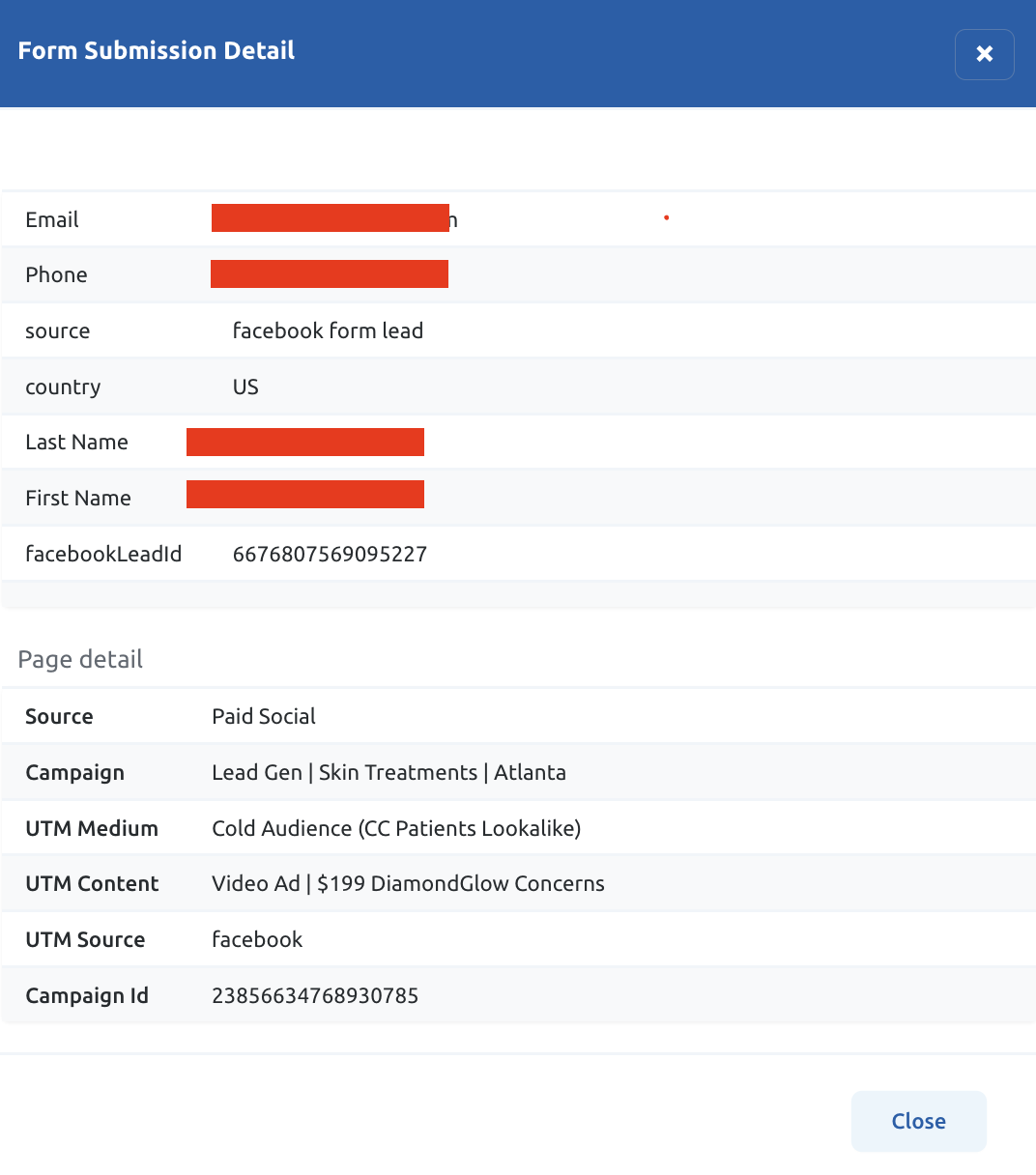
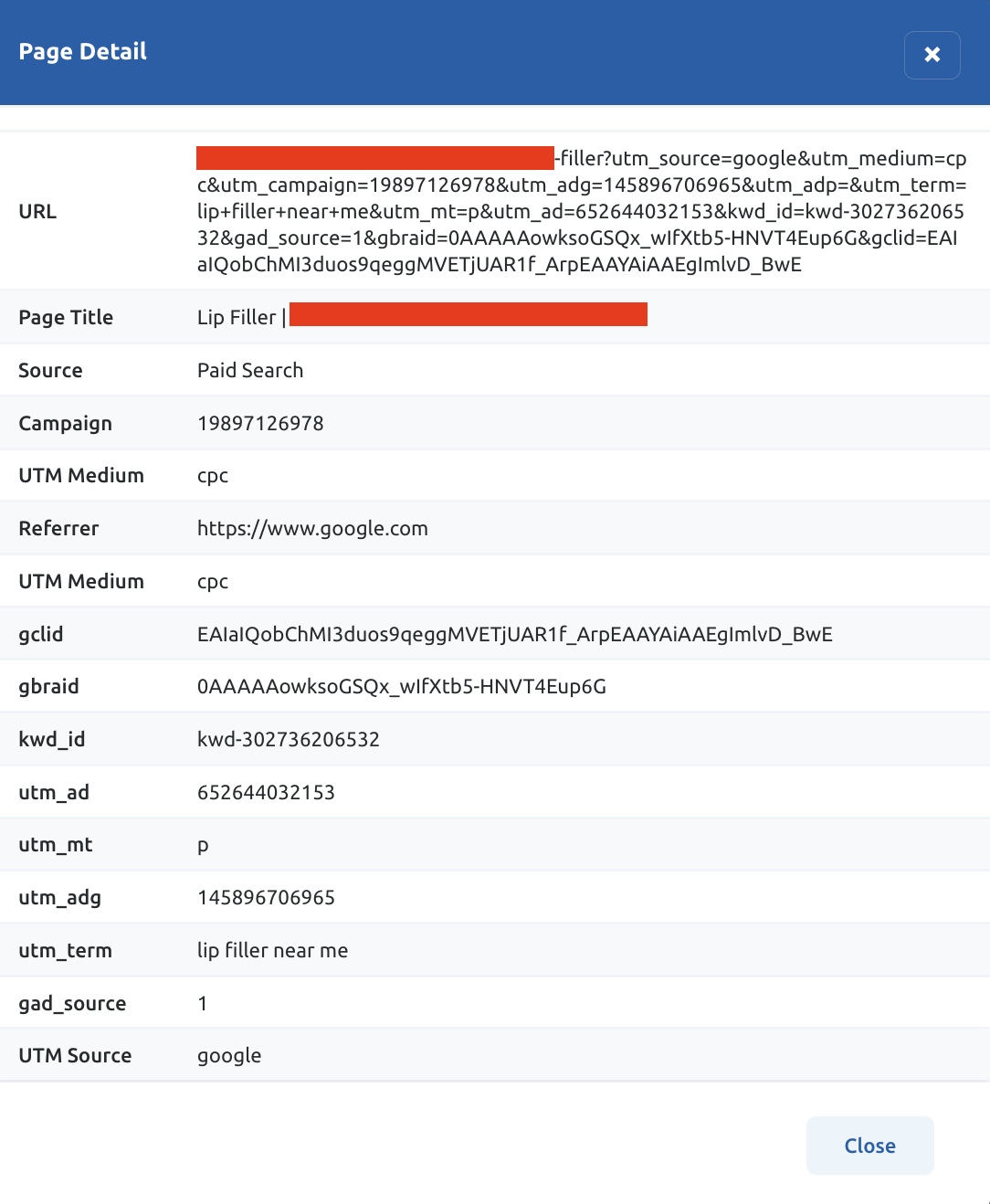
If you need to go beyond native UTM capture, custom fields can be built to store any additional UTM parameters your practice wants to report on. If you're running custom-built landing pages outside of Aesthetix CRM, that campaign data can also be sent in through a Zap or webhook so it still shows up as usable, reportable data on the contact record.
Every contact record includes a Contact Source field that stores the origin of that lead in a consistent, filterable format. This field, along with any related tags applied automatically at intake, is what powers your source-based lists, smart lists, and reporting filters throughout the CRM.
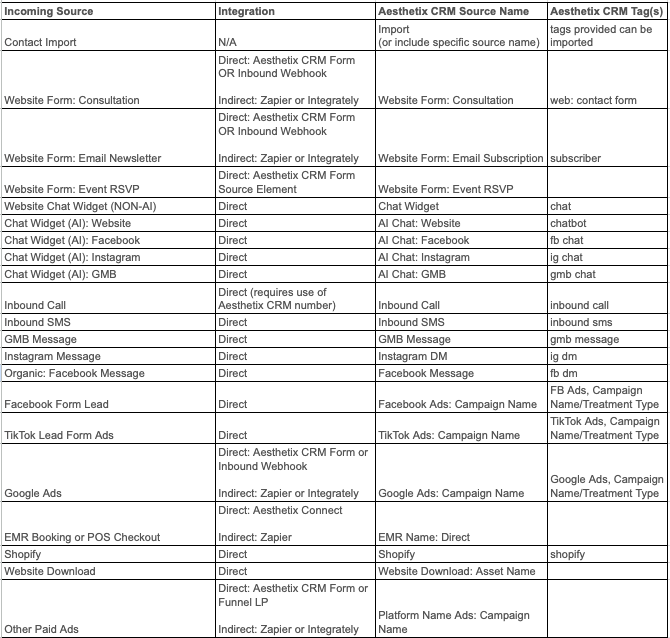
Because the Contact Source field lives directly on the contact record, you can filter, segment, and build workflows off of it just like any other contact property, letting you route a patient who came from a Google ad differently than one who was referred by an existing patient, for example.
Contact source and campaign attribution work alongside a few other reporting areas in Aesthetix CRM:
For flagship attribution dashboards and deeper conversion reporting across your whole practice, see the Essential Guides collection.
For ad-specific performance metrics (spend, clicks, conversions by campaign), see Ads Manager > Ad Reporting.
For reputation and review-driven source data, see the Review Management collection.
What is the difference between first attribution and latest attribution? First attribution is the original source that brought a contact into your account for the very first time. Latest attribution is the most recent source associated with that contact's activity. Both are tracked so you can see how patients discover your practice and what keeps bringing them back.
Do I need to do anything to turn on source tracking? No. Contact source categorization happens automatically as new contacts enter your account through forms, calls, texts, the chat widget, or manual entry.
Why isn't UTM data showing up for my Facebook ads? UTM capture for Facebook and Instagram requires either the native lead form integration or traffic sent to a native Aesthetix CRM form or landing page. If ad traffic is landing on an external website, UTM parameters won't be captured natively.
Can I track custom UTM parameters beyond the standard set? Yes. Custom fields can be created to capture any additional UTM parameters or campaign identifiers your practice wants to report on beyond the default set.
I use a custom-built landing page outside of Aesthetix CRM. Can I still get campaign data into contact records? Yes. Campaign data from custom landing pages can be sent into Aesthetix CRM through a Zap or webhook so it populates on the contact record and remains usable for reporting.
What is the Contact Source field used for? It's a field on every contact record that stores where that lead originated. It's used for filtering, building smart lists, and triggering workflows based on how a patient found your practice.
Does source tracking work for inbound calls and texts, not just web forms? Yes. Inbound calls and inbound SMS are both tracked as distinct source categories, alongside web forms, chat widget conversations, organic and paid channels, referrals, and third-party integrations.
Can I see source data for patients that came through our EMR integration? Yes. Third-party sources, including an EMR Direct connection, are captured as their own contact source category so those patients are represented in your reporting alongside every other channel.
Where do I go to see ad spend and campaign performance, not just contact source? Detailed ad performance metrics such as spend, clicks, and cost per conversion live in Ads Manager > Ad Reporting. Contact Source Reporting focuses on where the contact came from, while Ad Reporting focuses on how the campaign itself performed.
Can I build a workflow based on a contact's source? Yes. Because Contact Source is a standard field on the contact record, it can be used as a trigger or filter condition in Workflows, letting you route, tag, or follow up with patients differently depending on how they found your practice.
