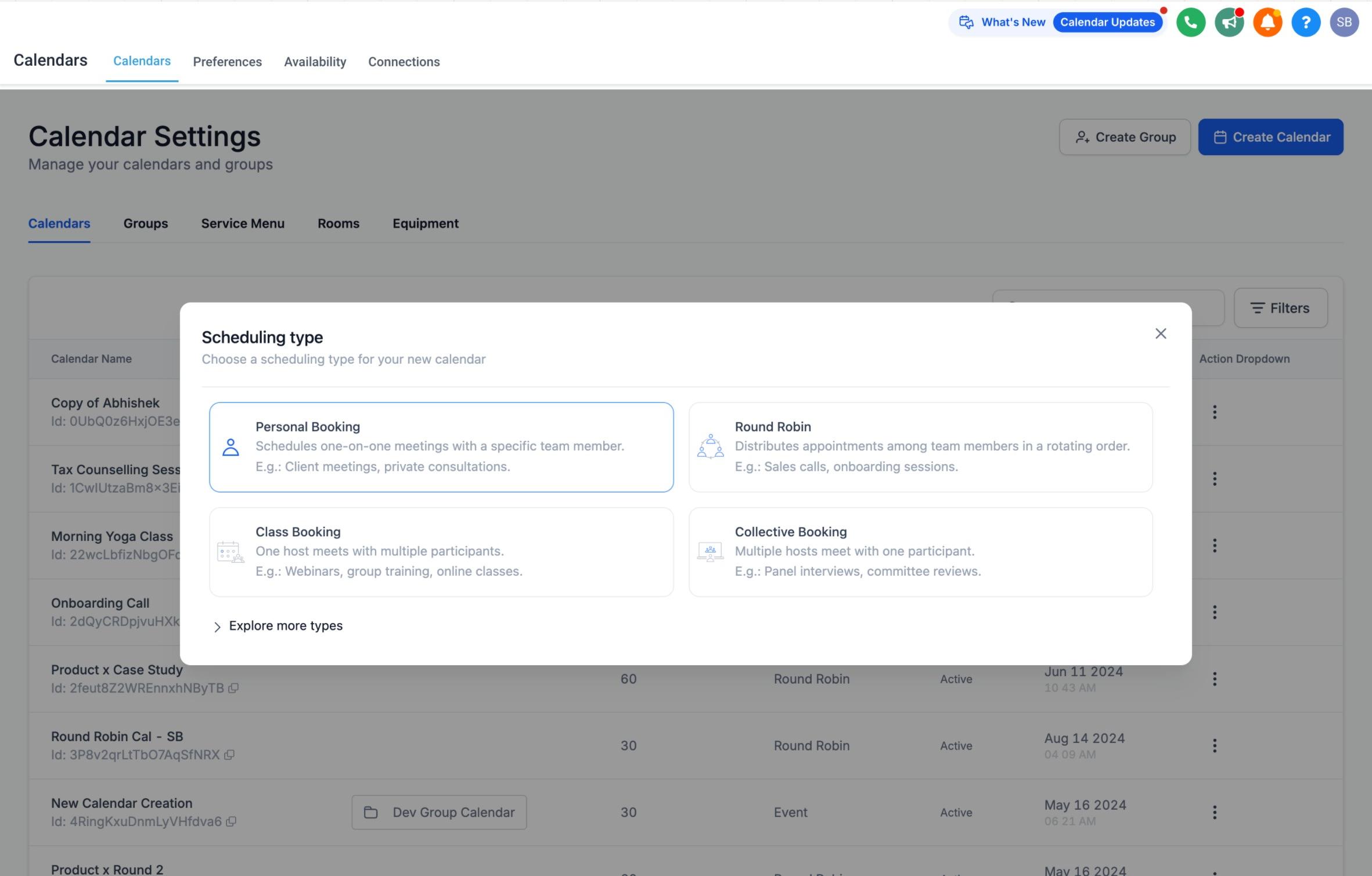
A Personal Booking Calendar is a one-on-one scheduling calendar tied to a single team member. It lives under Calendars > Calendar Settings > Create Calendar, alongside your other calendar types, and it gives an individual provider, injector, or front desk staff member their own dedicated booking link without setting up a full Round Robin rotation.
Many practices only need a simple 1:1 booking page for one person, such as a lead injector's consult calendar or a practice manager's intro call link. Two calendar types can technically be bent into this shape, but neither is really built for it:
Round Robin Calendars are designed to rotate bookings across multiple team members. Using one for a single provider works, but it carries setup steps meant for teams.
Event Calendars are meant for physical, in-person events (open houses, workshops) and do not support Zoom or Google Meet for virtual consults.
The Personal Booking Calendar removes that guesswork. It behaves like a Round Robin Calendar but is locked to one team member, so there's no rotation logic to configure.
Personal Booking Calendar | Round Robin Calendar | |
|---|---|---|
Team members | One (fixed) | Multiple, rotating |
Feature set | Same as Round Robin | Same as Personal Booking |
Best for | A single provider's own booking link | Distributing bookings across a team |
Setup complexity | Minimal | Requires assigning and ordering team members |
Because a Personal Booking Calendar shares the same feature set as a Round Robin Calendar (availability rules, buffer times, confirmation and reminder messages, meeting locations, intake forms, and more), you're not giving anything up by choosing it for a single-provider use case.
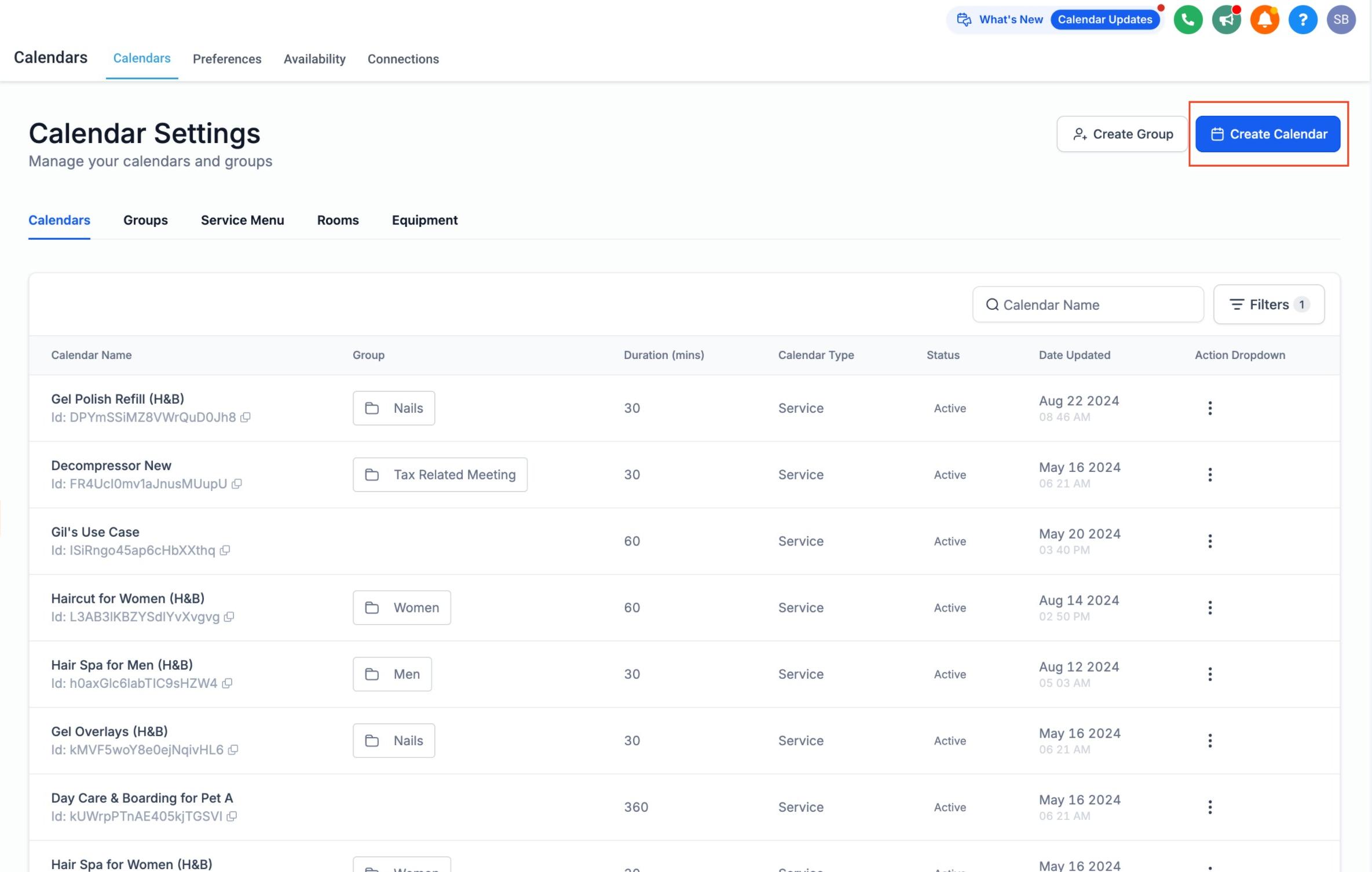
Go to Calendars > Calendar Settings.
Click Create Calendar.
Select Personal Booking as the calendar type.
Configure the calendar to match how that provider actually works: name, description, availability hours, meeting duration, buffer time, location (in-office, phone, or video), and confirmation/reminder messaging.
Save the calendar. It's ready to share as a booking link or embed on your website.
By default, the person who creates the calendar is automatically added as its team member. You can change this afterward if the calendar needs to belong to someone else, for example if an office manager sets up a calendar on behalf of a new injector.
A lead injector's personal consult booking link, separate from the general practice calendar.
A single provider's virtual consultation calendar for prospective patients who aren't ready to book an in-office visit.
A practice manager's or patient coordinator's intro call calendar for financing or membership questions.
A specialist's calendar (for example, a laser tech or aesthetician) who only needs their own hours reflected, without being pulled into a rotation with other providers.
If the assigned provider wants their personal booking calendar to check against or write to an external calendar (Google, Outlook, iCloud, or Zoom/Calendly meeting links), set that up from the Connections sub-collection. Because a Personal Booking Calendar is a native calendar, it also works with AI-driven appointment booking through your AI Employee, which can only book against native calendars, not EMR-based scheduling. If you want patients to submit intake details before their appointment shows on this calendar, attach an intake form (see the Forms collection). To publish the booking page on your website or a funnel, use the calendar embed options covered in Funnels & Websites.
How is a Personal Booking Calendar different from a Round Robin Calendar with one member? Functionally they behave the same way once configured, but a Personal Booking Calendar skips the multi-member rotation setup entirely, since it's locked to one team member from the start.
Can I use a Personal Booking Calendar for virtual consults? Yes. Unlike an Event Calendar, it supports video meeting locations such as Zoom or Google Meet, so it works well for virtual consultations.
Can I change which team member is assigned to the calendar? Yes. The creator is added automatically, but you can reassign the calendar to a different team member at any time from the calendar's settings.
Does a Personal Booking Calendar support the same features as other calendar types? Yes. It shares the full feature set of the Round Robin Calendar, including availability rules, buffer times, reminders, and intake forms. The only difference is that it's limited to a single team member.
Can more than one provider be added to a Personal Booking Calendar? No. If you need multiple providers sharing bookings, use a Round Robin Calendar instead.
Will this calendar work with AI-driven booking? Yes, as long as it stays a native calendar. AI appointment booking through your AI Employee only works with native calendars, not EMR-synced scheduling.
Can patients book this calendar directly from my website? Yes. You can embed the booking calendar on a funnel or website page, the same way you would with any other calendar type.
Should I use an Event Calendar instead for a single provider's schedule? No. Event Calendars are meant for physical, in-person events and don't support virtual meeting locations. A Personal Booking Calendar is the better fit for a single provider's ongoing appointment schedule.
