TikTok reaches millions of active users, but it does not give you the tools to manage contacts and conversations efficiently at scale. The TikTok Messaging and Comment Automation integration solves that by routing every direct message and post comment into your Aesthetix CRM Inbox, where you and your workflows can nurture, qualify, and convert leads without leaving the CRM.
Once connected, TikTok conversations sit alongside SMS, Email, WhatsApp, and every other channel in your Inbox, and each touchpoint is stored on the contact record for a complete cross-channel history. To publish and schedule the TikTok content that drives those conversations, use the Social Planner. To run paid TikTok campaigns, see Ads Manager.
Connecting your TikTok account to Aesthetix CRM means:
Direct messages and post comments appear in your Inbox in real time.
Workflows can be triggered by those incoming messages to send interactive replies, assign leads, create tasks, or start nurture sequences.
Every interaction is saved on the contact record, giving you one conversation history across all channels.
Unified Inbox: Manage TikTok conversations next to SMS, Email, WhatsApp, and more, with no tab switching.
Faster response times: Use workflows to send instant, around-the-clock answers that keep prospects engaged.
Automation-driven efficiency: Auto-reply, route leads, and hand off to a team member without manual effort.
Conversion focus: Turn TikTok engagement into CRM contacts and trackable nurture sequences.
Scale for teams: Handle high message volumes with shared inboxes and rules, ideal for busy or multi-location practices.
Real-time notifications: Get notified of new TikTok DMs and comments so your team can respond quickly from the Inbox.
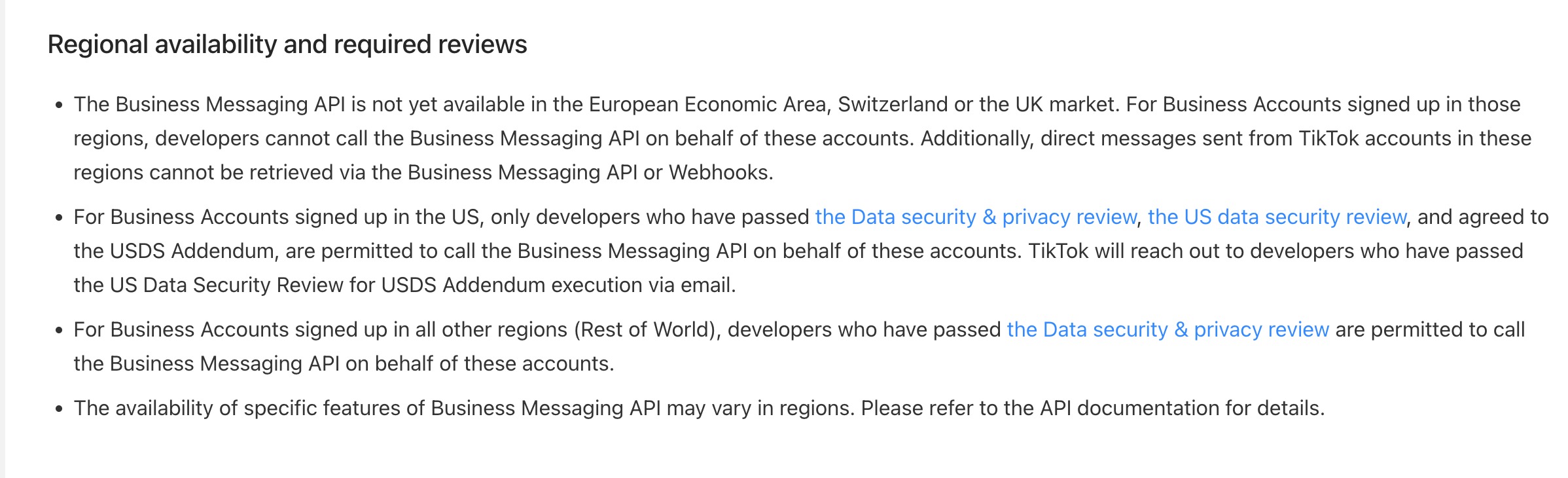
TikTok Messaging and Comment Automation is currently available only for business accounts registered in the United States. It is not yet available in the European Economic Area (EEA), Switzerland, or the United Kingdom. This limitation is due to restrictions within TikTok's public APIs.
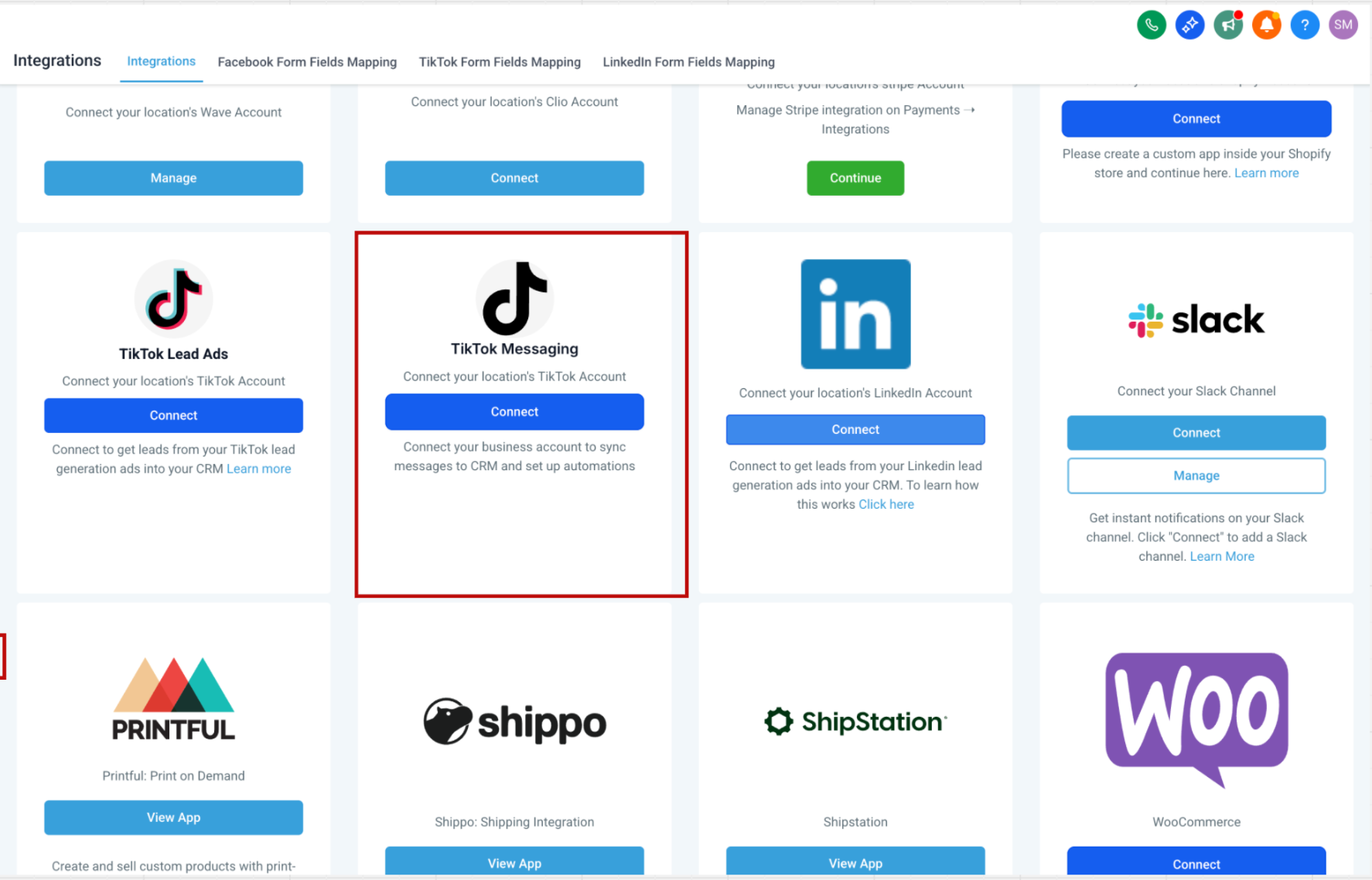
Before building any automation, connect your TikTok account to Aesthetix CRM.
From your account dashboard, go to Settings → Integrations and find the TikTok card, then authorize the account you want to use.
Incoming DMs and comments then sync to your Inbox like any other channel, so you can see profile photos, usernames, and message history in one thread, reply with text, emojis, media, or saved snippets, and use quick actions to add notes, tags, or tasks. If a TikTok message fails to deliver, the Inbox gives you clearer feedback so you can identify failed sends and take corrective action.
The integration adds two triggers and two actions to the workflow builder:
Triggers
TikTok Comment(s) on a Reel: Starts a workflow when there is a new comment on your TikTok post.
Customer Replied: Starts a workflow when a contact replies, with a reply channel filter set to TikTok for DMs.
Actions
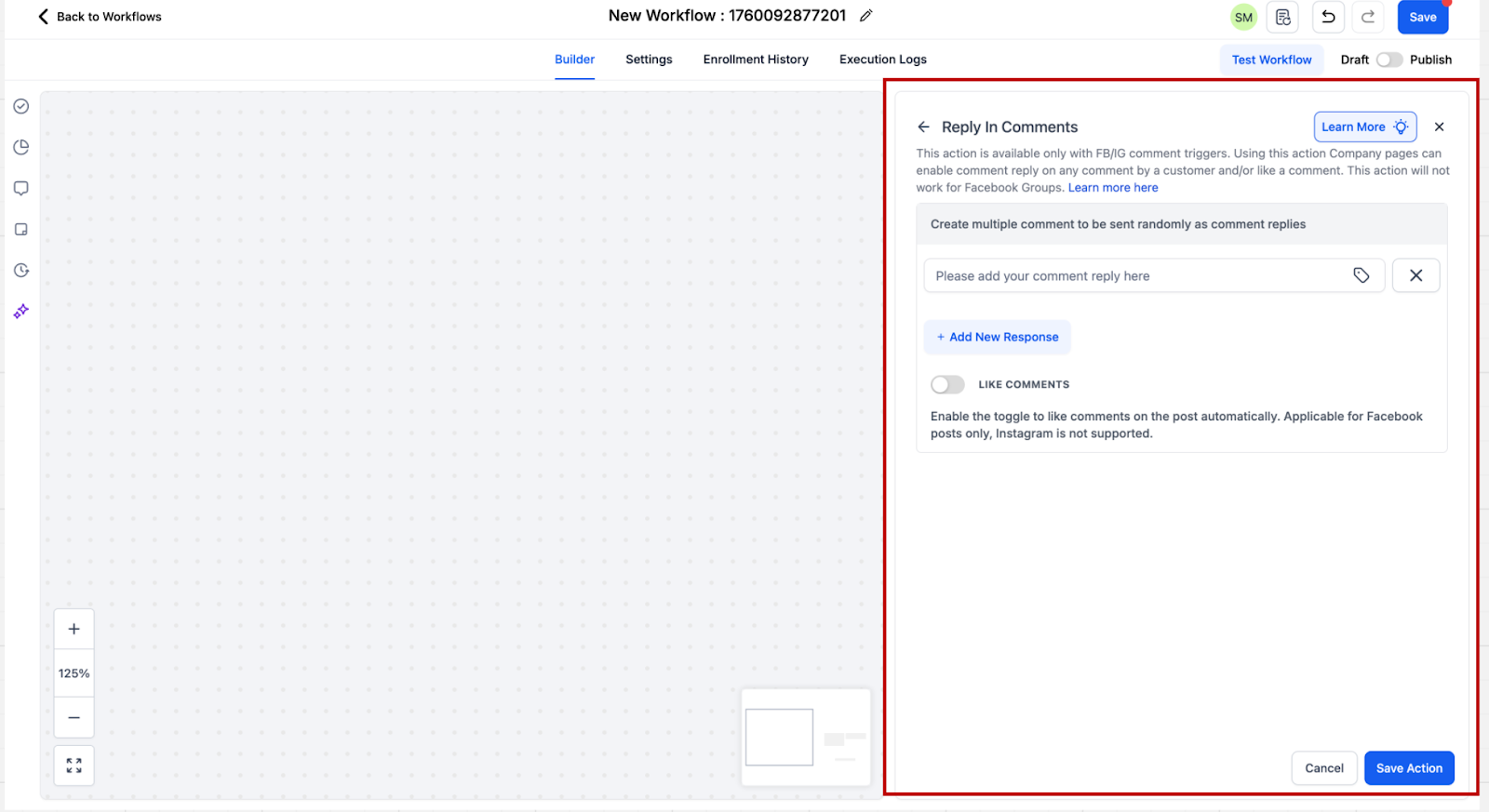
Reply in Comments: Replies publicly to a comment with a comment underneath it.
TikTok Interactive Messenger: Sends an automated DM reply or nurture message.
Comment automation turns your comment sections into lead sources. It fires when someone comments a phrase you specify on a post you choose, then replies publicly and can follow up privately.
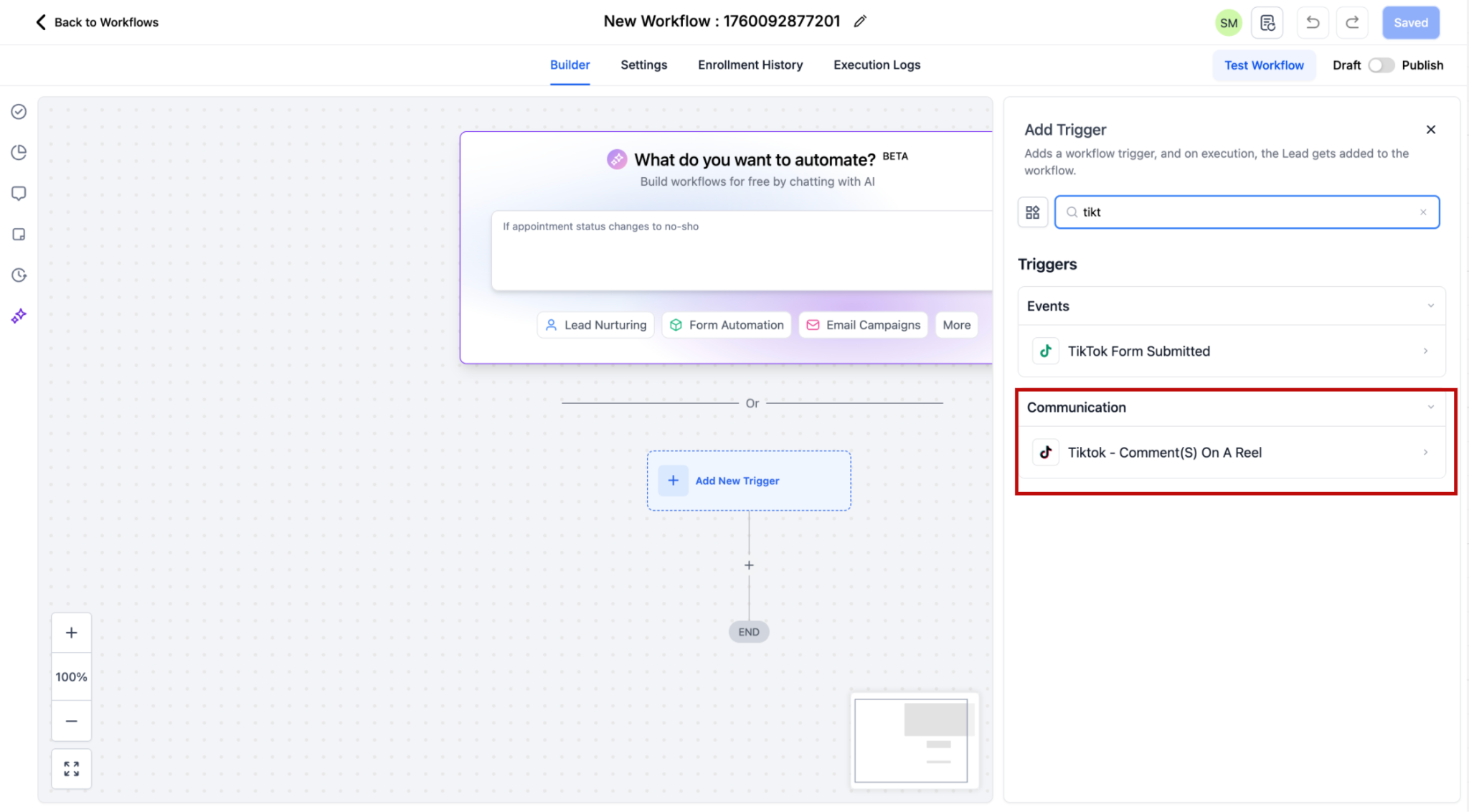
Step 1: Add the trigger. In the workflow builder, click Add New Trigger and select TikTok - Comment(s) on a Post. This trigger sits in the Communication category.
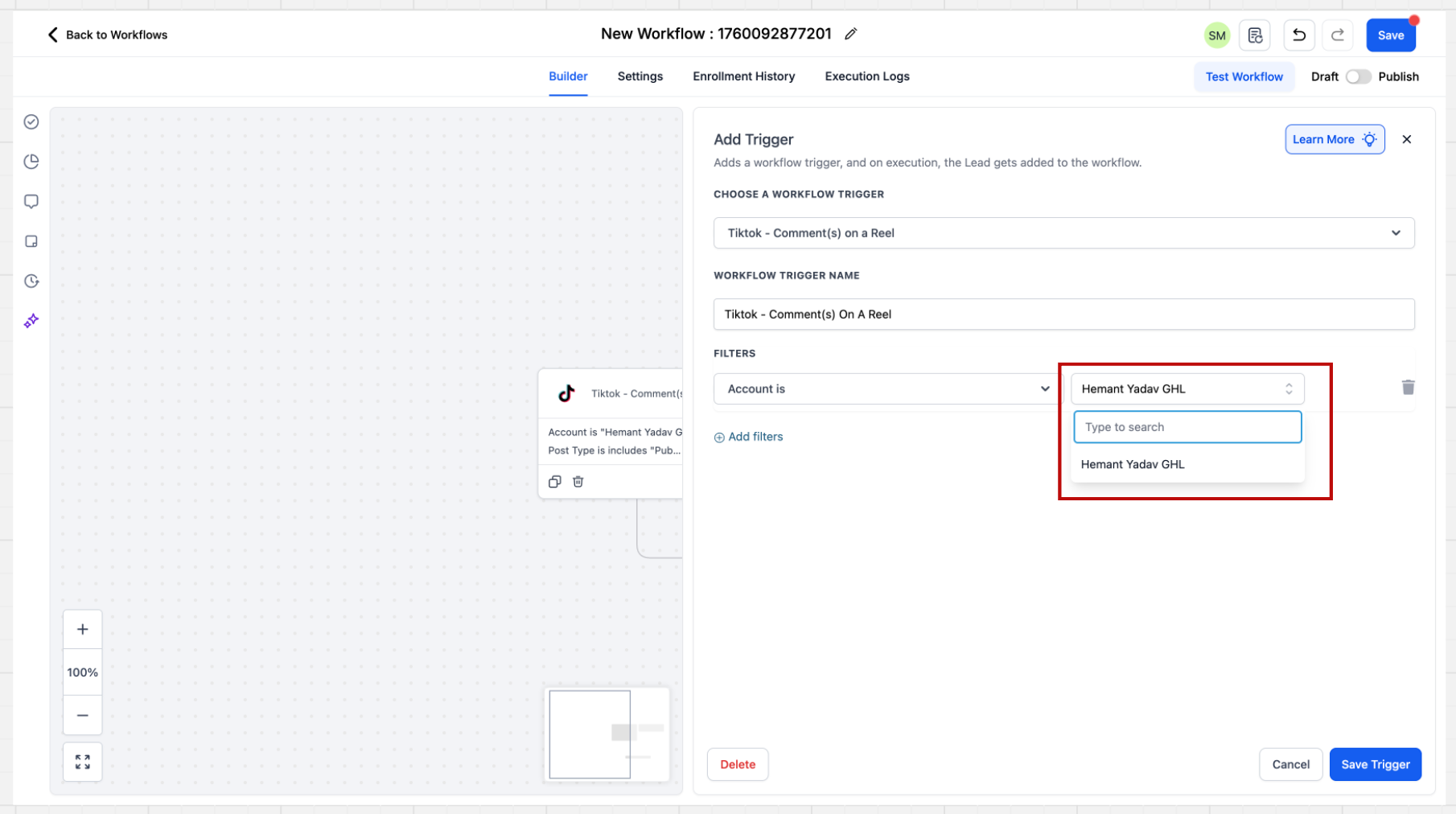
Step 2: Select the account. When the sidebar opens, choose the account. If you do not select a specific account, the automation runs across all connected TikTok accounts in your account.
Step 3: Select the post type. Choose Published or Custom. The Published Posts tab lists all posts on your business page in a dropdown. The Custom Post tab lets you define a post by URL. If you do not select a specific post, the system includes all posts on the connected account. If a post has no caption, the dropdown shows its Post ID and posting date so you can still pick the right one.
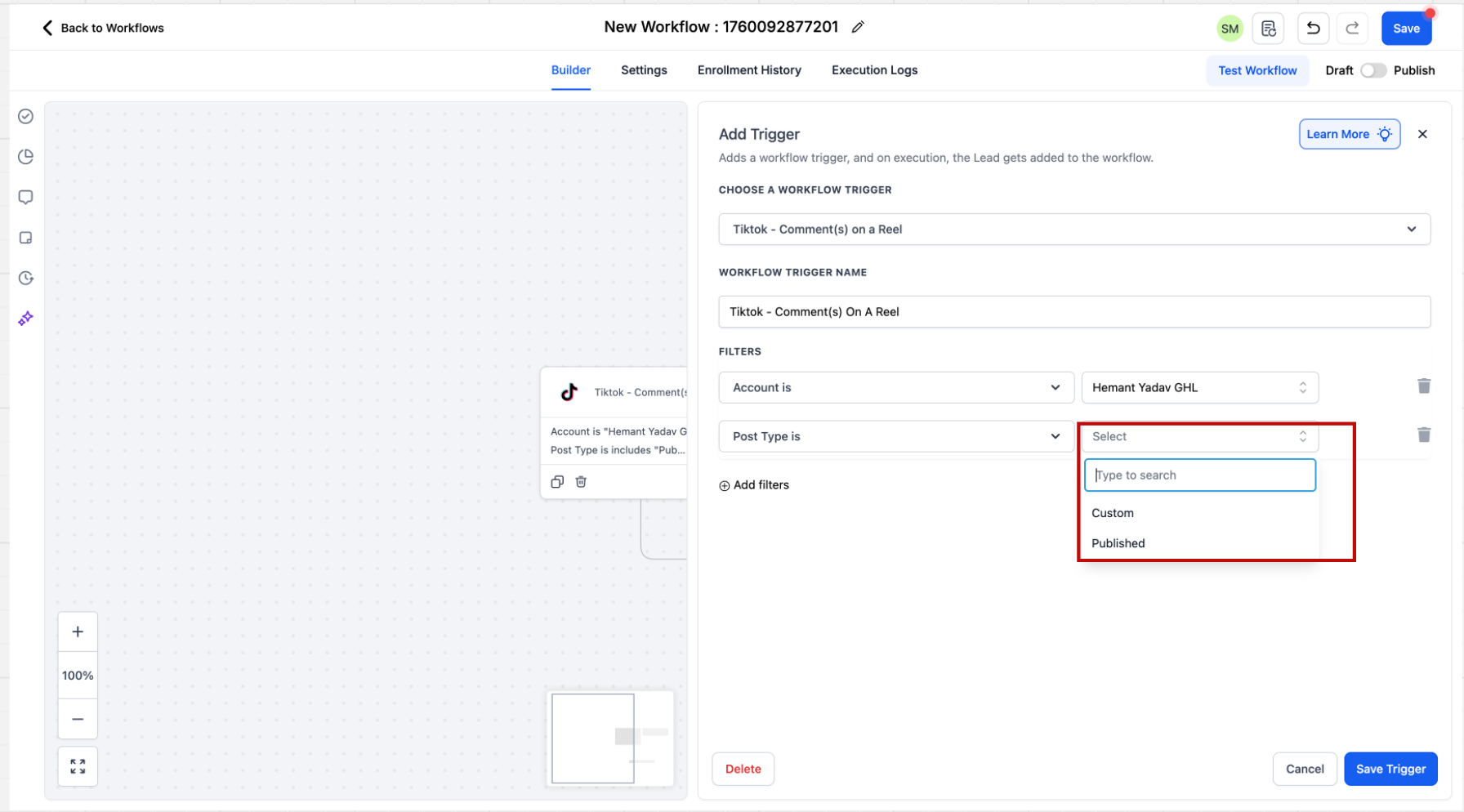
Step 4: Select the post or URL. Choose the post, or provide the URL, you want the automation to run on.
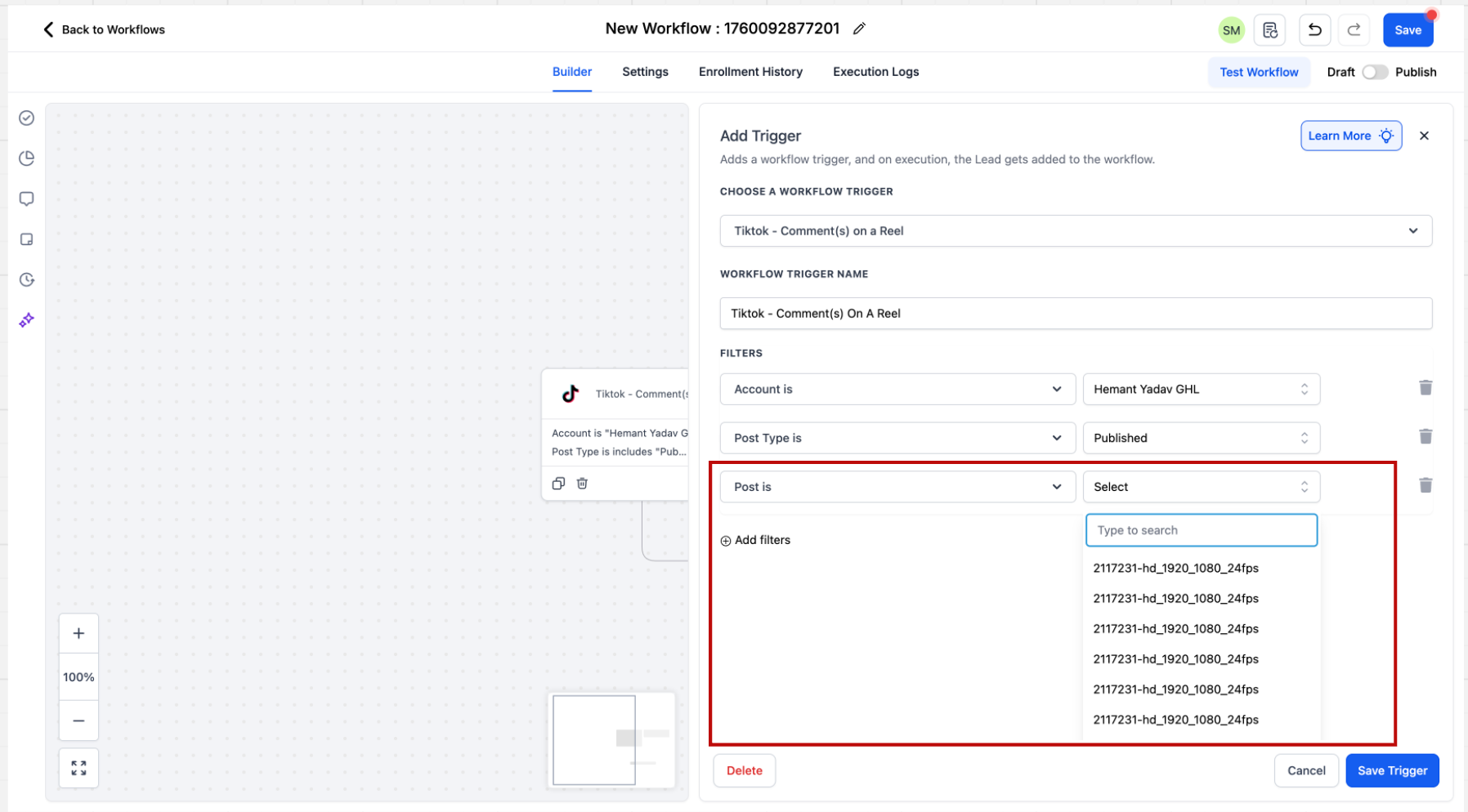
Step 5: Specify the match phrase. Enter what to look for in the comment and choose Contains Phrase or Exact Match:
Exact Match passes only when the comment matches your phrase exactly. "Price" matches "Price," but "Share the Price" does not match "Please share the Price."
Contains Phrase passes when the comment includes your phrase. "I bought from you" matches "I bought from you yesterday," but not "I bought one from you."
When a comment comes through the trigger, the commenter is saved as a contact, with their first and last name stored on the record.
Step 1: Add the action. From the Communications section, add the Reply in Comments action to your workflow.
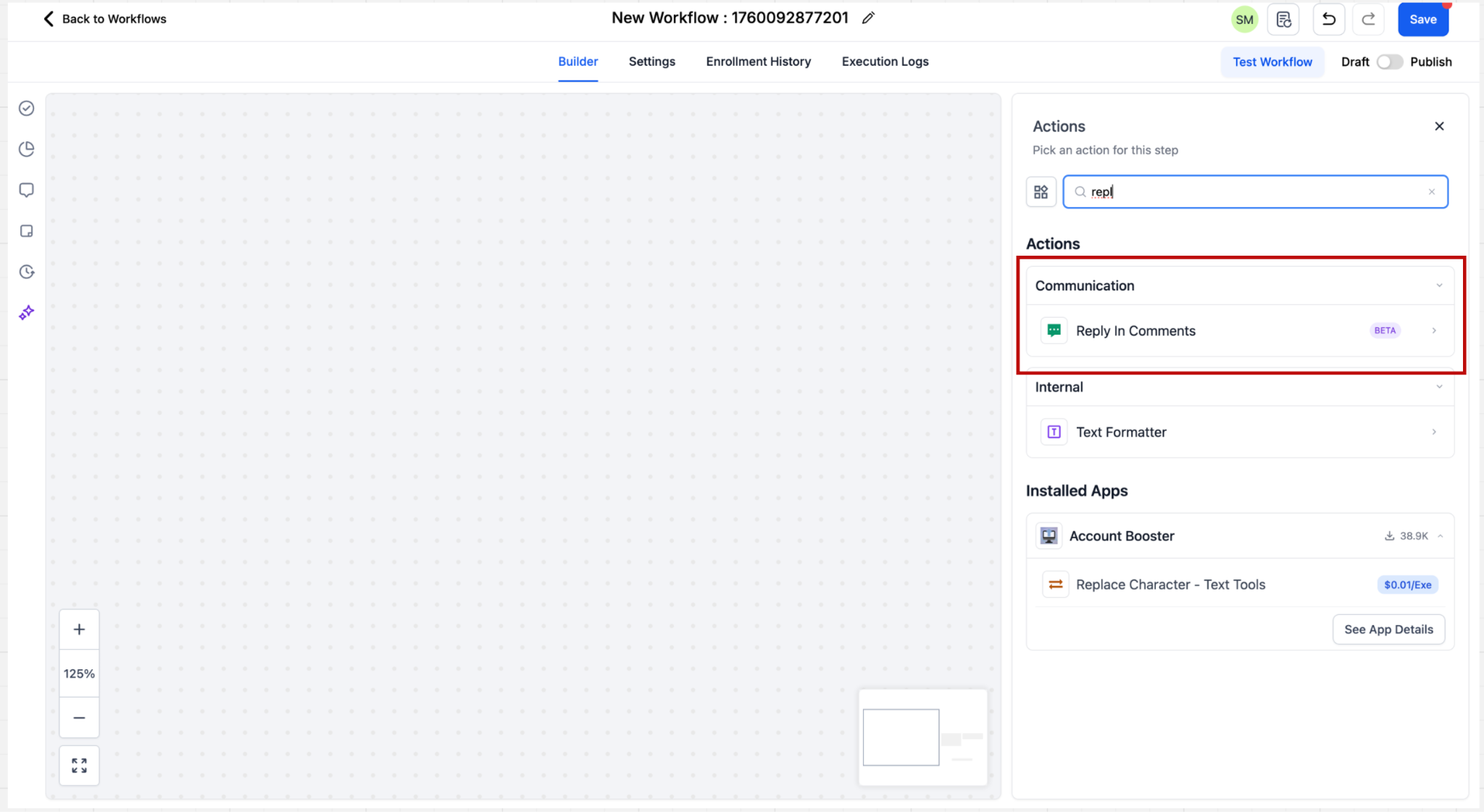
Step 2: Configure replies. You can add up to 10 reply comments, and one is selected at random each time the action runs, which keeps your responses from looking repetitive.
DM automation lets you respond to private messages automatically, so prospects get an instant answer even outside business hours.
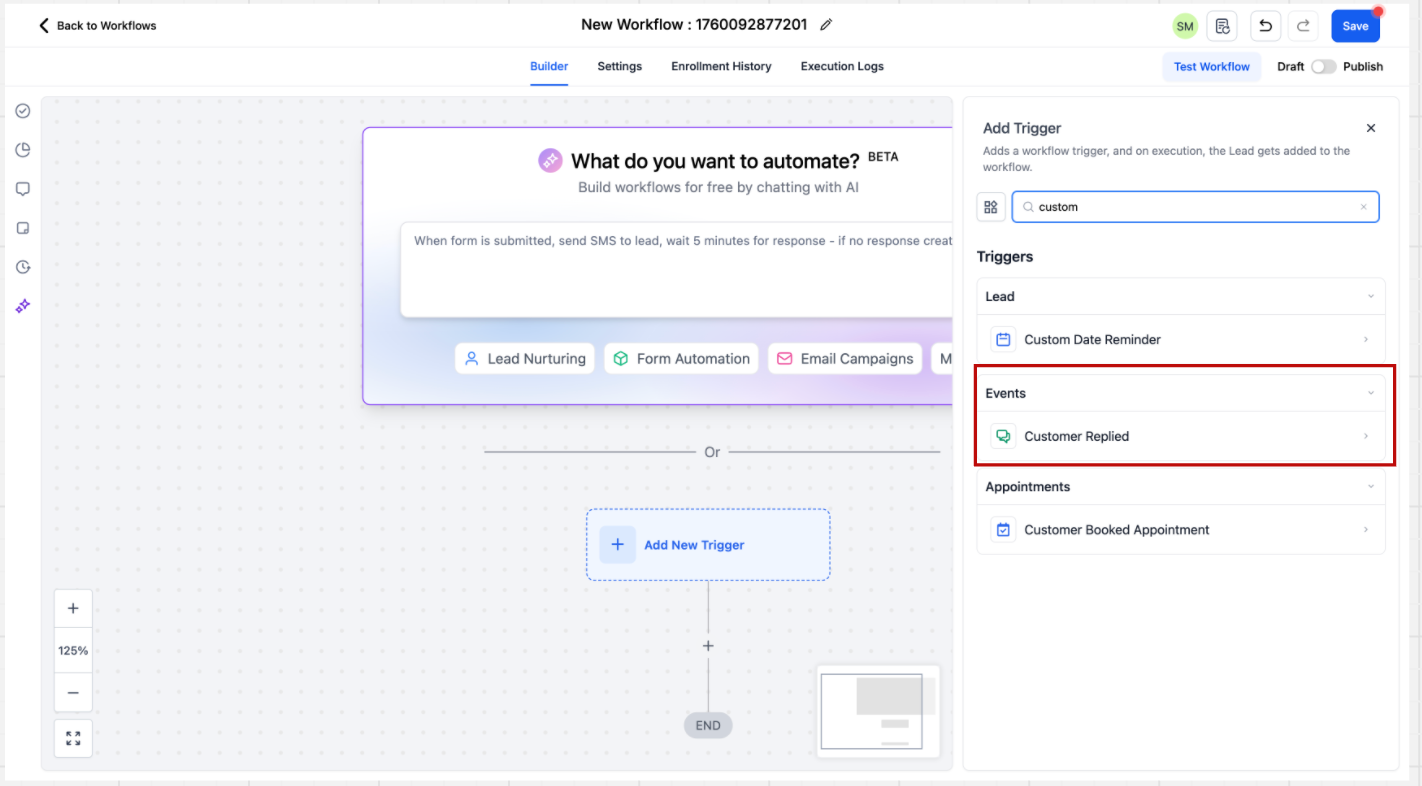
Step 1: Add the trigger. In the workflow builder, add a trigger and select Customer Replied, found in the Events category.
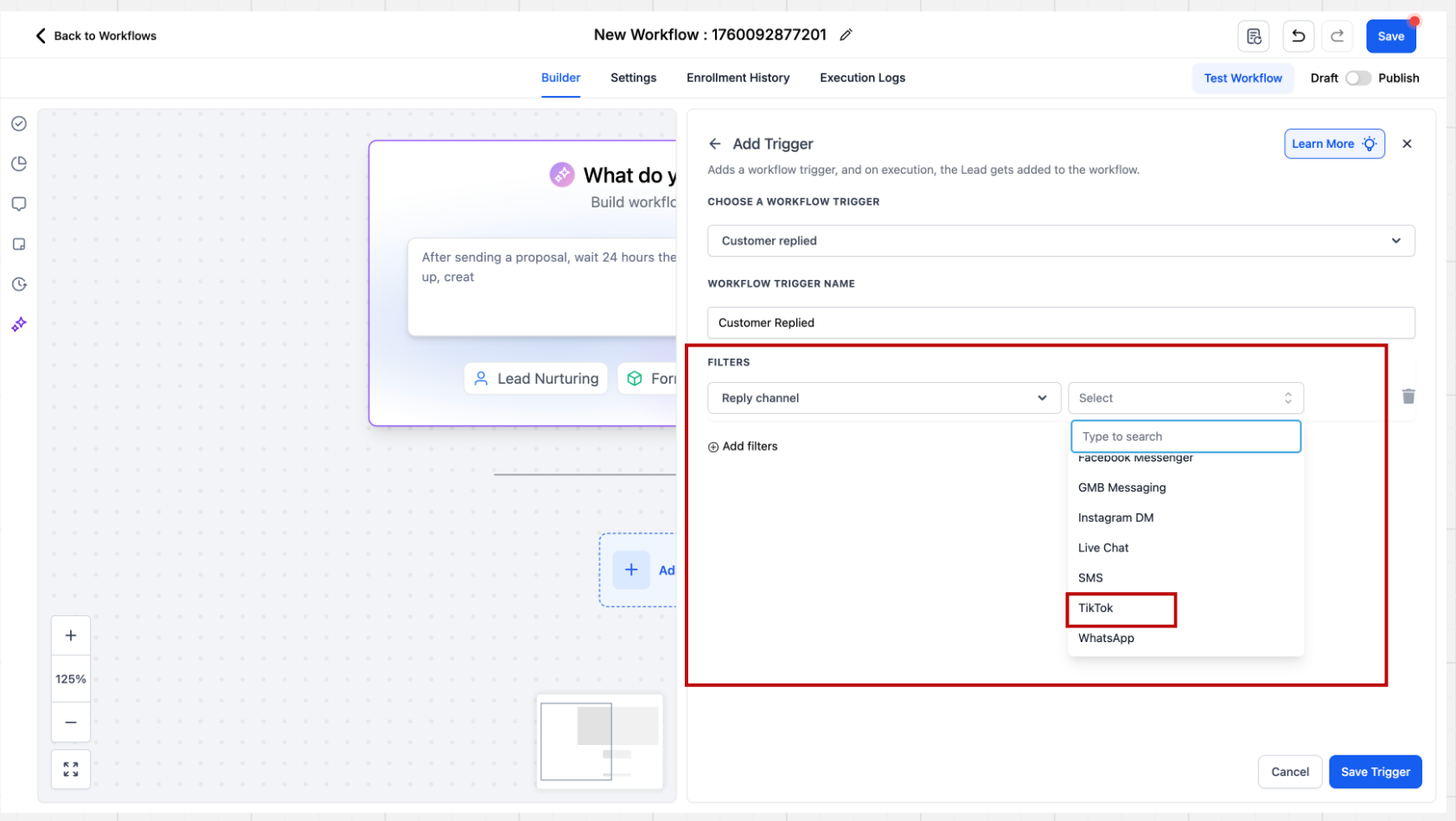
Step 2: Set the reply channel. In the sidebar, set the Reply channel filter to TikTok so the workflow fires only for TikTok DMs.
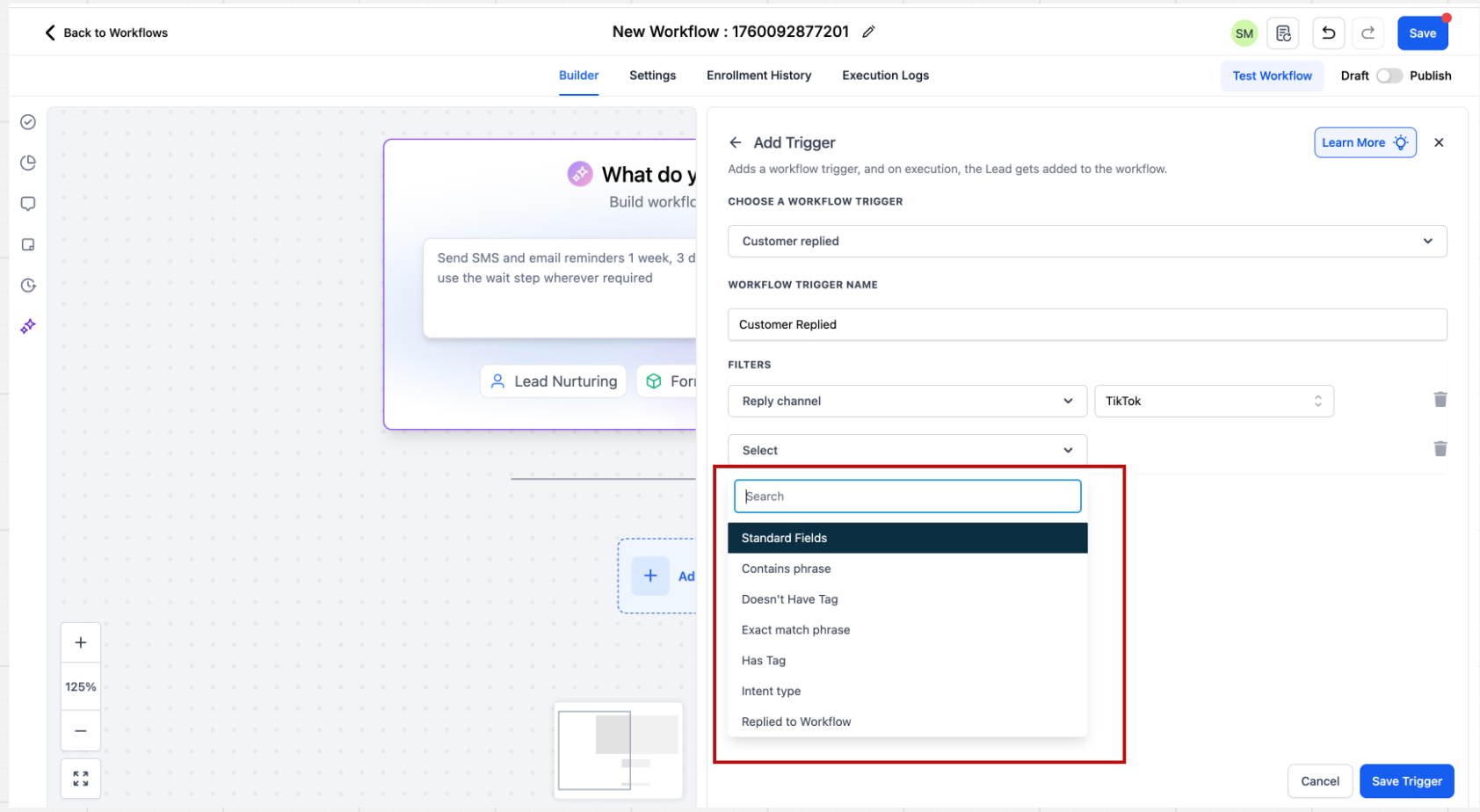
Step 3: Configure the rules. Set matching conditions such as Contains Phrase or Exact Match Phrase to define exactly when the automation should fire.
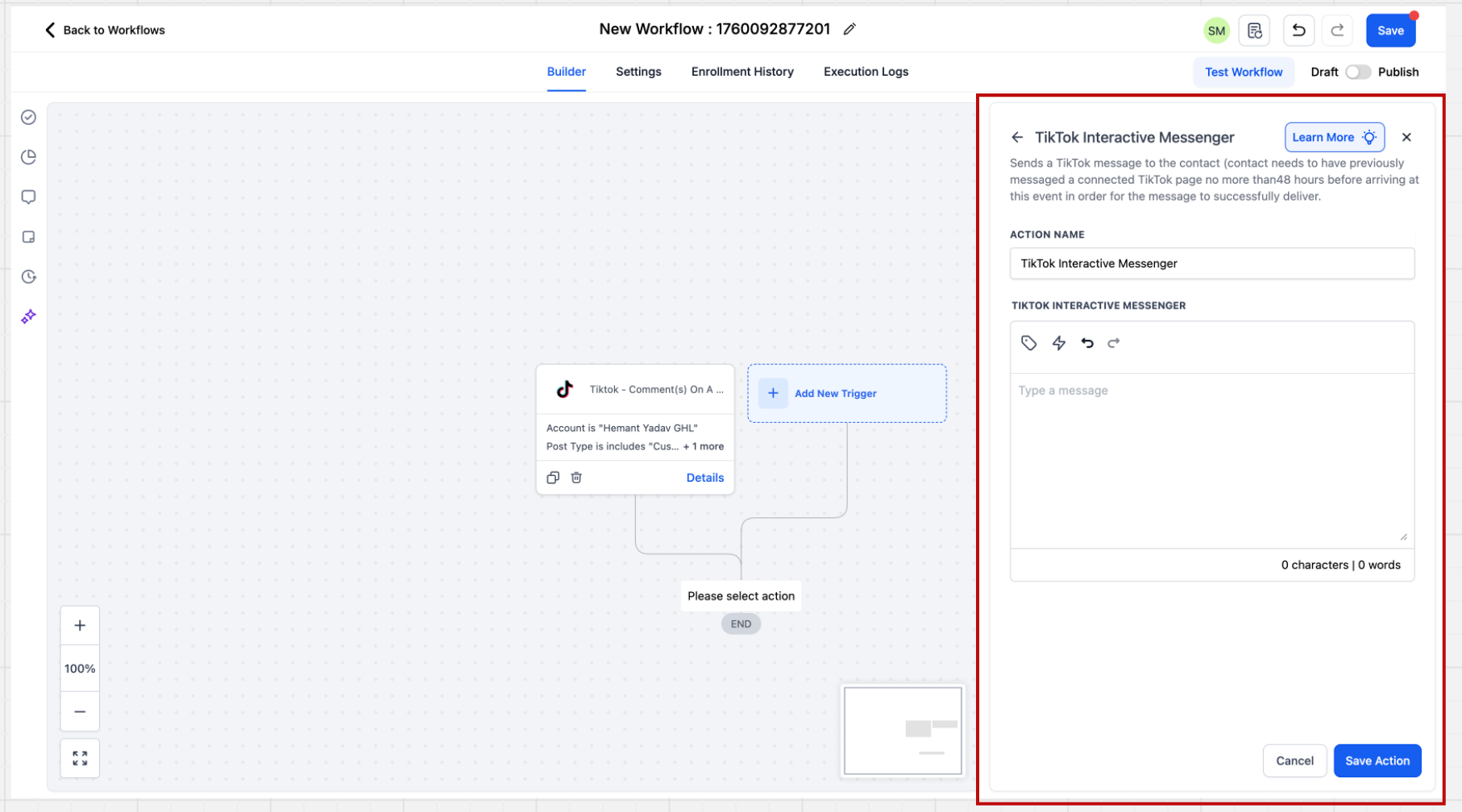
Step 1: Add the action. Click Add New Action and select TikTok Interactive Messenger.
Step 2: Provide the message. Enter the message you want to send in response to the trigger, then save the action.
The TikTok Interactive Messenger action is newer than the Facebook and Instagram equivalents, so a few options are not yet available:
It does not support a Reply Type field, such as "Reply as DM" or "Reply to Comment via DM." This will be enabled once TikTok's APIs support it.
It does not support message Templates. Support will roll out incrementally.
It does not support attachments, buttons, or quick replies. These will be enabled as TikTok's APIs support them.
How do TikTok DMs and comments reach my CRM?
Once your TikTok account is connected in Settings → Integrations, DMs and post comments sync into your Inbox in real time, right alongside your other channels.
How many reply variations can I add in the Reply in Comments action?
Up to 10 replies, which are used in a randomized order so your public responses feel natural.
Can I scope an automation to a specific post?
Yes. Use the TikTok Comment(s) on a Reel trigger and select the specific video or post you want to monitor.
Can I connect more than one TikTok account?
Yes. Authorize each account you intend to use at the account level, then scope your triggers and filters to the right account when building workflows.
What is the difference between comment automation and DM automation?
Comment automation responds publicly to comments on your posts, while DM automation responds privately to direct messages. You can pair them, for example replying to a comment publicly and then following up with a DM.
Where is TikTok Messaging available?
Currently only for business accounts registered in the United States, because of restrictions in TikTok's public APIs.
Does connecting messaging also handle scheduling my TikTok posts?
No. Messaging and comment automation route conversations into your Inbox. To schedule and publish TikTok content, use the Social Planner, and to run paid TikTok campaigns, use Ads Manager.
When a commenter is captured, what contact details are saved?
The person is saved as a contact with their first and last name stored, so you can nurture them like any other lead.
