Attribution shows which channel or source a contact came from. With this information, your practice can identify growth opportunities and see which channels bring in the most patients. For example, if you run both Facebook and Google Ads, attribution tells you which one is more effective at generating leads. This guide walks through attribution in Aesthetix CRM and where to set up your ad reporting.
For general dashboards and cross-channel reporting across all of your marketing, see the Reporting collection.
When attributing a contact to a source, it is common to look at both the first and the latest attribution. Both are always stored on every contact.
First Attribution is the first time a contact interacts with your system. For example, someone fills out a Contact Us form. That first session's attribution data is recorded.
Latest Attribution is the most recent recorded interaction. For example, after filling out a Contact Us form, the same person later books through a two-step order form. The latest attribution data is recorded for that most recent session.
The latest attribution always changes based on the last recorded interaction. The first attribution never changes.
Whether you want the first or latest attribution, you can find it in the bottom right of any contact record.
Within your account, go to Contacts, select a contact record, then locate the attribution data in the bottom right column under the Activity tab.
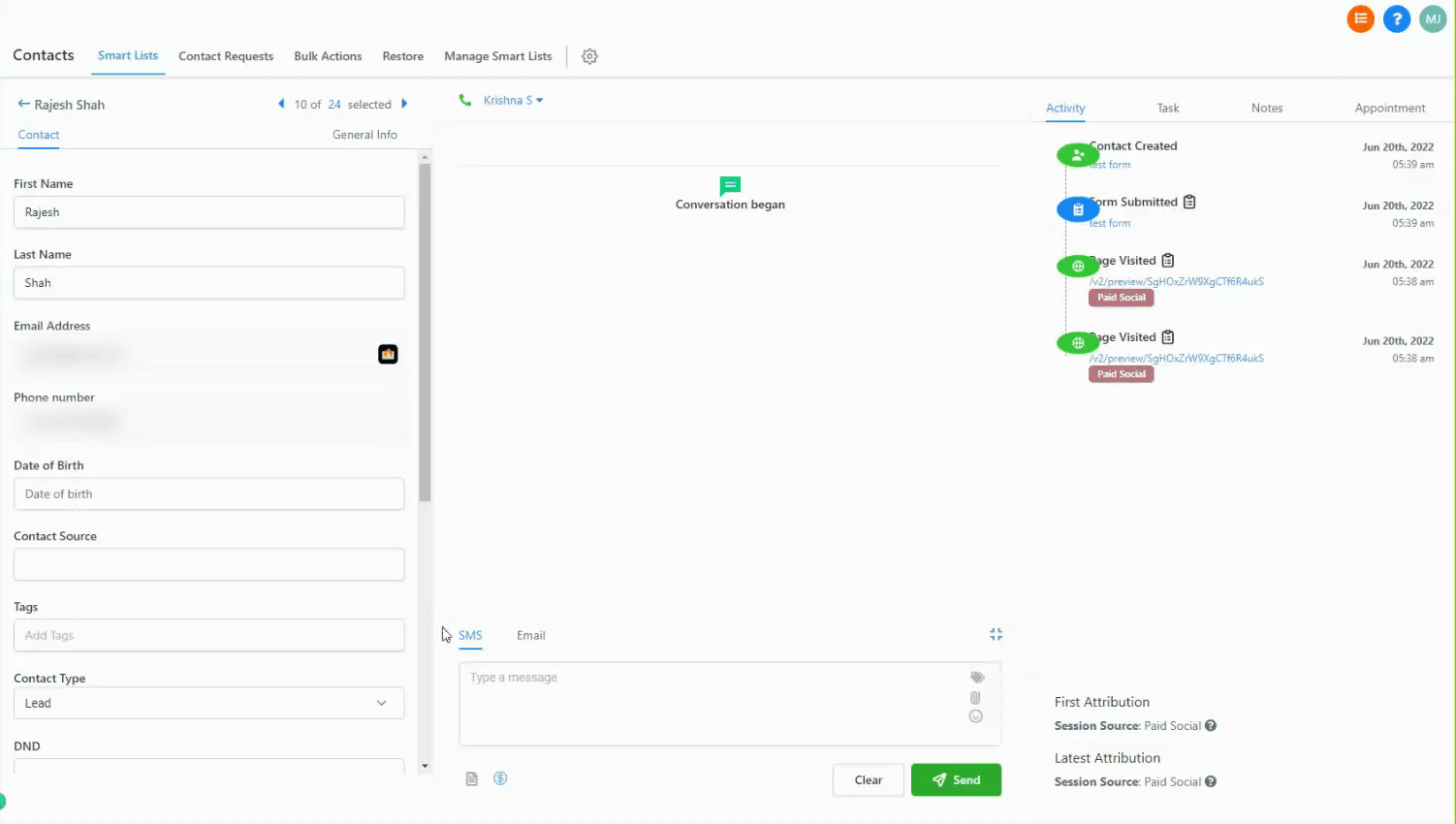
For contact creation, first and latest attribution are defined as:
First attribution: the contact's first interaction recorded in the system, usually their first visit to your website or an interaction with any of the sources listed below.
Latest attribution: the contact's last interaction before they were converted to a contact in the system.
Each contact's First Attribution or Latest Attribution value will be one of the following:
Traffic categorized under Paid Search comes from paid search campaigns such as Google Ads. This feeds your Google Ad Reporting. It requires matching UTM parameters, which are case sensitive:
{YourLandingPageUrl.com}?utm_source=adwords&utm_medium={adname}&utm_campaign={campaignname}&utm_content={adgroupname}&utm_keyword={keyword}&utm_matchtype={matchtype}&campaign_id={campaignid}&ad_group_id={adgroupid}&ad_id={creative}Google Ads UTM parameters:
Name | Key | Value | Type | Example |
|---|---|---|---|---|
UTM Source | utm_source | adwords | ||
UTM Medium | utm_medium | {adname} | ||
UTM Campaign | utm_campaign | {campaignname} | manual, changeable | summer_sale |
UTM Content | utm_content | {adgroupname} | ||
Match Type | utm_matchtype | {matchtype} | ||
Campaign ID | campaign_id | {campaignid} | set by Google Ads, constant | 123456789 |
Ad Group ID | ad_group_id | {adgroupid} | ||
Ad ID | ad_id | {creative} |
For full setup, see the "Set Up Google Ad Reporting" guide.
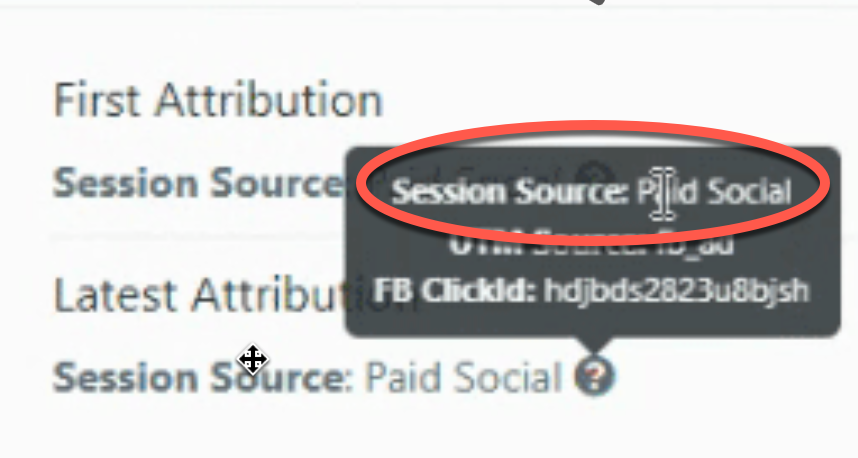
Traffic categorized under Paid Social comes from a paid social campaign. This feeds your Facebook Ad Reporting when leads come from Facebook or Instagram. It requires matching UTM parameters, which are case sensitive:
{YourLandingPageUrl.com}?utm_source=fb_ad&utm_medium={{adset.name}}&utm_campaign={{campaign.name}}&utm_content={{ad.name}}&campaign_id={{campaign.id}}Facebook and Instagram Ads UTM parameters:
Name | Key | Value | Type | Example |
|---|---|---|---|---|
UTM Source | utm_source | fb_ad | ||
UTM Medium | utm_medium | {{adset.name}} | ||
UTM Campaign | utm_campaign | {{campaign.name}} | manual, changeable | summer_sale |
UTM Content | utm_content | {{ad.name}} | ||
Campaign ID | campaign_id | {{campaign.id}} | set by Facebook Ads, constant | 123456789 |
For full setup, see the "Set Up Facebook Ad Reporting" guide.
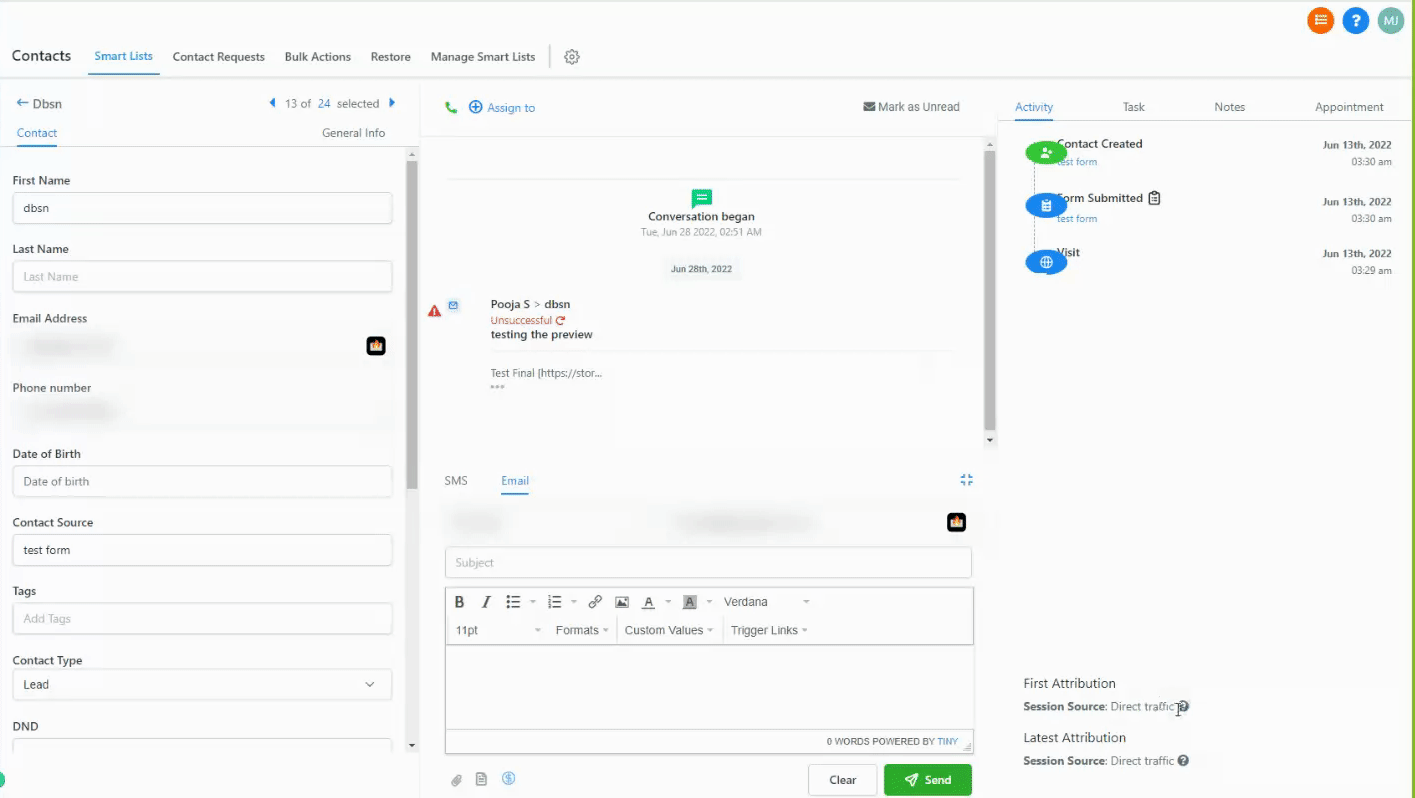
Traffic categorized under Direct Traffic has no indication of its source. Typically these people typed your URL directly into their browser or removed all query parameters before entering the site. To view the source URLs for these visitors, click the Direct traffic source.
Traffic categorized under Organic Search comes from non-paid search results in known search engines such as Google, Bing, Yahoo, and DuckDuckGo. To view the keywords used, click the Organic search source in the Sources table. When keywords show as Unknown (SSL), it is usually because the search engine encrypts user data. For example, Google encrypts all search terms entered by its users.
Traffic categorized under Social Media comes from social media websites or apps. An example is when a visitor shares your content and their followers visit it, or when someone clicks a link inside your social media messages.
Traffic categorized under Referrals comes from external sites that link to your website, other than search engines or social media sites. A referring domain may have multiple pages that link to you.
When a lead is generated through channels such as inbound calls, SMS, emails, WhatsApp messages, or Facebook messages, it is grouped under Others so all lead information stays in one place. This centralized view helps ensure no leads fall through the cracks.
When a lead is created manually inside Aesthetix CRM, its source is defined as CRM UI. This helps you identify leads that were added manually.
When a lead is created by a third-party tool such as Zapier, its source is defined as Third-Party. This helps you identify leads created through an external integration.
Within the same session, a contact must do one or more of the following:
Form or survey submission
Calendar booking submission
Chat widget (after submitting contact info)
Order form submission (one or two-step)
The action must use an Aesthetix CRM form, survey, calendar, chat widget, or order form for attribution data to be captured. Supported third-party forms can also capture attribution data when they are connected through External Tracking. External Tracking automatically detects supported DOM-based forms on your site and records attribution data for that submission, including UTM parameters, the page URL, and session data. Any event that falls outside of these built-in and tracked paths will not capture attribution data.
All attribution events follow a set of rules to categorize traffic into a specific source. Aesthetix CRM checks the full page URL and the referring domain, when available, against these rules, applied in this order:
Order | Rule | Source |
|---|---|---|
1 | The | Paid Search |
2 | The | Paid Search |
3 | The | Paid Search |
4 | The | Paid Social |
5 | The referring domain is a social media site. | Social Media |
6 | The referring domain is a search engine (Google, Yahoo, Bing, DuckDuckGo). | Organic Search |
7 | The referring domain is not a social media site or search engine. | Referral |
8 | No referring domain or tracking URL. | Direct Traffic |
9 | The lead came from an inbound call, SMS, email, WhatsApp, Facebook message, or any other source not covered above. | Others |
10 | The lead was created manually within Aesthetix CRM. | CRM UI |
11 | The lead was generated from a third-party integration tool such as Zapier. | Third-Party |
To set up your paid ad attribution tracking, use the following guides.
To set up Facebook and Instagram ad attribution, see the "Set Up Facebook Ad Reporting" guide. The Facebook Conversions API event pixel is configured in a funnel (see the Funnels collection), and the Facebook Conversions API trigger is configured in Workflows (see the Workflows collection). For connecting your Facebook ad account, see the Integrations collection.
To set up Google Ads attribution, see the "Set Up Google Ad Reporting" guide. For Google Analytics 4 tracking, the "Understanding Google Ad Reporting Terminology" details, and the Google troubleshooting checklist, see the other Ad Reporting guides. For more advanced external reporting and attribution tracking, you may want to consult an ad specialist.
If your attribution data is not being recorded after you set up Facebook, Instagram, or Google Ad Reporting, work through these steps:
Check for spaces or misspellings in the final URL. When creating your UTM parameters, check for misspellings, extra spaces from copying, and case sensitivity. Copy and paste the provided examples rather than typing them, then confirm they are correct. The examples are case sensitive, so an unexpected uppercase or lowercase letter will cause attribution errors. The final URL is the URL a contact clicks from their ad, which takes them to where they take the next action on your site or form.
Confirm submissions happen on the final URL. For UTM parameters to be recorded, a user must stay on the page they landed on from the ad. If they land on a page and then click through to another page to submit a form, no UTM attribution data can be recorded. Keep the submission on the landing page. A workaround is to add a pop-up or an on-page section with the submission form so the data is captured.
Do not add custom UTM parameters. Use the Aesthetix CRM UTM templates exactly as provided in the setup guides for Facebook, Instagram, and Google Ads. Adding custom UTM parameters can cause missing data or a failure to record any data.
What is the difference between first and latest attribution? First attribution is a contact's very first recorded interaction and never changes. Latest attribution is their most recent recorded interaction and updates every time they interact again. Both are stored on every contact.
Where do I find a contact's attribution data? Go to Contacts, open a contact record, and look in the bottom right column under the Activity tab. Both first and latest attribution appear there.
Which events actually record attribution? Attribution is captured when a contact submits an Aesthetix CRM form or survey, books a calendar, submits contact info through the chat widget, or completes a one or two-step order form within the same session. Supported third-party forms can also capture attribution when they are connected through External Tracking, which detects supported DOM-based forms on your site and records UTM parameters, page URL, and session data. Events outside of these paths do not capture attribution.
Why does a contact show as Direct Traffic? Direct Traffic means there was no referring domain or tracking URL. The person likely typed your URL directly or stripped the query parameters before visiting.
Why do my organic search keywords show as Unknown (SSL)? Search engines like Google encrypt the search terms their users enter, so those keywords cannot be passed through and appear as Unknown.
My ad attribution is not being recorded. What should I check first? Confirm your UTM parameters match the templates exactly (they are case sensitive), make sure the form submission happens on the same landing page the ad points to, and do not add any custom UTM parameters to the provided templates.
Does Aesthetix CRM track LinkedIn, Twitter, Reddit, or WhatsApp as paid social? Yes. Paid Social is recorded when utm_source contains linkedin_ad, twitter_ad, or reddit_ad, or when the ctwa_clid parameter is present for WhatsApp click-to-message conversations, in addition to fb_ad for Facebook and Instagram.
What source is used when I add a lead by hand? A lead you create manually inside Aesthetix CRM is attributed to CRM UI. A lead created by a third-party tool such as Zapier is attributed to Third-Party.
