Facebook Ad Reporting gives your practice live reporting and big-picture analysis for your Meta (Facebook and Instagram) ad campaigns, so you can see which promotions bring in patients and grow your return on investment. When your ads run, Aesthetix CRM does its best to attribute each lead to the campaign, ad-set, and ad that drove it. For the most accurate reporting and to clearly identify your winning campaigns, we recommend using Facebook UTM parameters together with the Facebook pixel and Conversions API.
The Facebook pixel and Conversions API are configured in Workflows. See the Workflows collection for the Facebook Conversions API trigger and action, and the Funnels collection for adding a Facebook Conversions API event pixel to a funnel. For general dashboards and cross-channel reporting across all of your marketing, see the Reporting collection.
If you are sending ad traffic to a landing page, set up your Facebook pixel and Facebook Conversions API in Workflows first.
Facebook will not add UTM parameters to your links while you are viewing your ad as a preview. This is expected.
Do not use special characters or emojis in any UTM parameter or any value that needs to be tracked.
First ad attribution data is only recorded for contacts that come from the entry points listed below. In all other cases, the first attribution data will be empty.
Form submissions
Survey submissions
Calendar bookings
Contacts coming directly from a Facebook Lead Form
Two-step order forms
Chat widget
Inbound calls (this works for click-to-call scenarios, but not when a lead dials a number pool directly)
Once tracking is set up, these values are stored on each contact and can be used in Workflows and merge fields:
Source (how the source is classified on the contact level)
Campaign Name: {{contact.attributionSource.utmCampaign}}
Adset Name: {{contact.attributionSource.utmMedium}}
Ad Name: {{contact.attributionSource.utmContent}}
Campaign Id: {{contact.attributionSource.campaignId}}
fbclid: {{contact.attributionSource.fbclid}}
gclid: {{contact.attributionSource.gclid}}
Referrer: {{contact.attributionSource.referrer}}
Accurate reporting depends on unique, stable names. Keep these rules in mind:
Campaign, ad-set, and ad names all need to be unique.
Name parameters cannot be changed during the lifetime of the campaign, ad-set, or ad. If a name has to change, create a new campaign, ad-set, or ad instead.
If you rename a campaign, ad-set, or ad without creating a new one, Aesthetix CRM will keep referring to the original name and your reporting data will stay tied to it.
Correct setup example (a med spa summer Botox promo):
Campaign name:
Summer Botox Promo
Ad-set:
Summer Botox Promo - Audience #1 (Austin, TX 20 mile radius, F 30 to 55)
Ads (each unique):
Ad #1: Summer Botox Promo - Carousel Ad - Audience #1
Ad #2: Summer Botox Promo - Video Ad - Audience #1
Ad #3: Summer Botox Promo - Image Ad - Audience #1
Open your Facebook Ads Manager, then select the campaign you want to add UTM parameters to and go to Manage ads > Ads > Edit.
Scroll down to the section labeled Tracking.
Click Build a URL parameter.
Complete the following steps in the URL parameters builder:
Click Campaign Source and type fb_ad into the field.
Click Campaign Medium and select {{adset.name}} from the dropdown.
Click Campaign Name and select {{campaign.name}} from the dropdown.
Click Campaign Content and select {{ad.name}} from the dropdown.
Click the Add Parameter button.
Enter campaign_id as the Parameter name, then select {{campaign.id}} from the dropdown as the Value.
Click Apply to save your changes.
Please note:
Facebook takes some time to verify and approve your ads. Once approved, your ads will start running and tracking through the UTM parameters inside Aesthetix CRM.
Do not use special characters or emojis in any tracked parameter.
When testing, Facebook will not add UTM parameters to your links while you view the ad as a preview.
Facebook Ad Reporting summarizes performance using the metrics below. Understanding each one makes it easy to read your ad performance and improve ROI.
The number of times your ad is displayed on a search results page or another placement within the Facebook network.
When someone clicks your ad, such as the headline or phone number, Facebook counts that as a click.
A conversion is any user interaction that results in a predefined, valuable action for your practice, whether it happens on a website, landing page, social platform like Facebook, app, or another digital touchpoint. Examples include signing up for a newsletter, booking a consultation, submitting a form, downloading a resource, or engaging with a Facebook Lead Ad. You define what counts as a conversion based on your goals. The aim of tracking conversions is to turn prospects into leads and patients.
The total cost of running the ads plus any management or markup fee you add. This value is only visible to users with admin-level permissions. See the "Adding Client/Ad Spend to Reporting" guide to configure a markup fee.
CPC is the average amount paid for each click on your ad. The higher the CPC, the more expensive it is to place that ad. Cost can vary based on many factors, such as:
Your budget
Number of impressions
Location and time of day
Type of ad content
Also known as Cost per Acquisition, this measures the average cost of acquiring one new patient. It is calculated by dividing the total cost of ads by the total number of conversions.
Conversion rate is the number of conversions divided by the number of total trackable ad interactions during the same period. For example, 50 conversions from 1,000 interactions is a 5% conversion rate, since 50 divided by 1,000 equals 5%.
When an opportunity is marked as won, its lead value (a monetary amount) is added to revenue. Revenue is the sum of all opportunities marked as won for a specific Facebook ad campaign.
Please note: When adding a lead value, use numerical integers only. Do not add a dollar sign, as the currency is already accounted for in the field.
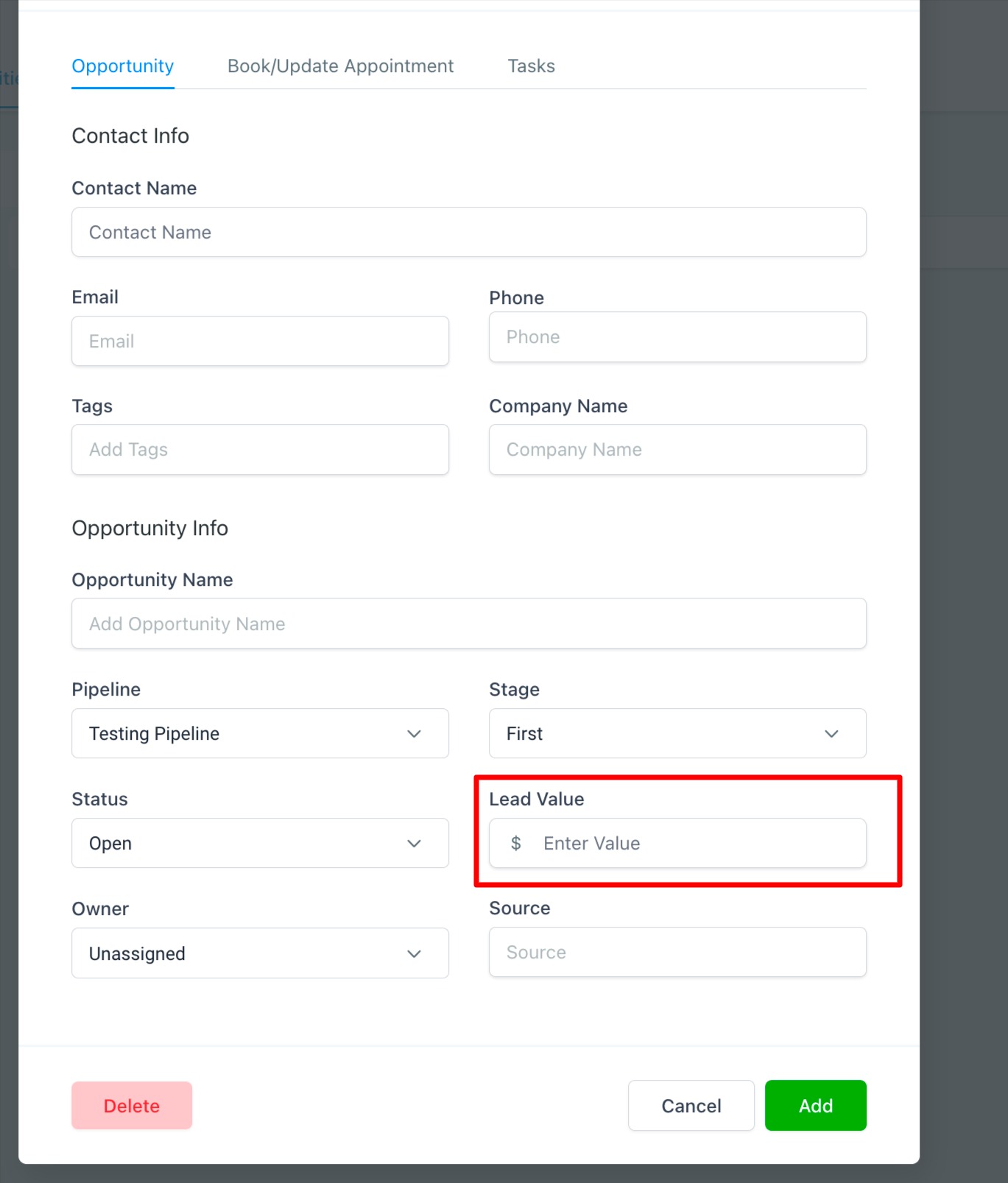
Return On Investment (ROI) is the ratio between the costs incurred during a campaign and the revenue generated from it. ROI can be measured for each individual ad or for the entire page.
The number of leads or opportunities that have been marked as won.
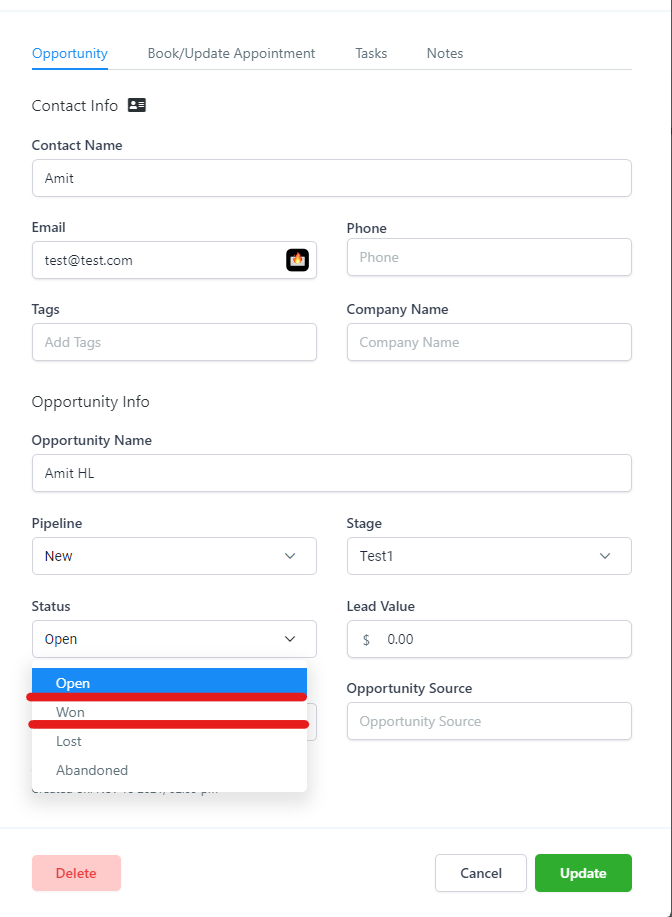
CPS is calculated by dividing the cost of running a specific campaign by the number of opportunities marked as won.
The number of leads or opportunities recorded as open through a form submission, a chat widget response, or a phone call.
CPL is calculated by dividing the cost of running a specific campaign by the number of opportunities in the open stage.
If your Facebook ads are not reporting correctly, work through the checks below.
Confirm that the Facebook ad account connected under Settings > Integrations has admin permissions. You must be an admin of the Facebook Page and have leads access to connect it. If you do not see your Page in Integrations, confirm your Facebook role. When you connect the account, the OAuth consent screen may reference LeadConnector, our underlying provider. This screen is expected and safe to approve.
Advertising accounts offer three admin permission types that control what each person can do or see. You need to be a Page admin, or ask a Page admin to assign you a Page admin (recommended), editor, moderator, advertiser, or jobs manager role. If you have moved to the new Pages experience and have task access, you can manage ads from Ads Manager or Meta Business Suite. For account connection basics, see the Integrations collection.
The UTM tracking template must be placed in the Tracking section of your ad, not in the destination URL.
If names are not unique, the same contact can appear as a duplicate under different ad-sets or ads in your reporting.
What not to do:
Level | Name | Ad |
|---|---|---|
Campaign Name | Botox Special | |
Campaign id | 12345 | |
Ad Set | Lip Filler 1 | |
Ad | Fresh Lip Look | |
Ad Set | Lip Filler 2 | |
Ad | Fresh Lip Look |
Here the ad "Fresh Lip Look" is spelled the exact same way twice, so a single patient could show up in the Leads column under two different ad-sets.
Correct setup:
Level | Name | Ad |
|---|---|---|
Campaign Name | Botox Special | |
Campaign id | 12345 | |
Ad Set | Lip Filler 1 Starter | |
Ad | 1.1 Fresh Lip Look Consultation | |
Ad Set | Lip Filler 2 Main | |
Ad | 2.1 Fresh Lip Look Package |
If you rename a Facebook campaign, ad-set, or ad, it will not update the UTM copy on Facebook's side, and reporting will keep attributing to the old parameters. The list view in Aesthetix CRM will show the new name, but the data will stop attributing sales, leads, and ROI because the UTMs are still tied to the original campaign. We recommend creating new campaigns, ad-sets, and ads instead of renaming.
When mapping a Facebook Lead Form, choose the correct Facebook Page and set the mapping to active so your Facebook form leads are collected. Text fields and custom fields map easily. Radio custom fields cannot be mapped to Facebook Lead Forms, and Timezone fields cannot be mapped. Facebook Lead Form triggers and the "Facebook Lead Form Submitted" workflow trigger are configured in the Workflows collection.
When I preview my ad in Facebook, why don't I see the UTM parameters? Facebook does not add UTM parameters to your links while you view the ad as a preview. The parameters are applied once the ad is approved and running.
Why am I not seeing first attribution data on some contacts? First attribution is only recorded when a contact comes through a supported entry point: a form submission, survey submission, calendar booking, Facebook Lead Form, two-step order form, chat widget, or a click-to-call inbound call. Contacts from other paths will have empty first attribution data.
I changed something in my ad, ad-set, or campaign and now my reporting is off. What happened? Campaign, ad-set, and ad names must stay unique and unchanged for the life of the campaign. If you renamed instead of creating a new campaign, Aesthetix CRM keeps referring to the original parameters. Create a new campaign, ad-set, or ad to fix this.
I do not have a Facebook Business account or Ads Manager. What do I do? You need a Facebook Business Manager and a Facebook ad account before you can run and report on ads. Create a Facebook Business Manager and a Facebook ad account through Facebook's Business Help Center, then connect the ad account under Settings > Integrations.
I'm running Facebook Lead-gen ads. Do I still need UTM parameters? Yes. Even for Lead-gen ads we recommend adding UTM parameters for improved reporting, using the same steps described above.
Where should I add the UTM parameters, in tracking or the destination URL? Add them in the Tracking section so each link click and page visit is tracked with its unique fbclid. Do not add them to the destination URL.
What is the Objectives dropdown in the Ad Report for? The Objectives dropdown at the top left of the Ad Report lets you define the objective your practice had for a campaign when it was created, so you can filter and group reporting by objective.
What is the difference between Leads and Sales in my reporting? Leads are opportunities recorded as open through a form, chat, or call. Sales are opportunities that have been marked as won. Revenue is the total lead value of those won opportunities.
