Google Demand Gen campaigns help your practice reach potential patients with visually rich ads across Google surfaces like YouTube, Discover, Gmail, and partner inventory. This campaign type is useful when you want to build awareness, drive clicks, or optimize for conversions before someone performs a direct search, for example putting a Botox or skincare offer in front of people earlier in their decision journey.
Ad Manager brings campaign creation, audience targeting, and ad setup into one workflow so you can launch faster and manage more from one place, without switching between multiple tools. The campaign still follows Google's Demand Gen framework for placements and delivery behind the scenes.
Visual reach: Run image- and video-led campaigns across YouTube, Discover, Gmail, and other Google partner surfaces to capture attention earlier in the patient journey.
Flexible optimization: Choose Conversions, Clicks, or YouTube Engagements based on whether your goal is action, traffic, or video interaction.
Centralized setup: Build the campaign inside Ad Manager instead of managing each part in separate tools.
Audience control: Use Google audience segment options such as Customer Match, Website Visitors, Interest Segments, and Lookalike Segments to reach more relevant people.
Creative flexibility: Depending on the goal, use single image ads, single video ads, or carousel ads.
Stronger preparation: Related workflows like conversion action setup and campaign-level assets improve readiness before launch.
Your campaign goal determines how Google optimizes delivery, so choosing the right objective is one of the most important setup decisions. Ad Manager's Demand Gen flow supports:
Conversions: Best when you want Google to optimize toward tracked outcomes such as leads or booked consultations. This requires conversion readiness, so make sure the relevant Google Ads conversion actions are available before launch. You can create and manage offline conversion actions inside Ad Manager (see the Google Ads Offline Conversions guide).
Clicks: Best when your goal is driving traffic to a page, offer, or funnel. Prioritizes visits rather than a specific conversion event.
YouTube Engagements: Best when you want to focus on video interaction. Tied to video-based creative, so plan for video assets before selecting it.
Audience targeting shapes who sees your ads, which directly affects relevance and performance. When setting up a Demand Gen campaign, you can work with these Google audience segment types:
Customer Match: Use first-party patient data to reach people based on existing contact lists. Useful for remarketing, re-engagement, or audience expansion.
Website Visitors: Target people who have visited your website. Useful for retargeting warm traffic that already knows your practice.
Interest Segments: Reach users based on interests and buying signals, drawing on Affinity and In-Market audience concepts for broader or more intent-focused targeting.
Lookalike Segments: Expand beyond your current audience by targeting people who resemble a source audience. Useful for finding new prospects with similar traits.
Location targeting, language targeting, and placements are also part of the ad group setup flow. Because delivery follows Google Demand Gen rules, expect Google's platform behavior to influence how eligible placements are used. Segment creation and details are covered in the audience segments section of the Create a Google Search Ad Campaign guide.
HIPAA note. Uploading patient contact lists (emails or phone numbers) to Google for Customer Match or Lookalike audiences shares patient data with Google. Get patient consent, follow your practice's HIPAA policies, and be aware Google hashes and uses the data. Upload only contact identifiers, never other protected health information.
Creative setup is central to Demand Gen performance because this campaign type depends on visual assets. Supported formats are:
Single Image Ads
Single Video Ads
Keep these points in mind:
Goal and format should match. YouTube Engagements is tied to video-focused delivery, so have video assets ready before choosing that goal.
Prepare assets early to prevent setup errors.
Campaign-level assets support your setup. You can add Business Logos, Image Assets, Call Extensions, and Sitelinks at the campaign level for Google Ads to improve visibility and keep assets consistent across ads.
Creative consistency matters. Correct logos, images, and destination details reduce friction during review and give ads a more complete appearance across multiple Google surfaces.
A structured setup reduces mistakes. Before building the ad, confirm account access, Google connection, audience readiness, and any conversion tracking tied to your goal.
Confirm Ad Manager access. Make sure Ad Manager is enabled for your account and visible to the correct user based on permissions.
Connect your Google account and Google Ads account. Before publishing Google campaigns, connect Google with Ad Manager. This onboarding is required before campaign creation can move forward. See the Connect Google with Ad Manager guide.
Prepare any required conversion actions. If you plan to use Conversions as the goal, make sure the needed conversion actions are available. You can create and manage Google Ads offline conversion actions inside Ad Manager for outcomes like qualified leads, booked appointments, or closed treatment packages.
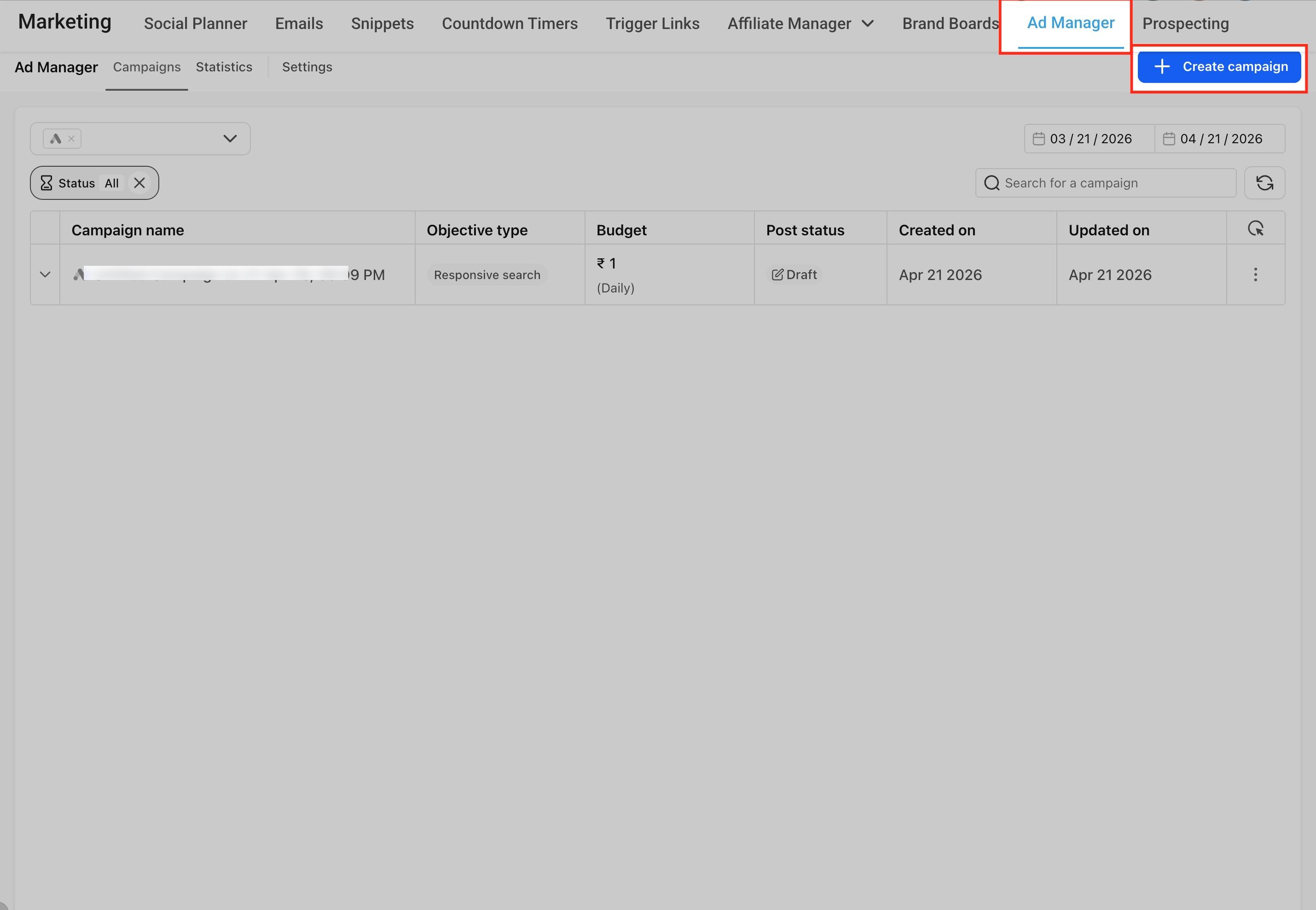
Open Ad Manager and create a new campaign. From the Ad Manager home screen, click Create Campaign and choose Google as the platform, then continue through the flow.
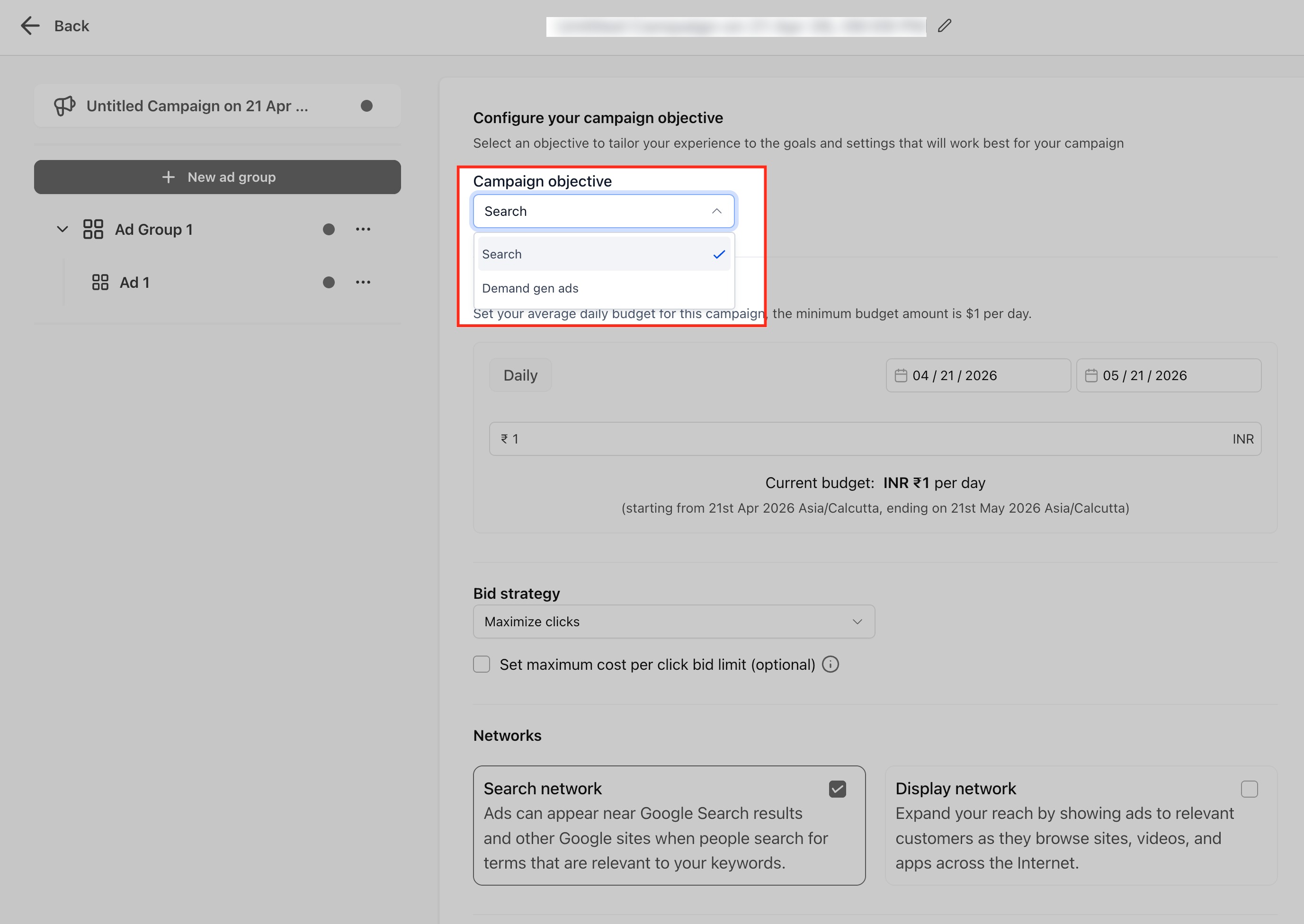
Choose Demand Gen Ads as the campaign objective. Demand Gen campaigns are ideal when you want to reach new audiences before they search, run visual or video-first campaigns, support awareness and consideration goals, and build full-funnel Google strategies from a single platform.
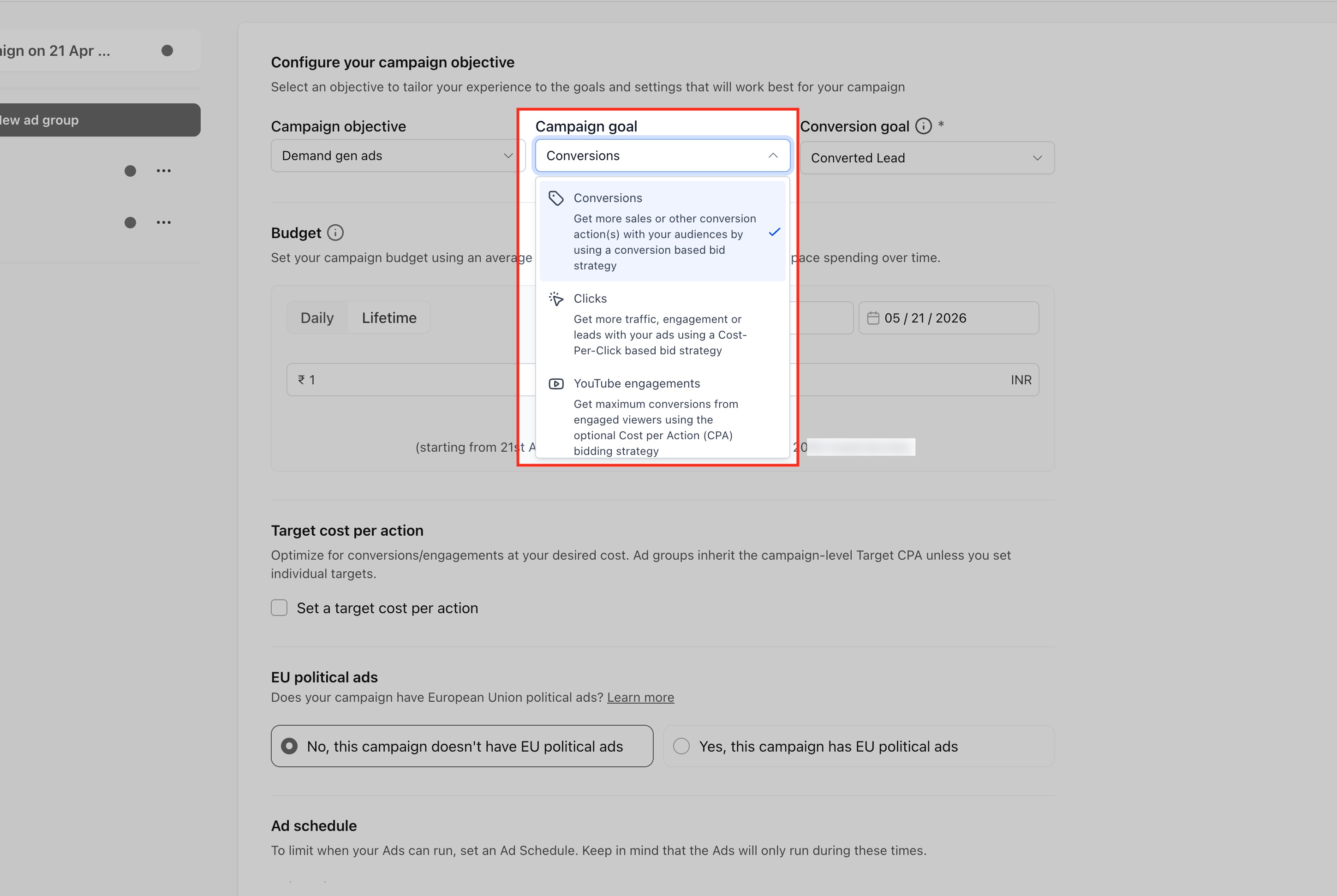
Choose your campaign goal. Select Conversions, Clicks, or YouTube Engagements based on the outcome you want.
Conversions: Select an existing conversion goal from your connected Google Ads account. Optionally enable Target CPA to optimize toward a specific cost per conversion.
Clicks: Optimizes for traffic. Optionally enable Target CPC. No conversion goal is required.
YouTube Engagements: Optimizes for engagement from YouTube viewers and automatically uses an engagement-based conversion goal. Only video ads are supported for this goal. Optional Target CPA is supported.
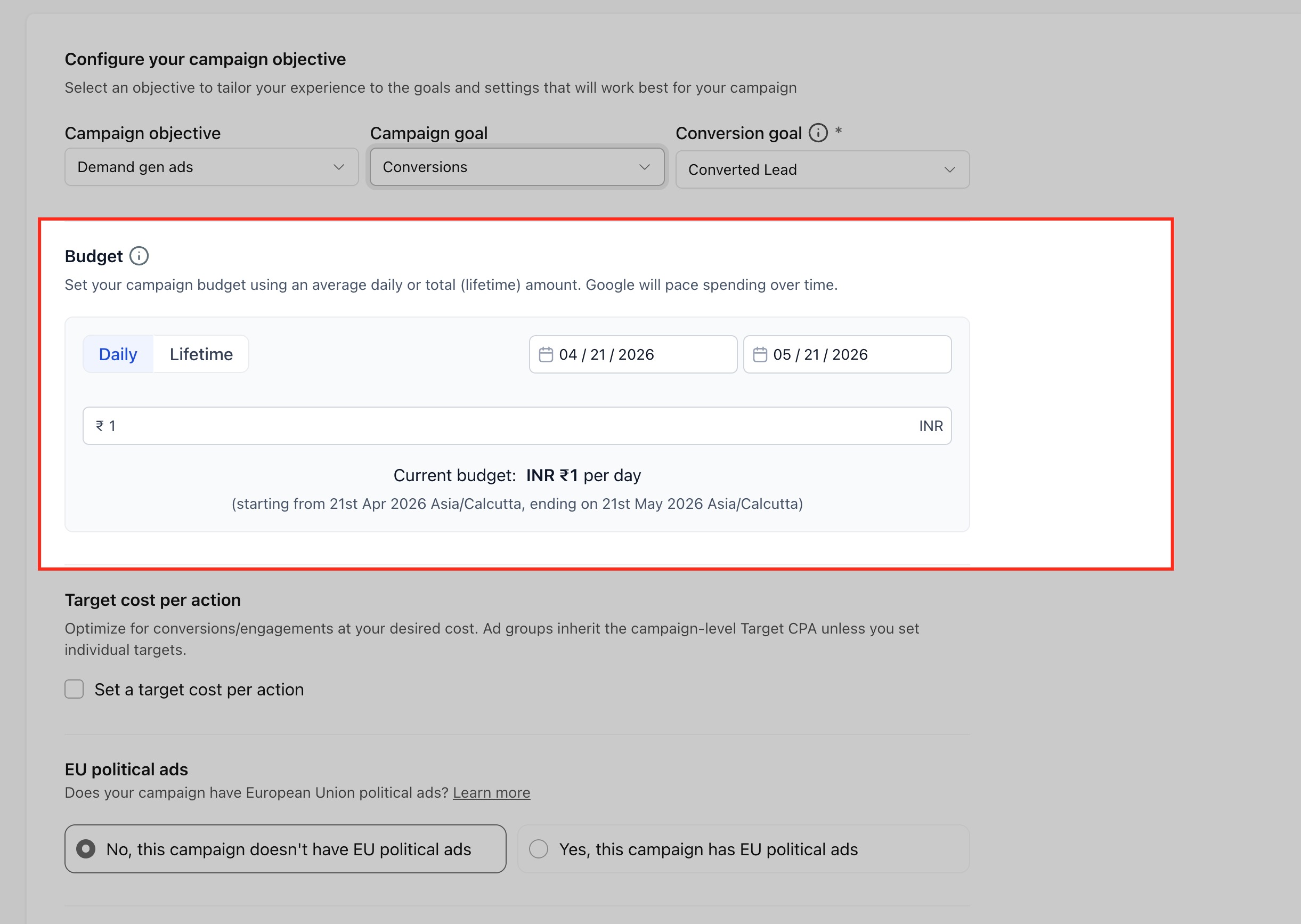
Set budget and schedule. Enter the campaign budget and define the schedule so the campaign has clear delivery rules. This controls how much your campaign spends and when it becomes active.
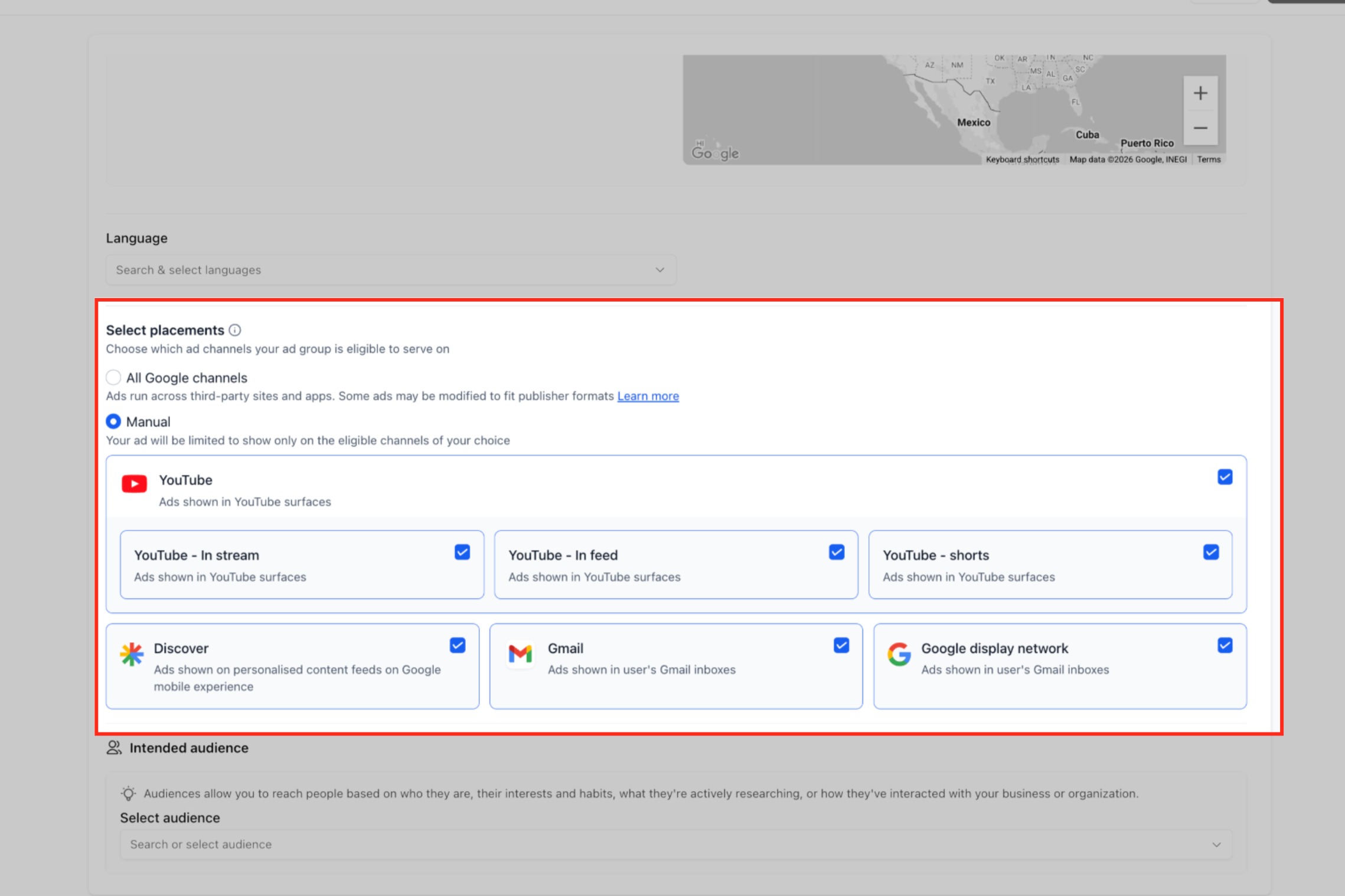
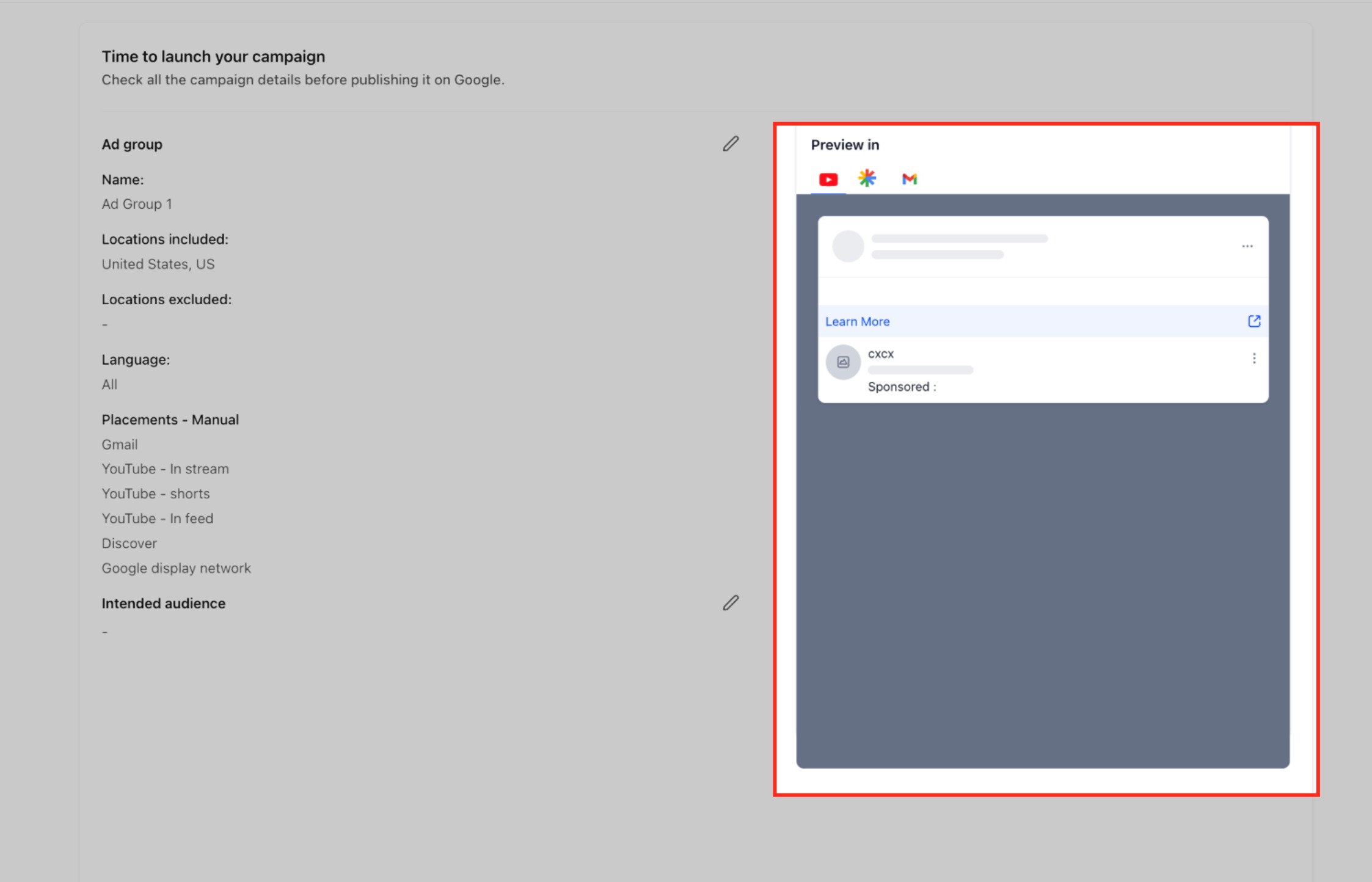
Configure ad group settings. Set up the ad group details, including location targeting, language targeting, and placements. Choose where your ads can appear:
All Google channels (automatic placement)
Manual placement selection, including:
YouTube (In-stream, In-feed, Shorts)
Google Discover
Gmail
Google Display Network
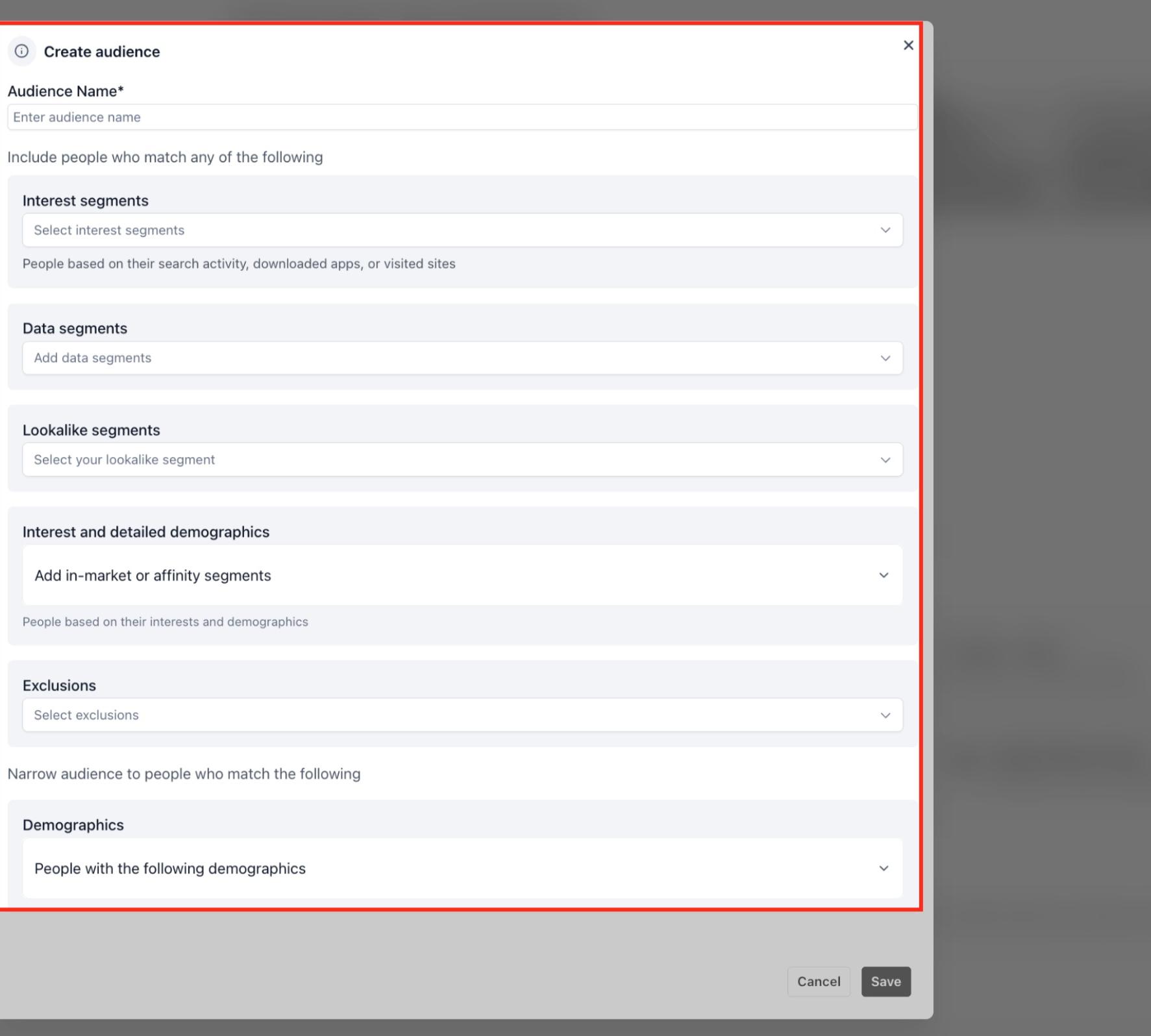
Define the audience. Choose the audience segment strategy that best fits the campaign, such as Customer Match, Website Visitors, Interest Segments, or Lookalike Segments. Use warmer audiences for re-engaging past patients and broader interest or lookalike audiences for prospecting.
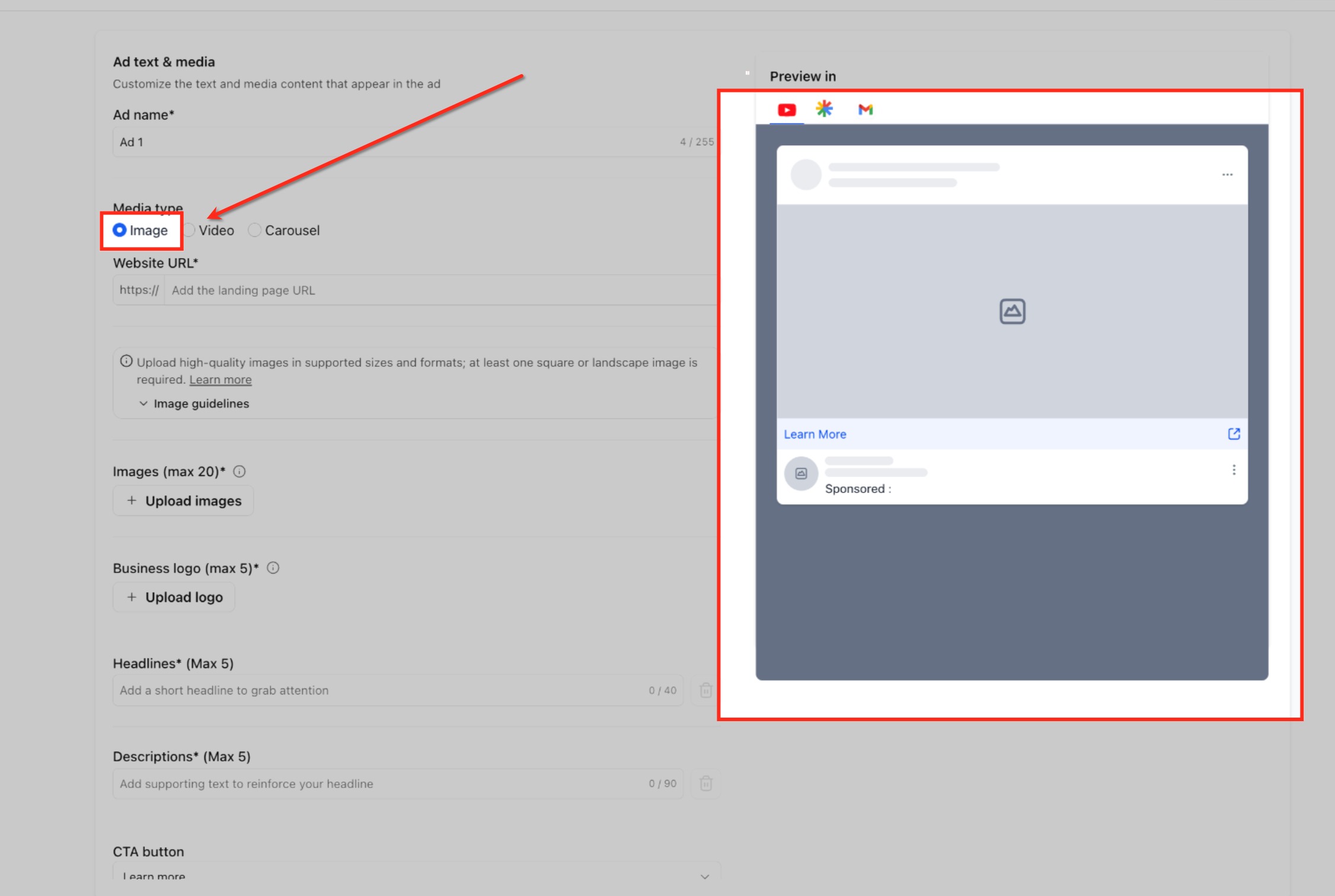
Create the ad using a supported format. Add the creative assets required for your chosen format. If you are using YouTube Engagements, the ad must use video assets.
Single Image Ads:
Upload up to 20 images.
Upload up to 5 business logos (required).
Add up to 5 headlines and 5 descriptions.
Choose a CTA and business name.
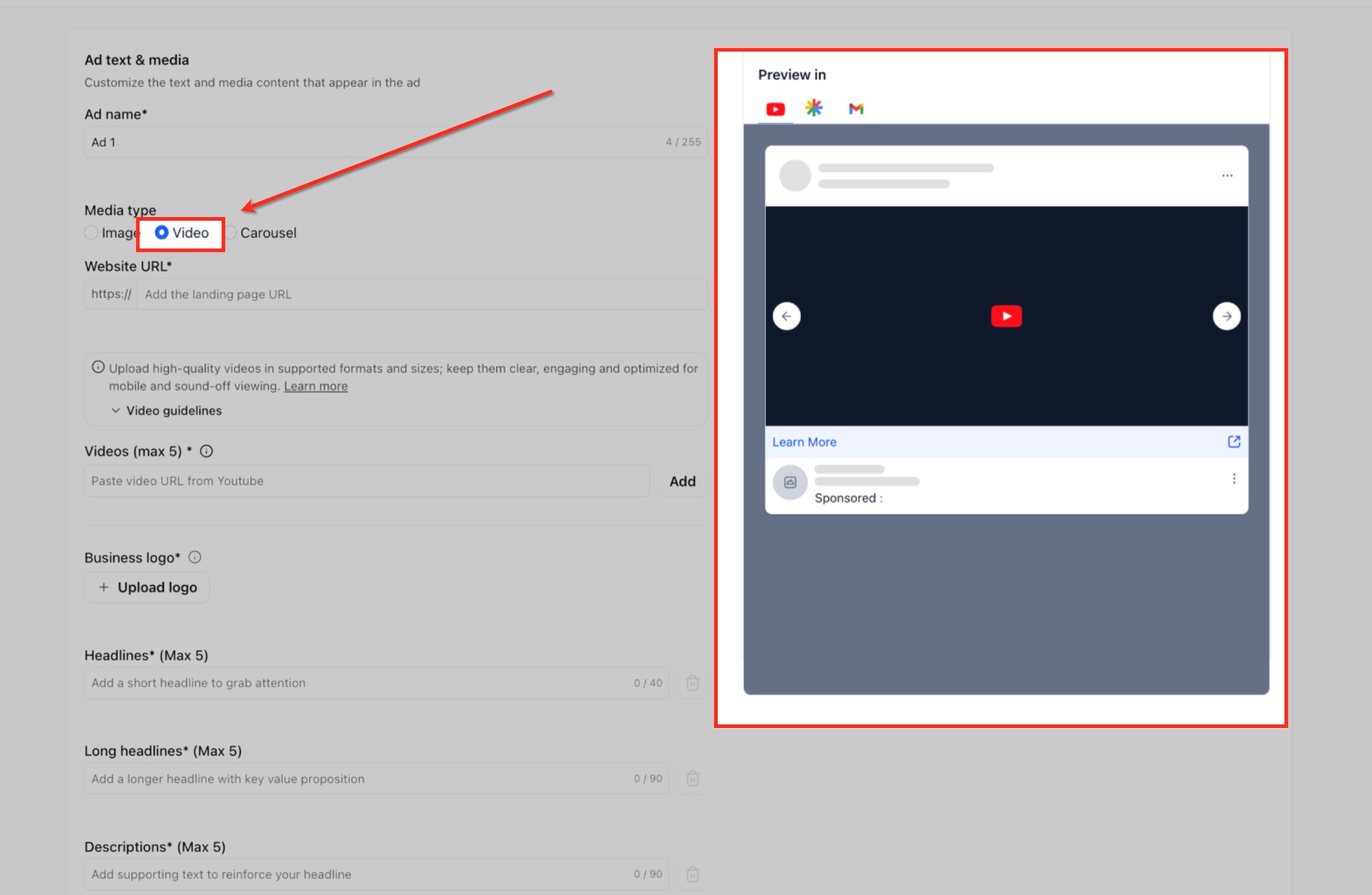
Single Video Ads:
Add up to 5 YouTube video URLs.
Videos must be at least 10 seconds long.
Include multiple aspect ratios where possible (16:9, 9:16, 1:1).
Upload business logos.
Add headlines, long headlines, descriptions, CTA, and business name.
Sitelinks are supported (shared at the campaign level).
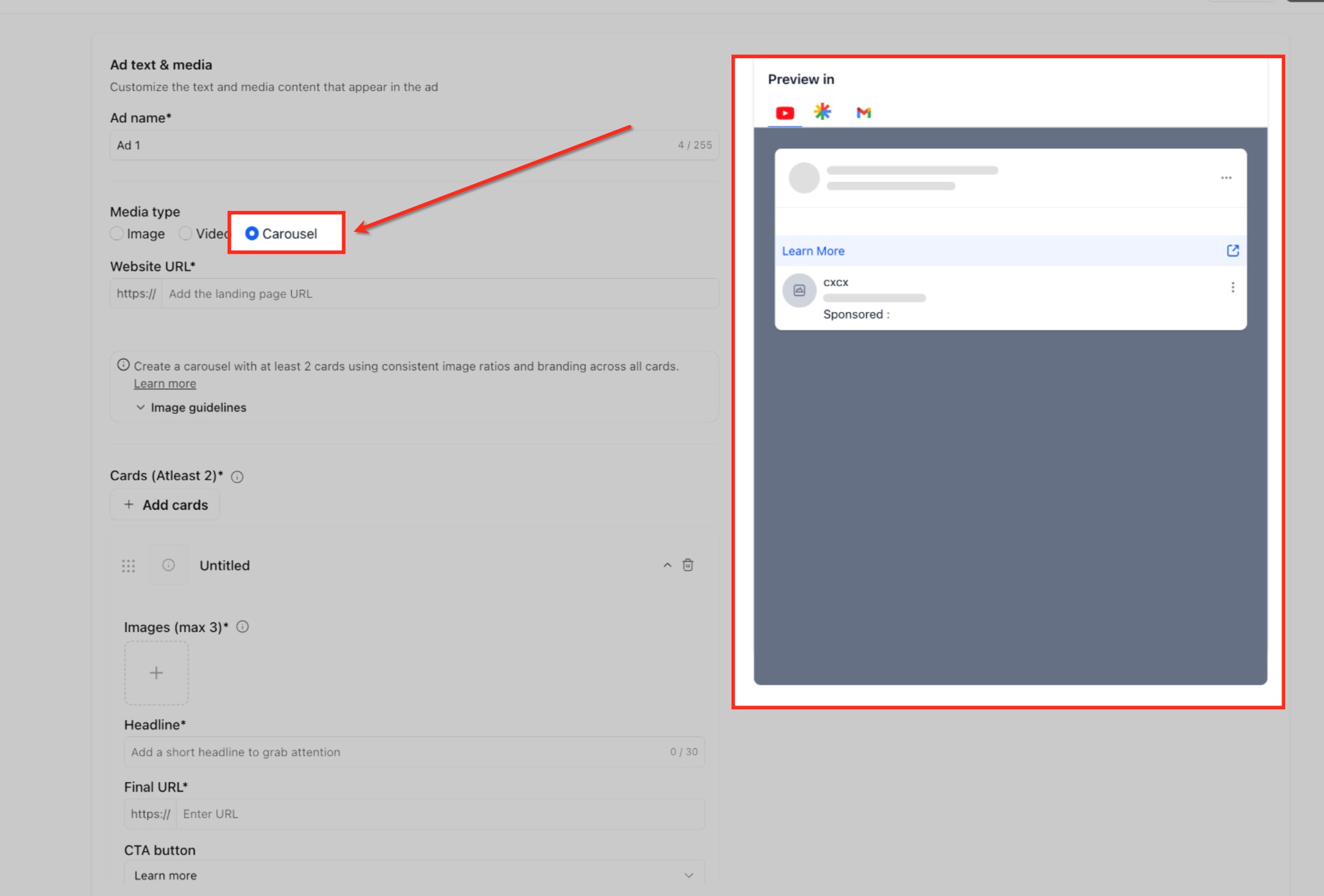
Carousel Ads:
Add a minimum of 2 cards, up to 10 cards.
Each card includes images (up to 3 per card), a headline, a final URL, and a CTA.
Keep branding and image ratios consistent across all cards.
Review and publish. Check the summary carefully to confirm the goal, audience, budget, schedule, and creative are correct, then publish from Ad Manager.
Important notes:
Google account connection is required before you can publish Google campaigns.
Conversion-based optimization depends on having the correct conversion actions available.
Creative choice should align with the selected goal, especially for YouTube Engagements.
Campaign-level assets such as logos, image assets, call extensions, and sitelinks may improve campaign completeness.
When should I choose Conversions instead of Clicks? Choose Conversions when you want Google to optimize for a tracked outcome such as a qualified lead or booked consultation. Choose Clicks when your main goal is traffic to a landing page or offer.
Do I need to connect Google before creating a Demand Gen campaign? Yes. Google onboarding and account connection is a required step before you can publish Google campaigns through Ad Manager.
What if no conversion goal appears during setup? Check whether the required Google Ads conversion actions are configured and available. You can create and manage offline conversion actions inside Ad Manager if tracking is not ready yet.
Can I use audience segments without leaving Aesthetix CRM? Yes. Google Audience Segments, including Customer Match, Website Visitors, Interest Segments, and Lookalike Segments, are supported directly inside Ad Manager.
Which ad format should I prepare before starting? Prepare the format that matches your goal. The Demand Gen flow supports single image ads, single video ads, and carousel ads, and YouTube Engagements is tied to video creative.
Are additional campaign assets available for Google campaigns? Yes. Business Logos, Image Assets, Call Extensions, and Sitelinks are supported at the campaign level for Google Ads.
What if I cannot access Ad Manager? Confirm that Ad Manager has been enabled for your account and that the correct user permissions have been granted.
Is Demand Gen the same as a Google Search campaign? No. Demand Gen is a visually driven campaign type built for earlier-stage discovery and engagement across Google surfaces, while Search campaigns focus on keyword-driven search intent. They are separate workflows.
Which format works best for a med spa promotion? Single image or carousel ads work well for showcasing before-and-after style visuals or a seasonal offer, while single video ads suit YouTube Engagement goals. Match the format to your goal and the assets you have ready.
