If your Meta Business account, ad account, or WhatsApp Business account has been disabled, locked, or banned, it is usually due to a policy violation, a failed or incomplete business verification, or suspicious activity. This guide walks through appealing the decision, resolving restricted custom audiences and conversions, and avoiding future blocks. These actions happen in Meta's own tools, not inside Aesthetix CRM, since Meta controls your ad account status.
For medical-aesthetics practices, one restriction deserves special attention: Meta now proactively blocks custom audiences and conversions that suggest specific health conditions. That directly affects how a practice can build audiences, so the section on restrictions below is important reading.
Follow these steps to appeal and improve your chances of reinstatement.
Go to the Account Quality dashboard at https://business.facebook.com/accountquality, then select the account or asset that Meta flagged. Click "View Details" and proceed to "Request Review" if the option is available.
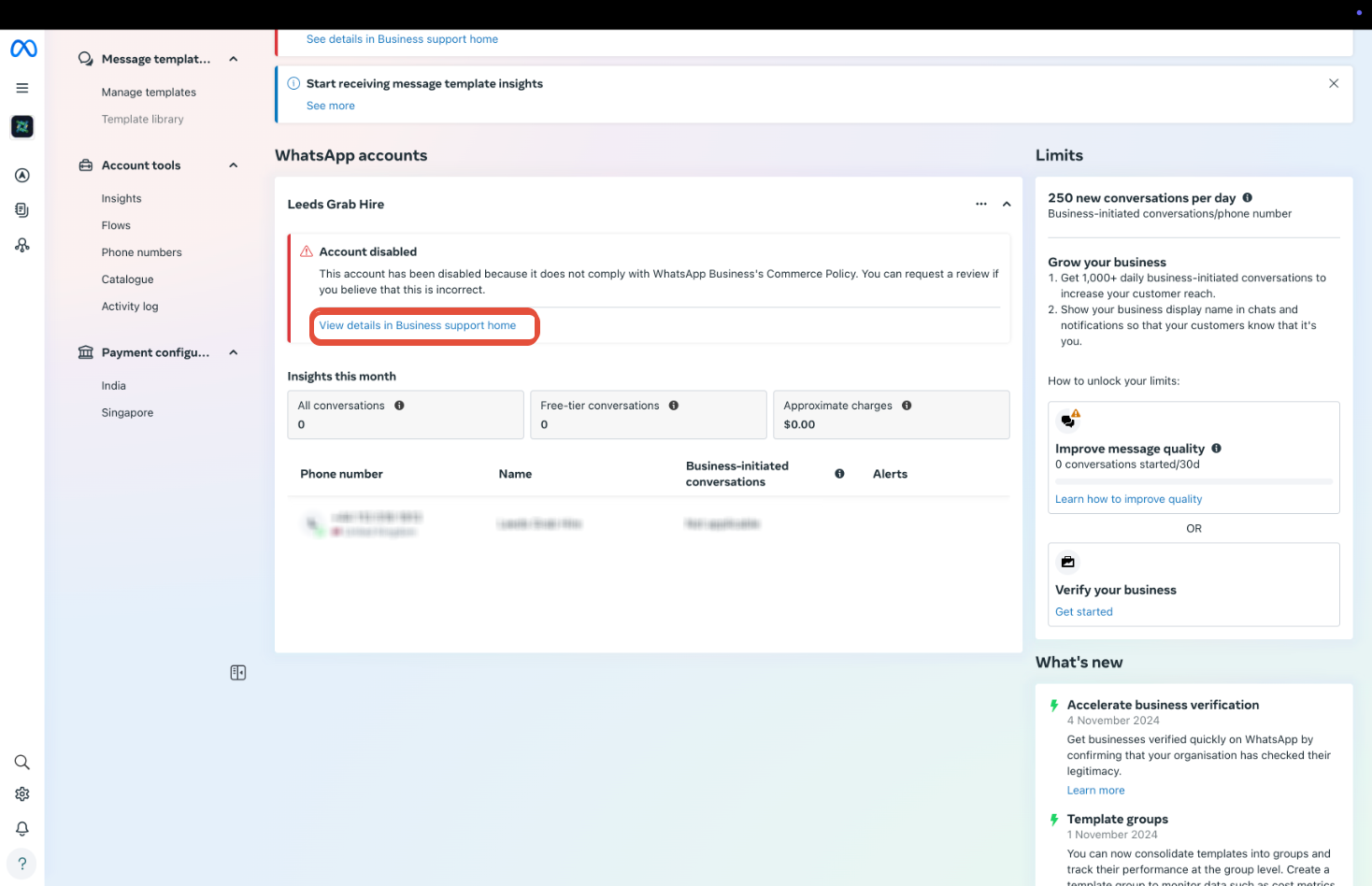
Click Request Review to open the appeal.
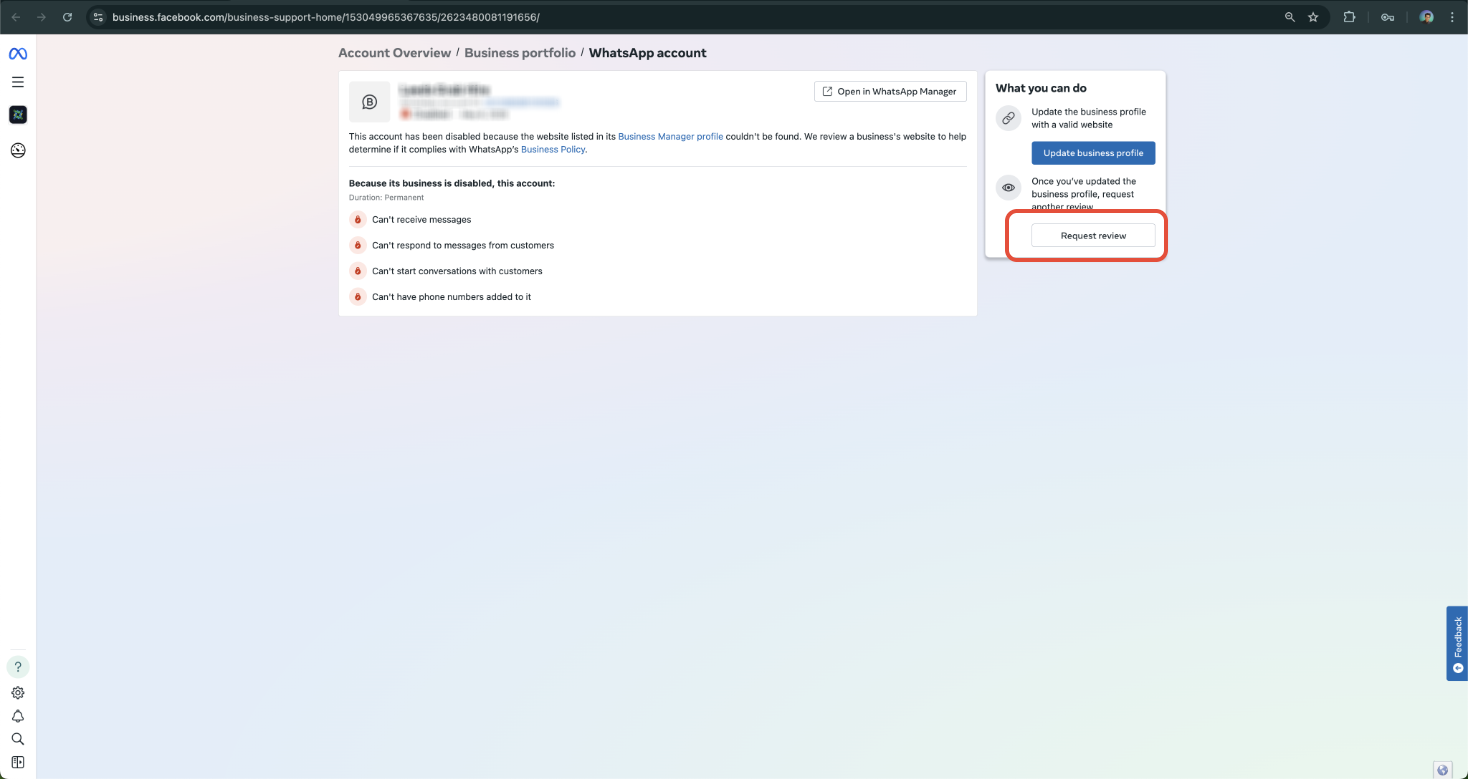
During the appeal, Meta may ask you to submit:
Valid business verification documents, such as a government-issued license, tax ID, or utility bill.
Proof of ownership for domain names or phone numbers.
A clear business use case explanation describing what your practice does and how you use Meta platforms.
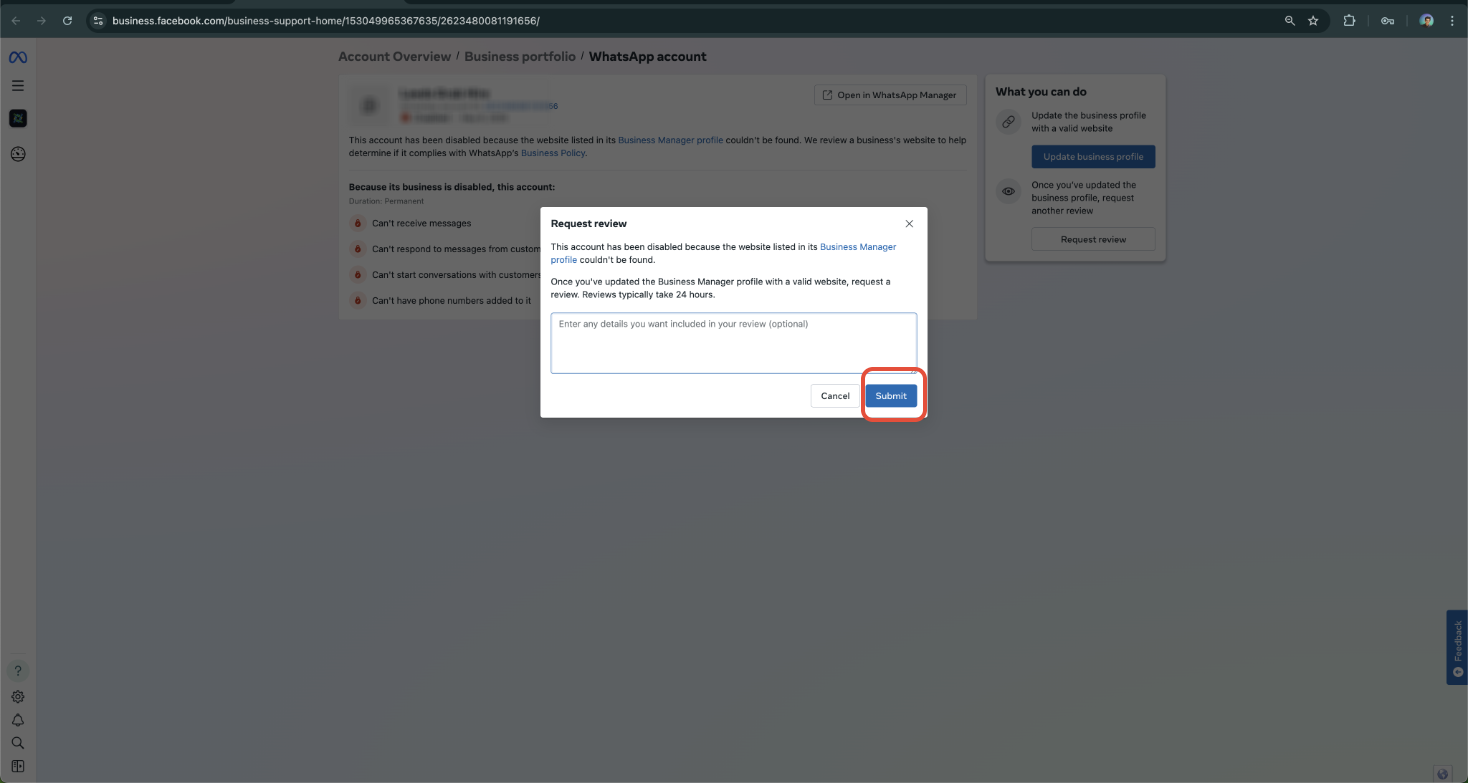
You can adapt the template below when submitting your appeal:
Dear Meta Business Support Team,
I am reaching out to appeal the recent restriction or lock placed on our account. Our business is committed to complying with all Meta policies, and we believe this action may have been applied in error or due to a misunderstanding.
Please find below the details of our account:
Business Name: [Your Business Name]
Business Manager ID: [Your Business Manager ID]
WhatsApp Phone Number (if applicable): [Your WhatsApp Business Number]
WABA ID (if known): [Your WhatsApp Business Account ID]
Website of the Business: [Your Website]
We kindly request a thorough review of our account. If there are any specific actions required on our part to resolve this issue or verify compliance, we are happy to cooperate fully.
Thank you for your time and support. We look forward to resolving this matter quickly.
Most appeals are reviewed within a few business days, typically 3 to 7. Avoid submitting multiple appeals or tickets, since that can delay the review.
If you prefer a shorter note, you can adapt this version:
Hello Meta Support,
My Business Manager account (ID: [your business ID]) was recently blocked. I believe this may have been a misunderstanding or a verification issue. I am requesting a review and would be happy to provide any supporting documentation required, such as a business license, domain ownership, or utility bills. My intention is to fully comply with Meta's policies and use the platform responsibly. Kindly assist me in resolving this.
Thank you, [Your Full Name] [Business Name] [Contact Email]
Beginning September 2, 2025, Meta rolled out more proactive restrictions on custom audiences and custom conversions that may include information not permitted under its terms. Any custom audience or custom conversion that suggests a specific health condition (for example "arthritis," "diabetes," or a specific cosmetic treatment) or financial status (for example "credit score" or "high income") can be flagged and prevented from being used in new and ongoing campaigns.
This matters directly for a med spa. Naming or defining an audience around a health condition, procedure, or diagnosis can get it flagged. Keep audience names and definitions general, focus on interests and location rather than health status, and never upload patient health details. When you build a custom or lookalike audience from a patient contact list, do so only with patient consent and in line with your HIPAA policies, and limit uploads to basic contact identifiers such as email and phone.
Meta will not pause ongoing campaigns when restrictions begin, but the impact depends on how a flagged audience or conversion is used:
Flagged custom audiences are prevented from being used for new campaigns. New people will not be added to them, and existing campaigns using a flagged audience may see reduced delivery and performance over time unless resolved.
Flagged custom conversions are prevented from being used for new campaigns, will no longer be matched, and any campaign using one stops receiving new conversion data and may see reduced optimization over time unless resolved.
For Web, Mobile App, Offline, and Customer File custom audiences: review and remove any non-permitted information, then create a new custom audience or choose a different existing one that does not include information disallowed under Meta's terms.
For Lookalike Audiences: resolve the issue in the underlying custom audience (the seed audience), or create a new lookalike from a compliant seed.
Request a review: if you believe an audience was flagged in error, request a review in Ads Manager or Audience Manager when you begin receiving in-product notifications.
For new campaigns: create a new custom conversion that does not include disallowed information, or choose a different compliant conversion.
For existing campaigns: if a running campaign is flagged because of a custom conversion, duplicate the campaign and select a different compliant conversion before publishing the duplicate. Once a campaign is published, you cannot remove or change its custom conversion.
Request a review: if you believe a conversion was flagged in error, request a review in Ads Manager or Events Manager when you begin receiving in-product notifications.
Meta began sending emails and in-product notifications on July 15, 2025 to advertisers whose audiences or conversions were affected, so you could resolve issues before restrictions took effect. Restrictions are applied on Meta's side, so you should not expect failed API calls for flagged audiences or conversions.
Complete and maintain your business verification.
Do not send spam or unsolicited promotional messages.
Use only Meta-approved templates for outbound WhatsApp messages.
Maintain a good quality rating in WhatsApp Manager. To check it, go to WhatsApp Manager, then Phone Number, then Settings.
Keep custom audiences and conversions free of health-condition or financial-status information.
What should I do first if my Meta or WhatsApp Business account gets banned?
Visit the Meta Account Quality dashboard at https://business.facebook.com/accountquality, select the banned asset, click "View Details," and proceed with "Request Review" to submit an appeal.
Why was my Meta Business account blocked?
Common reasons are a failed business verification, a policy violation such as sending spam, suspicious activity, or incomplete documentation. You can see the exact reason in the Account Quality Center.
What documents are required to appeal?
You may be asked for valid business verification documents such as a tax ID or utility bill, proof of domain or phone number ownership, and a clear explanation of your business use case.
How long does Meta take to review an appeal?
Appeals typically take a few business days, generally 3 to 7. Do not submit multiple appeals, since that can delay the review.
Will I lose my WhatsApp templates, number, or account data during a block?
No. A block affects access to the business account, not the data itself. Once reinstated, your WhatsApp setup and templates remain intact.
Why can't I use an audience that references a health condition?
Meta proactively flags and blocks custom audiences and conversions that suggest specific health conditions or financial status. Keep audience names and definitions general and focused on interests and location rather than diagnoses or procedures.
How do I fix a flagged custom audience?
Remove the non-permitted information and build a new custom audience, or choose a different compliant one. For a lookalike, fix or replace the underlying seed audience. If you think it was flagged in error, request a review in Ads Manager or Audience Manager.
Can I change the custom conversion on a campaign that is already published?
No. Once a campaign is published you cannot remove or swap its custom conversion. Duplicate the campaign, select a compliant conversion, and publish the duplicate instead.
How can I avoid future bans?
Complete your business verification, avoid spam and unsolicited messages, use only approved message templates, monitor your phone number quality rating in WhatsApp Manager, and keep audiences and conversions free of health or financial information.
