Clear notes and task descriptions keep your team on the same page. Rich Text in Aesthetix CRM lets you format the descriptions on tasks and notes with bold text, lists, and hyperlinks, so the important details stand out and are easier to scan, understand, and act on. Whether you are outlining a patient's pre-op checklist or linking a coordinator to a consult form, formatting helps the next person pick up exactly where you left off.
Rich Text adds lightweight, everyday formatting to notes and task descriptions so your team can emphasize key details, structure follow-ups with lists, and link out to supporting resources without leaving Aesthetix CRM. It provides:
Bold, italics, underline, and strikethrough
Bulleted and numbered lists
Hyperlinks (insert and edit)
Undo and redo
Basic paste formatting preservation
Formatting renders consistently wherever those notes and tasks appear.
Clarity: highlights key points so teammates can scan information quickly.
Consistency: looks the same across contacts, opportunities, companies, conversations, and calendars.
Speed: apply emphasis, lists, and links directly, with no need to switch tools or paste raw URLs.
Traceability: undo and redo reduce mistakes during longer edits.
Collaboration: shared note patterns and linked context improve handoffs between team members.
Reduced clean-up: pasting preserves basic formatting from docs and email, minimizing rework.
The toolbar gives you quick access to the most-used formatting controls:
Bold, italics, underline, strikethrough
Bulleted and numbered lists
Hyperlinks (insert and edit)
Undo and redo
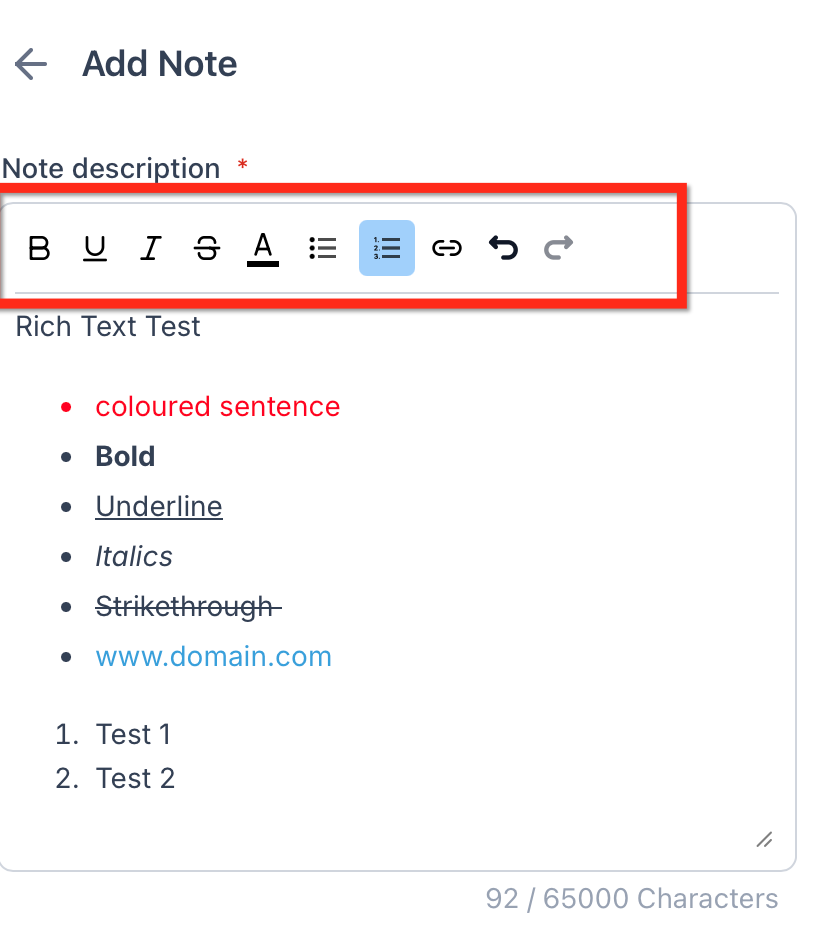
Lists make action items and patient notes easier to read and maintain over time.
Use bulleted lists for talking points and general notes.
Use numbered lists for steps, follow-ups, or an ordered checklist, such as the stages of a treatment plan.
Add links to external resources such as intake forms, shared drive folders, or reference documents, so your team can jump straight to the details from within Aesthetix CRM.
To insert or edit a link in a note or task description:
Select the text you want to hyperlink.
Click the Link icon in the toolbar.
Paste the URL and confirm.
Save your note or task. The link renders as clickable text wherever the note or task appears.
Notes and task descriptions show up in several places, and Rich Text keeps the same content readable wherever it is displayed. Formatting renders consistently in:
Contacts
Opportunities
Companies
Conversations
Calendars
The current release focuses on lightweight formatting. Not supported: images, tables, headings, text colors, text alignment, code blocks, and checkbox-style task lists.
Pasting preserves basic formatting only (emphasis, lists, links). Complex layout and media are omitted.
This feature does not introduce any changes to the public API.
Rich Text is available across Aesthetix CRM, so your team can format notes and tasks wherever they appear.
Open any note or task, new or existing. For example, open a patient's contact record and create or open a task there.
Click into the description field.
Use the toolbar to apply formatting, insert links, or create lists.
Save to apply your changes.
Because task descriptions and patient notes can contain protected health information, apply the same care to formatting content as you would to any patient record. Only include the detail your team needs, and avoid linking to resources that expose PHI to anyone outside your practice.
Does Rich Text change how notes or tasks are stored or exported?
Rich Text focuses on on-screen readability. When you export or print, the content may be simplified, so review exports to confirm they look the way you need.
Can I add images, tables, or headings to tasks and notes?
No. Notes and task descriptions support a lightweight set of formatting: emphasis, lists, links, undo and redo, and basic paste formatting.
Are hyperlink clicks tracked?
No. Hyperlinks are provided for quick navigation and this feature does not add link tracking.
Will formatting appear on mobile?
Formatting is designed to be readable across the platform. If you do not see a toolbar on mobile, use the desktop or web app to edit while the formatting stays intact when viewed.
Is there an API change?
No. This release does not add or modify public API endpoints.
Do internal comments in the Inbox use the same editor as notes?
Internal comments are distinct from notes. Rich Text improves note and task editing, and internal comments may have different capabilities.
Are text colors or alignment available?
No. The feature focuses on essential formatting for clarity and consistency, so colors and alignment are not included.
