Bluesky is a fast-growing, decentralized social network for sharing text, images, and video. With the Social Planner in Aesthetix CRM, you can connect your Bluesky account and publish without switching apps, managing Bluesky from the same calendar that already handles Facebook, Instagram, LinkedIn, Google Business Profile, TikTok, and more. This guide shows how to create the app password Bluesky requires, connect your account, and start posting.
Bluesky Integration adds the Bluesky network to the Social Planner's supported platforms. You authenticate your Bluesky handle using an app password, then create, schedule, and track Bluesky posts from the same calendar as your other channels.
Zero context-switching: Plan, draft, and publish Bluesky posts alongside your other channels in the Social Planner.
Faster approvals: Route Bluesky posts through the same review and approval flow your team already uses, so nothing goes live without sign-off.
Fail-safe publishing: Compose within Bluesky's limits (300 characters, up to 4 images or one video) to avoid last-minute errors and failed posts.
Steady cadence: Batch and schedule a week of posts in minutes so Bluesky stays active even when your team is busy.
Fewer tools: Skip a separate Bluesky scheduler and manage everything in one place.
Category | Images | Video |
|---|---|---|
File types | JPEG, PNG | MP4, MOV |
Max file size | 1 MB | 50 MB |
Max uploads per post | Up to 4 images | 1 video (cannot mix with images) |
Dimensions / resolution | Standard web resolution | Recommended 480p to 720p |
Aspect ratio | – | 16:9 or 1:1 |
Duration | – | Up to 3 minutes |
Frame rate | – | 30 to 60 FPS |
Codecs | – | H.264 (video), AAC (audio) |
Other notes | – | No custom thumbnails |
Tagging and mentions: Tag users with their full handle (for example, @name.bsky.social). There is no autocomplete, so type carefully or copy and paste.
Hashtags: Use #hashtag to make posts discoverable. Hashtags can include letters, numbers, and underscores, but not numbers alone.
Character limit: 300 characters per post.
Emojis: Supported.
Links: Must start with http:// or https://. Each link counts as 23 characters regardless of its length, and link shorteners are discouraged.
Daily posting limit: 100 posts per 24 hours.
Bluesky requires third-party tools like the Social Planner to connect with an app password rather than your main account password.
Important: The app password is displayed only once. If you miss it, you will need to delete it and create a new one.
Log in to your Bluesky account in a new tab.
Go to Settings > Privacy & security > App Passwords.
Click + Add App Password.
In the pop-up, name your app password, then click Next.
Copy the app password. You will need it when connecting Bluesky to the Social Planner.
Click the Marketing tab in Aesthetix CRM.
Click Social Planner.
Click the + Socials button.
Click the Connect Bluesky option.
Enter your Bluesky username, without the @ (for example, username.bsky.social).
Enter or paste the app password you copied. Do not use your main account password.
Click the Connect button.
Click the Add button next to your profile to add it to the Social Planner.
Once connected, your Bluesky account appears under the All Accounts dropdown in the Social Planner.
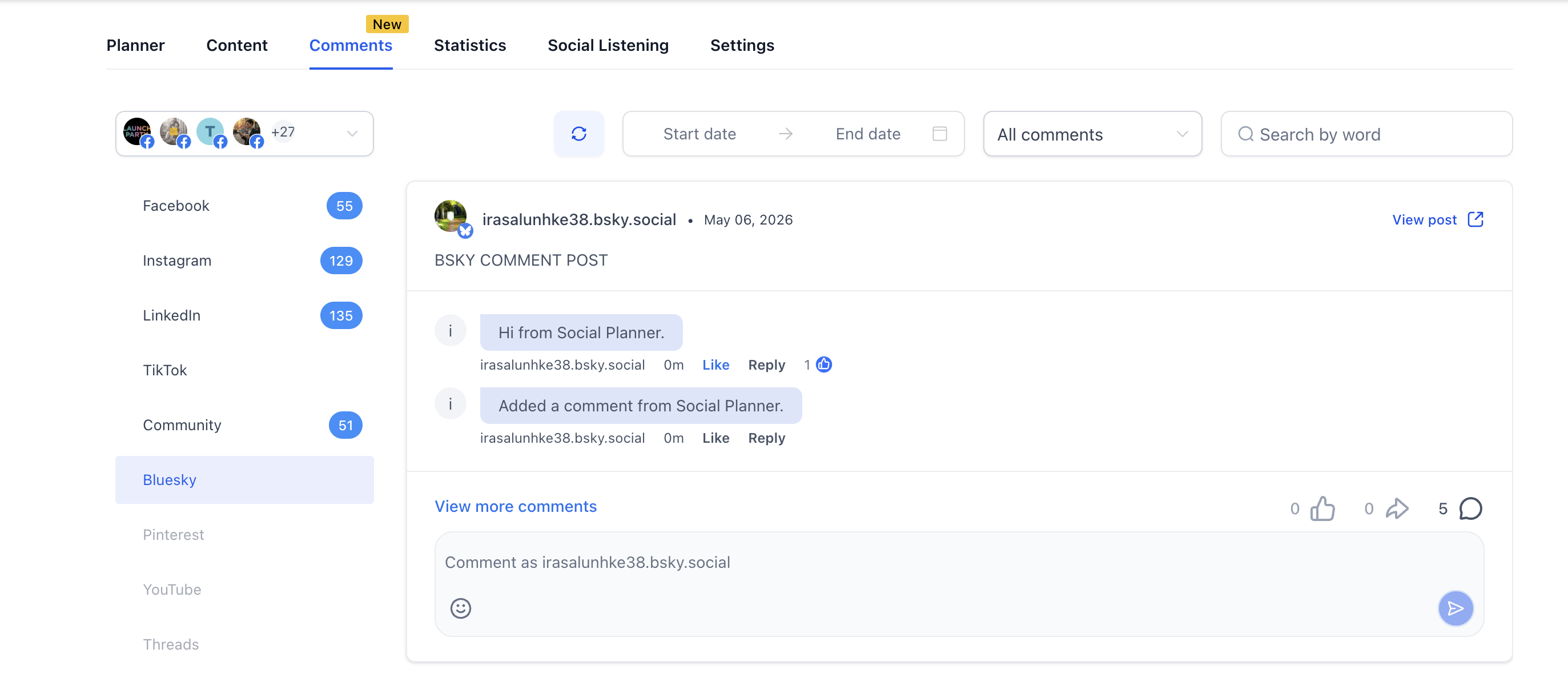
You can view comments on your Bluesky posts from within the Social Planner, reply using text and emojis, and keep conversation context with threaded replies (up to 3 levels visible). If a comment involves a patient's treatment or health details, avoid discussing those specifics in a public reply and move the conversation to a private, secure channel.
Why do I need an app password instead of my Bluesky login? For security. Bluesky requires third-party tools to use an app password so your main credentials stay protected.
What if I lose the app password? Go to Bluesky, delete the old app password, create a new one, then reconnect the account in the Social Planner.
What happens if my app password expires? Generate a new app password in Bluesky and reconnect the account in the Social Planner.
Can I connect multiple Bluesky accounts or handles? Yes. Connect each account separately, and each one needs its own app password.
Do I need to reconnect after logging out of Bluesky? No. Once connected with an app password, your Bluesky account stays connected until you remove it or reset the password.
Which analytics can I track for Bluesky in the Social Planner? You can track Posts, Likes, Comments, Impressions, and Engagement rate.
What is the character limit for a Bluesky post? 300 characters per post. Keep in mind that any link counts as 23 characters regardless of its actual length.
How many times a day can I post to Bluesky? Up to 100 posts per 24 hours.
