The Social Planner in Aesthetix CRM supports Facebook Text Posts with Backgrounds, so your practice can publish eye-catching, text-only Facebook posts with colorful backgrounds without leaving the composer. These are the same native background styles Facebook offers in its own composer, and they are a quick way to share a short promotion, a seasonal special, or a simple announcement that stands out in the feed.
You can publish or schedule background posts directly from the planner, with no need to switch over to Facebook.
Facebook Text Background Posts are native, text-only Facebook posts that display over a colorful background to make short messages more visually engaging in the feed. Inside the Social Planner you can:
Create native Facebook-style background posts
Choose a background preset right in the composer
Preview the post in real time
Publish instantly or schedule for later
Manage everything without switching to Facebook
You create background posts directly inside the Social Planner.
Navigate to Marketing → Social Planner. When Facebook is selected as the publishing platform, the Text Background option becomes available.
You can create text-only Facebook posts with native background styles directly inside the Social Planner. Supported capabilities include native Facebook colorful backgrounds, instant publishing, scheduled publishing, and seamless use of the existing composer.
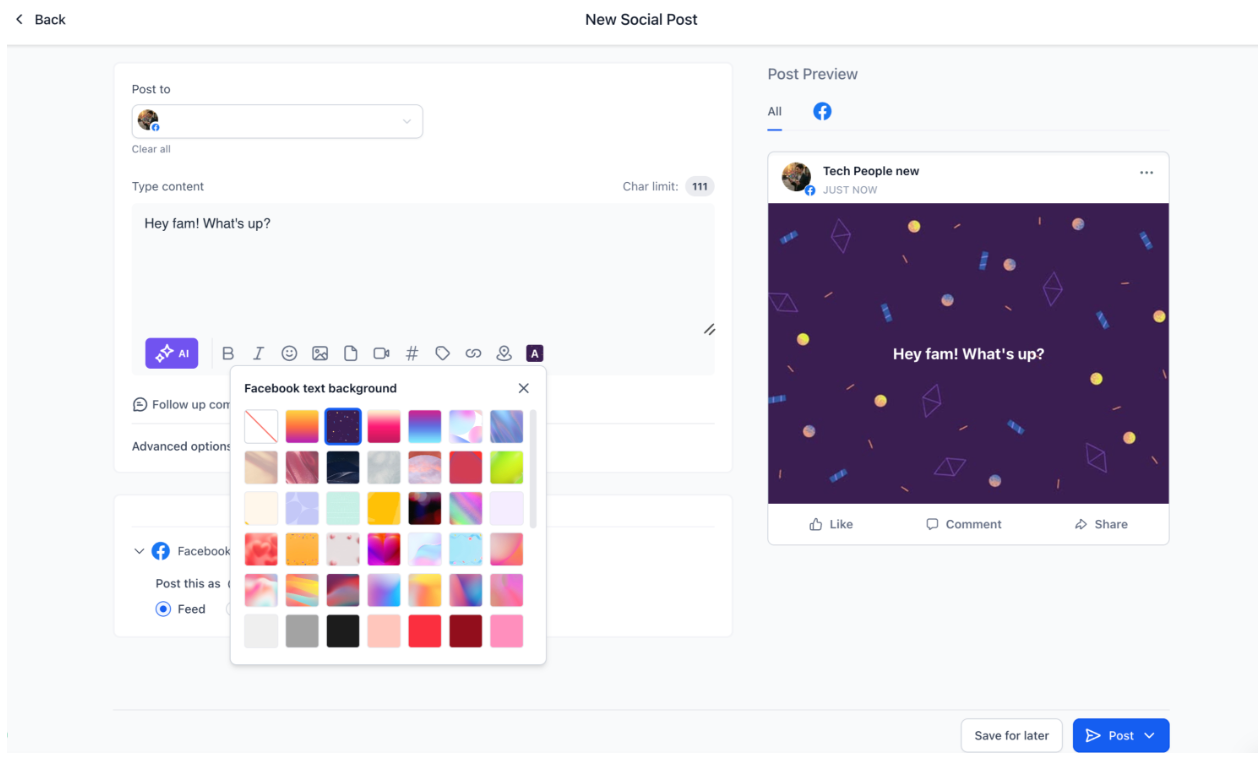
A Text Background option appears when Facebook is selected. Inside the picker you can browse multiple background presets, select the style you want, see instant visual updates, and customize the post without leaving the composer. The experience mirrors Facebook's native background post creation flow.
The composer preview reflects how the post will appear on Facebook. Preview improvements include live background styling updates, automatic font size adjustment based on text length, a native-style Facebook layout preview, and clearer visibility into the final look of the post before you publish.
The system automatically handles Facebook's background eligibility rules:
Backgrounds are available only for text-only Facebook posts.
Adding an image or video disables the background option.
Editing a scheduled post to add media automatically removes the selected background.
This keeps your post compatible with Facebook's publishing requirements.
Go to Marketing → Social Planner.
Select Facebook as the platform.
Enter your text content.
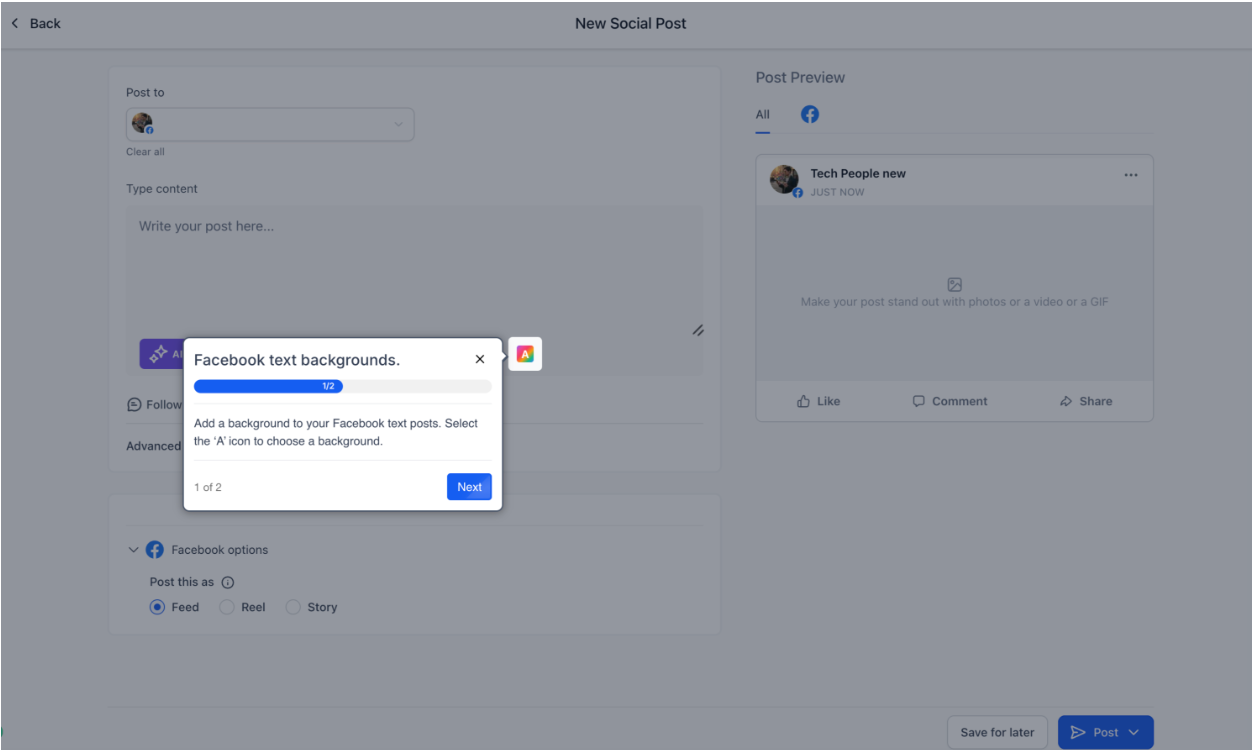
Click Text Background.
Choose your preferred background preset.
Preview the post in real time.
Click Publish Now or Schedule Post.
Backgrounds work only for text-only Facebook posts.
Adding media disables the background feature, and removing media re-enables background selection.
Background styling is supported only on Facebook, not on other platforms.
The character limit for a background post is 130 characters. Longer text is rejected.
Background posts are supported on Facebook Pages only. Groups are not supported.
When a background is applied, Facebook does not render a link preview alongside it.
The Social Planner offers 77 background presets, grouped by category in the same order shown in the preset picker. The preset ID and text color are listed for reference; you select each background visually in the composer.
Preset ID | Description | Text Color |
|---|---|---|
303063890126415 | Yellow, orange and pink gradient, background image | #FFFFFF |
319468561816672 | Dark blue illustration, background image | #FFFFFF |
121945541697934 | Pink illustration, background image | #FFFFFF |
288211338285858 | Blue illustration, background image | #FFFFFF |
106018623298955 | Solid purple, background | #FFFFFF |
1903718606535395 | Solid red, background | #FFFFFF |
1881421442117417 | Solid black, background | #FFFFFF |
249307305544279 | Gradient, red blue, background | #FFFFFF |
1777259169190672 | Gradient, purple magenta, background | #FFFFFF |
122708641613922 | Gradient, dark grey black, background | #FFFFFF |
446330032368780 | Gradient, red, background | #FFFFFF |
219266485227663 | Solid magenta, background | #FFFFFF |
1289741387813798 | Solid dark red, background | #FFFFFF |
1365883126823705 | Solid blue, background | #FFFFFF |
Preset ID | Description | Text Color |
|---|---|---|
1007203310607963 | Light purple illustration, background image | #4944A8 |
6524876100975152 | Light purple illustration, background image | #FFFFFF |
352226107216239 | Beige illustration, background image | #635C56 |
1718609505251057 | Light rose illustration, background image | #FFFFFF |
710893630898745 | Dark sandy hills illustration, background image | #FFFFFF |
698363068460805 | Grey illustration, background image | #595959 |
676677941094852 | Pink illustration, background image | #000000 |
243340214990392 | Red illustration, background image | #FFE8F0 |
650785203544528 | Light green illustration, background image | #086210 |
231438476584844 | White illustration, background image | #525252 |
1655172555010455 | Light purple illustration, background image | #534EBF |
1953054055059680 | Light blue illustration, background image | #009478 |
1369831517263092 | Yellow illustration, background image | #705C04 |
820220726468391 | Red illustration, background image | #FFFFFF |
992723408700211 | Light purple illustration, background image | #000000 |
328761036360061 | Light purple sparkle illustration, background image | #7970FB |
861250769045725 | Blurry red heart illustration, background image | #422828 |
847821360169458 | Orange confetti illustration, background image | #4B3686 |
233245916398282 | Abstract beige heart illustration, background image | #802A2A |
732044718735090 | Magenta illustration, background image | #FFFFFF |
1690448544763812 | Pink and purple wave illustration, background image | #44489E |
1723026288124782 | Light blue illustration, background image | #274C82 |
Preset ID | Description | Text Color |
|---|---|---|
1531491134287540 | Pink and orange gradient illustration, background image | #6C2666 |
299890096121791 | Pink illustration, background image | #3C3887 |
1452114928969476 | Orange and yellow gradient illustration, background image | #611316 |
149887694868218 | Red and purple gradient illustration, background image | #FFFFFF |
681225170735955 | Blue and purple gradient illustration, background image | #000000 |
1012699409936684 | Yellow and orange gradient illustration, background image | #920E1D |
844319284091919 | Pink and purple gradient illustration, background image | #000000 |
639000325036183 | Pink and orange gradient illustration, background image | #413C93 |
Preset ID | Description | Text Color |
|---|---|---|
1038184293978413 | Light grey illustration, background image | #828282 |
340531735020539 | Grey illustration, background image | #525252 |
334764089044169 | Black illustration, background image | #F5F5F5 |
3121716424802062 | Pink illustration, background image | #E11731 |
3625555494348449 | Red illustration, background image | #611316 |
841428021039542 | Dark red illustration, background image | #FF7C74 |
838428734606379 | Pink illustration, background image | #B9005F |
1354917475430263 | Pink illustration, background image | #5F1032 |
287628994046344 | Crimson illustration, background image | #FF90BD |
866176818274367 | Beige illustration, background image | #B15B0F |
653263790240452 | Orange illustration, background image | #7F420E |
618237107054113 | Brown illustration, background image | #FFC891 |
2046306532386635 | Light yellow illustration, background image | #9D8000 |
184083004658498 | Yellow illustration, background image | #887000 |
696971568609418 | Dark yellow illustration, background image | #625008 |
861160898741935 | Light green illustration, background image | #678F16 |
784913000073648 | Light green illustration, background image | #5A7C16 |
680142694061655 | Olive green illustration, background image | #D1FF71 |
1142122703434463 | Light green illustration, background image | #299633 |
1032899107855087 | Green illustration, background image | #206C25 |
345064321202371 | Green illustration, background image | #90E78A |
137309512798730 | Light blue illustration, background image | #009478 |
685611216963500 | Teal illustration, background image | #006A56 |
991525518807930 | Green illustration, background image | #8FE2CA |
1342634519948064 | Light blue illustration, background image | #0078B5 |
2032408867140667 | Light blue illustration, background image | #074C72 |
3543708749174422 | Steel blue illustration, background image | #42BDFF |
1798961300535344 | Light purple illustration, background image | #6760E4 |
646971224215411 | Purple illustration, background image | #F2ECFF |
1502418263945319 | Dark purple illustration, background image | #B7A7FF |
309187638478389 | Pink illustration, background image | #B93EB0 |
284033164441257 | Light purple illustration, background image | #60245B |
352064377250020 | Solid dark purple, background | #FCE3FA |
Can I add a photo or video to a background post? No. Backgrounds are available only for text-only Facebook posts. Adding an image or video automatically disables the background option. If you remove the media, background selection becomes available again.
What is the character limit for a background post? 130 characters. Text longer than that is rejected, so keep your message short and punchy, which suits a quick promo or announcement well.
Do backgrounds work on Instagram or my other connected platforms? No. Background styling is supported only on Facebook. On other platforms the same text publishes as a standard post.
Can I use backgrounds on a Facebook Group? No. Background posts are supported on Facebook Pages only, not Groups.
Will my post show a link preview if I include a URL? No. When a background is applied, Facebook does not render a link preview alongside it. If a link preview matters for that post, publish it without a background.
What happens if I add media to a scheduled background post when editing it? The system automatically removes the selected background so the post stays compatible with Facebook's rules, and it publishes as a standard media post.
Can I preview the post before it goes live? Yes. The composer preview updates in real time, showing the background style and adjusting the font size based on your text length so you can see the final look before publishing.
