The Link Shortener in Social Planner automatically converts long, complex URLs into short, clean links in your post preview and published post. This keeps your social content tidy and easy to read, which matters when you are sharing links to booking pages, landing pages, blog posts, or promotions. You can also add tracking so you know how each link performs.
The Link Shortener is built into Social Planner. It turns a long URL into a shorter link in your post preview and in the final published post. The full URL stays visible in your content editor so you always know exactly what you are sharing, while the shortened version appears in the preview and in the live post.
This improves the readability and appearance of your content, especially when sharing URLs from your website, landing pages, or external sources.
Clean posts: Keeps content uncluttered by shortening long URLs.
Better experience: Concise, easy-to-read links improve how your posts look to followers.
Automatic shortening: Generates a shortened version of any long URL for you.
Accurate preview: Shows how the final post will look with the shortened link.
Works everywhere: Applies across all connected social platforms in Social Planner.
Go to Marketing > Social Planner from the left sidebar.
Click + New Post > + Create New Post.
In the post composer, select the social accounts where you want to publish.
In the Content box, add your caption.
Click the URL Shortener icon next to the content editor.
Add the Name of the Link and the Target URL.
Set up your tracking details:
UTM Campaign (utm_campaign): select or create a campaign name.
Add custom UTM parameters such as source and campaign.
Click Generate and Insert Link.
Once inserted:
The preview pane shows the shortened version of the URL.
The input field still shows the original long URL.
Review your post, then choose Publish or Schedule to send it later.
Content input vs. preview: The long URL stays in the input box so you always see the full link, while the shortened version appears in the preview and the final post.
Automatic conversion: You do not need to replace the link manually. Clicking the shortener icon does it for you.
Auto-generated links: Short links are generated automatically and cannot currently be renamed or customized.
Social Planner provides link-level analytics on the Statistics page, so beyond shortening links you can also see how they perform after publishing. With URL tracking:
Both shortened links and long URLs appear in your performance analytics.
Every link you publish becomes trackable automatically.
You do not need to do anything extra for click tracking. It starts as soon as the post goes live.
Campaign names let you group multiple posts that share the same link.
Note: Only links created through Social Planner appear on the Statistics page.
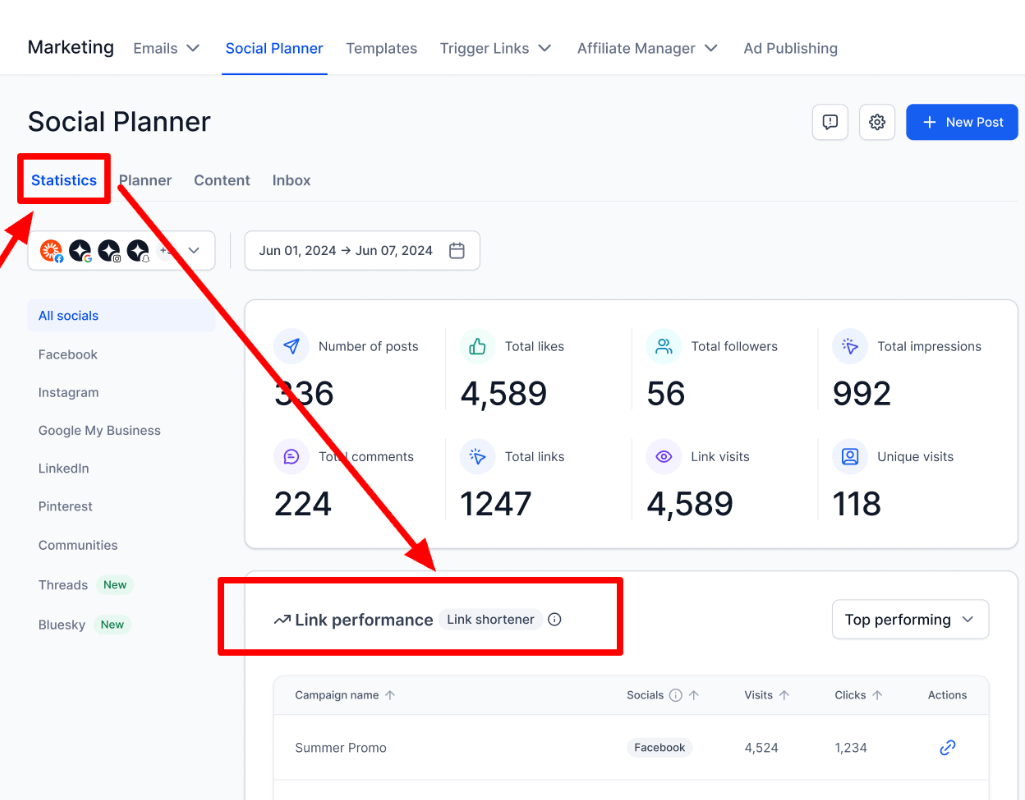
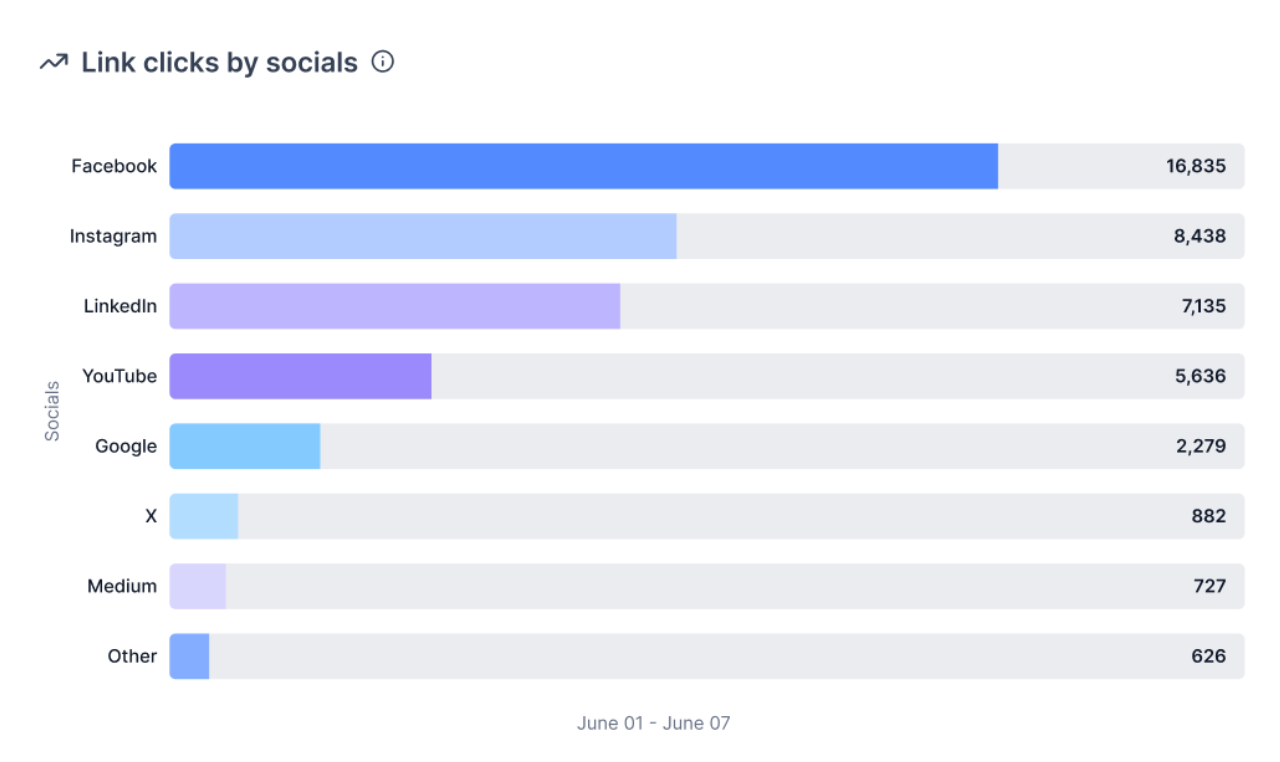
Every URL you share through Social Planner is measurable. You can track:
Total clicks on each shortened or original URL
Platform-by-platform performance (Facebook, Instagram, LinkedIn, and more)
Trends over time
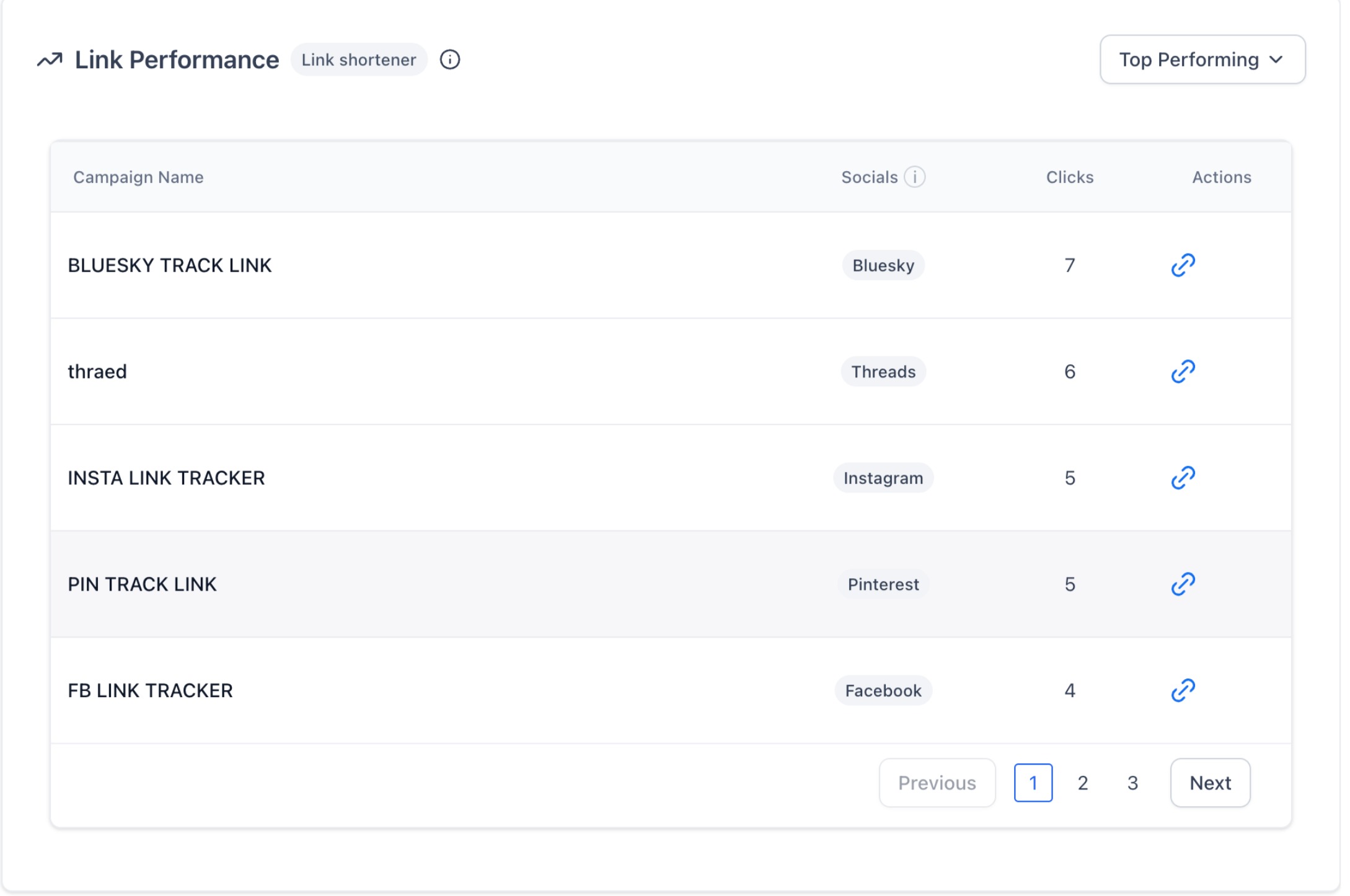
When composing a post, you can assign a Campaign Name to your link. All posts using the same link and campaign are grouped together in analytics, so you can compare performance across posts and channels.
Under Marketing > Social Planner > Statistics > URL Tracking, you can filter by top-performing and low-performing links.
Selecting any URL shows a preview panel so you can confirm exactly which link you are analyzing.
Will my social post show the long link or the short link?
The published post displays the shortened link. The long URL is only visible to you in the content editor.
Why do UTMs matter when using a shortener?
Without UTMs, analytics often show traffic as generic "direct" or "referral," so you cannot tell which post or placement drove it. With UTMs, you can track campaigns properly in Google Analytics and other tools, compare channels and creatives, and see which specific link is working. The shortener keeps the long, UTM-heavy URL clean and clickable while the UTM tags do the reporting work.
Can I customize or rename the short link?
Not yet. Short links are currently auto-generated and cannot be edited.
Does the Link Shortener work on all social platforms?
Yes. The shortened link appears across all social platforms supported in Social Planner, including Facebook, Instagram, LinkedIn, and more.
Can I still use my own external shortener like Bitly?
Yes. You can manually add shortened links from a third-party service if you prefer.
Do I have to set up click tracking?
No. Click tracking starts automatically as soon as a post with a Social Planner link goes live.
Where do I see how my links are performing?
Go to Marketing > Social Planner > Statistics > URL Tracking to see clicks, platform-by-platform performance, campaign groupings, and trends over time.
