If a social account will not connect, disappears from Social Planner, or stops publishing your scheduled posts, this guide walks through the most common causes and how to resolve them. It also explains why X (formerly Twitter) is no longer available and how Aesthetix CRM alerts you when a connected account drops offline.
Most connection problems come down to a few root causes:
Wrong login or profile. You must authorize with the account (and, for Facebook Pages, the profile) that actually owns or administers what you are trying to connect. If you have admin rights on a Page under one Facebook profile, log in with that profile.
Missing admin rights. Facebook Pages, LinkedIn Pages, and Google Business Profile locations all require an admin-level role. If you do not have it, the item will not appear in the selection list.
Permissions not fully granted. During authorization, grant every requested permission. Declining one often causes the account to connect partially or show a "Permissions Missing" status. Reconnect and allow all permissions.
Already connected elsewhere. If an account was previously connected under a different profile, you may need to remove the app from that platform's settings before reconnecting. For Facebook, remove it under Facebook Settings > Business Integrations, then reconnect.
Platform-specific limits. For example, a Google Business Profile account with more than 10 locations is treated as a chain by Google, which disables posting for those listings. These limits are set by the platform, not by Aesthetix CRM.
When in doubt, reconnect the account from Marketing > Social Planner > Settings > Connect Social, granting all permissions. Clearing your browser cache or using an incognito window can also resolve stubborn authorization issues.
When you connect Facebook, Instagram, Google Business Profile, YouTube, LinkedIn, or TikTok, the authorization screen may reference LeadConnector. LeadConnector is the underlying provider that powers Social Planner's social connections for Aesthetix CRM. Seeing it during authorization is expected and safe, and it does not change how your account or content is managed.
If posts to a previously connected Facebook Page suddenly start failing with a token or permission error, the most common cause is a later reauthorization of the same Facebook account that did not include that Page.
Facebook issues one authorization per Facebook user per app. When you connect (or reconnect) your Facebook account and choose which Pages to share, that selection replaces your previous one. Any Page you leave unchecked is deauthorized, even if it is actively connected at another location in your account.
Example:
Your Facebook account manages Pages A and B.
At one location, you connect Facebook and grant access to Page A only. Posting works fine.
Later, at a second location, you connect the same Facebook account and grant access to Page B only.
Page A is now deauthorized. Posts at the first location begin failing with a token error, since Social Planner now has a valid token for only Page B.
Recommended practice: When the Facebook authorization screen asks which Pages to share, select all Pages associated with the account. This makes every Page available for connection from any eligible location, without breaking existing connections or requiring reauthorization later.
Note: Granting access to all Pages does not connect every Page to every location. You still choose which Page each location uses in Social Planner.
Adding Pages later: You can grant access to additional Pages at any time by reconnecting the account. When you do, keep all previously selected Pages checked and add the new ones. Unchecking a Page revokes its access and will break the connection anywhere that Page is in use.
Already seeing token errors?
Reconnect the Facebook account and select all Pages this time.
At each location where posting was failing, verify the Page connection in Social Planner and reconnect the Page if it still shows an error.
This behavior is specific to Facebook and Instagram, where the newest authorization replaces the previous one. For other platforms, granting access to all available profiles is still good practice wherever the option exists.
As of December 4, 2024, the integration with X (formerly Twitter) was disabled. You can no longer create, schedule, or post to X through Social Planner, and X does not appear as an option in the connect flow.
What this means for you:
Posting to X via Social Planner is no longer possible, and you cannot connect an X account.
All other integrations (Facebook, Instagram, LinkedIn, Google Business Profile, TikTok, Pinterest, YouTube) remain fully supported.
Why this happened: X made significant changes to its API requirements. The new terms would have added a large monthly fee that would ultimately be passed on to customers. After working to reach an agreement that would have avoided that cost, we were unable to do so. We continue to monitor X's API requirements in the hope of re-integrating in the future, and we will keep you informed of any progress.
Even after a successful connection, a social account can lose its authentication over time. This usually happens because of expired authentication tokens, password changes, revoked permissions, or a platform's security updates. LinkedIn tokens, for example, are valid for about 60 days before requiring a reconnect.
To help you catch this quickly, Aesthetix CRM shows in-app notification banners for disconnected accounts.
Go to Marketing, then open the Social Planner tab.
Connect your desired accounts (Facebook, Instagram, Google Business Profile, LinkedIn, TikTok, Pinterest, YouTube).
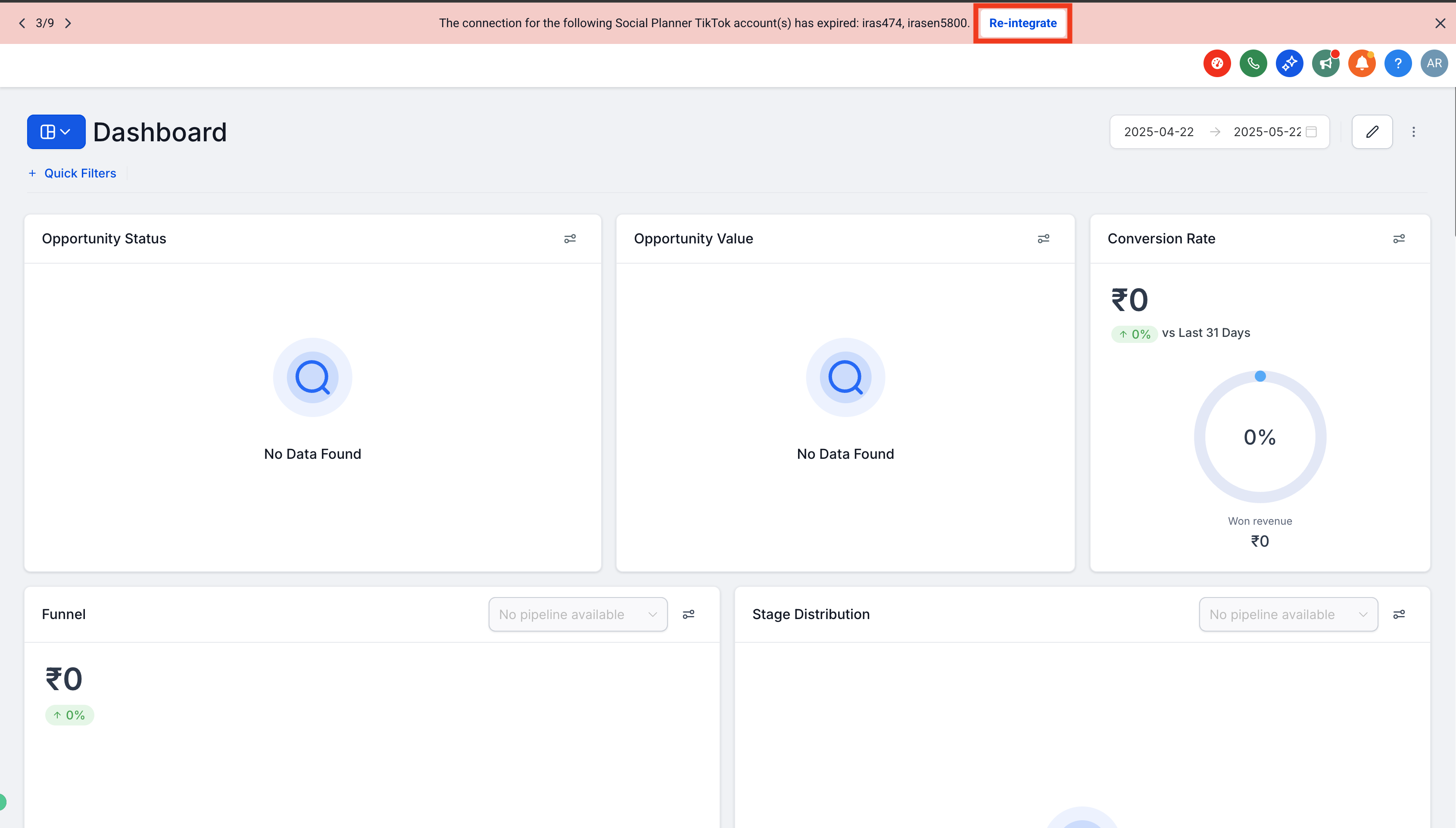
If an account becomes disconnected, a banner appears at the top of Social Planner, Launchpad, or the Dashboard. The banner names the specific account and platform that needs attention, with a message such as "The connection for the following Social Planner Facebook page(s) has expired: [Account Name]."
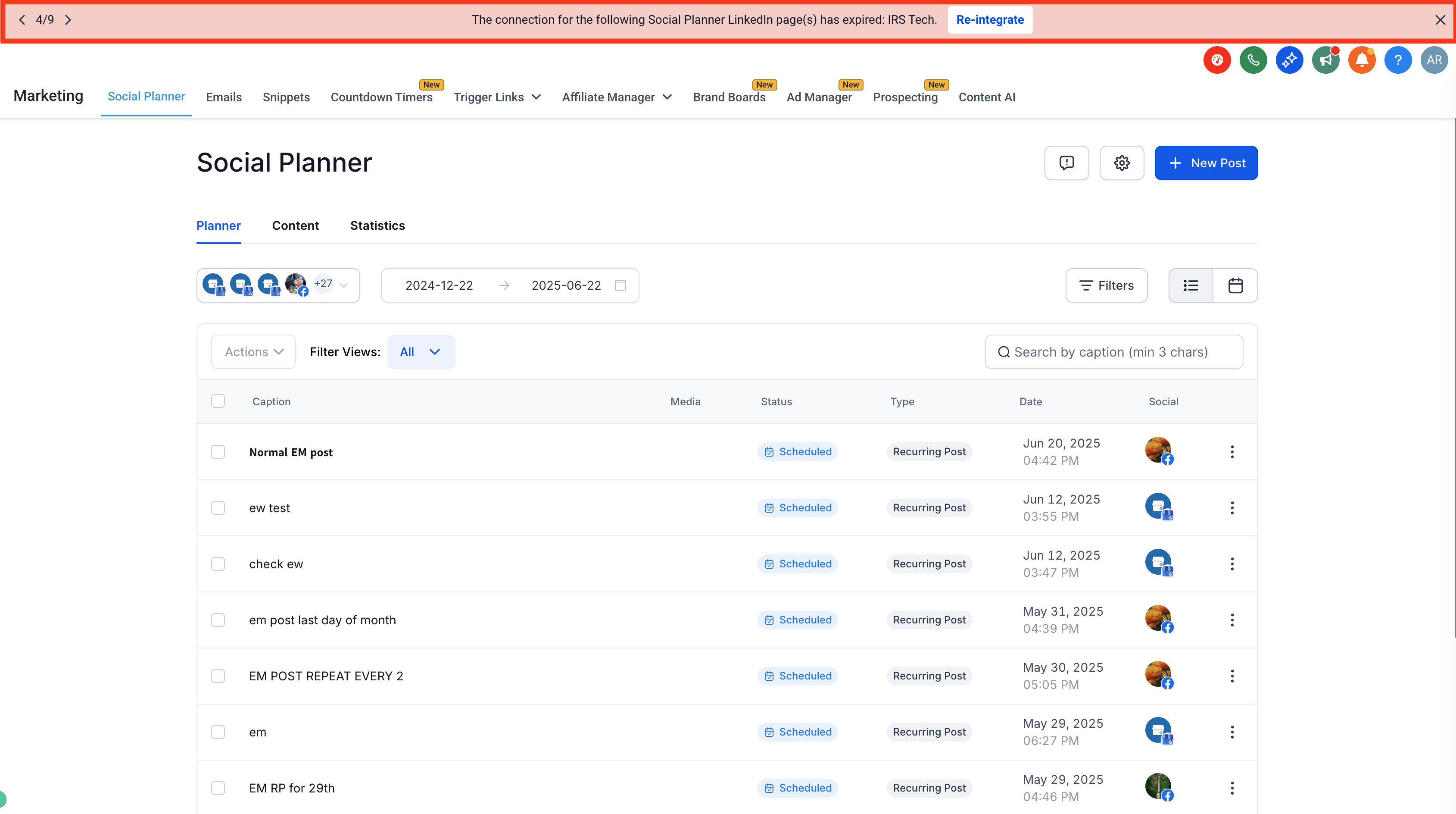
Click the Re-integrate button on the banner.
Complete the authentication process for that platform.
You will also receive an email notification about the disconnection as a backup prompt.
A little routine maintenance prevents missed posts:
Check regularly for notification banners in Social Planner, Launchpad, and the Dashboard.
Reconnect any disconnected account promptly so your scheduled posts keep publishing.
Review your email for disconnection alerts, especially if you are not logged in every day.
Why won't my account appear when I try to connect it?
The most common causes are logging in with the wrong profile, not having an admin role on the account, or declining a required permission during authorization. Confirm your role, log in with the correct profile, and reconnect while granting all permissions.
What causes a connected account to become disconnected?
Disconnections typically happen because of expired authentication tokens, password changes, revoked permissions, or platform security updates. LinkedIn connections, for instance, expire roughly every 60 days.
Why did a previously working Facebook Page suddenly show a token or permission error?
This usually happens when the same Facebook account was reauthorized at another location and the authorization did not include that Page. Facebook replaces your previous Page selection every time you authorize, so any Page left unchecked loses access. Reconnect the Facebook account, select all Pages this time, and verify the connection at each affected location.
Will granting access to all my Facebook Pages post to every one of them automatically?
No. Granting access only makes the Pages available to connect. You still choose which Page each location uses in Social Planner.
Can I add more Facebook Pages later without breaking my existing connections?
Yes, but you will need to reconnect the Facebook account and complete the authorization flow again. Keep every previously selected Page checked while adding the new ones. To avoid this extra step, grant access to all Pages during your initial connection. This behavior is specific to Facebook and Instagram.
Will I lose my scheduled posts if an account disconnects?
Your scheduled posts will not publish while an account is disconnected, but they are not deleted. Once you reconnect, posting resumes as normal.
How quickly am I notified about a disconnection?
Notifications are sent in real time through both in-app banners and email as soon as a disconnection is detected.
Will my team members also see the disconnection banner?
Yes. Everyone with access to Social Planner will see the banner for a disconnected account.
Why does the consent screen mention LeadConnector?
LeadConnector is the underlying provider that powers Social Planner's connections for Aesthetix CRM. Seeing it during authorization is expected and safe.
Can I still post to X (formerly Twitter)?
No. The X integration was disabled on December 4, 2024, due to changes in X's API pricing and terms. All other platforms remain supported, and we continue to evaluate re-integrating X in the future.
A connection keeps failing with "Permissions Missing." What should I do?
This means a required permission was not granted or your role on the account is too low. Reconnect the account, grant every requested permission, and confirm you have admin (or, for ad accounts, the appropriate manager) rights. Clearing your cache or using an incognito window can help.
My Google Business Profile location shows a "chain" error. Can that be fixed?
If your Google account has more than 10 locations, Google disables posting for those listings and treats them as a chain. This is a Google restriction and cannot be changed within Aesthetix CRM.
