Reduce fake form submissions in Aesthetix CRM using CAPTCHA, email and phone validation, and geo-restricted SMS permissions.
Forms are one of the most common ways new patients reach your practice, which also makes them a target for spammers and bots. Aesthetix CRM forms include built-in protections against fake submissions, using multiple security signals such as IP addresses, geographic data, and other advanced parameters, along with Cloudflare's DDoS protection to safeguard your forms and submissions.
For even stronger protection, apply the best practices below when designing your forms.
Unprotected forms can expose your practice to fake submissions that create real problems, including:
Fake contacts that clutter your CRM and skew your patient records.
Excessive automated submissions that overload your systems.
Increased costs from automated SMS, email, or other communication updates triggered by fake entries.
This is especially important when you have automations set up to send SMS, email, or other communication updates. Without protection, you may see increased costs from fake contacts being created by bad actors.
Adding a CAPTCHA is one of the most effective ways to block scammers and spammers from submitting large volumes of fake entries. This helps prevent:
The creation of fake contacts that can clutter your CRM.
Excessive automated form submissions that overload your infrastructure.
Increased costs from automated SMS, email, or other communication triggered by fake entries.
To add a CAPTCHA to your form, navigate to Forms > Custom Fields > CAPTCHA.
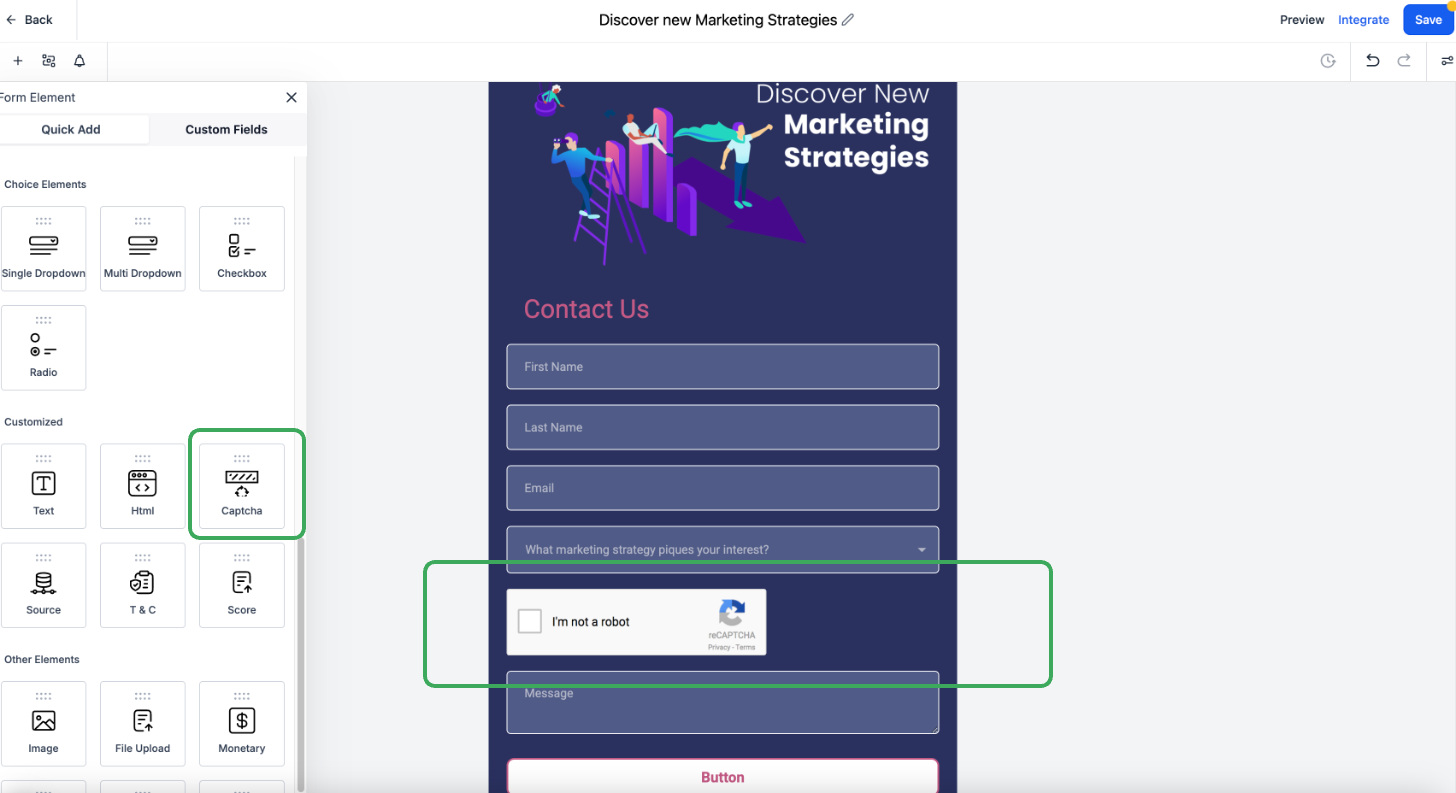
Note: CAPTCHA is especially valuable when your form triggers automated SMS or email. It stops fake contacts before they can drive up your communication costs.
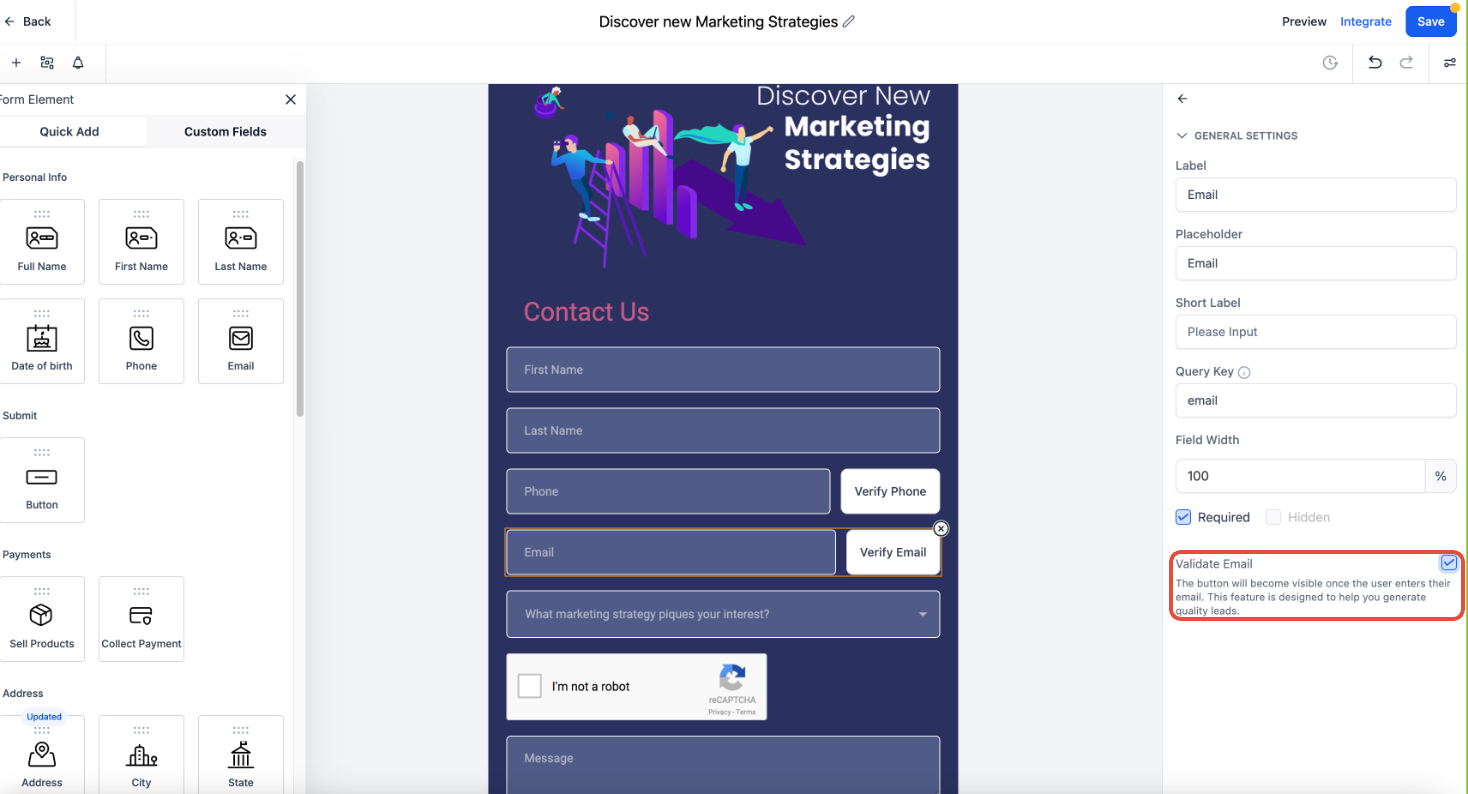
Ensure only legitimate patients submit forms by enabling email and phone number validation. This helps:
Block temporary, invalid, or fake contact details.
Prevent fraudulent entries from affecting your marketing and sales data.
Reduce unnecessary outreach costs.
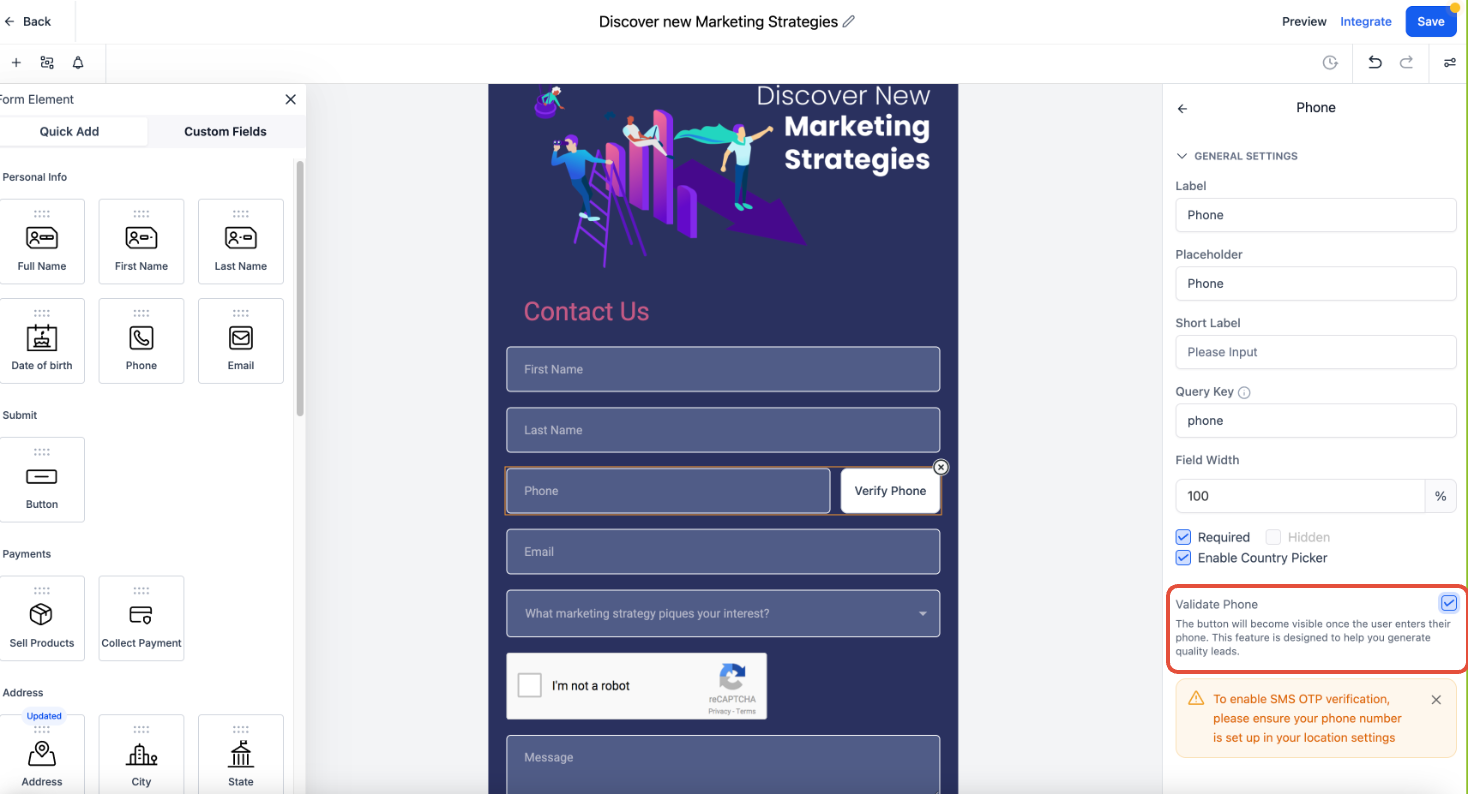
If your form triggers SMS communications, configure SMS geo-permissions to prevent messages from being sent to high-risk regions.
Geo-permissions are managed at the account level. By default, most countries are enabled except for high-risk regions. If you need to modify geo-permissions for your account, contact Aesthetix CRM support with the list of countries you want to enable or disable for texting and calling.
The following high-risk countries are kept turned off by default:
Somalia (+252)
North Korea (+850)
Cuba (+53)
Syria (+963)
Iran (+98)
Sudan (+249)
Liberia (+231)
Zimbabwe (+263)
Afghanistan (+93)
Yemen (+967)
Note: For optimal security, only enable SMS permissions for the regions where your actual patients are located. Be cautious when activating SMS in high-risk areas to prevent fraudulent activity.
Strengthening form security protects your practice from spam, fake contacts, and unnecessary costs. Built-in protections do much of the work, and adding CAPTCHA, email and phone validation, and geo-restricted SMS permissions further hardens your forms. Apply these best practices so only genuine patient submissions reach your system.
Do Aesthetix CRM forms have any spam protection by default? Yes. Every form includes built-in protections that use security signals such as IP addresses and geographic data, along with Cloudflare's DDoS protection, to guard against fake submissions.
Where do I turn on CAPTCHA for a form? Navigate to Forms > Custom Fields > CAPTCHA and add it to your form. This is one of the most effective ways to block automated, high-volume spam.
What does email and phone number validation do? It blocks temporary, invalid, or fake contact details from being submitted, which keeps fraudulent entries out of your marketing and sales data and reduces wasted outreach costs.
Why should I care about spam form submissions? Fake submissions create junk contacts in your CRM, overload your systems, and can drive up costs when automations send SMS or email to those fake entries.
What are SMS geo-permissions? Geo-permissions control which countries your account can send SMS to and receive calls from. Limiting them to regions where your patients live helps prevent fraudulent activity and unexpected charges.
Which countries are blocked for SMS by default? High-risk countries kept off by default include Somalia, North Korea, Cuba, Syria, Iran, Sudan, Liberia, Zimbabwe, Afghanistan, and Yemen.
How do I change SMS geo-permissions for my account? Contact Aesthetix CRM support with the list of countries you want to enable or disable for texting and calling, and the team can update your account settings.
Will adding these protections affect real patients filling out my forms? No. CAPTCHA and validation are designed to stop bots and invalid data while allowing legitimate patients to submit normally. Geo-permissions only restrict regions you choose to disable.
