In Aesthetix CRM, the person who owns a contact does not have to be the same person who owns the related opportunity. Separating these two owners gives your team the flexibility to split responsibility between relationship management and deal management. For example, a coordinator can own the contact and manage the ongoing relationship, while a provider owns the opportunity and drives it toward booking or purchase.
Alongside ownership, the Followers feature lets you add extra users to a contact or opportunity so they can view and edit the record and stay notified of activity. This article explains how to assign separate owners, how followers work, and how to keep the two aligned automatically when ownership changes.
By default, contacts and opportunities often follow the same ownership structure. Enabling separate owners lets those assignments be managed independently, giving you more control over who is responsible for the contact and who is responsible for the related opportunity.
This is useful when one team member manages the relationship while another team member manages the deal or follow-up process. For example, a coordinator who owns the contact handles nurturing and communication, while a provider who owns the opportunity focuses on converting the deal. Decoupling ownership lets each record reflect real responsibilities instead of forcing the same person to own both.
To turn on separate owners for contacts and opportunities:
Step 1: Open Settings. Navigate to Settings in your account.
Step 2: Go to Opportunities & Pipelines. Open the Opportunities & Pipelines section of Settings.
Step 3: Find the ownership setting. Locate the setting labeled Allow different owners for contacts and its opportunities.
Step 4: Turn the toggle On. Enable the setting so contacts and opportunities can be owned and managed by different users.
Step 5: Review the follower options and save. Review the two optional follower settings below the toggle, then click Save Changes to apply the update.
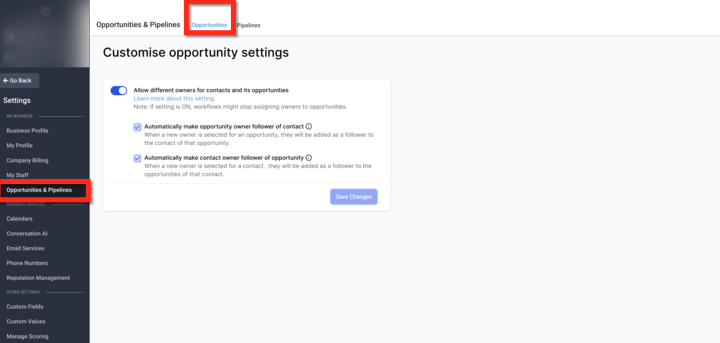
Once this setting is enabled, contacts and opportunities can have different owners.
A contact can remain assigned to one owner while the related opportunity is assigned to someone else. This allows ownership to match your team's real workflow instead of forcing the same person to own both records.
When a new opportunity is created, the default owner is still the same as the contact owner. After creation, the opportunity owner can be updated as needed to reflect the appropriate ownership.
If ownership automation is available in your account, this feature can also support more advanced assignment and routing logic, enabling further customization and automation of how owners are set.
Two optional settings help keep followers aligned when ownership changes.
Enable this option if you want the opportunity owner to automatically become a follower of the related contact whenever the opportunity owner changes. This ensures the person managing the opportunity can also stay updated on the contact record and all contact-level activity.
Enable this option if you want the contact owner to automatically become a follower of related opportunities whenever the contact owner changes. This ensures the person managing the contact is looped in on deal progress and stays informed about deal activity.
These settings improve visibility and collaboration without forcing ownership to remain the same.
The Followers feature for contacts and opportunities allows multiple users to follow and access the same record. You can add up to 10 users as followers who are able to view and edit the record even when the Only Assigned Data user permission is turned on.
Followers are users added to a contact or opportunity who gain access to view and manage that record, even if they normally have restricted data access under the Only Assigned Data permission setting.
Followers inherit the same permissions as the record owner.
This allows them to view and edit the contact or opportunity information.
However, they cannot modify the ownership itself — they cannot change the owner of the record.
Followers can view appointments for the contacts they follow when calendar permissions allow it, even if the user has Only Assigned Data enabled.
To view appointments, followers must have the View appointments, calendars & groups permission.
Without Manage appointments, followers can view appointments but cannot edit or delete them.
With Manage appointments, followers can edit and manage appointments based on their calendar access.
Followers can be added to contacts on the detailed page of the contact record.
Add followers to opportunities in the Opportunity Details on the Edit/Add opportunity modal.
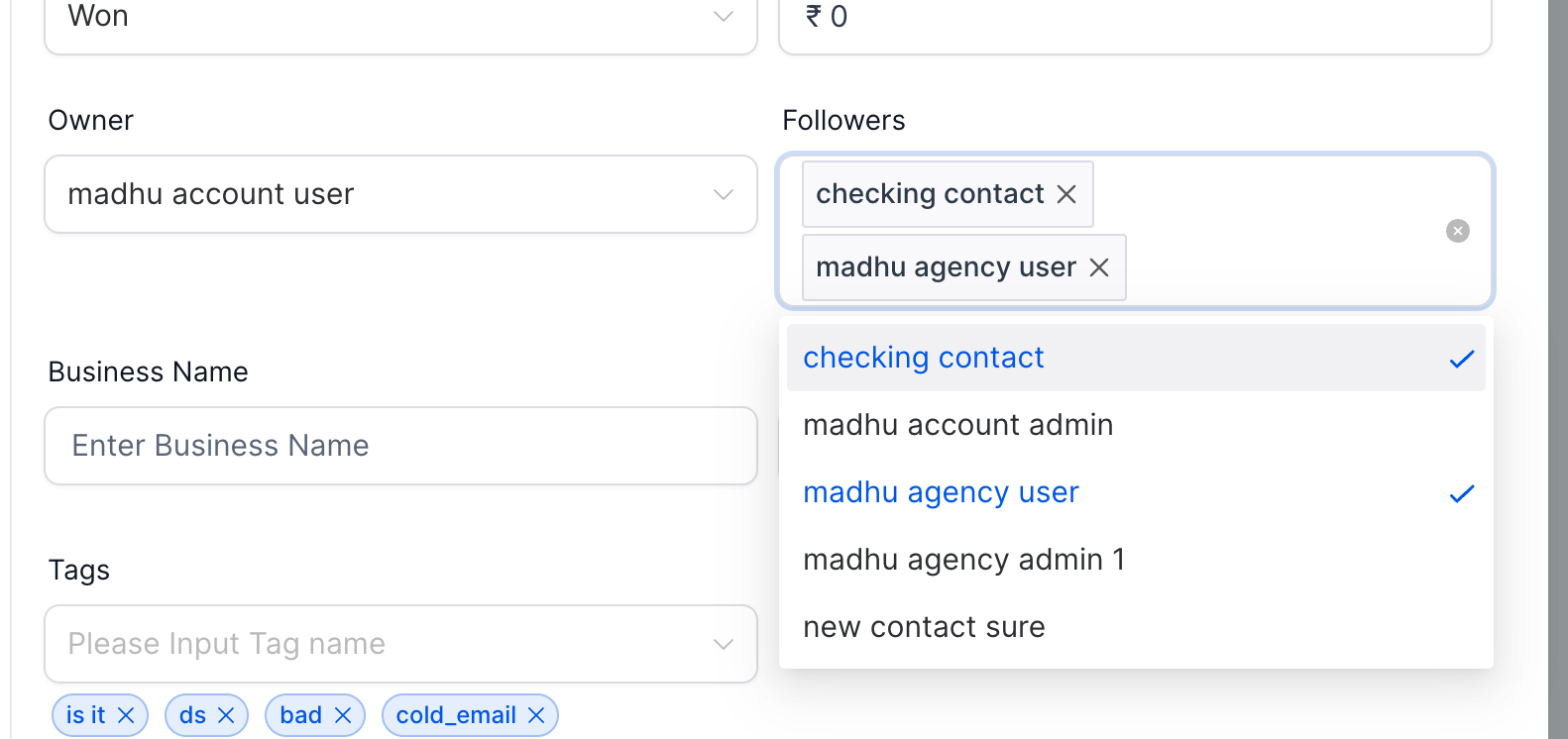
You can assign records based on real responsibilities instead of a one-owner-only structure — for example, assigning contacts to one team and opportunities to another.
Follower updates help the right people stay informed when ownership changes, keeping communication seamless across departments. Followers also improve collaboration across teams, and are especially useful when combined with workflows that assign followers automatically.
Contacts and opportunities can reflect the correct owners without manual workarounds.
When sales, support, or account management teams share responsibilities, ownership can be updated without losing visibility. Use followers strategically to maintain access without compromising the ownership hierarchy.
Can a contact and its opportunity have different owners?
Yes. Once separate ownership is enabled, contacts and opportunities can be assigned to different owners.
What is the default owner when a new opportunity is created?
A new opportunity starts with the same owner as the contact by default. You can update the opportunity owner afterward if needed.
What do the follower settings do?
They automatically add the updated owner as a follower on the related record so the right person stays informed.
Do I need to enable the follower settings for separate ownership to work?
No. Separate ownership works on its own. The follower settings are optional and only affect record visibility and updates.
When should I use separate owners?
Use separate owners when different team members manage relationships and opportunities, or when handoffs are common across your process — such as a coordinator owning the contact while a provider owns the opportunity.
What happens if the contact owner changes after an opportunity has already been assigned?
If Automatically make contact owner follower of opportunity is enabled, the contact owner will automatically be added as a follower of the opportunity when ownership changes. This helps keep the correct team members informed about updates and activity related to that opportunity.
How many followers can I add to a record?
You can add up to 10 users as followers on a contact or opportunity.
Can a follower change the owner of a record?
No. Followers can view and edit the record based on the owner's permissions, but they cannot change who owns it.
If separate ownership is not behaving as expected:
Confirm the main ownership toggle is enabled.
Make sure you clicked Save Changes after updating the setting.
Review whether the follower settings are turned on or off.
Check the contact and opportunity records directly to confirm ownership changes were saved.
If the issue continues, contact Support and include:
A screenshot of your ownership settings
The contact and opportunity records involved
A short description of what you expected to happen
