Email warm-up is an essential step for any new sending domain in Aesthetix CRM. It is the process of gradually increasing your email volume so that mailbox providers learn to trust you, which keeps your messages landing in the inbox instead of the spam folder. When you send from a brand-new domain, providers have no history to judge you by, so they treat large or sudden sends with suspicion. Warming up builds the sender reputation that makes reliable deliverability possible.
To protect your reputation from day one, Aesthetix CRM automatically places new sending accounts in warming mode as part of setup. You do not have to enable anything. While your account is in this mode, your sending is paced to a safe ramp so your domain establishes credibility before you scale up. This guide explains what is happening during that period and the best practices to follow so your warm-up succeeds.
A new sending domain has no track record. Even when your sending subdomain is linked to your established root domain, email providers assess subdomains separately and start your reputation from scratch.
Mailbox providers often route emails from new domains straight to spam because anyone, including spammers, can spin up a new domain and start sending.
Warm-up gives your domain time to establish credibility and prove you are a legitimate sender.
Accounts that skip the warm-up period typically see low deliverability and poor open rates.
Rushing the process can get your messages filtered to spam or your domain flagged, which is far harder to recover from than warming up slowly.
Plan to warm up your domain across at least your first couple of campaigns. A full warm-up generally takes around four weeks. Once your domain is warmed up, you can send larger volumes consistently without issues.
When your sending account is created, Aesthetix CRM places it in warming mode automatically. This is built into setup so that your earliest sends are paced safely while your reputation is still forming.
During warming mode, your sending is held to recommended hourly and daily limits that increase in stages as your domain proves itself. The stage you are in is not just a measure of how long you have had the domain. It reflects the current point in your sending ramp at the moment you send. As you complete sends within the limits, you progress to the next stage and your allowed volume grows.
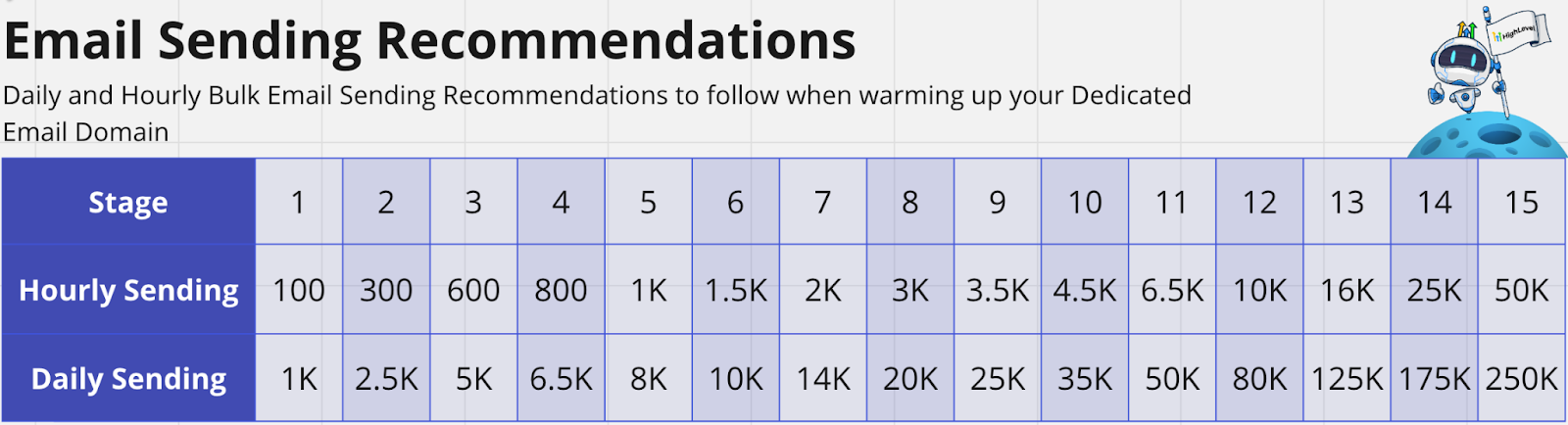
A typical ramp works like this:
Stage one: send no more than 100 emails per hour and no more than 1,000 in a single day.
Stage two: increase to about 300 per hour and up to roughly 2,500 in a single day.
Volume continues to step up over the following weeks as your reputation strengthens.
Lists under 10,000 contacts stay relatively stable in their sending limits. For larger lists, especially if you have never emailed these contacts before, the recommended starting rate is slower to avoid being flagged. After one to two weeks of healthy sending, your volume can increase.
The habits you build during warm-up determine whether your domain earns a strong reputation. Follow these practices closely while you are warming up, and keep them as standards afterward.
Your first warm-up sends should go only to contacts who have opted in and are likely to open and click. Engagement signals like opens and clicks tell mailbox providers your mail is wanted, which is exactly what you need early on.
Send to your most active, most engaged contacts first.
Do not send cold email, meaning email to people who have not opted in, during warm-up. Cold sends need a separate list-cleaning process and tend to hurt deliverability badly on a new domain.
Stop sending to recipients who have taken no action for weeks. It is better to quietly stop sending to an unengaged contact than to have them mark you as spam or unsubscribe.
Resist the urge to send your whole list at once. Build up your volume in small, steady increments.
Stay within the recommended hourly and daily limits for your current stage.
Send fewer emails per hour or day than the maximum if you can, especially at the very beginning.
Prefer spreading a send into small batches over a few minutes rather than one large burst. For example, to stay near 100 emails per hour, send a few emails every couple of minutes.
Use evergreen content for your warm-up sends. Avoid time-sensitive offers, because you cannot send your full list quickly while warming up.
How often you send matters as much as how much you send. Both long gaps and sudden spikes can damage your reputation.
Sending only once a month or every few weeks can hurt your standing, and so can sending every day or several times a day, particularly if that is a sudden change from your past behavior.
A reliable pattern: for a freshly opted-in contact, you might send daily for a brief window (for example, the first five days) to convert them, then slow to a couple of sends per week.
After a week or two of no engagement, slow to a weekly cadence. After a longer stretch of no engagement, stop sending to that contact entirely.
Send special promotions as you have them, but keep them shorter and less frequent. It is better to under-send than to over-send.
Keep emails short and to the point, and add an appropriate image when it helps.
Do not use public link shorteners like bit.ly or tiny.url, which raise your spam risk.
Make sure every email includes a working unsubscribe link.
Most senders warm up on shared sending infrastructure and never need anything more. Businesses sending very high volumes can benefit from a dedicated IP, which gives you exclusive control over your own IP reputation. A dedicated IP needs its own warm-up.
If you set up a dedicated IP, follow these steps so it warms up properly:
Register with Google Postmaster Tools to monitor your domain quality.
Register with Microsoft Sender Reputation tools.
Follow the staged sending ramp above to increase volume gradually.
Send at regular intervals. Sending daily helps providers classify you as a good sender faster and makes it easier to judge volume increases. Sending three or fewer times per week is workable but takes longer for providers to assess you.
Send to your most active users first.
Set up a Reverse DNS (PTR) record for the dedicated IP. This is a two-step process: add an A record in your DNS provider that points your sending hostname (such as msg.yourdomain.com) to the dedicated IP, then submit a request to Aesthetix CRM so we can update the PTR record to match. Propagation usually completes within about 15 minutes.
Once your campaign begins sending, watch your performance and adjust as you go.
Open rate: aim for 25% or higher. Senders who complete a full warm-up commonly reach 40% to 55% open rates.
Deliverability: watch for high bounce rates.
Spam complaints: keep them as low as possible.
If your open rates are low, improve your email content, adjust your sending frequency, and confirm your domain authentication (SPF, DKIM, and DMARC) is set up correctly. If emails are going to spam, check how long you have been sending (it can take up to four weeks to warm up), confirm your DNS and DMARC records are correct, and reach out to support if issues persist.
What is email warm-up? It is the process of gradually increasing your email sending volume so you build a good reputation with mailbox providers, which helps your emails stay out of the spam folder.
Do I need to turn on warming mode? No. Aesthetix CRM places new sending accounts in warming mode automatically as part of setup, so your earliest sends are paced safely while your reputation is forming.
How long until my domain is warmed up? Usually around four weeks. Stick to the best practices and monitor your performance so your domain builds a healthy reputation.
What happens if I send more than the recommended amount? Sending too much too soon can damage your domain reputation and even get you blacklisted. Stay within the volume guidelines for your current stage.
What is email deliverability? It is your ability to land emails in the inbox instead of spam. It is influenced by sender reputation, list health, content quality, and recipient engagement.
What is domain reputation? It is how mailbox providers rate your domain's trustworthiness. A strong reputation gets you to the inbox, while a poor one sends you to spam.
Can I send cold email during warm-up? No. Cold email to people who have not opted in is not recommended on a new domain and tends to hurt deliverability. Warm up with engaged, opted-in contacts first.
