Toll-free numbers (those beginning with 800, 888, 877, 866, 855, 844, or 833) are a popular choice for med-spa practices that want a professional, recognizable number for texting and calling patients. Before a toll-free number can send SMS/MMS to recipients in the US and Canada, it must be verified with the carriers. This guide walks you through buying a toll-free number in Aesthetix CRM, starting toll-free verification (the toll-free equivalent of A2P registration), and resolving rejections.
Aesthetix CRM runs on Twilio and handles toll-free and A2P registration on Twilio for your practice. You do not have direct access to Twilio. We register your number with the carriers on your behalf, but toll-free verification cannot be started from inside the app. To begin, you contact Aesthetix support and provide your business details, and our team submits the verification on your behalf.
Your SMS will fail until your toll-free number is verified. Unverified toll-free numbers are filtered and blocked from sending SMS to the US and Canada, so every text you attempt will fail (commonly with error 30032 or 30007) until verification is complete. Verification is required for messaging only — it has no impact on calling. Contact Aesthetix support to start verification as early as possible.
For details on the broader A2P program, see the A2P Campaign Registration Requirements & Updates article.
1. Open the practice account where you want to purchase the toll-free number.
2. Click Settings at the bottom left.
3. Click Phone Numbers.
4. Click Add Number.
5. Set the Country to United States, then click Filter.
6. In the Phone Number Type filter, de-select Local and Mobile so that only Toll-Free is selected, then click Apply. (You can also type a specific area code to narrow the results.)
7. Select a number you like and click Proceed to Buy.
Toll-free numbers begin with one of these three-digit codes: 800, 888, 877, 866, 855, 844, or 833. If the number you want isn't available, reach out to support.
Toll-free numbers carry a higher per-message cost than local numbers, but they offer advantages for practices that send a higher volume of texts:
Higher throughput — verified toll-free numbers support up to 3 SMS message segments per second, compared with the lower throughput of standard local (10DLC) numbers.
Faster path to sending — once submitted, a toll-free number can often send a limited volume while verification is in progress, whereas A2P 10DLC numbers are typically blocked until registration is approved.
Verification registers your toll-free number and business use case with the carriers so they know you're a legitimate sender. This protects message deliverability and reduces the risk of your texts being filtered or blocked.
Verification is not done in the app. You cannot start or submit toll-free verification yourself from inside Aesthetix CRM, and you have no direct access to Twilio. To begin, contact Aesthetix support and provide the business details below. Our team submits the verification to the carriers on your behalf and keeps you updated on its status.
Until your toll-free number is verified, all of your SMS will fail. Reach out to support to start verification as soon as you buy your number — do not wait until you need to text patients.
Benefits of verifying:
Higher message deliverability
Compliance with carrier rules
Reduced risk of message filtering or blocking
Improved customer trust and brand reputation
Before you contact support to start verification, gather:
Legal business name
Business website (or a public social media link if you have no website)
Business address
A detailed use-case description (what types of messages you'll send)
At least 2 sample message templates
The opt-in method you use to collect patient consent (web form, text keyword, verbal, paper form, etc.)
Note: As of May 2025, toll-free numbers no longer require an EIN or business tax ID for SMS verification. The simplified flow lowers the barrier for sole proprietors and smaller practices. A lightweight Know Your Customer (KYC) step may still be requested to confirm identity.
If you haven't already, follow the steps in the How to Buy a Toll-Free Number section above.
You do not submit the verification form yourself — there is no in-app verification screen, and you have no direct access to Twilio. Instead, submit a request to Aesthetix support with the information below, and our team will file the toll-free verification with the carriers on your behalf.
Important: Until the toll-free number is verified, all of your SMS will fail. Start this process as soon as you buy the number so messaging is ready when you need it.
Provide the following when you contact support:
Business and contact information:
Legal Entity Name — the name that appears on your government and legal forms. This must be the end business the patient is engaging with (for example, your practice name). Approved example: Lakeside Aesthetics.
Website URL — the website or public social media page of the business named above. Social links are allowed only if the business has no formal website and the pages are public. The URL must be live, publicly accessible, and free of any aggregator or third-party branding. Rejected examples: a URL that isn't live, or one that's password-protected or private.
First Name, Last Name, and Email of the point of contact.
Country Code and Phone Number.
Business location details — the physical address of the end business the patient interacts with:
The Country your business operates from.
The State, Address Line 1 (street), City, and Postal/Zip Code.
Messaging use case details:
Your Estimated Monthly Message Volume.
Your Opt-In Type (see the opt-in methods below).
The opt-in method you select must match your submitted use case, and you'll be asked to provide visual proof of how patients consent to receive messages. Below are the accepted methods.
1. Verbal Opt-In
Consent is collected during a phone call with the patient. Provide the exact script used. Example:
"As part of our service we can send you automated text alerts regarding your appointments and account activity. Message and data rates may apply depending on your mobile plan. Reply HELP for help or STOP to opt out at any time. Our Terms of Service and Privacy Policy are available on our website. Please reply 'yes' or 'no' to indicate whether you'd like this service."
2. Web Form Opt-In
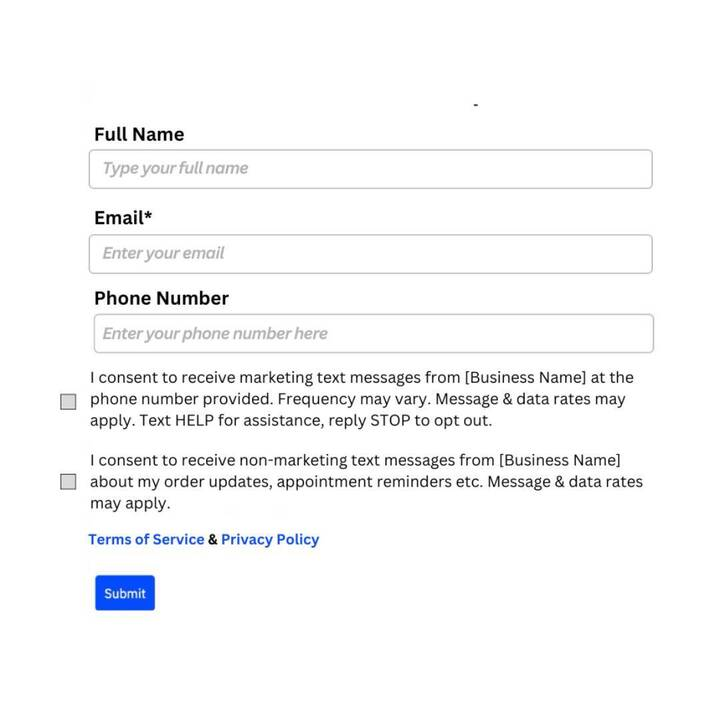
An embedded form on your website prompts patients to enter their mobile number and opt in. Web-form opt-ins must follow these requirements:
The opt-in checkbox must be selectable by the patient and cannot be pre-selected. It cannot be required to submit the form.
The checkbox must include a consent disclaimer, such as: "I consent to receive SMS notifications and alerts from [Practice Name]. Message frequency varies. Message and data rates may apply. Reply HELP for assistance or STOP to unsubscribe at any time."
The SMS opt-in consent must be separated from Privacy Policy / Terms of Service and from any promotional/marketing consent checkboxes.
The disclaimer must include all of the following: the program name or a description of the messages (appointment reminders, offers, etc.); the business represented; a fee disclosure ("Message and data rates may apply"); message frequency ("Message frequency varies"); customer-care info ("Reply HELP for help"); opt-out instructions ("Reply STOP to unsubscribe"); and links to your Privacy Policy and Terms of Service in the page footer (not inside the checkbox statement).
Example — when the phone-number field is mandatory on the form: consent checkboxes should be separated for marketing and non-marketing messages, cannot be pre-selected, and must always be optional. Privacy Policy and Terms link in the footer.
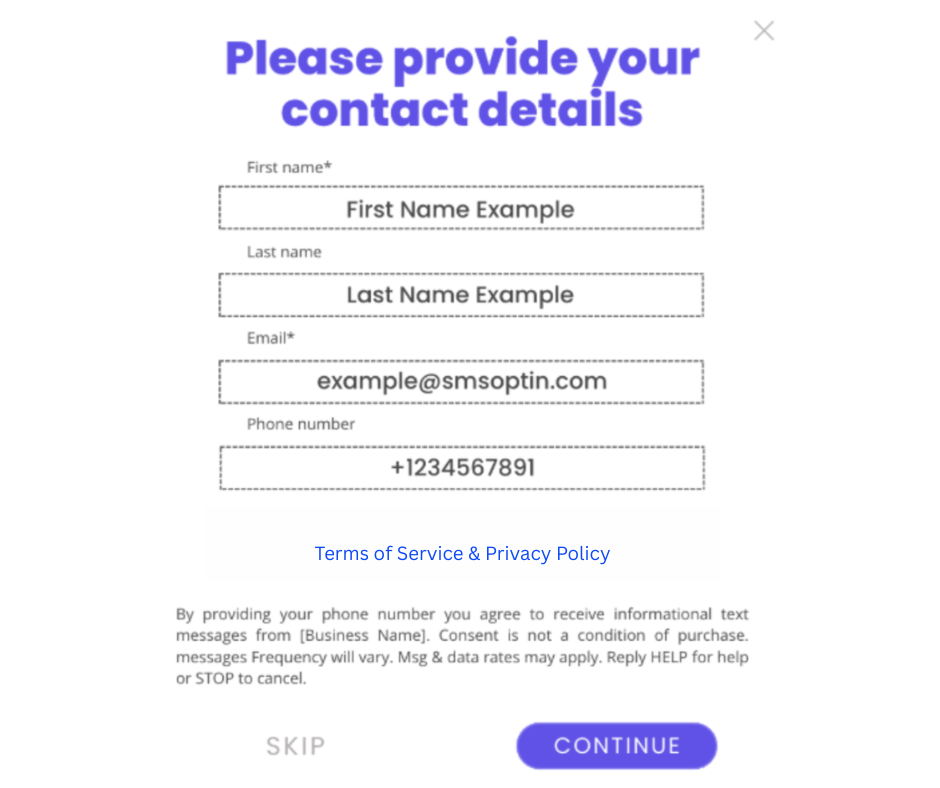
Example — when the phone-number field is not mandatory: consent checkboxes aren't required, but the Privacy Policy and Terms link should still appear in the footer.
If your web opt-in is behind a login or isn't published yet, host a screenshot of it on a publicly accessible location (such as Google Drive, OneDrive, or your account's Media Storage library) and provide that image URL along with the website URL where the form asks how patients consent to receive messages.
3. Paper Form Opt-In
An in-person visitor completes a physical form that collects their phone number and consent. Host a screenshot of the paper form on a publicly accessible location and provide the URL when asked how patients consent.
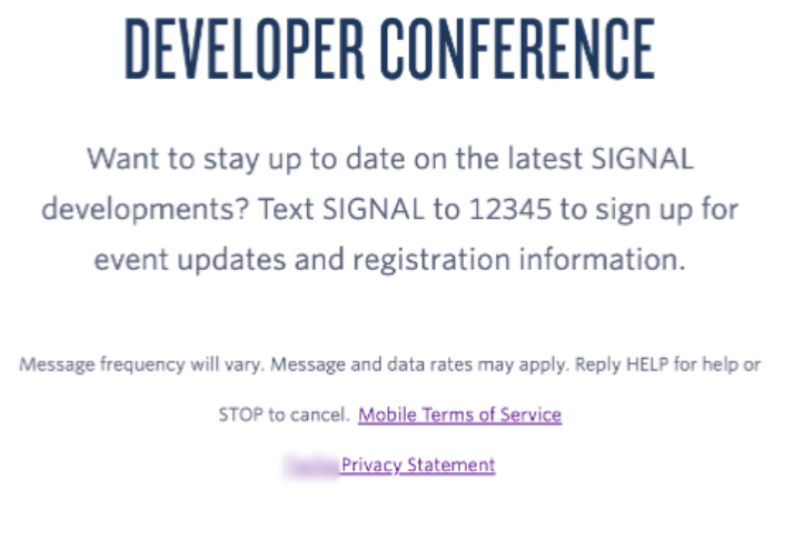
4. Text Message Opt-In
Host a screenshot of the campaign collateral (for example, signage with a keyword) on a publicly accessible location and provide the URL, along with your website URL.
5. Mobile QR Code Opt-In
A QR code links patients to an online form (or opens their messaging app with a templated opt-in message) where they enter their mobile number and opt in. If the QR code leads to a web form, that form must meet all the Web Form Opt-In requirements above.
The opt-in method must match the submitted use case. Marketing campaigns require express consent, where the patient actively agrees to receive messages. Your website must be operational, include a clear messaging opt-in, and show Terms of Service and Privacy Policy links in the footer of all pages.
Along with your opt-in method, include the remaining use-case details in your request to support:
Use Case Category/Categories — the categories that best represent how the number will be used; they must reflect the actual messaging pattern tied to this toll-free number. If any marketing activity is involved, be sure the Marketing category is included (and that your opt-in form reflects marketing), or verification may fail.
Opt-In Workflow Image URLs — a publicly accessible image, screenshot, or document that matches your selected opt-in type and clearly shows where and how the patient provides their phone number and agrees to receive messages. The link must not be behind a login or in a private folder.
Use Case Description — explain in detail how messaging is used. Include the purpose of the messages, target audience, opt-in methods, and platforms used. Approved example: "This number is used to send appointment reminders and promotional offers to patients of Lakeside Aesthetics who have opted in through our website intake form." Rejected example: "Marketing" — too vague and not tied to specific content or an opt-in method.
Message Content — sample messages that match the use case. Each must include a clear message, personalization (if applicable), your business name, and opt-out language. Approved example: "Hi {{name}}, this is Lakeside Aesthetics confirming your appointment on Friday at 2 PM. Reply STOP to opt out." Rejected example: "Your appointment is today at 10:00 AM" — lacks business name, opt-out language, and context.
Once you've sent this information, Aesthetix support submits the verification to the carriers for you. If a Know Your Customer (KYC) identity check is required, our team will let you know what's needed.
Depending on your business type, support may ask for additional fields that help carriers validate your identity and improve approval reliability:
Business DBA (Doing Business As) name
Legal Entity Type
Business Registration Authority
Business Registration Number
Business Registration Country
Toll-free verification can take 4 to 6 weeks to complete, though some numbers are approved in as little as two days. No timeline is guaranteed. Once submitted, you can monitor the status as it moves through processing:
Status | Traffic limit | What's happening |
|---|---|---|
Restricted (Un-verified) | Blocked | The number hasn't been submitted for verification or wasn't approved. All restricted toll-free traffic to the US and Canada is blocked. Submit for verification as soon as possible. |
Verified (Approved) | 3 SMS segments per second | After a successful review and carrier approval, the number moves to Verified. Verified numbers have full A2P sending access and a greatly reduced risk of filtering across major US and Canada networks, as long as you adhere to your stated use case and all applicable rules (including Twilio's Messaging Policy). |
Rejected | Blocked | The verification request was rejected. See the rejection reasons below to determine whether you can resubmit. |
Political Election Campaign use cases have an extra requirement: a valid Campaign Verify (CV) Auth Token must be supplied during toll-free verification.
Beginning February 17, 2026:
All new political toll-free verifications require a valid token.
Existing approved political toll-free numbers must also comply.
Political messaging without a valid token may be rejected or restricted by the carriers.
This applies only to political campaigns, political organizations, and agencies sending political messaging. Non-political toll-free messaging is not affected, and Campaign Verify is separate from A2P 10DLC registration — it does not replace it.
How to obtain a Campaign Verify token:
Visit campaignverify.org.
Complete the political-organization identity verification process.
Obtain your Campaign Verify Auth Token.
Copy the token for use during toll-free verification.
Aesthetix CRM does not issue Campaign Verify tokens.
Add the CV token to your verification:
When you contact Aesthetix support to start verification for a political use case, include your Campaign Verify Auth Token and indicate that the use-case category is Political Election Campaigns. Our team enters the token and submits the verification on your behalf.
If your verification request fails for an eligible reason, you can correct the issue and resubmit. Rejected submissions that are eligible for resubmission stay in a Pending state while awaiting the requested information. If you don't respond within 7 days, the submission expires and you'll need to start a new one.
Each rejection code below can be corrected and resubmitted. Take the listed corrective action, then re-submit with the updated information.
Error Code | Rejection category | Reason | Correction needed |
|---|---|---|---|
30448 | Alcohol with no robust age gate | Age gate was similar to "Are you 18/21+? Yes/No" | Change the age gate to collect the birthday as MM/DD/YYYY |
30448 | Age gate not present / not acceptable | Same as above | Same as above |
30449 | Public URL shortener | Link is a free public shortener associated with high abuse | Use a branded URL or paste the full unshortened link |
30449 | Non-secured URL | Insecure URL in message content | Add the https:// protocol |
30445 | Can't verify business information | Business info couldn't be verified, was missing, or invalid | Provide complete, valid end-business info in all fields |
30445 | Can't validate URL | Website didn't resolve, isn't live, says "Coming Soon," or is password-protected | Ensure the website is live, working, and publicly accessible |
30445 | End user (not ISV) required | The business info provided was a software vendor, not the end business sending the SMS | Provide the end-business name, address, contact name, email, and URL that will engage with subscribers |
30446 | Express consent required | Use case is marketing/promotional but express consent isn't collected | Collect stand-alone express consent (not part of a transaction, terms, or privacy policy) |
30446 | Consent for messaging is a service requirement | Opt-in doesn't show the user consenting to SMS (e.g., only an email signup) | Add language making clear the patient is signing up to receive SMS |
30446 | No opt-in provided | Opt-in field blank, "N/A," buried in terms/privacy, behind a login, expired, or low-resolution | Provide a clear, publicly accessible opt-in that shows the patient's SMS consent |
30446 | Opt-in shared with 3rd parties | Opt-in language says messages may also come from affiliates or partners | Make opt-in a 1:1 relationship; stop sharing it across businesses |
30447 | Single number used for multiple businesses | One number is used for multiple businesses | Use a separate toll-free number per business |
30447 | More than 5 numbers per business | More than 5 numbers under the same business name and address | Justify the need (different agents, departments, or locations, with addresses) |
30511 | Verbal consent script must be provided | You indicated verbal opt-in but didn't provide a complete script | Provide a detailed verbal consent script, a sample interaction, how consent is recorded, and opt-out instructions, then resubmit |
Error 30437 means the 7-day window for a rejected verification has expired. You can still edit and resubmit, but it's treated as a new submission (no longer prioritized), and messaging on the number stays blocked until it's verified. Fix all rejection reasons before resubmitting.
The categories below are forbidden messaging types and cannot be resubmitted. Use cases that violate the platform's Acceptable Use or Messaging Policy are also not allowed, regardless of number type or destination.
Error Code | Category | Reason |
|---|---|---|
30441 | SHAFT — Sex | Nudity, pornography, adult content |
30441 | SHAFT — Hate | Hateful, profane, or violent speech |
30441 | SHAFT — Firearms | Firearms, ammo, gun ranges |
30441 | SHAFT — Tobacco / Vape | Cigarettes, cigars, tobacco, vape products |
30441 | SHAFT — CBD / Marijuana | Cannabis, marijuana, CBD, THC, hemp |
30442 | Known spam campaign | Flagged for spam or fraud |
30442 | Known phishing campaign | Flagged for phishing |
30443 | Loan marketing | Mortgage, auto, student, personal, or payday loan marketing |
30443 | 3rd-party debt collection | No first-party opt-in present |
30443 | Gambling | Casino, betting, or gambling |
30443 | Sweepstakes | Sweepstakes, contests, prize awards |
30443 | Stock alerts | Stock or stock-market content |
30443 | Cryptocurrency | Crypto, NFTs, blockchain |
30443 | Risk investment | Promised returns on an initial investment |
30443 | Debt reduction | Consolidating or reducing debt |
30443 | Credit repair | Repairing or improving credit |
30443 | 3rd-party lead generation | Customer info shared outside the end business |
30443 | Federally illegal substances | Any federally illegal substance |
30444 | Fraud | Flagged for spam or fraud |
30444 | Deceptive marketing | Assessed for deceptive marketing tactics |
If you believe a rejection was made in error, you can contact support to request an appeal. Use the subject line "Toll-Free Verification Rejection Appeal for [your business name or number]."
Error 30032 means you sent a message from a toll-free number to a US or Canada mobile subscriber, but the number hasn't completed verification. Common causes:
The toll-free number hasn't been verified to send traffic to the US and Canada.
The toll-free verification submission was rejected.
To resolve it, contact Aesthetix support to submit (or correct and resubmit) the toll-free verification for that number using the information described above. Messages on restricted toll-free numbers are blocked, and messages on pending numbers may also be filtered until verification is approved.
What happens to my traffic if my toll-free number is rejected?
If the rejection is eligible for resubmission, the number stays Pending for up to 7 days so your traffic can continue while you submit the requested changes. After 7 days without an amended submission, it moves back to Restricted (Not Verified) and traffic is blocked with a 30032 error. If the rejection is ineligible, the number moves to Blocked and traffic is blocked with a 30032 error.
My request was rejected and is ineligible for resubmission. What can I do?
You may be able to reach recipients another way. Email is an option for many use cases (with proper age-gating where required), and Programmable Voice (calling) is not subject to the same SMS carrier restrictions.
Can I send SMS before my toll-free number is verified?
No. Until the number is verified, all of your SMS will fail — unverified toll-free traffic to the US and Canada is blocked, and even pending numbers are heavily filtered. Contact Aesthetix support to start verification as early as possible so messaging is ready when you need it. Verified numbers have full sending access and a much lower risk of filtering.
I'm sending under the allowed segment limit but messages still aren't going through.
Toll-free messages can be filtered or blocked even under the daily limit. The stated limits are the maximum a number can send, not a guarantee. If you see error 30032, you may have hit a limit or a filter. Verifying the number early reduces the risk.
Can I verify multiple numbers?
Yes. Each toll-free number must be verified individually — let Aesthetix support know which numbers you need verified and provide the required details for each.
Do I need to be a US business to register a toll-free number?
No. You can use a business address from another country to register.
Is verification required for small practices too?
Yes. All businesses using toll-free messaging must comply, regardless of volume.
Will I be charged if I hit an error when sending an SMS?
If an internal error occurs before the message is handed off to the phone provider, you won't be charged. However, charges apply to every message where a delivery attempt was made, regardless of final delivery status — including undelivered messages. Review messages carefully before sending, as refunds aren't issued for failed SMS.
Do political toll-free campaigns require a Campaign Verify token?
Yes. Political Election Campaign use cases require a valid Campaign Verify (CV) Auth Token, obtained from CampaignVerify.org. The requirement applies only to political messaging.
Does Campaign Verify replace A2P 10DLC registration?
No. Toll-free verification, Campaign Verify, and A2P 10DLC are separate registration systems.
