Text messaging is one of the most effective ways to reach your patients, but costs can add up quickly if you don't understand how messages are billed. This guide explains what drives SMS and MMS costs in Aesthetix CRM, how to estimate the cost of a message before you send it, and the factors that can quietly increase your bill.
This article focuses on how messages are billed so you can budget and optimize your campaigns. For current per-message rates, see the Technology & Messaging Credits page. Higher-volume customers may be able to secure better rates, so reach out if your sending volume is significant.
Several factors impact the cost of an SMS, including the number of message segments, the direction of the message (inbound or outbound), whether you attach an image (which makes it an MMS), emojis, hidden characters, the destination country, and carrier fees. Each of these is covered below in "Factors That Impact SMS Costs."
Understanding this cost structure helps you:
Budget accurately for messaging campaigns.
Optimize message content to keep costs down.
Decide when to use SMS versus MMS.
Understand carrier fees and other charges on your bill.
An SMS is measured and billed in segments. Each segment holds 160 characters when standard GSM-7 encoding is used. If your message exceeds 160 characters, it is automatically split into multiple segments, and each segment is billed.
A message with 160 characters = 1 segment.
A message with 161 characters = 2 segments.
The more segments your message contains, the higher the cost.
When a message runs across multiple segments, each segment after the first can hold slightly fewer characters (about 153) because space is reserved to stitch the segments back together. As a rule of thumb: 161–320 characters = 2 segments, 321–480 characters = 3 segments, and so on.
Because outbound messaging is typically your largest texting expense, the steps below walk through estimating the cost of a single outbound SMS.
There are four steps to estimating the cost of an outbound SMS:
Find the number of segments in your text.
Look up the per-segment cost.
Account for carrier fees.
Calculate.
Conceptually, your estimate comes from this relationship:
Estimated Cost of Outbound SMS = (Number of Segments × Per-Segment Cost) + (Number of Segments × Carrier Fees)
This estimate assumes a single outbound SMS sent from a US number to another US number. Many factors can change the final cost — see "Factors That Impact SMS Costs" below. Rates may change from time to time; always confirm current rates on the Technology & Messaging Credits page.
Write the message you want to send, then copy the text. Open the Messaging Segment Calculator and paste your message into it. Note the "Number of Segments" — you'll use this value in the calculation.
The per-segment cost depends on the country you're sending to and the number type you use (for example, local long-code numbers versus toll-free numbers). For current per-segment rates, see the Technology & Messaging Credits page. If you send at high volume, you may be able to secure better rates than the standard published figures.
In the US and Canada, mobile carriers (such as T-Mobile, AT&T, and Verizon) charge a small per-segment pass-through fee for messages delivered to their subscribers. These fees vary by carrier and by number type (long code, toll-free, or short code).
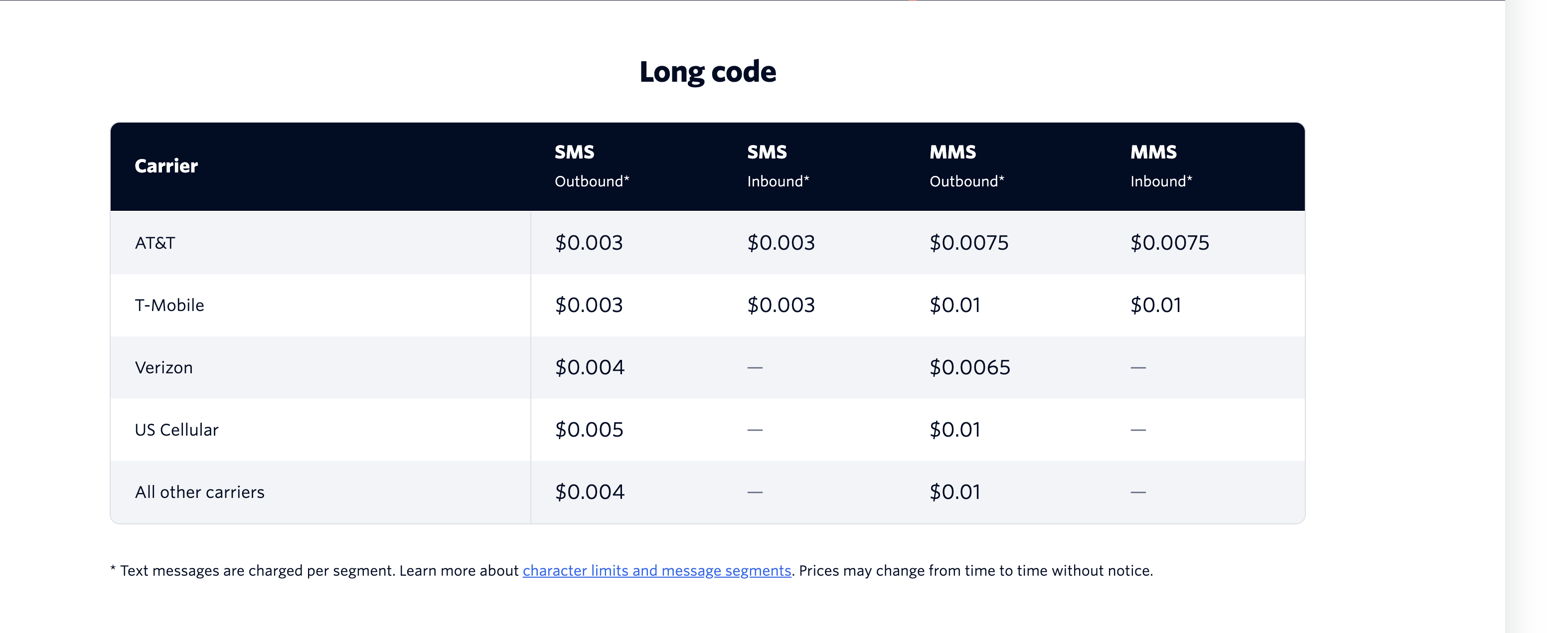
Note: Carriers change these pass-through fees multiple times per year. The figures shown in any carrier-fee table are illustrative and may be out of date — always check the current rates on the Technology & Messaging Credits page before relying on them.
Because carrier fees depend on the recipient's carrier — which you won't know in advance — it's best to estimate using the highest current carrier fee as a worst-case figure.
Combine your values:
Estimated Cost = (Number of Segments × Per-Segment Cost) + (Number of Segments × Carrier Fee)
First, multiply the number of segments (Step 1) by the per-segment cost (Step 2). Then multiply the number of segments (Step 1) by the carrier fee (Step 3). Finally, add the two results together for your estimated total.
This is only an estimate — the final price can only be known after the message is sent. Adding an image, emojis, or hidden characters will change the cost, as explained below.
Many factors affect the final cost of a message: direction (inbound or outbound), the destination country, the number of segments, carrier fees, whether you add an image, emojis, and hidden characters. The most common ones are covered below.
Costs scale directly with the number of segments — more segments means a higher cost. A 5-segment message costs roughly five times as much as a single-segment message. Keeping your messages concise is the single most effective way to control texting costs.
Character limits per segment also vary by country and encoding. Most regions use 160 characters per segment with standard GSM-7 encoding, but some use 70 characters depending on the encoding required.
Adding a media attachment, such as an image, turns the message into an MMS, which is billed differently than SMS. Unlike SMS, an MMS is not split into 160-character segments — it is generally counted and billed as a single message regardless of the text length, but at a higher rate that also includes MMS carrier fees. As a result, MMS is typically more expensive per message than a single-segment SMS. For current MMS rates, see the Technology & Messaging Credits page.
A single message can include up to 10 media files with a combined size of up to 5 MB. If a file pushes the total over 5 MB, it's uploaded to your media library and a short link is created that you can include in the message instead. Messages with more than 5 MB of attached media will not be accepted.
Emojis can boost engagement, but they increase cost. Emojis and other non-standard characters (such as Chinese, Arabic, or special symbols) trigger UCS-2 (Unicode) encoding instead of GSM-7. Under UCS-2, each segment holds only 70 characters instead of 160 (and about 67 characters per segment in a multi-segment message).
Because the per-segment limit drops so sharply, even a short message can jump from 1 segment to several once emojis are added. In the example below, a message that fit in 1 segment as plain text expanded to 4 segments after a few emojis were added — so use them sparingly.
When you copy and paste message text from a word processor or webpage (such as Microsoft Word or Google Docs), invisible characters can come along with it. You can't see them, but they count toward your character total and can silently inflate your segment count.
In the example below, a simple "Hey there" copied from a webpage looks like it should be 1 segment, but the hidden characters bloated it to 4 segments.
Use the Segment Calculator to check the real character count and segment count of any message. To avoid pulling in hidden characters, paste as plain text:
Windows: Ctrl + Shift + V
Mac: Cmd + Shift + V
As noted in Step 3, carriers like Verizon, T-Mobile, and AT&T charge a pass-through fee when you send a message to one of their subscribers. Carrier fees are billed per segment, so reducing your segment count also reduces the carrier fees you pay.
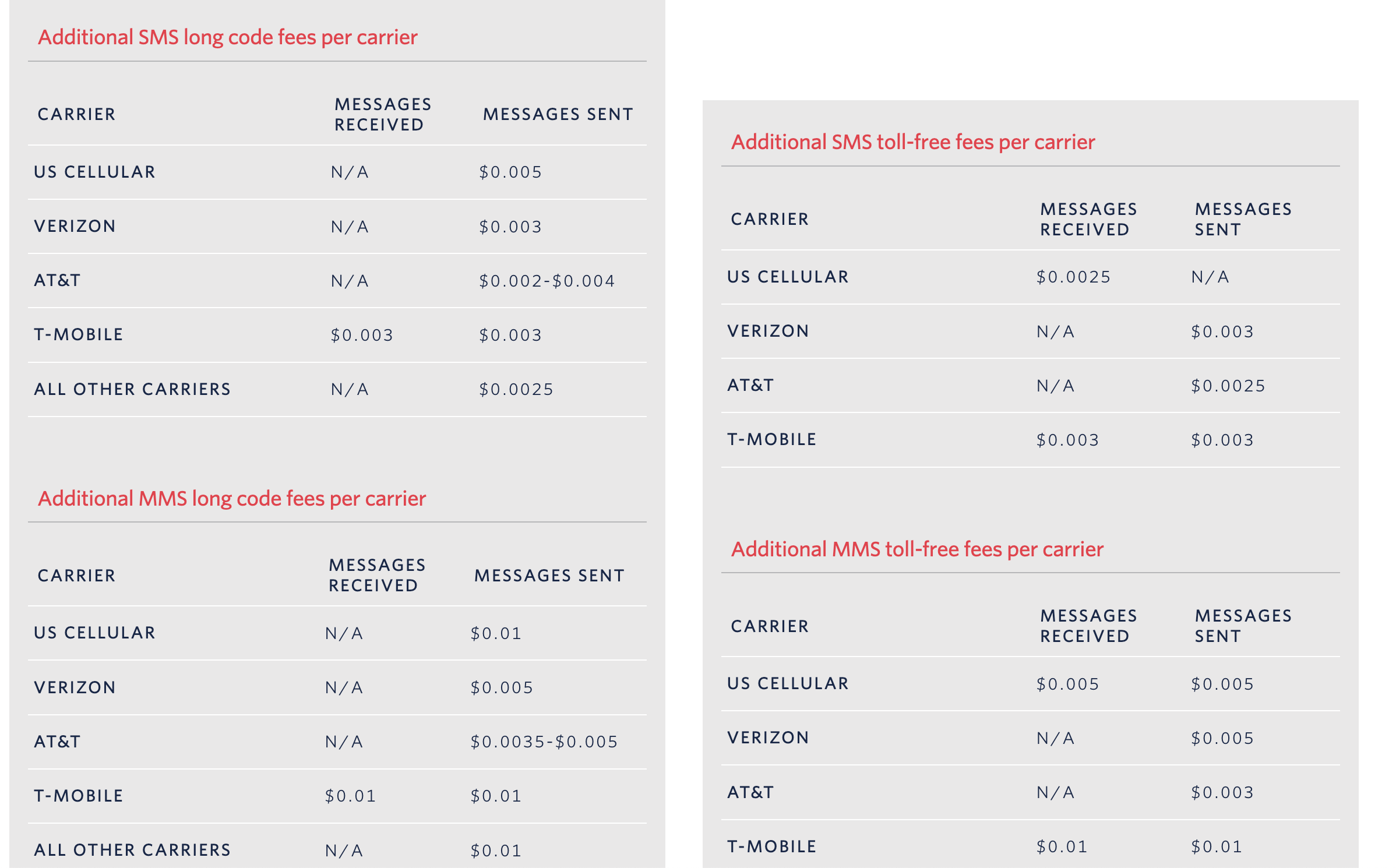
Note: Carrier pass-through fees change several times per year, and SMS and MMS carrier fees differ from one another. Any fee figures pictured here are illustrative and may already be out of date — confirm the current rates on the Technology & Messaging Credits page.
To send application-to-person traffic, your account must complete toll-free or A2P 10DLC registration — Aesthetix CRM handles this registration for you. For details, see the article A2P 10DLC Registration.
The examples above estimate an outbound message — one you send from Aesthetix CRM to a contact. When a contact replies, you are also billed for the inbound message.
To estimate an inbound message, use the same relationship but substitute the inbound per-segment cost and inbound carrier fee from the Technology & Messaging Credits page:
Estimated Cost of Inbound Text = (Number of Segments × Inbound Per-Segment Cost) + (Number of Segments × Inbound Carrier Fee)
Be sure to reference the inbound rates, and check whether your message is SMS or MMS, when filling in the values.
The examples above assume you're sending between US/Canada numbers. If you text a number in another country, you're billed at that destination country's rates, which can be significantly higher than US/Canada rates.
You're generally charged the destination country's pricing, but in some cases additional fees apply. Because international rates vary based on each country's rules and regulations, sending a single test message is a good way to see the real cost before running a larger campaign. For current international rates, see the Technology & Messaging Credits page.
Am I charged for messages that fail to send?
If a message fails due to an internal error before it's handed off to the phone provider, you are not charged. However, once a delivery attempt has been made, charges apply regardless of whether the message is successfully delivered. This includes messages sent from toll-free and A2P numbers, and messages that can't be delivered due to country restrictions or other limitations. Refunds are not issued for undelivered messages, so review your messages carefully before sending.
Why are my SMS costs so high?
The most common reason is messages with multiple segments. Because pricing is based on segments, a 5-segment message costs about five times more than a single-segment message. Open the Segment Calculator, paste your message, and trim it to reduce the segment count.
How can I reduce my messaging costs?
Keep messages short to minimize segments, avoid emojis and special characters (which cut the per-segment limit to 70), paste as plain text to strip hidden characters, and use SMS instead of MMS when you don't need to attach media. Reviewing the factors above will help you tailor each message to balance cost and effectiveness.
