Lead → Surgery Complete Journey in Aesthetix CRM
The Surgical Opportunity Pipeline in Aesthetix CRM is designed to support longer decision timelines, higher-value procedures, and staged commitment—while ensuring consistent follow-up, accurate reporting, and clean automation.
This pipeline balances automation with human judgment so patients are supported without feeling rushed.
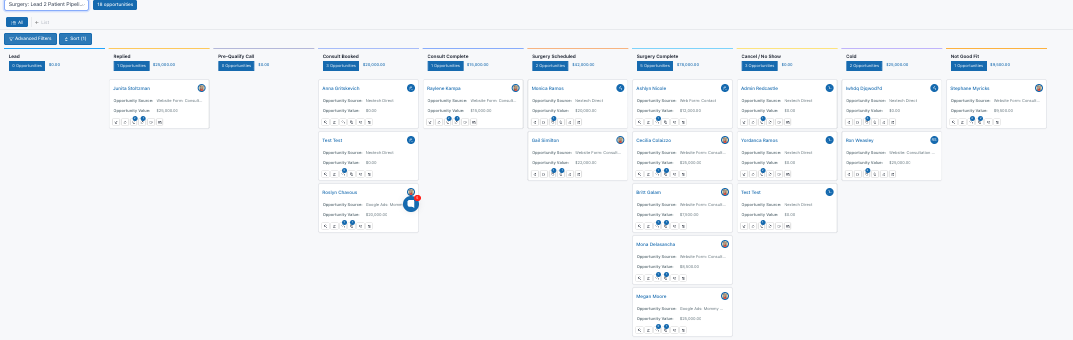
Each opportunity represents one surgical journey.
The system:
Tracks progress through clearly defined milestones
Uses time-based and stage-based automation
Supports re-engagement when conversations go quiet
Counts patient lifetime value when surgery is complete
Pipeline Status: Open
A surgical inquiry enters the system.
What the system does
Creates and assigns the opportunity
Starts a 60-day activity window
Allows outreach or nurture to begin (if enabled)
If no engagement occurs during this window, cold logic applies.
Pipeline Status: Open
Two-way communication has occurred (text, email, or call).
What the system does
Marks the opportunity as active
Pauses cold logic
If an opportunity remains in Replied for 7 days with no new activity:
Replied re-engagement nurture fires automatically
Messaging gently re-opens the conversation
If the patient responds:
Re-engagement pauses immediately
This prevents engaged leads from stalling without pressure.
Pipeline Status: Open
The surgical consultation has been booked.
What the system does
Keeps the opportunity active and progressing
No automatic reminders or re-engagement fire at this stage
Pipeline Status: Open
The consultation is confirmed and upcoming.
What the system does
Tracks progress only
No automation fires at this stage by default
This stage exists for visibility and reporting clarity.
Pipeline Status: Open
The surgeon consultation has taken place.
When an opportunity is moved to Consult Completed:
Post-consult nurture fires immediately
There is no waiting period
Why this matters
Surgical patients often need time after consults to process information, pricing, and timing. This nurture exists to:
Maintain momentum
Reinforce education
Support confident decision-making
This nurture continues until:
The opportunity moves forward to Surgery Scheduled or Surgery Complete, or
The opportunity is marked Not a Good Fit
Pipeline Status: Open
A surgery date has been confirmed.
What the system does
Opportunity remains open and forecastable
No re-engagement or cold logic fires at this stage
This stage improves revenue visibility without triggering unnecessary automation.
Pipeline Status: Won
The procedure has been completed.
What the system does
Marks the opportunity as Won
Finalizes revenue in dashboards and reporting
Stops all re-engagement logic
Pipeline Status: Open
A consult or surgery was cancelled or missed.
Optional Workflow
Re-book nurtures can be enabled if desired
These workflows are optional and clinic-controlled
They do not affect revenue unless the opportunity later converts
Pipeline Status: Abandoned
If an opportunity remains in the Lead stage for 60 days with no engagement:
The opportunity is automatically moved to Cold
Cold re-engagement nurture fires
Cold means inactive, not lost.
If the patient re-engages:
The opportunity moves forward (often to Replied)
Cold logic pauses automatically
Pipeline Status: Closed (Not Won)
The patient is not a candidate or declines surgery.
Important
This stage is moved manually
All conversion and re-engagement automation stops
When an EMR integration is enabled, Aesthetix CRM automatically move surgical opportunities based on status changes in the EMR, such as:
Consult booked → Consult Completed
Consult completed → Surgery Scheduled
Surgery scheduled → Surgery Complete
This ensures pipelines and reporting reflect real clinical outcomes without double entry.
Open: Opportunity is still progressing through the surgical journey
Won: Opportunity reaches Surgery Complete
Only Won opportunities count toward revenue reporting.
No duplicate opportunities
New opportunities are not created for existing patient’s additional appointments
Opportunities may move to any previous or future stage in pipeline
The opportunity status of a patient will always remain won
The opportunity value will show patient lifetime value (total revenue from all purchases)
The notes and custom fields will reflect repeat visit data.
Ex. Loyal customer, Stella, checks out for her routine botox, and books a follow-up appointment for filler in a few weeks. Here’s what would automatically happen to Stella’s opportunity:
Opportunity Value: checkout amount added to reflect total lifetime value
Opportunity Status: remain won
Opportunity Stage: move from Patient to Booked (because of upcoming visit)
Why am I “missing” opportunities?
Check Advanced Filters and remove all filters, such as Status = Open
This will reveal all opportunities, including those for existing patients whose status is Won
Why did my customer’s opportunity move back to the booked stage after checkout?
Appointment bookings trigger the opportunity to move to the booked stage.
Do you automatically create opportunities for “everything?”
Opportunities are not created for all contacts that enter the CRM.
Opportunities are auto created with form submissions connected to Lead Capture Workflows.
EMR Integration: Opportunities are auto updated by Appt. Status
Non-Connected Opportunity Sources (Most Common): Phone Calls, Instagram DMs, Facebook Messages, Word-of-Mouth Referrals
Note: If you book these leads or they book online, then the opportunity will automatically be created through the EMR integration.
